The best free Spotify to MP3 converters in 2026 are three kinds of tool: free online sites that use public playlist links, a desktop converter that pulls directly from Spotify streams, and an open-source command-line downloader. Online sites are the quickest option with no account required, though most fail to deliver genuine 320 kbps audio. We tested eleven of these tools on the same 100-track playlist and measured every output file.
⚖️ Disclaimer: All tools were tested on public Spotify links for review. Our bitrate and spectrum test results are replicable via the links below and only valid as of our test date. Converting Spotify content may violate Spotify's terms of service. Any exported files are for personal use only; confirm you own the rights to the source audio.
Quick Pick: Which Spotify to MP3 Converter Should You Choose?
Short on time? Find the best tool by your exact needs below. Click any tool name to jump directly to its detailed test review.
| Tool / Type | Free Limit / Constraint | Real 320 kbps? ℹ️ | Batch Download |
|---|---|---|---|
|
AudiFab
Top Pick
Win / Mac
|
First minute per track on trial | ✔️ 320 kbps MP3 or 24-bit FLAC | ✔️ |
|
SpotiSaver
Online
|
1 active playlist at a time | ⚠️ 320 kbps | ✔️ |
|
SpotiDown
Online
|
5 tracks free | ⚠️ 110~320 kbps | ❌ Error |
|
SpotiSongDownloader
Online
|
Capped at 2 tracks/ZIP; 3 tracks/day | ⚠️ 320 kbps | ❌ 2 files |
|
SpotiDownloader
Online
|
Silently drops tracks (delivered 23–29/100) | ⚠️ 320 kbps | ⚠️ Incomplete |
|
Spotdown
Online
|
No ZIP; requires clicking each track | ❌ 99~117 kbps | ❌ |
|
SpotSaver
Online
|
ZIP is behind Premium | ⚠️ 320 kbps | ⚠️ Paid |
|
SpotyLoader
Online
|
3 tracks/min limit | ❌ 192 kbps | ❌ |
|
SpotMate
Online
|
120s+ per track; free 3-track ZIP broken | ⚠️ 320 kbps | ❌ Error |
|
Sidify
Android App
|
First minute per track on trial | ✔️ 320 kbps | ✔️ |
|
spotDL
CLI / GitHub
|
Needs Python/FFmpeg; YouTube source | ❌ 128 kbps | ❌ |
How We Tested 11 Spotify to MP3 Converters
The 8 online sites ran on one Windows 11 laptop in Chrome 156, all without a Spotify login, using public playlist and track links copied from the Spotify app. The desktop converter and the Android app use the Spotify web player, with login being optional. The open-source tool was installed locally and run from a command line.
Three things were tested separately. The 100-track playlist measured batch handling. Audio quality was checked with two reference tracks, not all 100 tracks: Every Breath You Take (4:12), a dense, cymbal-heavy control, and Mad World (3:08), a quieter sample. The third test used non-Latin titles to verify filename display for foreign scripts.
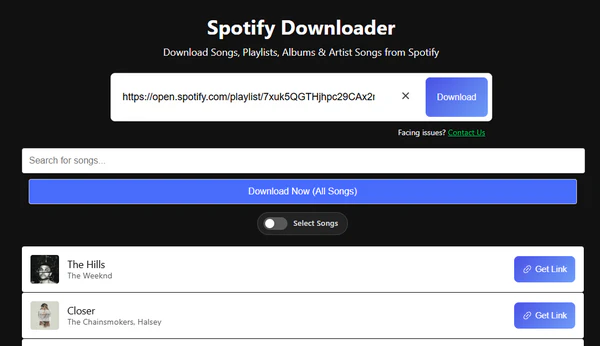
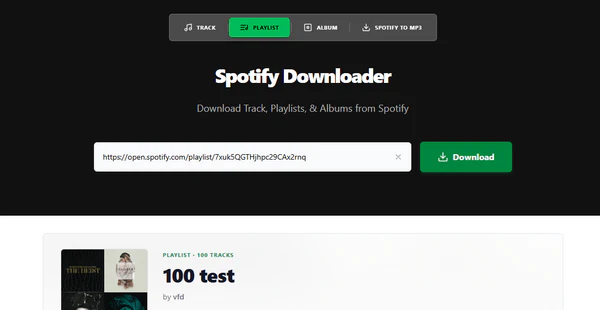
- Test playlist (100 tracks): https://open.spotify.com/playlist/7xuk5QGTHjhpc29CAx2rnq
- Reference track 1, Every Breath You Take (4:12): https://open.spotify.com/track/4zhe3dOJRzXntjHLZZIUJ1
- Reference track 2, Mad World (3:08): https://open.spotify.com/track/1dYgWIKrLTkJb91SSabX9j
For each downloaded file, we recorded the properties panel's bitrate, sample rate, ID3 fields, embedded cover dimensions, and duration cross‑checked against Spotify. A spectrum check is the only reliable way to confirm a file marked 320 kbps, so we ran Spek on files claiming 320 kbps; files not listed as 320 kbps required no spectrum analysis.
Top 1. AudiFab Spotify Music Converter (Windows & Mac)
Recommend level: ⭐️⭐️⭐️⭐️⭐️
URL: https://www.audifab.com/spotii-music-converter.html
| 100-track playlist | 100 of 100 files in one batch, playlist order kept, no watermark |
|---|---|
| Output | MP3 128/192/256/320 kbps selectable, plus AAC, WAV, FLAC, AIFF, ALAC |
| Lossless | 24-bit/44.1 kHz FLAC for tracks streamed from a Premium account |
| ID3 tags | Title, artist, album, year, track number, disc number, cover art, lyrics file |
| Speed | Up to 40X |
Quality is where AudiFab separates itself from the free sites. With a Spotify Premium account, output can be set to 320 kbps MP3 or 24‑bit/44.1 kHz lossless FLAC. On a Free account the ceiling is whatever Spotify streams to free users.
The batch ran as a single job, and all 100 files were on disk in 23 minutes 36 seconds, in the order the playlist had them, with nothing renamed or re-tagged afterwards. Title, artist, album, year, track number and disc number were present on every file, and the cover art was square and full size. That combination lets you migrate these files to iPod and Rekordbox, so the folder loads as an album instead of a loose stack of files.
 Try It Free
 Try It Free
How to Convert Spotify to MP3 in Three Steps
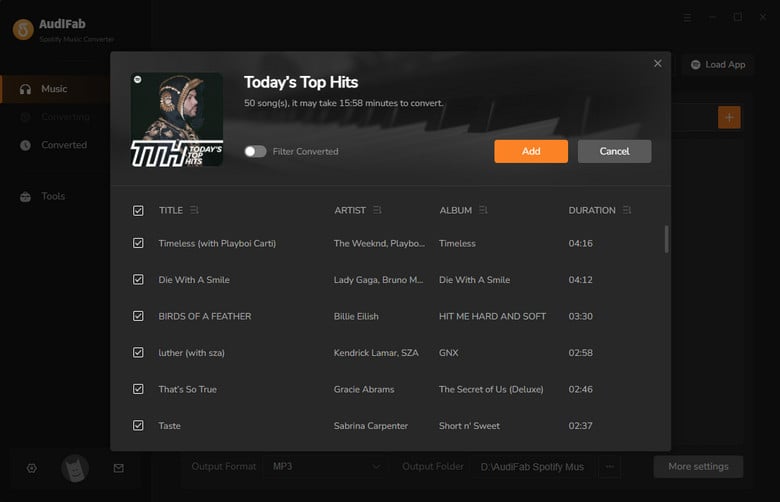
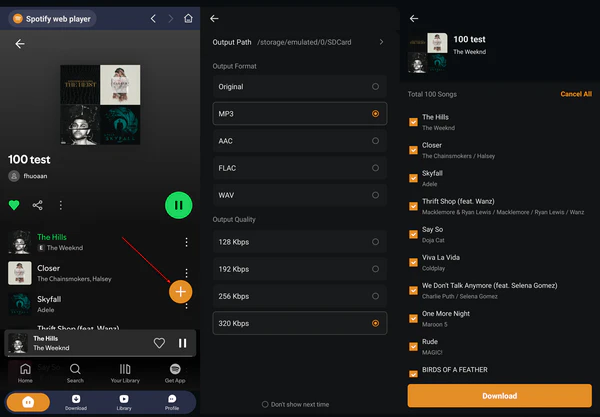
Step 1 Add the playlist. Launch AudiFab Spotify Music Converter and the built-in Spotify web player will appear. Sign in inside the web player, pick your playlist, then click the + button in the bottom-right corner to parse and add tracks directly to the download queue.
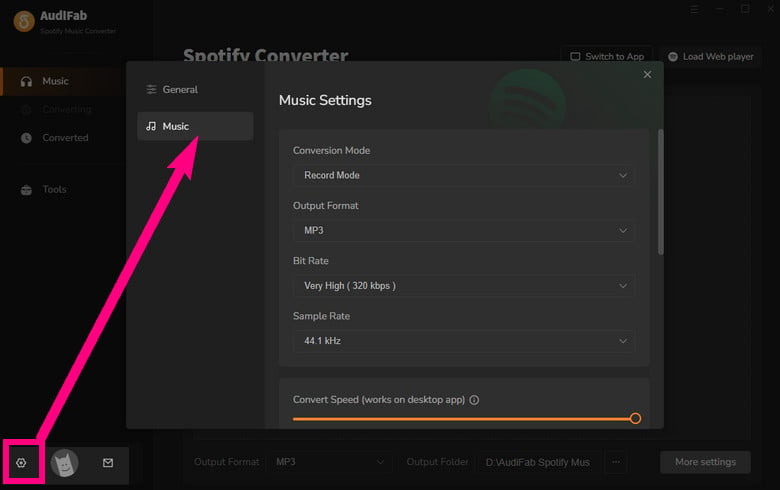
Step 2 Choose the format and quality. In Output Settings pick MP3 at 128, 192, 256 or 320 kbps, or FLAC at 24-bit/44.1 kHz.
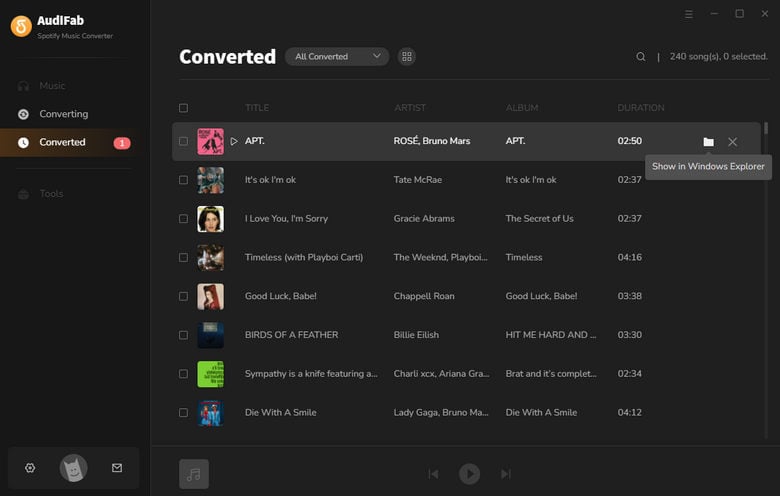
Step 3 Convert and check the folder. Press Convert and the whole batch runs at up to 40X, keeping playlist order plus disc number, year and cover art on every track, so the folder plays in album order on a player.
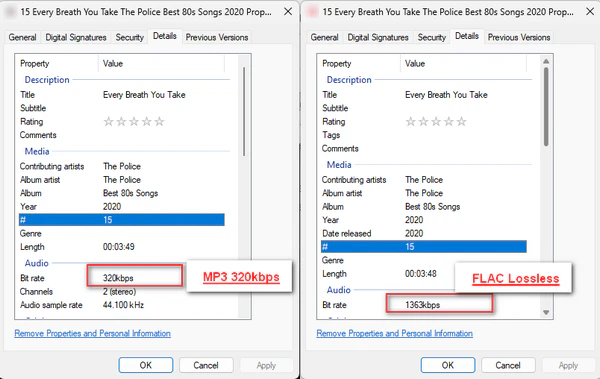
The same track from AudiFab: MP3 at 320 kbps on the left, FLAC at 1363 kbps on the right.
- ✅ All 100 tracks in one batch, playlist order and disc numbers intact
- ✅ Converts from the Spotify stream, so 320 kbps is real and FLAC is lossless
- ✅ Six output formats with a selectable 128 to 320 kbps range
- ✅ Cover art, track number, year and lyrics file on every track, no watermark
- ❌ Windows and Mac only, no browser or Android build
- ❌ A licence is required for full-length conversions
Top 2. SpotiSaver (Online & Free)
Recommend level: ⭐️⭐️⭐️⭐️
URL: https://spotisaver.net/en1
| 100-track playlist | 100 of 100 files in one ZIP, the counter read 0 failed |
|---|---|
| Bitrate (frame header) | 320 kbps on both reference tracks, 44.1 kHz |
| Spectrum ceiling | Content stops at about 17 kHz on both files |
| ID3 tags | Title, artist, album, year and track number in all 100 files, 640×640 cover art |
| Time and limits | 58 min 28 s for 100 tracks, one active playlist on the free plan |
SpotiSaver is the only site that completed the full 100-track ZIP test. We pasted in our playlist, and the ZIP took 58 minutes 28 seconds to generate, coming in at 827 MB. The file count on screen matched what we saw on disk: 100 files, all playable. Inside the archive, tracks are sorted alphabetically by artist instead of following the original playlist sequence. The download is fully complete, but you'll have to reorder the tracks manually.
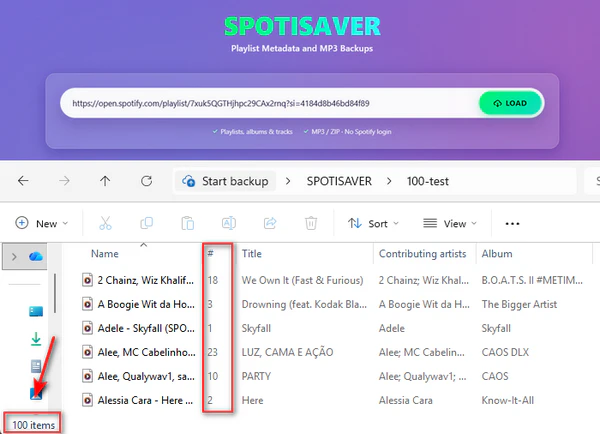
Tagging is where it beats every other free site. Title, artist, album and year populated correctly across all 100 files. Track numbers show their actual album positions instead of defaulting to 1, and artwork is embedded as a 640×640 JPEG. There are two downsides: every filename is suffixed with (SPOTISAVER), and email delivery for the final ZIP is a paid add-on, not included in the free tier.
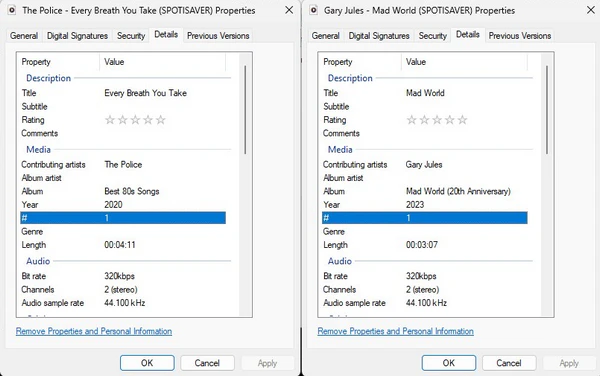
Audio quality is where it falls short. Both reference files report 320 kbps, 44.1 kHz. Even so, the spectrum rolls off around 17 kHz for both tracks. The free tier only handles one playlist at a time; submitting a second triggers the message: "all download slots are busy, please try again in 25 sec".
- ✅ The only free site here that returned all 100 tracks in a single ZIP, 827 MB, 0 failed
- ✅ Real track numbers, album, year and embedded 640×640 cover art on every file
- ✅ No login, no fake download buttons, no captcha
- ❌ 58 minutes 28 seconds for 100 tracks, about 35 seconds each
- ❌ (SPOTISAVER) appended to every filename, and the ZIP files sort by artist, not playlist order
- ❌ Re-encoded audio: the spectrum stops at about 17 kHz, not a Spotify stream
- ❌ One active playlist on the free plan, the second waits for a slot, and email delivery of the ZIP is paid
Top 3. SpotiDown (Online & Free)
Recommend level: ⭐️⭐️⭐️
URL: https://spotidown.app/en7
| 100-track playlist | All 100 parsed, the 5-track free ZIP button never responded |
|---|---|
| Bitrate (frame header) | 110~320 kbps |
| Spectrum ceiling | Reaches about 18 kHz on the 320 kbps track |
| ID3 tags | 640×640 cover available as a separate download, no track number, site name in the comment |
| Extra | Cover art is a separate "Download Cover [HD]" button, not embedded |
SpotiDown looks good on paper but fails at the one button that matters. A yellow banner says free users are limited to five tracks. We picked five songs and hit "Download selected songs as ZIP", yet nothing triggered. Select a sixth track and the site offers an upgrade instead, so the free tier has no working route to a ZIP.
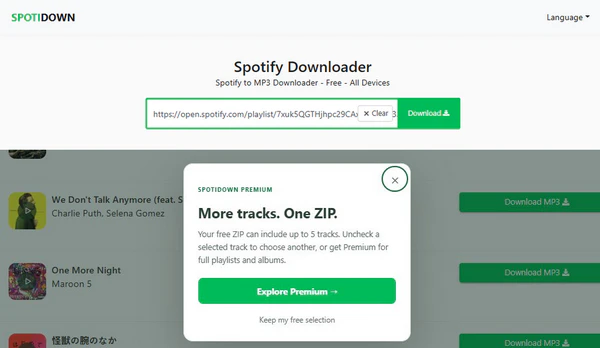
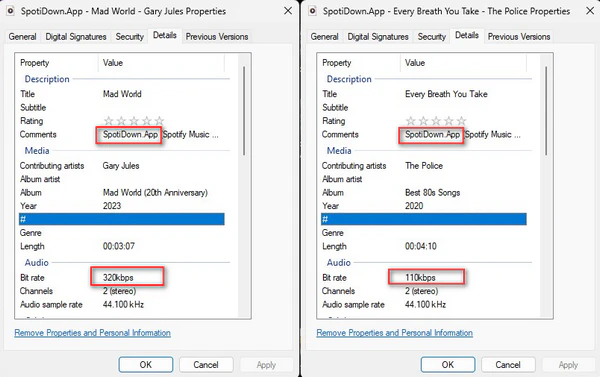
Single tracks work and are fast, around 41 seconds, but the quality is a coin toss inside one session. Mad World came back at 320 kbps with a spectrum reaching about 18 kHz, the best file we measured among the eight online sites; Every Breath You Take came back at 110 kbps.
Metadata is thin: the cover exists only as a separate Download Cover [HD] button; the track number is empty, the comment carries the site name and every filename starts with "SpotiDown.App - ". The Thai title arrived with its characters replaced by underscores.
- ✅ Parses all 100 tracks of a playlist correctly
- ✅ Single-track downloads are quick
- ✅ One 320 kbps file with the highest spectrum ceiling we measured
- ✅ The five-track free limit is stated in the interface, not hidden
- ❌ The free 5-track ZIP button does not respond at all
- ❌ 110 kbps on one reference track and 320 kbps on the other
- ❌ Thai filenames mangled, site prefix on every file, site name in comments
- ❌ Cover art is a separate download instead of embedded, and no track number
Top 4. SpotiSongDownloader (Online & Free)
Recommend level: ⭐️⭐️⭐️
URL: https://spotisongdownloader.com/en4/
| 100-track playlist | 2 of 100 files in the ZIP |
|---|---|
| Bitrate (frame header) | 320 kbps on both files |
| Spectrum ceiling | Hard stop at 16 kHz |
| ID3 tags | Full date in TDRC, track number, 640×640 cover, site name in the comment field |
SpotiSongDownloader promises a free limit of 100 tracks per playlist, but what it delivers is two files. It parsed all 100 correctly; the ZIP downloaded, yet it contained only two MP3s plus a page explaining how to unlock more behind a signup. A separate popup capped the free tier with the message: "Only 3 song downloads are allowed per day."
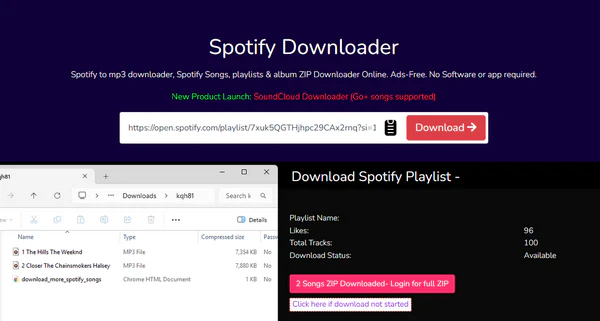
The quality dropdown offers M4A, 64, 128, 192, 256 and 320 kbps. No fake download buttons, no browser hijack, no redirect window. The two files are properly made. Both measured 320 kbps with TDRC dates, a track number and a 640×640 cover, the comment field says where the file came from.
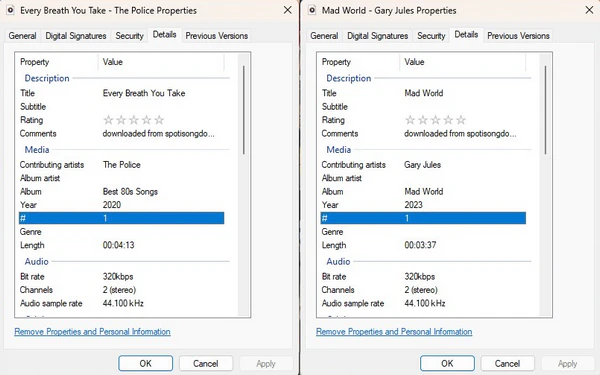
- ✅ Full date, track number and 640×640 cover art on both files
- ✅ Output quality selector from 64 to 320 kbps, plus M4A
- ✅ No pop-up ads and no misleading download buttons
- ✅ Fast, roughly 32 seconds per track
- ❌ Advertises 100 free tracks, delivered 2
- ❌ A three-song daily cap sits behind the ZIP
- ❌ The 320 kbps label is not real audio: the spectrum stops at 16 kHz
- ❌ Site name written into the comment tag, Cloudflare on every download
Two files out of a hundred, then a signup wall?
A two-song playlist cap, a three-a-day limit and 16 kHz behind the badge. AudiFab returns all 100 tracks in one batch at real 320 kbps, or FLAC.
Compatible with Windows & macOS · 100% Safe & Clean · 3k+ downloads monthly · 99.9% success rate
Top 5. SpotiDownloader (Online & Free)
Recommend level: ⭐️⭐️⭐️
URL: https://spotidownloader.com
| 100-track playlist | 23 files on the first run, 29 on a retry, no warning either time |
|---|---|
| Bitrate (frame header) | 320 kbps on both reference tracks |
| Spectrum ceiling | Fades out around 18 kHz |
| ID3 tags | Year reads 1970 in every file, track number empty in the batch, 640×640 cover |
| Ordering | Output re-sorted alphabetically by song title, not playlist order |
SpotiDownloader gets farther than most tools before silently aborting. Its first ZIP contained 23 files, the second 29, with no warning that 71 tracks were missing — you only find out by counting. Two defects show on inspection. Tracks sort alphabetically by title instead of playlist order, every file shows 1970 as the year and lacks track numbers. Three of the 29 files cut off at 29.7 seconds, and a fourth stops at 1:40.
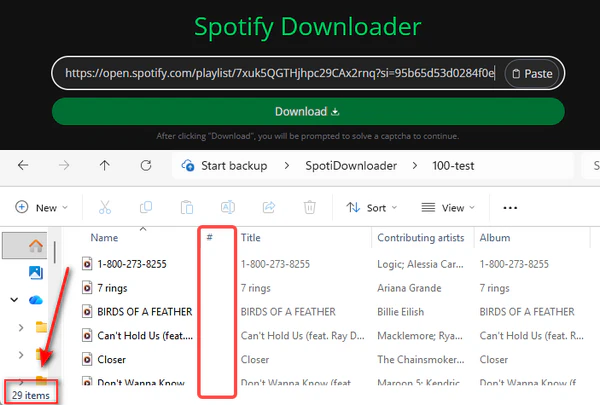
Every download click opens an advert, and a banner sells ad removal. Everything that did arrive measured 320 kbps with the spectrum fading around 17 kHz, better than the 16 kHz wall but still not a genuine 320 encode.
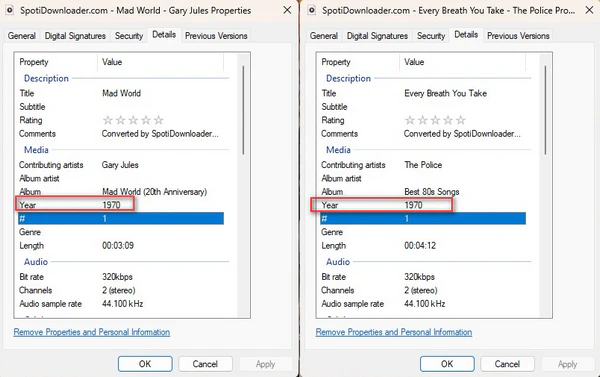
- ✅ Free ZIP with no stated track cap
- ✅ All 100 tracks parsed on every attempt
- ✅ 320 kbps on the files that did arrive, with 640×640 cover art
- ✅ No login, and single-track downloads are reliable
- ❌ 23, then 29 of 100 files, with no error shown either time
- ❌ Year 1970 and an empty track number in the batch
- ❌ Playlist order replaced with alphabetical order
- ❌ Truncated files, misleading Setup.exe adverts, Cloudflare on every click
Top 6. Spotdown (Online & Free)
Recommend level: ⭐️⭐️⭐️
URL: https://spotdown.org/en2
| 100-track playlist | All 100 parsed in one pass. Download-all works one file at a time, no bulk download, no ZIP. |
|---|---|
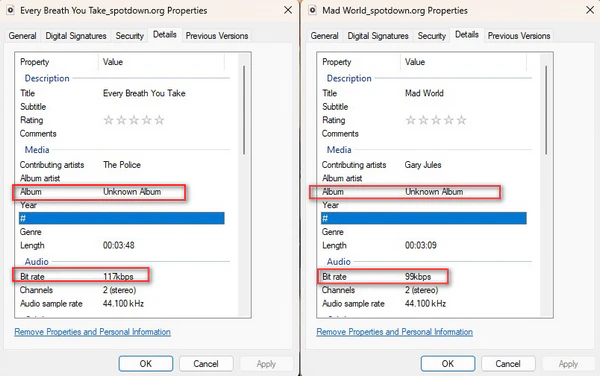
| Bitrate (frame header) | 117 kbps and 99 kbps, variable |
| Spectrum ceiling | No 320 label to verify |
| ID3 tags | Album reads "Unknown Album", no year, no track number, 300×300 cover |
Spotdown has the cleanest interface here and the weakest audio. It accepts tracks, albums, playlists, artist pages and keyword searches, and it loads a 100-track playlist in one pass without an account. The full list took 25 minutes 56 seconds from pasted link to the last file on disk, parsing included. A download-all button does exist, but there is no ZIP at the end of it: the site hands you one file at a time and the browser asks you to confirm each save, so a hundred tracks still costs a hundred clicks.
The v1.64 changelog claims quality was upgraded to 320 kbps. Our two test files hit just 117 and 99 kbps, with VBR ranging 99.8–270.4 across six samples. Every Breath You Take came back at 3:48, 24 seconds short of Spotify, so it is not the same recording. Tags are minimal: the album reads "Unknown Album", year and track number are empty, the only cover is a 300×300 thumbnail, and the filename ends in "_spotdown.org".
- ✅ Parses playlists, albums, artist pages and single tracks correctly
- ✅ Clean interface with no banner ads, no login and no paywall
- ✅ Keeps non-Latin filenames intact, including Thai and Arabic titles
- ❌ 99 to 117 kbps in practice, against a 320 kbps changelog claim
- ❌ No ZIP: the download-all button saves one file at a time, so 100 tracks means 100 clicks
- ❌ A reference track 24 seconds short, so the wrong recording
- ❌ "Unknown Album", no year, no track number, 300×300 cover, site name in filenames
Top 7. SpotSaver (Online & Free)
Recommend level: ⭐️⭐️⭐️
URL: https://spotsaver.net/
| 100-track playlist | The ZIP and batch save are Premium, so 100 files then have to be saved one at a time |
|---|---|
| Bitrate (frame header) | 320 kbps on both reference tracks, 9.69 MiB and 7.17 MiB |
| Spectrum ceiling | Hard stop at 16 kHz on both files |
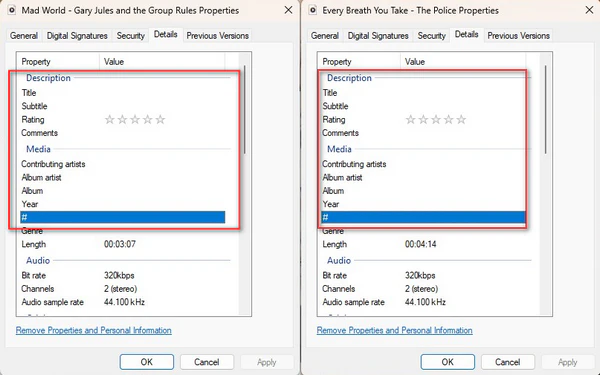
| ID3 tags | None. No ID3v2 header at all, so no title, artist, album, year or cover |
SpotSaver converts faster than any other tool in this test but takes the longest to complete. The full 100-track playlist processed in 27 minutes 11 seconds for free — no account, no captcha, no filename watermarks. Free users cannot access ZIP or batch downloads; you must save each track individually. At 10–12 seconds per file, this adds another 17–20 minutes of manual clicking.
Zero metadata. Both reference files lack a usable ID3v2 block: no title, album, year, track number or cover art. The folder contains 100 untagged files with no consistent filename scheme. Rebuilding your library from this folder requires manually retagging every track — more work than the download itself.
The audio checks out at first glance until you inspect it. Both files show 320 kbps in the frame header and their file sizes match that bitrate, but the spectrum rolls off at 16 kHz. This is the signature of a low‑quality source re‑encoded to 320 kbps, not a true 320 kbps rip. It is only worth using if you prioritize speed and already have a tag editor.
- ✅ 100 tracks on disk in 27 minutes, free and without an account
- ✅ No filename watermark, no captcha, no fake download buttons
- ✅ Frame header and file size both report 320 kbps
- ❌ No ZIP and no batch save on the free plan, so 100 files means 100 manual saves
- ❌ Zero metadata: no ID3v2 block, no cover art, and one artist field filled with the wrong name
- ❌ 320 kbps on paper, 16 kHz in the spectrum
Fast conversion, but 100 untagged files and no bulk save?
No title, artist, year or cover art, and 16 kHz behind the 320 badge. AudiFab writes every ID3 field as it converts.
Compatible with Windows & macOS · 100% Safe & Clean · 3k+ downloads monthly · 99.9% success rate
Top 8. SpotyLoader (Online & Free)
Recommend level: ⭐️⭐️⭐️
URL: https://spotyloader.com
| 100-track playlist | 100 tracks parsed successfully, no batch download, no ZIP |
|---|---|
| Bitrate (frame header) | 192 kbps at 48 kHz on both reference tracks |
| Spectrum ceiling | No 320 label to verify |
| ID3 tags | Complete: track 7 and track 11, disc 1 of 1, 640×640 cover art |
| Rate limit | "You can download 3 tracks a minute" on the free plan |
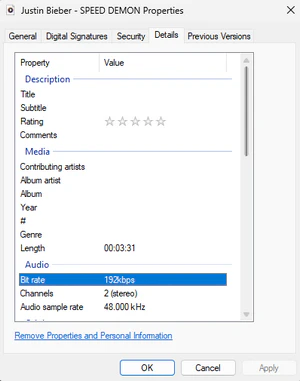
SpotyLoader is the only free site in this test whose output we would keep. Both tracks register 192 kbps at 48 kHz, with matching file sizes and a steady sample rate. It has the best tags out of the eight tools: proper track numbers (7 and 11), disc 1 of 1, a 640×640 cover, and no site branding in filenames.
What it cannot do is batch downloads. While all 100 tracks parse successfully, there is no select-all, no queue, and no ZIP export. Downloads are rate-limited to three tracks per minute, and the full playlist took 42 minutes 25 seconds of clicking to finish, which is the real cost of a site with no bulk option.
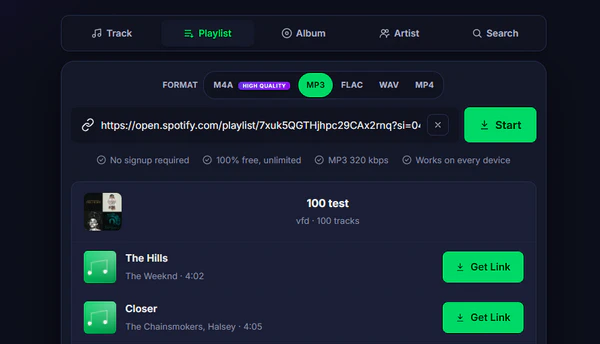
Then there is the misleading labeling. The interface advertises MP3 320 kbps, alongside M4A, FLAC, WAV and MP4, but our two test tracks both came in at 192 kbps. The 192 kbps output is consistent, though the 320 kbps badge on the page overstates the delivered quality.
- ✅ 192 kbps at a constant 48 kHz, which is a believable encode
- ✅ The most complete tags of the free online tools: track, disc, year, 640×640 cover
- ✅ No watermark, no account, no Premium tier, no captcha
- ✅ MP3, M4A, FLAC, WAV and MP4 output
- ❌ Advertises 320 kbps, delivered 192 kbps on both reference tracks
- ❌ No batch download and no ZIP, one file at a time
- ❌ Three tracks per minute, so 100 tracks took 42 minutes 25 seconds
Top 9. SpotMate (Online & Free)
Recommend level: ⭐️⭐️⭐️
URL: https://spotmate.online/en1
| 100-track playlist | The free 3-track ZIP failed on every attempt, "Archive: failed to build mini ZIP" |
|---|---|
| Bitrate (frame header) | 320 kbps on both reference tracks, 9.64 MiB and 7.17 MiB |
| Spectrum ceiling | Hard stop at 16 kHz |
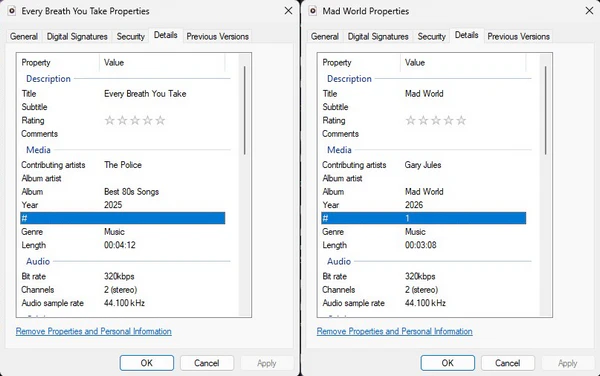
| ID3 tags | Title and artist present, no embedded cover, genre "Music", year 2025 and 2026 |
| Time | 122 seconds for one track and 131 seconds for the other |
SpotMate downloads one track at a time, so it has no batch function to fail. It still advertises a free 3‑track mini ZIP, but this feature broke both times we tested. The counter reached 3 of 3, and the site threw the error: "Archive: failed to build mini ZIP".
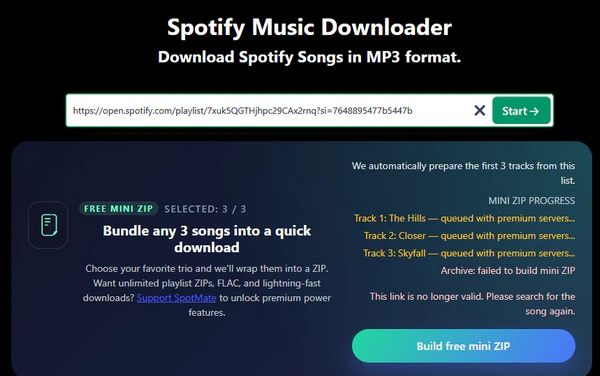
Speed was a surprise: one track took 122 seconds, another 131 seconds, versus SpotiSaver's roughly 35 seconds per track. Free-tier requests are queued behind paying users, so a 100-track playlist here is an afternoon rather than an hour. Premium unlocks fast MP3, FLAC, one-click ZIPs and an instant queue.
Audio quality is solid. Both tracks came in at 320 kbps, their durations within one second of Spotify's, and there are no filename watermarks. The spectrum rolls off at 16 kHz though, and the files contain no embedded cover art, resulting in a grey placeholder tile in your music library.
- ✅ 320 kbps with durations that match Spotify
- ✅ No filename watermark, no account needed
- ✅ Simple interface with an honest FAQ about the one-track limit
- ✅ No misleading download buttons
- ❌ 122 to 131 seconds per single track, the slowest here
- ❌ The free mini ZIP fails with an archive build error
- ❌ No embedded cover art, and 16 kHz spectrum ceiling
- ❌ Batch download and FLAC are Premium only
Top 10. Sidify Spotify Converter for Android (Mobile App)
Recommend level: ⭐️⭐️⭐️⭐️
URL: https://www.sidify.com/sp-android/music-converter.html
| Platform | APK for Android 8 or above, installed on the phone, no desktop step |
|---|---|
| Formats | MP3, AAC, WAV, FLAC, AIFF, ALAC |
| Batch | Playlists, albums, podcasts, radio and audiobooks in one queue |
| Account | Spotify login inside the app, works with Free or Premium |
If you want Spotify music for offline mobile use, Sidify is the most straightforward pick here. It saves straight to local storage, so the playlist plays locally with no file transfer needed. We installed the APK on an Android 8 handset, logged into Spotify within the app, and added our playlist using the plus button. The queue handled all 100 tracks smoothly, and exporting the full queue took 29 minutes 16 seconds. Songs, albums, podcasts, radio and audiobooks share the same queue. Output format and save folder are set in Settings before you begin.
Full tracks convert at up to 320 kbps. The app also supports lossless and uncompressed formats for tracks your account can stream in those quality tiers. Files are permanent: they stay on the device once your subscription ends, and the build we tested contains no ads or bundled toolbars.
- ✅ Files land in the phone's own storage, no cable or cloud transfer
- ✅ Batch queue for playlists, albums, podcasts and audiobooks
- ✅ Spotify Free accounts work, no Premium needed on the source side
- ✅ Six output formats, up to 320 kbps and lossless with a licence
- ❌ Android only, and it needs Android 8 or newer
- ❌ A licence is required before any full song is exported
Top 11. spotDL (GitHub)
Recommend level: ⭐️⭐️⭐️⭐️
URL: https://github.com/spotDL/spotify-downloader
| 100-track playlist | 84 files on the first pass, 97 of 100 after a retry, 3 tracks never arrived |
|---|---|
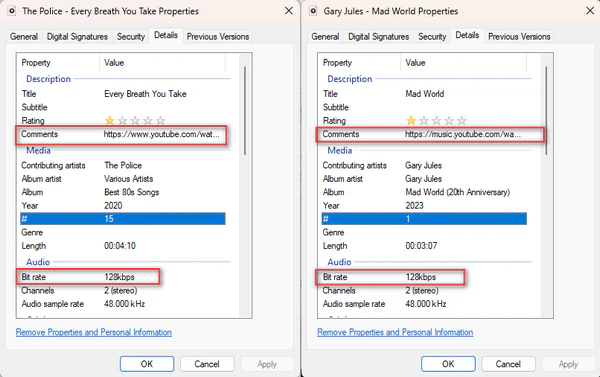
| Bitrate (frame header) | 128 kbps at 48 kHz on both reference tracks |
| ID3 tags | Title, artist, album, year, track number, disc number, 640×640 cover, YouTube URL in the comment field |
| Lyrics | Not embedded: every file ended up with lyrics=false |
| Time | 69 minutes for 84 tracks, then 55 minutes for the last 13 |
spotDL relies on YT‑DLP to pull audio matches after reading Spotify playlist data. Its first run on the 100‑track playlist yielded 84 files in roughly 69 minutes. All failures came from the YouTube side, not Spotify. A second pass recovered 13 more tracks, reaching 97 out of 100 in another 55 minutes. Total runtime came to around two hours for a nearly complete playlist.
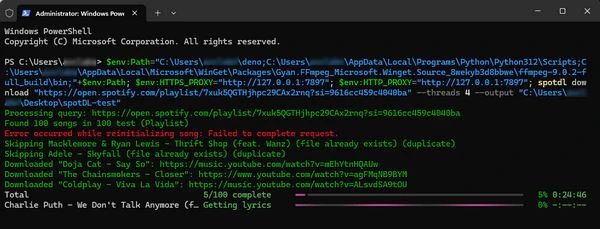
Setup is the real barrier. spotDL needs Python, FFmpeg, and Deno for certain sources. Another important limitation is audio quality: 128 kbps for free users, and 256 kbps for YouTube Music Premium subscribers.
spotDL's biggest weakness in our test is handling non-Latin characters. Japanese, Russian, Arabic and Thai titles returned no matches at all; the search failed to identify viable sources for those titles. The English-language files, by contrast, were tagged better. The only oddity: the YouTube URL gets written into the comment tag.
- ✅ No cap, no quota, no captcha, no watermark, no adverts
- ✅ Fully local, nothing is uploaded and no site can disappear on you
- ✅ Complete ID3 tags including track and disc numbers, plus cover art
- ✅ Free and open source, MIT licensed, still maintained
- ❌ The audio comes from YouTube Music
- ❌ 97 of 100, with the misses caused by upstream provider errors
- ❌ Non-Latin titles failed outright in our four-track side test
- ❌ Python, FFmpeg and sometimes Deno, and a terminal, before anything works
Worth the setup if 128 kbps is the ceiling?
Python, FFmpeg and Deno first, two hours for 97 of 100 tracks, and no luck with non-Latin titles. AudiFab takes the same playlist in one pass at 320 kbps.
Compatible with Windows & macOS · 100% Safe & Clean · 3k+ downloads monthly · 99.9% success rate
Is Spotify 320 kbps Real? Spek Test Results
We followed one simple rule for this test: we only used Spek on files labeled 320 kbps in their properties. Testing 117 kbps or 192 kbps files adds no insight — those bitrates are already stated in the header.
Most online tools do not stream audio out of Spotify. They read the title, artist and duration from the link, fetch a 128/192 kbps audio source and re-encode it tagged as 320 kbps, which is why the resulting file has a correct 320 header, but its audio cuts off at just 16–17 kHz.
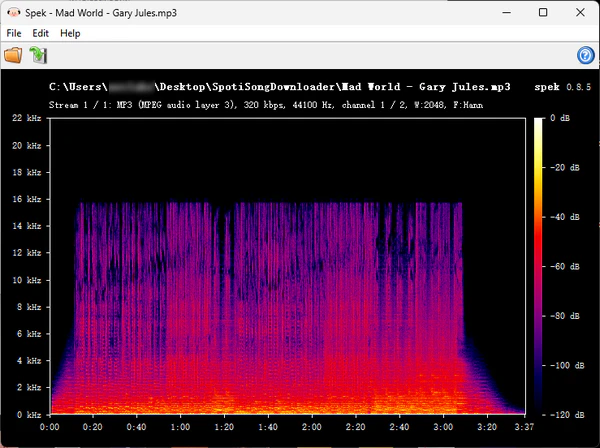
SpotiSongDownloader, Mad World: a typical online re-encode, flat wall at 16 kHz on the same song.
AudiFab does the opposite: it converts from the Spotify stream, so its 320 kbps MP3 measures 320 kbps and its FLAC is a real 24-bit/44.1 kHz file rather than an upsampled re-encode. The frequency gap is the key difference. In our Spek test, its output for Mad World extended up to ~18 kHz.
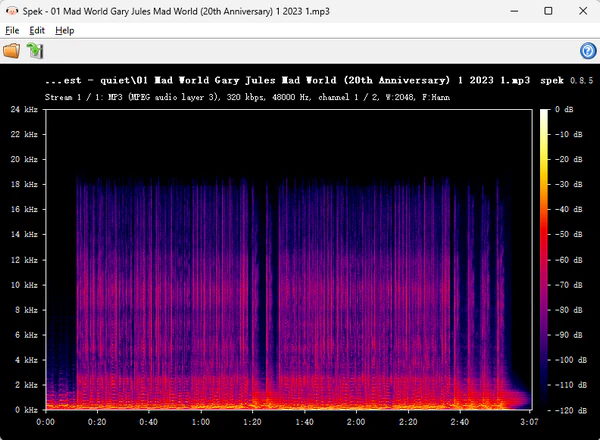
AudiFab, Mad World: a real 320 kbps encode read from the Spotify stream, with energy carried to about 18 kHz.
Comparison: 11 Spotify to MP3 Converters Side by Side
Everything in this table came out of our own folders, not out of a marketing page.
| Tool | Free limit | Time (100 tracks) |
Tested audio quality | Real 320 kbps? | Ad-free | Batch ZIP | Clean filename |
|---|---|---|---|---|---|---|---|
| AudiFab | First minute on trial | 23min 36s (up to 40X) | 320 kbps MP3 / 24-bit FLAC | ✔️ | ✔️ | ✔️ | ✔️ |
| SpotiSaver | 1 playlist at a time | 58 min 28 s | 320 kbps | ❌ | ✔️ | ✔️ | ❌ site suffix |
| SpotiDown | 5 tracks per playlist | — | 110~320 kbps | ❌ | ❌ | ❌ error | ❌ site suffix |
| SpotiSongDownloader | 3 songs per day; 2 songs per playlist | — | 320 kbps | ❌ | ✔️ | ✔️ 2 files only |
⚠️ site in comment |
| SpotiDownloader | No track limit | 12 min 41 s for 29 files | 320 kbps | ❌ | ❌ | ✔️ incomplete | ❌ site suffix |
| Spotdown | No track limit, one file at a time | 25 min 56 s | 99~117 kbps | ❌ | ✔️ | ❌ | ❌ site suffix |
| SpotSaver | ZIP bulk save needs Premium | 27 min 11 s | 320 kbps | ❌ | ✔️ | ❌ Premium only | ✔️ |
| SpotyLoader | 3 tracks a minute | 42 min 25s | 192 kbps | ❌ | ✔️ | ❌ | ✔️ |
| SpotMate | 3-track mini ZIP only | — | 320 kbps | ❌ | ✔️ | ❌ error | ✔️ |
| Sidify (Android) | First minute on trial | 29min 16s | 320 kbps | ✔️ | ✔️ | ✔️ | ✔️ |
| spotDL | No track limit | 124 min | 128 kbps CBR at 48 kHz | ❌ | ✔️ | ❌ | ✔️ |
Want to get a real 320 kbps file?
Only a tool that reads the Spotify stream can produce one. AudiFab converts from the stream, so 320 kbps measures 320 kbps and FLAC stays lossless.
Compatible with Windows & macOS · 100% Safe & Clean · 3k+ downloads monthly · 99.9% success rate
FAQs About Free Spotify to MP3 Converters
Q 1 Can I download a whole Spotify playlist as a free ZIP?
SpotiSaver converted the 100-track playlist and handed over a single archive. SpotSaver converted all 100 for free but the ZIP sits behind Premium. AudiFab converts the same 100-track playlist in one batch and exports MP3 or FLAC straight from the Spotify stream.
Q 2 Do I need a Chrome extension or an app to convert Spotify to MP3 online?
No. We ran online converters in desktop Chrome. A browser extension is not needed, because the site reads the public link itself, and we would not install one for this job.
Q 3 Why does a Spotify download claim 320 kbps, yet the audio sounds muddy?
Bitrate and actual audio bandwidth are not the same. An MP3 can correctly report 320 kbps while cutting off all sound above 16 kHz, which is common among these web download tools. They re‑encode lower-quality audio using a 320 kbps preset, so the label looks right, but fine details disappear. Load it in Spek, and you'll see the cutoff right away. If you want genuine full-spectrum 320 kbps or FLAC files, use AudiFab.
Q 4 Is a free Spotify to MP3 converter safe to use?
Depends on the site. SpotiSaver, SpotSaver and SpotMate ran clean, with no fake download buttons. SpotiDownloader served ad banners styled like a "Setup.exe" installer, SpotiDown kept pushing us to disable the ad blocker, and several sites opened redirect windows. If a page tells you to run an executable to finish a music download, close it.
Q 5 Is it legal to convert Spotify music to MP3?
Converting or downloading Spotify music may violate Spotify's Terms of Service and applicable copyright laws, even if the files are intended for personal use. Whether a particular use is permitted depends on the content, applicable law and your authorization. Always respect copyright and Spotify's terms.
Summary
Pick an online converter when you need a handful of tracks today and can install nothing, so long as you accept 16 to 17 kHz audio and one save per file; Sidify when the files go straight onto an Android phone; the open-source spotDL when nothing may cap or meter you, in exchange for Python, FFmpeg, Deno and a 128 kbps ceiling; and AudiFab when the file itself has to be a real 320 kbps or lossless export with track numbers, year and cover art intact across a whole playlist, on Windows or Mac;
The gap between a real 320 kbps file and a relabelled one closes only when the audio comes from the Spotify stream, which we cover in Spotify music at 320 kbps.