We tested the best SoundCloud playlist downloaders across desktop, online, open-source, browser, and mobile — here is how to download whole SoundCloud playlists to MP3, batch by batch, with real limits and audio quality spelled out.
SoundCloud cannot export a playlist as ordinary audio files directly. Its Go/Go+ subscription only caches tracks inside the app for offline playback, and that cache disappears when you sign out or uninstall the app. If you want the songs as MP3 files you can keep, move, or play on any device, a third-party SoundCloud playlist downloader is required. Each tool below is rated, described, and walked through with its real workflow, free limits, and tested output quality.
⚖️ Disclaimer
This guide is for informational purposes only. Use the tools below for personal, non-commercial use, respect uploaders' download settings, and obey copyright rules in your region.
Quick Comparison: The Best SoundCloud Playlists Downloaders at a Glance
How we tested:We tested SoundCloud playlist downloaders across full playlist support, audio quality, output formats, ID3 tags, free limits, ads, and supported platforms. All tools used the same public 50-track playlist. For each file, we verified bitrate, checked spectra with Spek for re‑encoding, and examined ID3 tags. Limits and broken features were last verified in 2026.
✨ Tips: "320kbps" labels below are container bitrates, not studio quality. SoundCloud's standard stream is 128kbps MP3; Go+ serves up to 256kbps AAC on eligible tracks; and the original file the artist uploaded may be higher still. What you actually get is capped by the stream you can reach, not by the downloader's bitrate menu.
1. AudiFab Music One — Best Desktop SoundCloud Playlists Downloader
Best for: Anyone who wants to batch-download large SoundCloud playlists with original audio quality, complete ID3 tags, and tidy, organized folders — without ads or web-server limits.
Best Audio Quality
Batch Download
Metadata
Ads-free
320kbps MP3 (preserves source quality)
✅
✅ Full ID3 tags + cover art
✅
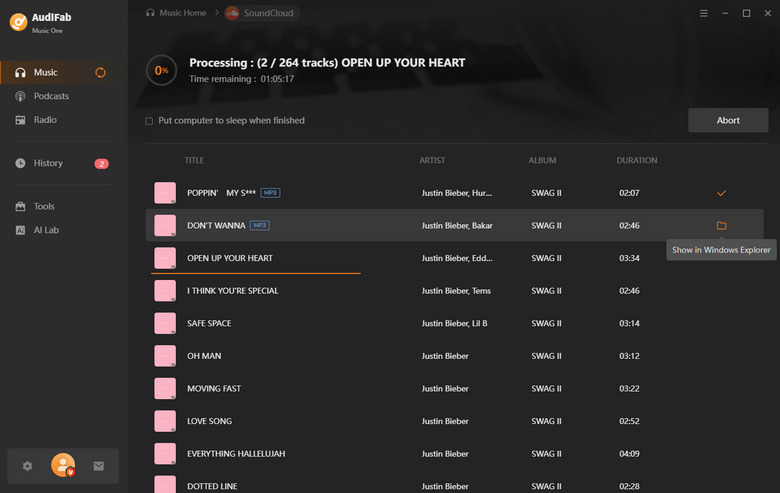
AudiFab Music One is a desktop SoundCloud playlist downloader for Windows and Mac with a built-in browser. Open SoundCloud inside the program, navigate to a playlist, and AudiFab queues every track as you play, then converts the whole SoundCloud playlist to MP3 in one run rather than making you download songs one by one. It is not limited to SoundCloud: the same program also covers Spotify, Apple Music, Amazon Music, Tidal, YouTube Music, and several other streaming services.
In our test, we pointed it at a full playlist and selected the tracks we wanted; AudiFab pulled the entire set into a single conversion queue and kept each song's title, artist, album, and embedded cover art without manual tagging. Output supports MP3, AAC, WAV, FLAC, AIFF, and ALAC, and because it runs locally on your machine it is not subject to the track caps, queues, or ads that free online sites rely on. If you regularly archive several playlists or a long library, this is the most reliable, repeatable way to download SoundCloud playlists to MP3.
How to Download SoundCloud Playlists to MP3 with AudiFab Music One
Open SoundCloud inside AudiFab
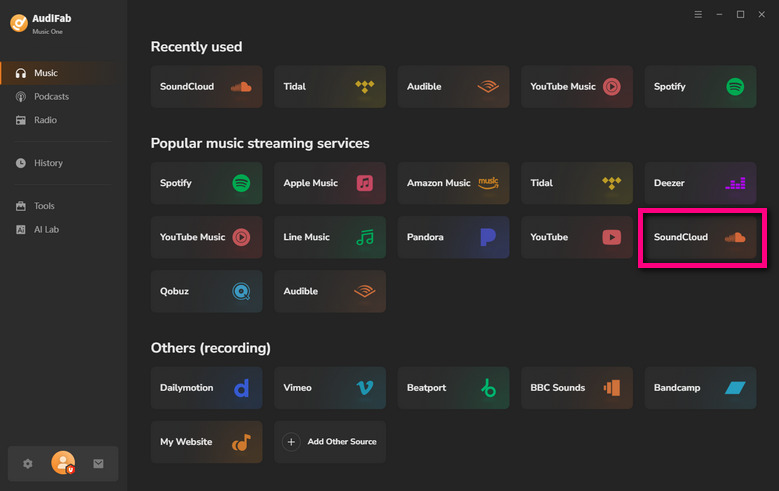
Install and launch AudiFab Music One, then choose SoundCloud from the supported services. This opens a built-in browser where you can browse and search directly.
Open the playlist and add tracks
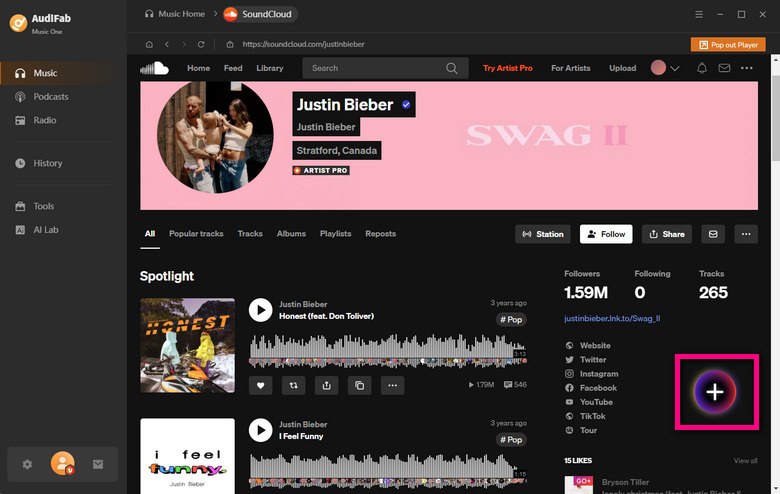
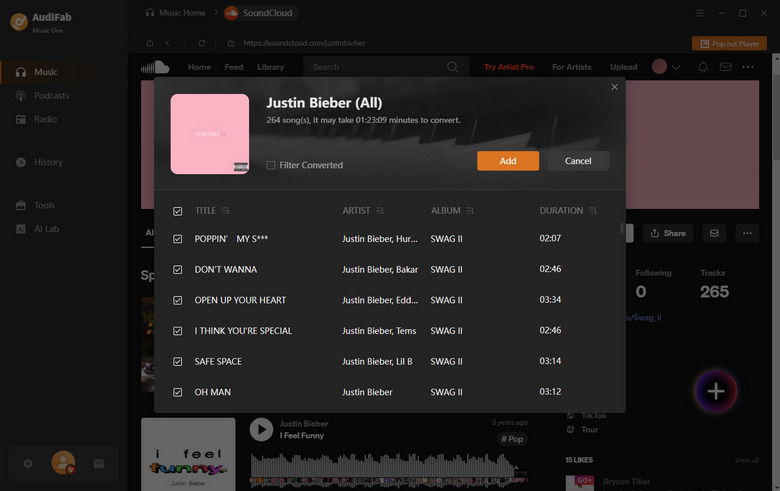
Navigate to the playlist you want to save. Play the tracks or click the add button; AudiFab detects the whole playlist and adds every track to the conversion list.
Choose MP3 and quality
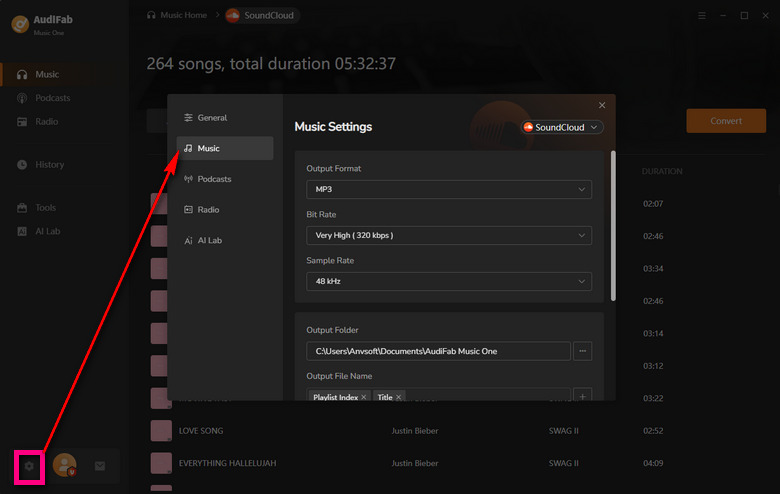
Open Settings and set the output format to MP3, choose the output quality, and pick a destination folder. You can also organize files by artist or album.
Convert the playlist
Click Convert to batch-download the whole playlist at up to 10X speed, with all ID3 tags and cover art preserved.
Locate your files
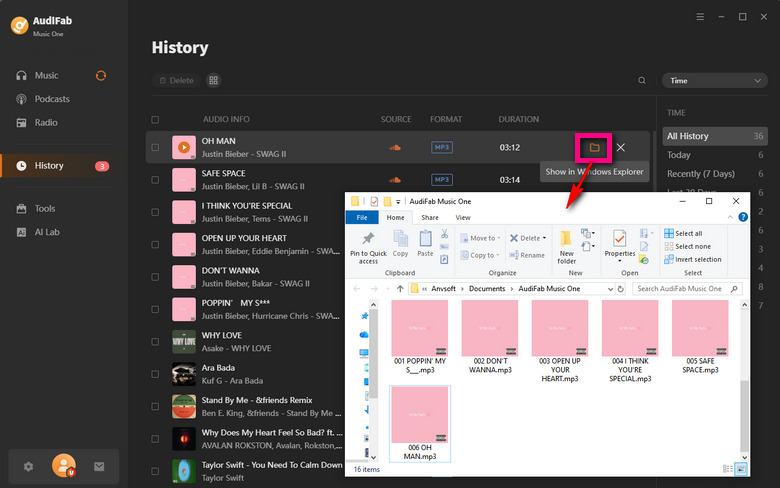
When finished, open the History tab or the output folder to find your tagged, ready-to-play MP3 files.
How To Access: https://scloudplaylistdownloader.app/
Best for: Free single-track grabs and quick browser-based saves with zero install.
Best Audio Quality
Batch Download
Metadata
Ads-free
Up to 320kbps selectable (lossy re-encode in our test)
⚠️ Free ZIP capped at 2 tracks; full playlists need a subscription
⚠️ Partial ID3
✅
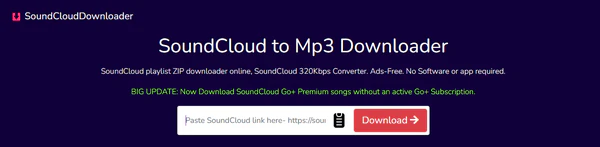
We tested SCloudPlaylistDownloader with a real playlist to see how well this SoundCloud playlist downloader holds up for batch saves. Singles came down for free, but a batch ZIP only packed 2 tracks — the full set needs a subscription, and a playlist ZIP tops out at 100 songs anyway. We picked 320kbps and ran the file through Spek: it reads as 320kbps, but the audio cuts off around 16kHz, so it's really a lossy re-encode, not true 320 quality.
Tags came through halfway too — title, artist and album survived, but Album artist and Genre were left blank and Comments carried a leftover "downloaded from scloudplaylistdownloader.app" note. That aside, it's a painless way to download SoundCloud playlists on the fly: paste a link, no install, no account, and we hit no ads. Just know the free plan stops well short of a full playlist.
How to Use SCloudPlaylistDownloader
Step 1: On SoundCloud, open the playlist and choose Share → Copy link.
Step 2: Paste the URL into the box on scloudplaylistdownloader.app and wait a couple of seconds for it to parse.
Step 3: Pick your preferred bitrate, then click the ZIP button — on the free tier this packages just the first 2 tracks, and downloading the full set prompts you to subscribe; unzip what you get to play offline.
Pros
✅ No install, no account; single-track downloads are free and our session was ad-free
✅ Real quality selector (64–320 Kbps plus Go+ M4A); basic ID3 tags preserved
✅ Works in any browser, desktop and mobile
Cons
❌ Free batch ZIP is capped at 2 tracks; a full playlist requires a subscription
❌ 100-song ceiling per playlist
❌ "320 Kbps" output is a lossy re-encode
❌ Metadata incomplete: Album artist and Genre left empty, Comments field polluted
3. SoundCloudAud — Free Download SoundCloud Playlists to ZIP
Recommend Level: ★★★★☆ (4.0/5)
How To Access: https://soundcloudaud.com/en83/playlist
Best for: A fast, free whole-playlist ZIP on any browser with no track cap — if you don't mind 128kbps audio and empty tags.
Best Audio Quality
Batch Download
Metadata
Ads-free
Fixed 128kbps MP3, no bitrate selector
✅ Free playlist-to-ZIP, no track limit
❌ Title/artist/album empty
✅
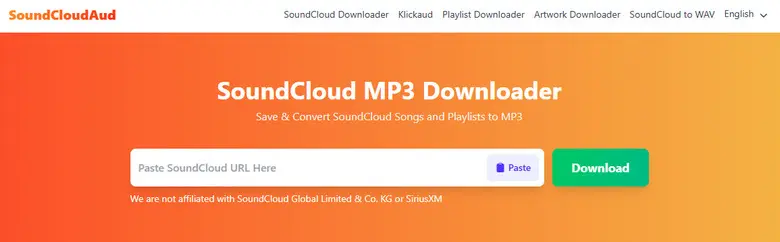
SoundCloudAud is one of the freer options to bulk save tracks from SoundCloud — paste a playlist link and you can pull a single track or the whole set as a ZIP with no track limit, which is more generous than most free SoundCloud playlist downloaders. It even adds separate buttons to grab the album cover and the artist's profile picture, handy if you want the artwork alongside the files. There's no bitrate selector, though, and the file we checked in Spek came out as 128kbps MP3.
Tags are the real weak spot: in the file's Properties the title, artist, album, year and genre were all left empty, so you'll be tagging these tracks yourself. That aside, it's an easy way to download SoundCloud playlists in bulk — no account, no install, and we hit no ads the whole time. Just keep the fixed 128kbps and the blank metadata in mind before you commit.
How to Use SoundCloudAud
Step 1: Copy the SoundCloud playlist URL.
Step 2: Paste it into the search box on the SoundCloudAud playlist page.
Step 3: Click Download entire Playlist as ZIP (or Download Single MP3 Audio), and use the separate buttons for the album cover and profile picture if you want them.
Pros
✅ Free playlist-to-ZIP with no track limit; single tracks too
✅ Separate album cover and profile picture downloads
✅ No install or account; our session was ad-free
Cons
❌ Fixed 128kbps MP3, no bitrate or format choice
❌ Metadata left blank — you tag the files yourself
4. DownCloudMe — Online SoundCloud to MP3 Downloader for Single Tracks
Recommend Level: ★★★☆☆ (3.0/5)
How To Access: https://downcloudme.com/
Best for: A quick, no-account single-track grab with cover art included — playlist downloads didn't work in our test.
Best Audio Quality
Batch Download
Metadata
Ads-free
Fixed ~132kbps, no bitrate selector
❌
⚠️ Partial tags + cover art
❌
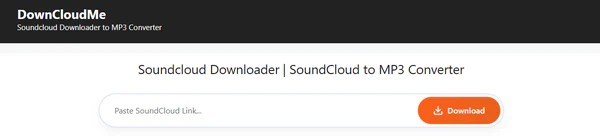
DownCloudMe handles single tracks fine — paste a link, hit FAST DOWNLOAD and you get the MP3, no account needed. But as a SoundCloud playlist downloader it let us down: pasting a playlist URL took us to a page where every field read "undefined", and the download button did nothing, so we couldn't download SoundCloud playlists through it at all.
Quality and ads are weak points too. There's no bitrate selector and the file came out at ~132kbps, with the spectrum rolling off above 14kHz. Tags came through only in part — artist populated, genre showed as "Music", and the year was there, but Title, Album and Album artist stayed empty, even though the cover art did come along. And expect ad redirects: downloading a single track bounced us to a new page.
How to Use DownCloudMe
Step 1: Open the track or playlist on SoundCloud and copy its link.
Step 2: Paste the link into the box on DownCloudMe.
Step 3: For a single track, click FAST DOWNLOAD (or the Backup Download Link) — expect an ad redirect; playlist downloads did not work in our test.
Pros
✅ Single-track downloads work, no account needed
✅ Backup Download Link as a fallback
✅ Cover art comes through
Cons
❌ Playlist download didn't work in our test
❌ Fixed ~132kbps, no bitrate or format choice
❌ Ad redirects on download; album tags missing
Tired of broken playlist links and ad redirects?
AudiFab runs on your desktop, queues the whole playlist at once, and saves it to MP3 or FLAC with full tags — no broken links, no ad bounces.
Compatible with Windows & macOS
·
100% Safe & Clean
·
3k+ downloads monthly
·
99.9% success rate
Best for: A quick single-track 320kbps MP3 with cover art and no extra click — playlist downloads and WAV output sit behind Premium.
Best Audio Quality
Batch Download
Metadata
Ads-free
320kbps MP3
⚠️ Playlist download needs Premium, no free batch
⚠️ Partial tags + cover art
⚠️ No banner ads, but frequent upgrade pop-ups
MusicVerter is refreshingly quick for singles — paste a URL, hit download, and the MP3 saves straight away with no extra click. We checked the file and it came out as 320kbps MP3 with the cover art attached. But there's no quality choice: the free download is a fixed standard MP3, and the higher-quality 320kbps and lossless WAV options sit behind Premium.
For a SoundCloud playlist downloader it's a paywall story. Downloading whole playlists needs Premium — there's no free batch. MusicVerter pushes that upgrade often with regular pop-ups, though we hit no banner ads. If you only grab singles at 320kbps it's pleasant to use; if you want to download SoundCloud playlists in bulk or get WAV output, budget for the plan.
How to Use MusicVerter
Step 1: Copy the public track or playlist link.
Step 2: Paste it into MusicVerter.
Step 3: Click Download — single tracks save automatically; playlists and WAV output require Premium.
Pros
✅ Single-track download is instant, no extra click
✅ 320kbps MP3 with cover art
✅ No banner ads in our session
Cons
❌ Playlist downloads require Premium (no free batch)
Best for: Technical users who want a scriptable, ad-free, properly tagged whole-playlist downloader — and don't mind a maintenance-mode tool that may need the occasional retry.
Best Audio Quality
Batch Download
Metadata
Ads-free
Original source by default; MP3 (~128kbps, source-dependent)
✅
✅
✅
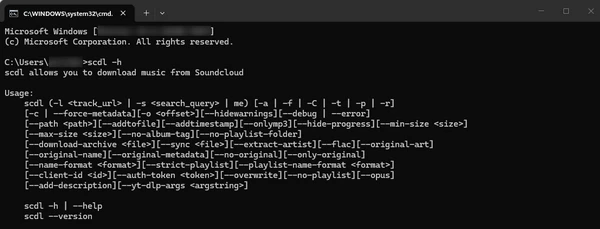
scdl is the best-known open-source SoundCloud playlist downloader — a command-line tool on PyPI and GitHub for Windows, macOS, and Linux. Point it at a playlist and it batches the whole set with full ID3 tags. It grabs the original source by default or outputs MP3 via --onlymp3, typically around 128kbps.
Just know the project now sits in maintenance mode, so a run can stall and need a retry. If you're at home in a terminal it's the cleanest way to automate downloading SoundCloud playlists; otherwise the web and desktop tools above are easier.
How to Use scdl
Step 1: Install Python, then open a terminal and run pip install scdl (it also requires ffmpeg).
Step 2: Run scdl -l https://soundcloud.com/artist/sets/playlist-name, adding a client ID if prompted.
Step 3: Because the project is in maintenance mode, a run may occasionally stall — just retry or pass the client ID when asked, and you'll get a clean, tagged folder.
Pros
✅ Mature, free, open-source, ad-free, and cross-platform
✅ Defaults to original source quality, with an MP3 option
✅ Whole-playlist batches with full ID3 tags
✅ Scriptable for automation
Cons
❌ Maintenance mode can make runs stall; occasional retries needed
❌ Command-line only; requires Python and ffmpeg to set up
❌ Output quality depends on the track's source (often 128kbps MP3)
7. AddonCrop — Browser Extension to Download SoundCloud Playlists
Recommend Level: ★★★★☆ (4.0/5)
How To Access: https://addoncrop.com/exension/soundcloud-music-downloader/
Best for: A quick in-browser grab straight from the SoundCloud page, with one click for the whole set — as long as 128kbps audio is fine.
Best Audio Quality
Batch Download
Metadata
Ads-free
128kbps MP3
✅
⚠️ Basic tags kept; album fields sparse
✅
AddonCrop installs as a browser extension through the CrossPilot helper, then puts a download control right on the SoundCloud page. You can download SoundCloud playlists without leaving the tab. In our test the click-through download finished cleanly, no server parsing or account needed.
Quality is the limit, though. The file came out as 128kbps MP3. Tags came through only partly — title, year and genre were populated, but the album fields were sparse, and the album artist field just echoed the full title. And not every track or playlist opens its download: uploaders can switch it off, and those just won't come through the extension.
How to Use AddonCrop
Step 1: Install the extension via CrossPilot for your browser.
Step 2: Open a SoundCloud track or playlist.
Step 3: Click the download button on the track, or use Download all tracks for the whole set.
Pros
✅ Works right on the SoundCloud page, no server or account
✅ "Download all tracks" for the whole set
✅ Free and ad-free
Cons
❌ Fixed 128kbps MP3, not high fidelity
❌ Tags only partly filled (album fields sparse)
❌ CrossPilot install step; tied to the browser
❌ Tracks or playlists with downloads disabled can't be fetched
Want more than a 128kbps MP3 with half-empty tags?
AudiFab converts entire playlists to MP3, WAV or FLAC at source quality, completes the tags, and grabs tracks the extension leaves blocked.
Compatible with Windows & macOS
·
100% Safe & Clean
·
3k+ downloads monthly
·
99.9% success rate
How To Access: Google Play — SoundLoadMate (SCloudMate) by LeetLab
Best for: Android users who occasionally want to save a single track straight to their phone.
Best Audio Quality
Batch Download
Metadata
Ads-free
~128kbps MP3 (source-dependent)
✅
⚠️ Basic tags kept
❌
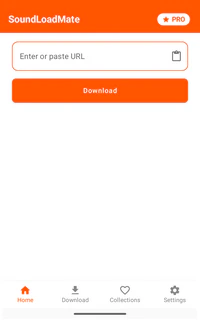
SoundLoadMate is a free, ad-supported Android app that turns a pasted SoundCloud link into an MP3 on your phone. It's lightweight and needs no login — but every now and then a run throws an "Unknown error" popup and stops before saving, so as a SoundCloud playlist downloader it's best treated as a grab-when-it-works option rather than a reliable tool.
It's aimed at simple single-track saves, with no quality or format choice, and whole-playlist support is at best inconsistent. For anything beyond the occasional track on Android, a mobile web tool from the list above is the safer bet.
How to Use SoundLoadMate
Step 1: Install SoundLoadMate from Google Play.
Step 2: Copy a SoundCloud track or playlist link and paste it into the app.
Step 3: Tap Download — most runs save fine, though an occasional "Unknown error" may need a retry.
Pros
✅ Free and lightweight, no login
✅ Simple single-track saves to the phone
Cons
❌ Downloads can throw an "Unknown error" and fail
❌ Whole-playlist support is inconsistent
❌ Ad-supported; no quality or format options
Which SoundCloud Playlists Downloader Should You Choose?
The right SoundCloud playlist downloader depends on how many playlists you save, where you want the files, and how much you care about quality and organization.
You archive large libraries
Choose AudiFab Music One for reliable batch downloads, lossless-capable formats, full ID3 tags, and tidy folders across SoundCloud and 10+ other services.
You need a quick free ZIP
For a genuinely free whole-playlist ZIP, SoundCloudAud packs the entire set with no track cap (at 128kbps and with empty tags). SCloudPlaylistDownloader suits single tracks or tiny batches, since its free ZIP stops at 2 tracks.
You want no account, any device
SoundCloudAud works sign-up-free in any browser for whole sets; DownCloudMe is fine for a quick single-track grab, but its playlist download didn't work in our test.
You want format options
AudiFab Music One gives you the widest range: MP3/AAC/WAV/FLAC/AIFF/ALAC; MusicVerter also offers MP3/AAC/WAV/FLAC, but playlist downloads and WAV output require its Premium plan.
You are comfortable with code
scdl is the cleanest automatable option if you're comfortable working in a terminal. The trade-offs are setup (Python plus ffmpeg), and runs may occasionally stall.
You work inside the browser
AddonCrop adds a download button right on the page for a quick grab; SoundLoadMate is only for the occasional Android single track.
FAQs About SoundCloud Playlists Downloaders
Q1 Can I download an entire SoundCloud playlist at once?
The easiest way is a desktop converter like AudiFab Music One — open a playlist inside the program and it queues every track, converts the whole set at once, and saves everything into tidy folders. If you'd rather not install anything, free online sites pack a playlist into a ZIP, AddonCrop works as a browser extension, and the open-source scdl CLI handles it from a terminal.
Q2 Can I download SoundCloud playlists in WAV or lossless FLAC?
Yes, but only with desktop or open-source tools. AudiFab Music One exports whole playlists to MP3, AAC, WAV, FLAC, AIFF and ALAC while preserving source quality. The free online downloaders are MP3-only. For a genuinely free lossless option, the open-source scdl CLI grabs the original source file.
Q3 What is the best SoundCloud playlist downloader for mobile?
On Android, the free SoundLoadMate app lets you paste a link and save tracks to MP3, though it is ad-supported and playlist batches can occasionally throw an error. iPhone has no dedicated app, but you can use any of the free online tools in a mobile browser, which is more reliable than an app for whole playlists.
Q4 Is there a free open-source SoundCloud playlist downloader on GitHub?
Yes — scdl, a free open-source command-line tool on GitHub. It batch-downloads whole SoundCloud playlists with full tags. The trade-off is that it requires Python and ffmpeg. Since the project has moved to maintenance mode, a run may occasionally stall and need a retry.
Q5 Does downloading in 320kbps mean the original audio quality?
No. SoundCloud's standard stream is 128kbps MP3, Go+ tops out at 256kbps AAC on eligible tracks, and the artist's original upload may be higher still. A "320kbps" download just re-wraps that stream into a larger container, and it can't add detail the stream never had.
Q6 Is using a SoundCloud playlist downloader legal?
It depends on the content. Respect uploaders' download settings and copyright rules, and only save tracks you have the right to download. Private or protected content should not be pulled.
Conclusion
If you only download the occasional playlist, any of the free tools above will get the job done. If you build a real local library — multiple large sets, tags that stay intact, lossless-capable formats, and organized folders — a desktop SoundCloud playlist downloader like AudiFab Music One is the more reliable, ad-free choice.
We've run the same playlist-to-local-library tests on other services too, so if you also archive from YouTube Music or Spotify, our roundups of the best YouTube Music playlist downloaders and the free online Spotify playlist downloaders cover those in the same detail. Whichever tool you pick, respect the uploader's download settings and use the files for personal, non-commercial listening only.
Discover 7 best 2026 SoundCloud to FLAC converters to extract high-quality SoundCloud FLAC audio, convert playlists, and enjoy offline FLAC music.
8 SoundCloud to WAV Converters in 2026 (Batch & Lossless)
We tested 8 SoundCloud to WAV converters in 2026 to help you batch download high-quality lossless SoundCloud tracks, playlists, and audio effortlessly.
9 Free SoundCloud Equalizers for iPhone, Android & PC (2026)
Find the best SoundCloud equalizers for iPhone, Android, PC, Mac, and Chrome. Compare free EQ tools, SoundCloud support, features, and ease of use.
10 Best Free Spotify Playlist Downloaders to 320 kbps MP3
Discover a clean, 320 kbps, 40x faster Spotify playlist to MP3 converter that's perfect for you.
10 Best YouTube Music Playlist Downloaders - Work in 2026
Here is the ultimate, field-tested guide to downloading entire YouTube Music playlists to MP3 cleanly, safely, and with full album art.

 Try It Free
 Try It Free