10 Best YouTube Music Playlist Downloaders - Work in 2026
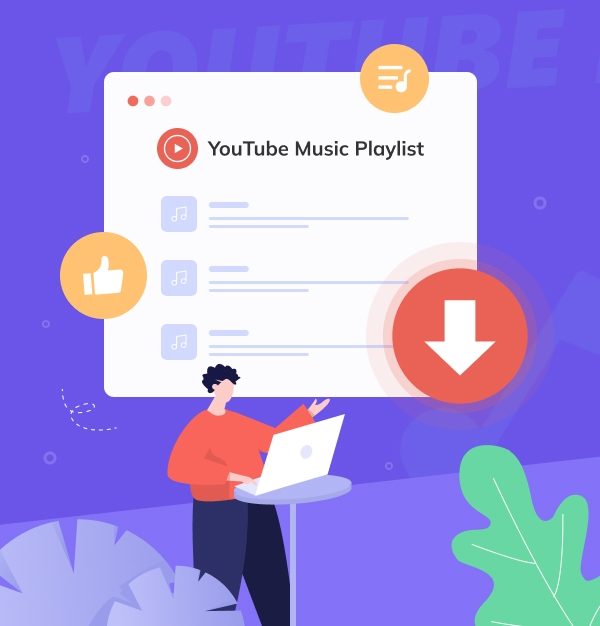
Here is the ultimate, field-tested guide to downloading entire YouTube Music playlists to MP3 cleanly, safely, and with full album art.
Here is the ultimate, field-tested guide to downloading entire YouTube Music playlists to MP3 cleanly, safely, and with full album art.
Downloading a YouTube Music playlist sounds simple—until you start trying different tools. Some only support single tracks, some are packed with ads, and others stop working after a few downloads. To help you avoid the trial and error, we've gathered the best YouTube Music playlist downloaders available today, including free online websites, desktop applications, and community-recommended open-source tools. No matter how large your playlist is, you'll find a YouTube Music to MP3 converter that fits your needs.
See also:
Best 10 Best Free Spotify Playlist Downloaders to 320 kbps MP3
⚖️ Disclaimer This guide is just for info—use the tools below for personal, non-commercial use only.
This comparison table is based on real-world testing and evaluates professional desktop converters, open-source command-line tools, mobile Android apps, and web-based solutions.
| Tool Name | System Compatibility | Recommendation | Pricing | Ads Status | Safety Rating | Download Formats | Download Speed | Audio Quality | Ease of Use |
|---|---|---|---|---|---|---|---|---|---|
| 🏆 AudiFab YouTube Music Converter | Windows, Mac | ⭐⭐⭐⭐⭐ | Paid (Free Trial) | 🚫 No Ads | 🛡️🛡️🛡️🛡️🛡️ (High) | MP3, AAC, FLAC, WAV, ALAC, AIFF | 🚀🚀🚀🚀🚀 (Up to 10X) | 🎧🎧🎧🎧🎧 Lossless / 320kbps | 😊 Very Easy (One-click GUI) |
| yt-dlp | Windows, Mac, Linux | ⭐⭐⭐⭐⭐ | 100% Free | 🚫 No Ads | 🛡️🛡️🛡️🛡️🛡️ (Max) | Native M4A/OPUS, MP3, FLAC, etc. | 🚀🚀🚀🚀☆ Fast (Max Line Speed) | 🎧🎧🎧🎧🎧 Pristine (Direct Server Rip) | 🤯 Very Complex (Command Line Only) |
| 4K Video Downloader+ | Windows, Mac, Linux | ⭐⭐⭐⭐☆ | Free (Caps) / Paid | ⚠️ In-app Promos (Free) | 🛡️🛡️🛡️🛡️☆ (High) | MP3, M4A, OGG | 🚀🚀🚀🚀☆ Fast (Multi-threaded) | 🎧🎧🎧🎧☆ Great (Up to 320kbps) | 😊 Very Easy (Smart Mode Copy-Paste) |
| SnapDownloader | Windows, Mac | ⭐⭐⭐⭐☆ | Paid (48h Trial) | 🚫 No Ads | 🛡️🛡️🛡️🛡️☆ (High) | MP3, M4A, WAV, FLAC, AAC | 🚀🚀🚀🚀☆ Fast (Bandwidth Control) | 🎧🎧🎧🎧☆ Great (High Bitrate) | 🙂 Easy (Clean Interface + Cutter) |
| YTDLnis | Android 6.0+ | ⭐⭐⭐⭐☆ | 100% Free | 🚫 No Ads | 🛡️🛡️🛡️🛡️🛡️ (High) | Native OPUS/M4A, MP3, FLAC, etc. | 🚀🚀🚀🚀☆ Fast (Mobile Optimized) | 🎧🎧🎧🎧🎧 Pristine (Native Stream Copy) | 😐 Moderate (Technical Options) |
| YTMP3 | Web-based (All) | ⭐⭐☆☆☆ | Free / $14.99 Buyout | 🛑 Heavy Pop-ups | 🛡️🛡️☆☆☆ (Low) | MP3 (ZIP), MP4, WAV | 🚀🚀☆☆☆ Slow (Cloud Queues) | 🎧🎧🎧☆☆ Average (Lossy Transcode) | 😄 Extremely Easy (No Install) |
| JDownloader 2 | Windows, Mac, Linux | ⭐⭐⭐⭐☆ | 100% Free | 🚫 No Ads (Watch Installer) | 🛡️🛡️🛡️🛡️☆ (High) | Raw M4A, AAC, MP3 | 🚀🚀🚀🚀🚀 Extreme (Multi-chunk Links) | 🎧🎧🎧🎧🎧 Pristine (Direct Extraction) | 🧐 Complex (Technical UI) |
| Loader.to | Web-based (All) | ⭐⭐⭐☆☆ | 100% Free | 🛑 Heavy Redirects | 🛡️🛡️☆☆☆ (Low) | MP3, M4A, WAV, FLAC, OGG, OPUS | 🚀🚀🚀☆☆ Moderate (Server Load Bound) | 🎧🎧🎧🎧☆ Great (Supports WAV/FLAC) | 😄 Extremely Easy (Browser Tool) |
| OFA Downloader | Web-based (All) | ⭐⭐⭐☆☆ | 100% Free | ⚠️ Light Banner Ads | 🛡️🛡️🛡️☆☆ (Medium) | MP3 (ZIP), M4A, WAV | 🚀🚀🚀🚀☆ Fast (10-sec Parsing) | 🎧🎧🎧☆☆ Standard Compressed Audio | 😄 Extremely Easy (One-click ZIP) |
| Seal | Android 7.0+ | ⭐⭐☆☆☆ | 100% Free | 🚫 No Ads | 🛡️🛡️🛡️🛡️🛡️ (High) | MP3, M4A, OGG, etc. | 🚀🚀🚀🚀☆ Fast (Background Runs) | 🎧🎧🎧🎧🎧 Pristine (1:1 Album Art) | 😊 Very Easy (Material You UI) |
| Recommend level: ⭐⭐⭐⭐⭐ (4.9/5) | |||||||
|---|---|---|---|---|---|---|---|
|
While many free tools can rip audio from YouTube videos, few are designed specifically for YouTube Music playlists. AudiFab YouTube Music Converter lets you download songs, albums, and playlists from YouTube Music and convert them to MP3, AAC, FLAC, WAV, AIFF, or ALAC. It supports batch downloading, preserves ID3 tags, and maintains original audio quality. After conversion, you can transfer YouTube Music playlists to MP3 players, USB drives, or burn them to CDs for offline playback.
Beyond YouTube Music, AudiFab also supports downloads from YouTube, Spotify, Amazon Music, Apple Music, Tidal, and more streaming music platforms.
STEP 1: Add YT Music Playlist

Click YouTube Music. Click "+Add" to add YT Music playlists to AudiFab.
STEP 2: Choose MP3
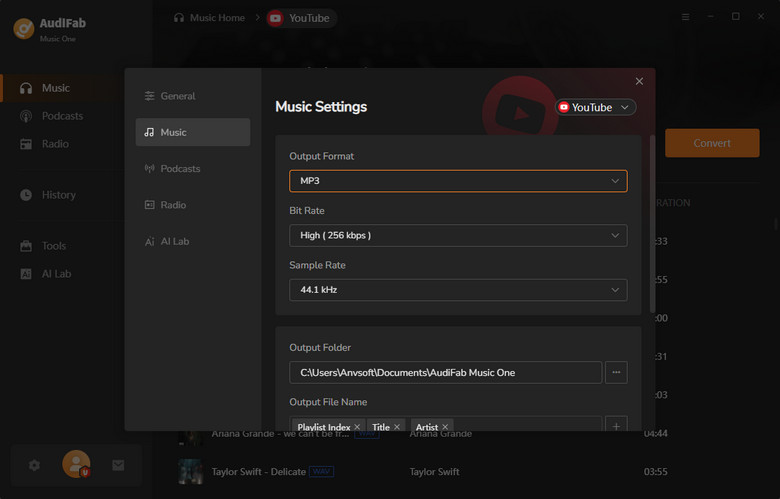
Set the output format to MP3 and adjust other preferences.
STEP 3: Rip YouTube Music to MP3
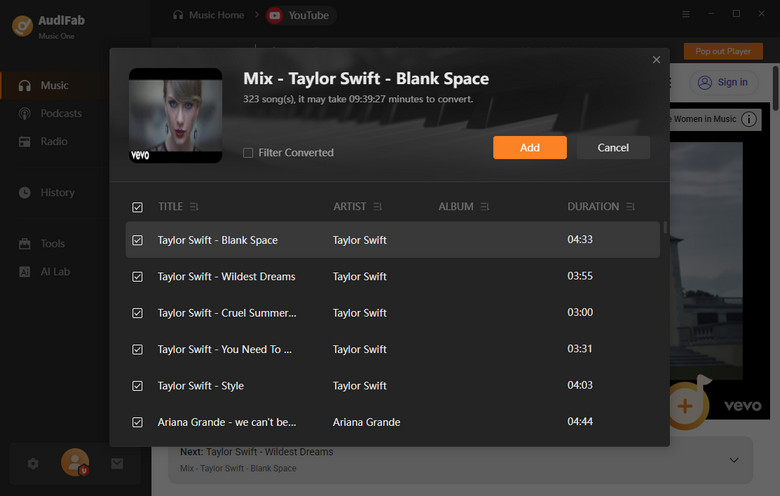
Click "Convert" to save YT Music playlist as MP3 for offline use.
⚠️ Note: Before using any third-party download or transfer tools, we recommend setting your YouTube Music playlist to "Public" or "Unlisted". This can help avoid most parsing failures caused by playlist permission restrictions.
If you browse tech-focused subreddits like r/youtubedl or r/DataHoarder, you’ll quickly see yt-dlp mentioned as one of the most recommended tools for downloading online media. It’s a free, open-source command-line program known for its stability, speed, and strong support for downloading YouTube Music playlists.
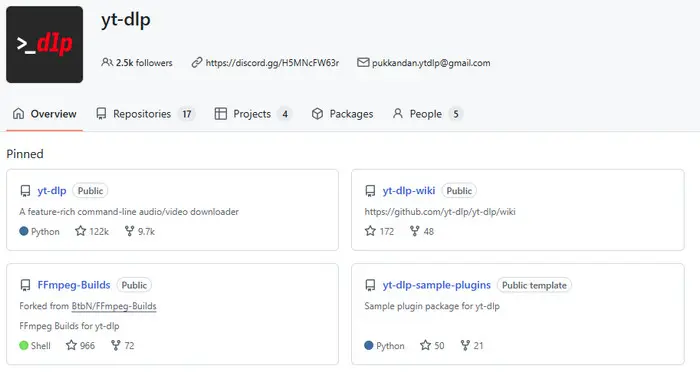
💬 What Reddit Users Say About yt-dlp:
On Reddit, yt-dlp is generally viewed very positively, especially among users who frequently download YouTube or YouTube Music content.
“It's versatile so you can control quality, download audio only, etc.; it's updated often to avoid YT's constant updates to prevent downloading, it works with a ton of other websites (TikTok, for example), and you know it's going to work every time.”Step 1: Download yt-dlp.exe and place it in a folder (for example C:\yt-dlp).
Step 2: Download FFmpeg from: https://github.com/BtbN/FFmpeg-Builds/releases/latest
Step 3: Extract the ZIP file, then copy everything inside the bin folder into the same folder as yt-dlp.exe.
Step 4: (Optional) Download Deno from: https://github.com/denoland/deno/releases/latest
Step 5: Place deno.exe in the same yt-dlp folder.
Step 6: Open Command Prompt (Win + R, type cmd, press Enter), then navigate to your folder using:
cd C:\yt-dlp
Step 7: To test the setup, run:
yt-dlp -x --audio-format mp3 "https://music.youtube.com/playlist?list=xxxxx"
4K Video Downloader Plus is one of the best desktop apps that let you download videos, audio, playlists, and subtitles from sites like YouTube, TikTok, Vimeo, and Facebook. It offers a clean, ad-free interface and is often used as a simpler alternative to command-line tools. The tool supports batch downloads and keeps the original video or audio quality while making playlist saving easy with just a few clicks.
Step 1: Copy your YouTube Music playlist or video URL from the browser.
Step 2: Open 4K Video Downloader Plus and choose Extract Audio. Select format (MP3/M4A/OGG) and quality (e.g., 320kbps).
Step 3: Click Paste Link and let the app analyze the URL.
Step 4: If it’s a playlist, choose Download Entire Playlist to start batch downloading.
💡 Smart Mode Tip:
Enable Smart Mode to preset format, quality, and save location. After that, pasting a link will start downloading automatically with your saved settings.
SnapDownloader is a desktop downloader for Windows and macOS that lets users extract videos, audio, and full playlists from YouTube and other major platforms. It’s often used for backing up YouTube Music playlists because it supports batch downloads and multiple audio formats like MP3. Compared to lightweight online tools, it focuses more on stability and handling larger downloads, which is why it is commonly mentioned in user discussions around playlist archiving and media backup workflows.
Step 1: Copy a YouTube or YouTube Music link and paste it into SnapDownloader.
Step 2: Choose format (MP3/MP4) and quality, then select playlist download if needed.
Step 3: Click Download and wait for the files to be saved to your computer.
YTDLnis is an open-source Android app (GitHub-based) built on yt-dlp for converting YouTube and YouTube Music to MP3. It’s mainly used for saving playlists and watching offline with a YouTube-like interface. Users often use it for offline-first playback with tools like VLC or mpv, giving more control over media (editing, audio extraction, or custom viewing settings).
Step 1: Open YouTube or YouTube Music and find a playlist or track.
Step 2: Tap Share → YTDLnis.
Step 3: Wait for the download panel to load and parse the link.
Step 4: Choose format (OPUS/M4A/MP3) and quality (up to 320kbps).
Step 5: Enable optional tweaks like SponsorBlock or chapter splitting.
Step 6: Tap Download to start processing.
⚠️ Note:
If downloads fail or show errors, update the built-in yt-dlp core in settings to restore compatibility.
YTMP3.gg is a browser-based YouTube Music playlist downloader that lets users convert video or playlist links into audio files without installing any software. From real user experience patterns seen in communities, it’s considered a “quick fix” tool—easy to use, but not designed for long-term or heavy playlist archiving compared to desktop apps or yt-dlp-based solutions.
Step 1: Open Ytmp3, paste your YouTube Music playlist link, and select MP3.
Step 2: Click Start, select tracks if needed, then click Convert and download the ZIP file.
JDownloader 2 is a free open-source download manager that can detect and organize YouTube Music playlist links for batch downloading via its LinkGrabber system. It is often used as a GUI alternative to yt-dlp for users who prefer a simple interface over command-line tools. It is a long-running open-source project widely used by the community when installed from the official source.
Step 1: Open JDownloader 2 and enable clipboard monitoring, then copy your YouTube Music playlist URL to auto-detect tracks in LinkGrabber.
Step 2: Filter to keep only audio files and choose your preferred format (MP3 / M4A / AAC).
Step 3: Click Start Downloads to begin batch downloading.
Loader.to is a browser-based video downloader that allows users to convert YouTube Music and other platform links into MP3 or MP4 formats without installing software. In our testing, single-track downloads worked smoothly, but playlist processing was extremely slow. A 30-song YouTube Music playlist remained stuck in the analysis stage and failed to start downloading during our test.
Step 1: Copy and paste your YouTube Music playlist URL into Loader.to.
Step 2: Select an output format such as MP3 or M4A and click Download.
Step 3: Wait for the playlist to be processed, then download the converted files to your device.
OFA Downloader is a free YouTube Music playlist downloader that supports batch downloads and ZIP exports. In our testing, a 30-song YouTube Music playlist was processed and packaged into a downloadable ZIP file in about 10 seconds, making it one of the faster free options for playlist downloads.
Step 1: Paste your YouTube Music playlist URL into OFA Downloader.
Step 2: Select the desired output format and quality.
Step 3: Click Download and save the generated ZIP file to your device.
See also: 10 YouTube to MP3 Download Sites Tested for Safety (2026)
Seal is an open-source Android downloader that serves as a front-end for yt-dlp and supports YouTube videos and some playlists. YouTube Music playlist compatibility may vary depending on backend support and source links. For security, it is recommended to download the app only from trusted repositories such as GitHub releases.
Step 1: Download Seal from official GitHub releases and install it on Android.
Step 2: Share a YouTube or YouTube Music link directly to Seal to start processing.
Step 3: Select audio format and tap Download to save files locally.
We tested several YouTube Music playlist download tools that rank in search results and appear in online reviews. However, these tools were found to have limitations such as poor playlist support, broken YouTube Music compatibility, paywalls, or unstable performance, and are therefore not recommended based on our 2026 testing.
| Tool Name | Type | Why You Should Avoid It |
|---|---|---|
| youtubeplaylist.cc | Web Tool | Requires login and redirects to a secondary domain. MP3 download is locked behind paywall; free mode is limited and workflow is confusing. |
| YouTube Music ReVanced APK | Android App | Download features are no longer working due to YouTube updates; playlist/audio extraction is effectively broken. |
| EzMP3 | Web Tool | No batch or playlist support; only single-track conversion is possible. |
| Postly Downloader | Web Tool | Does not reliably support YouTube Music playlists and has a complex interface. |
| Tubly Extension | Extension | Supports video only; YouTube Music playlists are not supported. |
AudiFab is our top pick for converting YouTube Music playlist to high-quality MP3. Keep original metadata, organize tracks by playlist or channel, and enjoy fast, batch downloads. Safe, ad-free, and perfect for offline listening or audio editing.
✅ High-quality MP3 from YouTube • ✅ Batch download playlists • ✅ Preserve ID3 tags & metadata • ✅ Ad-free and safe
It depends on how the content is used. Converting copyrighted music without permission may violate YouTube’s terms of service or local copyright laws.
Some are safe, but many contain ads, redirects, or unstable servers. Desktop tools are generally more reliable. AudiFab YouTube Music Converter is a more stable option for playlist conversion and offline music management.
Basic online tools often generate random filenames and missing metadata. For proper organization, you need a tool with built-in ID3 tagging. AudiFab YouTube Music Converter preserves track titles, album info, and album artwork automatically during conversion, so files display correctly in music players.
No. In practice, most Chrome extensions only support standard YouTube videos (youtube.com). Even if “playlist support” is advertised, it usually applies only to regular YouTube playlists, not YouTube Music.
No. Most Telegram bots only support standard YouTube links, and Chrome extensions also typically do not support YouTube Music playlists.
See also: Best Telegram Bots - Convert Spotify Playlist at 320kbps MP3
Yes. You can manually transfer downloaded MP3 files to Spotify as local files, or use AudiFab’s “Upload to iTunes” feature for Apple Music. For direct playlist migration without downloading, tools like Soundiiz or PlaylistGo can be used.
Choosing the right YouTube Music playlist downloader depends on your needs, whether it is batch downloading, audio quality, or ease of use. Desktop tools generally offer more stable performance and better metadata handling. Among the tools mentioned above, AudiFab YouTube Music Converter offers a more well-rounded experience, supporting one-click batch exporting and ID3 tag preservation while maintaining the original audio quality.
AudiFab is free to try—download it to convert the first minute of any song. Buy a license to remove the limit.

Download YouTube Music songs, playlists & albums in original quality, batch convert to MP3, AAC, FLAC, WAV, ALAC or AIFF, and keep ID3 tags.
Music is the greatest communication in the world and here are some articles that may help you enjoy music in a better way.

 Try It Free
 Try It Free