6 Best YouTube to OGG Converters in 2026 (Free & Tested)
YouTube doesn't offer OGG as a download option anywhere in its own interface — here are 6 converters we tested that actually produce real, playable OGG files.
YouTube doesn't offer OGG as a download option anywhere in its own interface — here are 6 converters we tested that actually produce real, playable OGG files.
YouTube does not offer OGG as a native download format, so converting YouTube videos to OGG always requires a third-party tool. We tested six converters below and confirmed each produces valid, playable OGG audio, whether you need a single track for a game mod or a full playlist for offline listening.
⚖️ Legal Disclaimer Only convert YouTube videos or playlists you own the rights to, or that are otherwise cleared for personal use. This guide is meant for private, non-commercial listening — not for redistributing copyrighted commercial tracks.
| Tool | Type | Workflow | Batch Support | Best For |
|---|---|---|---|---|
| AudiFab YouTube Downloader 🔥 | Desktop (Win/Mac) | Download → Convert | ✅ | Converting entire playlists or channels at once |
| YTMP3 | Online | Direct | ❌ | Quick single-track download |
| AceThinker | Online | Direct | ❌ | Direct paste-and-download |
| AudioCleaner | Online | Download → Convert | ❌ | Ad-free single-track conversion |
| Hicoo | Online | Download → Convert | ❌ | Privacy-conscious users (local processing) |
| Cisdem VideoPaw | Desktop (Win/Mac) | Download → Convert | ✅ | Multi-format converter, not OGG-only |
We tested AudiFab specifically for batch YouTube downloading, and it's the one tool on this list built to pull an entire playlist or channel in a single pass rather than one link at a time. Instead of pasting URLs one by one, it has a built-in YouTube browser where you search or navigate directly and add videos to the download queue — batch downloads then run at up to 10x speed while keeping ID3 tags and metadata intact.
Its native output formats are MP3, AAC, WAV, FLAC, ALAC, and AIFF. To get an OGG file, you download from YouTube first, then use AudiFab's built-in Format Converter tool to batch-convert those files to OGG. It's an extra step compared to a one-click online converter, but it holds up well if you're processing a large batch of tracks with consistent output settings.
Download the YouTube Audio
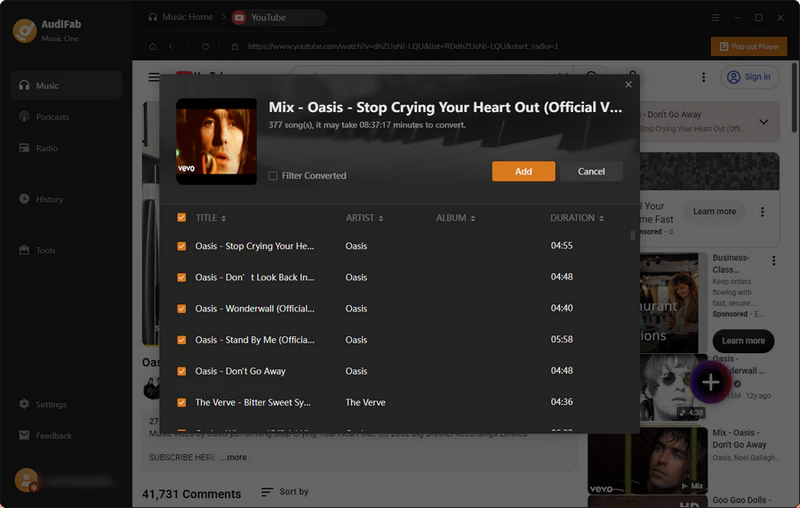
Launch AudiFab and open the built-in YouTube browser from the Music tab. Search for or paste the link to the video, playlist, or channel you want. Once tracks are detected, click Add, select the ones you want, and confirm.
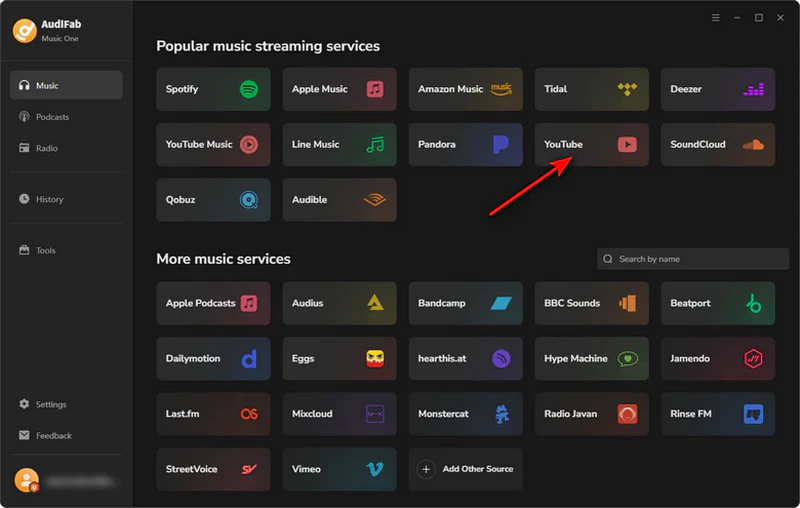
Set Output Format to Recommended and Download
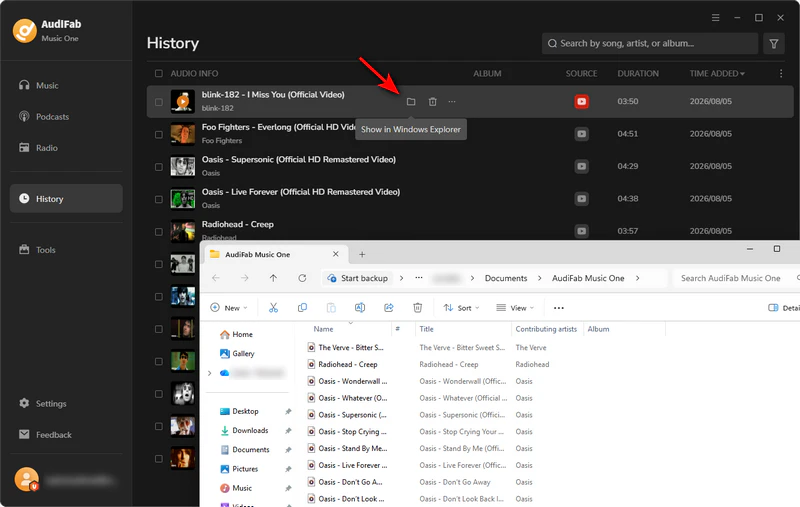
Open Settings and leave Output Format set to Recommended — this automatically selects the best source format based on the track and platform. Click Convert to batch download the tracks.

Open the Format Converter Tool
From the left sidebar, click Tools, then select Format Converter from the Tools screen.

Add Your Files and Choose OGG
Click + Add (or drag and drop) to load the FLAC or WAV files you just downloaded — you can add multiple files at once for batch conversion. Open the Output Format dropdown and select OGG.

Set Quality and Convert
Choose your preferred bitrate from the Quality dropdown, confirm the Output Folder, and click Convert in the top right. Your batch of OGG files will save to the folder you selected.

We tested YTMP3's dedicated OGG converter page and found a proper format dropdown that lists OGG alongside MP3, WAV, and Opus. Paste a YouTube link, pick OGG, choose your quality, and the file downloads directly without intermediate format. One thing worth flagging from our test: the downloaded OGG file's bitrate field was blank in file properties, so if you need to confirm a specific bitrate for a game or app, double-check the file plays and sounds right.

Is YTMP3 safe to use in 2026? Read our YTMP3 review covering safety risks, common issues, and the best desktop, Android & iPhone alternatives.
Learn More →We tested AceThinker's online downloader by pasting a YouTube URL directly, and it produced a working OGG download without separate conversion step. The free online tier does come with real limits, though: it's capped at 128 kbps audio, 30 minutes per clip, and 5 files per day, with the page repeatedly prompting an upgrade to the desktop Aqua Clip or Aqua Tune apps for higher quality, longer videos, and batch downloads.

We tested AudioCleaner and found it's a two-step process, not a direct converter: the first step downloads the YouTube video as MP3 or MP4 (128 kbps max on MP3 in our test), and a second, separate conversion turns that file into OGG. Both steps worked and produced a valid, playable OGG file in our testing, with no ads along the way. The output is a standard OGG Vorbis file, so it works fine for game or mod audio just like the OGG files from any other converter on this list.

Web tools work fine for a single track, but if you're converting more than one video regularly, Audifab batch-downloads a whole playlist in one pass instead of pasting each link separately. Compatible with Windows & macOS · 100% Safe & Clean
We tested Hicoo and found it's also a two-step tool: the first page downloads YouTube audio as MP3 (capped at 128 kbps on the free web version), and a second, separate page converts that MP3 to OGG. What stood out in our test of the second step is that the conversion runs locally in the browser rather than uploading your file to a server. Hicoo's own product page advertises support for up to three files at once, but in our testing the tool only processed one file per conversion — worth confirming yourself if batch support matters for your workflow. There's also a daily conversion limit before it prompts a Premium upgrade.

We tested Cisdem VideoPaw as the desktop alternative to AudiFab on this list. It's also a two-step process in practice: the Video Downloader module saves the YouTube video as MP4 first, then the separate Video/Audio Converter module converts that MP4 to OGG. It also lists OGG as a native output format alongside MP3, FLAC, M4A, WAV, and WMA, so you can pick it directly from that dropdown instead of running a separate conversion pass.
Unlike AudiFab, VideoPaw doesn't have a built-in YouTube browser — you paste each video URL into the Video Downloader one at a time rather than searching or browsing within the app. In our test, the free trial capped conversion at half the audio. For anything over 5 minutes, only the first 5 minutes downloaded, with a license required to unlock the rest.

AudiFab YouTube Downloader (Free Download for Windows | Mac) batch download YouTube with 10x conversion speed and keeps original audio quality. Cisdem VideoPaw is a similar desktop option, though you'll paste each video URL manually since it doesn't have AudiFab's built-in YouTube browser.
YTMP3, AceThinker, AudioCleaner and Hicoo get you a downloaded OGG file in under a minute.
Whichever tool you land on, check one more thing before converting for a specific game or app: whether it needs OGG Vorbis specifically or just "OGG" generally, since not every converter lets you choose the codec.
OGG is a container format, not an audio codec. Think of it like a file wrapper, much the same way MP4 can hold different kinds of video. The actual audio inside an .ogg file is usually encoded with Vorbis or Opus, two different lossy audio codecs.
Most tools labeled "OGG" output OGG Vorbis by default. When you do have a choice between them, Opus tends to sound clearer at low bitrates and is the modern default for voice chat and streaming, while Vorbis has been around longer and is the safer bet for older engines and hardware media players.
| Term | What It Is | Commonly Used In |
|---|---|---|
| OGG | Container format (the file wrapper) | — |
| Vorbis | Older, widely supported audio codec | Unity, Godot, Unreal Engine, older hardware players |
| Opus | Newer codec, more efficient at low bitrates | Discord, WebRTC, modern web browsers |
If you convert audio for games, mods, or certain apps, double-check which codec they support: a program that only accepts OGG Vorbis will not load an Opus file, even though the file itself is a valid OGG container. Also worth knowing: the .ogg extension alone doesn't guarantee the codec inside, since Opus audio can technically be wrapped in an .ogg container too. If a converted file gets rejected, use a tool like VLC's media info to check its real codec.
Many games including My Summer Car and engines like Unity read OGG audio natively, rather than MP3 or WAV. This makes OGG a common choice for game mods and custom in-game audio.
Before converting, check your game or engine's guide for exact audio rules — confirm it needs OGG Vorbis (the most common option), a suitable sample rate (44.1kHz is a safe default), and any limits on file size or length. An audio file that plays fine in a media player can still fail to load inside a game if the codec, sample rate, or channel setup doesn't match what the engine expects.
A few things that trip people up in practice:
When in doubt, convert one test file first and confirm it loads and plays correctly in your project before batch-converting an entire folder of assets.
Batch-convert a whole folder of source clips to OGG at once with AudiFab's Format Converter, instead of running each file through a web tool one at a time. Compatible with Windows & macOS · 100% Safe & Clean
It depends on how often you're converting. For a single file with no install, YTMP3 or AceThinker will get you a working OGG download in under a minute. For playlists, channels, or frequent batch conversion, AudiFab YouTube Downloader supports batch downloading and preserves metadata with a built-in YouTube browser.
Yes. Several free online tools can help you convert YouTube videos to OGG without installing software. However, some tools don't support direct YouTube-to-OGG conversion and require an extra step, such as converting the downloaded MP3 or MP4 file to OGG. Free tools may also limit audio quality, file length, or the number of conversions per day.
No. YouTube audio is already compressed before you download it. Converting it to OGG later won't restore lost audio details. A converter can only keep the original quality as well as it can — it cannot make the sound better than the source. This holds even if the converted file's properties show a higher bitrate than the original.
For regular listening, 128–192 kbps OGG Vorbis hits a good balance between file size and sound quality. If you're making game audio or mods, follow the bitrate and sample rate recommended by your game engine or app, since some are strict about matching source assets. OGG Vorbis commonly uses variable bitrate (VBR), so the bitrate shown in file properties may not represent a simple fixed bitrate.
OGG is royalty-free, so Linux and open-source players favor it, and game engines like Unity and Godot use OGG Vorbis for audio. MP3, however, works on nearly every device and app. OGG can deliver better quality than MP3 at similar bitrates, depending on the encoder and settings. Go with OGG when a game, mod or app requires it. For regular playback across different devices, MP3 is still the reliable default.
If you don't specifically need OGG, see our guide to converting YouTube to MP3 for an easier and more widely supported option.
Getting OGG audio out of YouTube always takes a third-party tool. For a single track with no install, YTMP3, AceThinker, AudioCleaner, or Hicoo will get you a file in under a minute. For playlists, channels, or regular batch conversion, Audifab batch-downloads with a built-in YouTube browser and hands off to its Format Converter for OGG.
For game or mod audio, any tool here that outputs genuine OGG Vorbis will work — just confirm the sample rate and codec match what your engine expects first.
The free trial lets you convert a limited number of tracks per playlist so you can test the whole workflow first; unlocking unlimited batch conversions and every supported format needs a license.

Download YouTube Music songs, playlists & albums in original quality, batch convert to MP3/AAC/FLAC/WAV/ALAC/AIFF, and keep ID3 tags.
Music is the greatest communication in the world and here are some articles that may help you enjoy music in a better way.

 Try It Free
 Try It Free