YTMP3 Review 2026: Is It Safe? Any Alternatives?
Is YTMP3 safe to use in 2026? Read our YTMP3 review covering safety risks, common issues, and the best desktop, Android & iPhone alternatives.
Is YTMP3 safe to use in 2026? Read our YTMP3 review covering safety risks, common issues, and the best desktop, Android & iPhone alternatives.
Looking for a reliable YouTube downloader? While YTMP3 remains a widely searched online converter, constant site redirects, sudden errors, and potential security risks can turn a quick download into a frustrating experience.
To save you time, this 2026 YTMP3 review takes an honest look at how safe the site really is. We'll also explain what YTMP3 is, why YTMP3 may not be working, and explore the best YTMP3 alternatives for Windows, Mac, iPhone, and Android.
YTMP3 is a free online YouTube converter that converts YouTube videos into downloadable MP3 audio or MP4 video files.
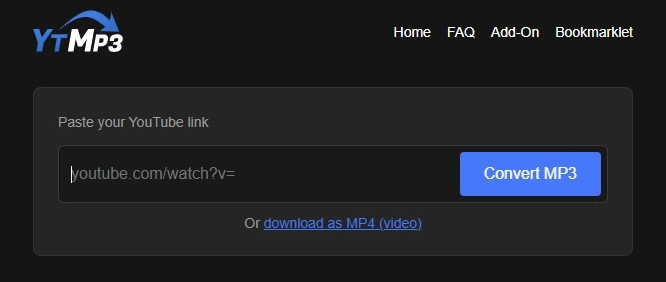
While the brand originally built its reputation around ytmp3.cc back in 2017, 'YTMP3' no longer refers to one specific platform. Due to constant legal takedowns and Google domain blocks, the original site has continuously shifted or expired.
Today, 'YTMP3' has become a generic label shared by hundreds of copycat sites, using domain extensions like .cc, .mobi, .nu, .biz, .blue, and .bet.
https://ytmp3.gl/https://ytmp3.biz/https://yttmp3.com.co/https://convertytmp3.org/https://media.ytmp3.gg/tools/youtube-to-mp3-320kbps-converter/ahzcodThe YTMP3 sites listed above were tested in September 2026 and are currently working. For the tests that follow, we primarily used YTMP3.gl and its mirror sites as our main sources for testing.
The table below summarizes the key YTMP3 features, supported links, quality settings, and common conversion limitations.
| What You May Want to Know About YTMP3 | Answer / Requirements (Info from YTMP3.gl site) | ||||||
|---|---|---|---|---|---|---|---|
| What formats and quality does YTMP3 support? |
Supports:
|
||||||
| Is YTMP3 free? Is registration required? |
Completely free.
|
||||||
| Does YTMP3 work with YouTube playlists? |
No.
|
||||||
| What YouTube links does YTMP3 support? |
Supports:
|
||||||
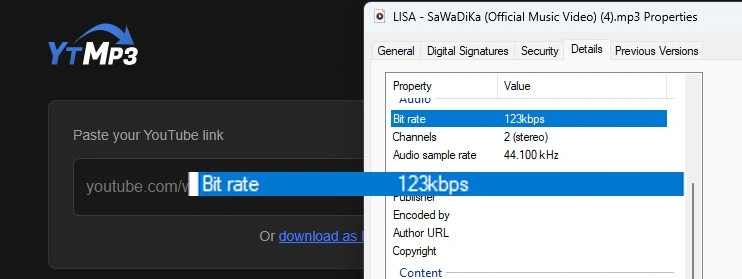
| *Note: YTMP3 advertises up to 192kbps, but our September 2026 test produced 123kbps MP3 output. | |||||||
Overall, YTMP3 is simple to use, but its format options, playlist support, and conversion limits may not meet every user's needs.
Tips: YTMP3 doesn't support bulk downloads for entire YouTube channels or playlists. If you need to convert multiple YouTube or YouTube Music tracks to MP3 at once, consider using an alternative tool like AudiFab YouTube Converter.
Using YTMP3 to convert a YouTube video is a straightforward process that only takes a few steps. Follow the guide below to convert a YouTube Video with YTMP3.
Open the YouTube video you want to convert and copy its URL from the browser's address bar or the Share menu.
Paste the YouTube URL into the YTMP3 input box, then choose MP3 for audio or MP4 for video.
Click Convert and wait for the process to finish. Then click Download to save the converted file to your device.
| Audio Quality | Video Quality | Metadata | Batch Download | Ads & Redirects |
|---|---|---|---|---|
| Up to 123 kbps | Up to 720p | Not preserved | Not supported | No banner ads; redirects on download |
Recommend Level: ⭐⭐⭐
During practical testing, YTMP3 delivered mixed results across media quality, functionality, and overall user experience.
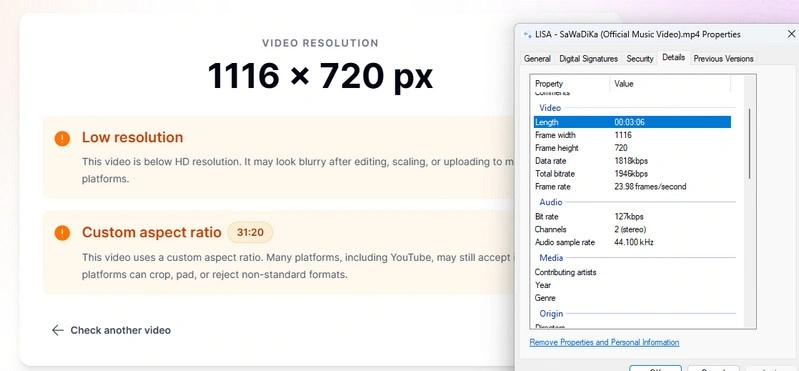
Regarding output quality, YTMP3 YouTube MP3 audio exports max out at 123 kbps, while YTMP3 MP4 YouTube video downloads cap at around 720p; additionally, all converted YouTube files strip out original metadata and ID3 tags.
In terms of functionality, YTMP3 only processes individual YouTube links, lacking support for batch downloading entire YouTube playlists or channels.
Finally, while the user interface remains clean and free of banner ads during conversion, users will still encounter periodic web redirects when clicking download buttons.
Try AudiFab Free Trial Now
Compatible with Windows & macOS · 100% Safe & Clean
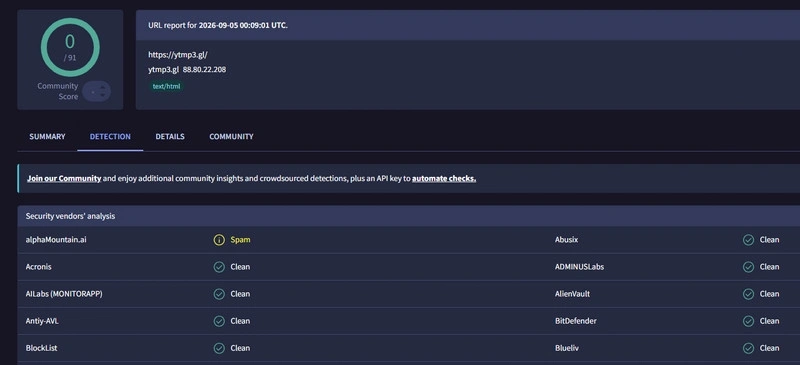
YTMP3 appears to be generally safe to use, but you should still be careful with its ads and pop-ups. In our latest VirusTotal check, YTMP3 received 0 detections from 91 security vendors, although one vendor flagged it as spam. So, there is no strong indication that YTMP3 itself is currently malware.
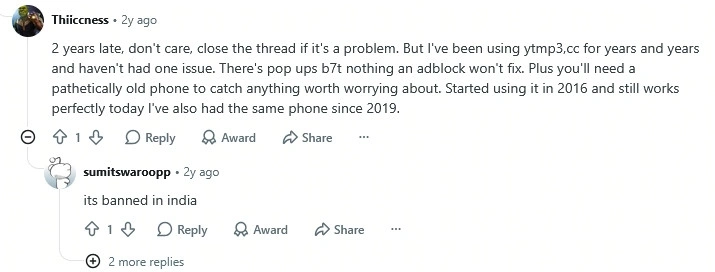
However, Reddit users have reported mixed experiences. Some people say they have used YTMP3 for years without any issues, while others mention pop-ups, unexpected background activity, and redirects to random URLs. Based on these user reports, here are the main things to watch out for when using YTMP3:
Pop-up ads may appear while using YTMP3. Beyond being annoying, these ads can sometimes direct you to unrelated or untrusted third-party sites if clicked. Indeed, long-time users on Reddit report that while YTMP3 frequently triggers pop-ups, the site remains functional as long as those ads are ignored.
How to stay safe: Avoid clicking on any pop-ups, especially those prompting you to download software, install browser extensions, or claim rewards. Simply close the pop-up tab immediately without interacting with its content.
Check the Review from a Reddit User:
When initiating a download, YTMP3 may automatically open a new tab or redirect your browser to an unfamiliar URL. This can make it tricky to determine whether you are still on the genuine YTMP3 site or have been routed to an external page.
How to stay safe: Always double-check your browser's address bar after clicking any download button. If a new page appears suspicious, requests personal details, prompts for payment, or asks for software downloads, close the tab right away and return to the original page.
Check the Review from a Reddit User:

Free conversion tools like YTMP3 often change their web domains over time, making it easy for users to accidentally land on copycat or unofficial sites. These lookalike domains may feature different advertising networks, aggressive redirects, or even malicious download files.
How to stay safe: Verify the website URL carefully before pasting any video links. Do not assume that every site containing "YTMP3" in its name is operated by the same service.
Check the Review from a Reddit User:

Besides these security concerns, users often report that YTMP3 simply stops working or fails to process YouTube links. These conversion failures typically stem from three sources: the YTMP3 service itself, the specific YouTube video, or your local browser environment.
If refreshing the page or testing a standard public video doesn't resolve the issue, the YTMP3 service is likely down. In these cases, switching to a reliable alternative converter is usually the fastest solution.
Download YouTube & YouTube Music Audio with AudiFab Free Trial Now
Compatible with Windows & macOS · 100% Safe & Clean
AudiFab YouTube Converter is a safe and versatile tool that allows you to download music, podcasts, audiobooks, and videos from YouTube, YouTube Music, Spotify, Apple Music, SoundCloud, and more. It can convert YouTube Videos to MP3, AAC(.m4a), WAV, FLAC, AIFF, or ALAC while preserving 100% original audio quality and full ID3 tags for safe and ad-free offline listening.
Whether you need to save music, live shows, podcasts, or interviews, AudiFab easily extracts audio from any YouTube video. If you are specifically downloading music and demand higher sound quality, you can switch to its dedicated YouTube Music Converter mode for a more tailored listening experience.
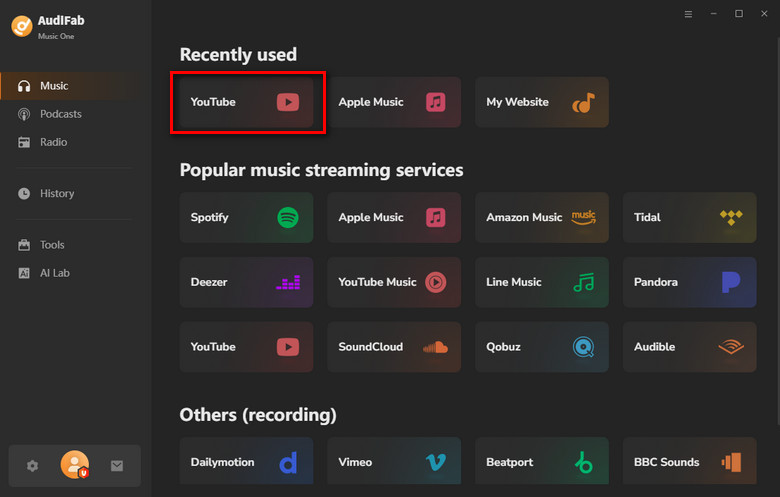
Select YouTube as Your Download Source
Launch AudiFab on your computer. On the main dashboard, select 'YouTube' as your platform.
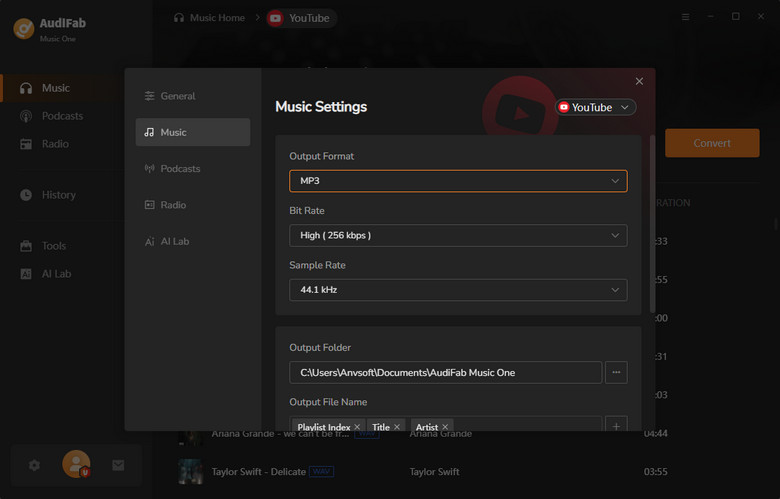
Customize the Output Settings
Before downloading, open the Settings panel to customize your output preferences. You can choose from MP3, AAC, FLAC, WAV, AIFF, and ALAC, adjust the bit rate and sample rate, select an output folder, and customize the file naming format to keep your downloads organized.
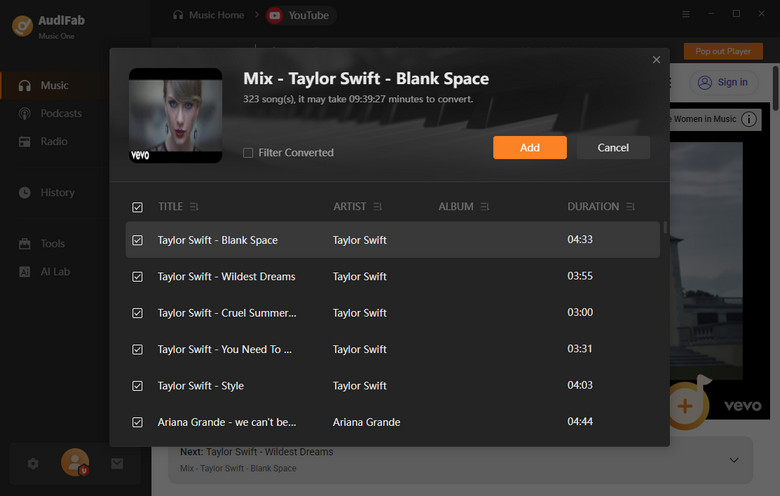
Add YouTube Videos or Playlists
Find the YouTube video, playlist, or channel you want to download and copy its link, and then click 'Add'. AudiFab will analyze the link and show the available videos or tracks.

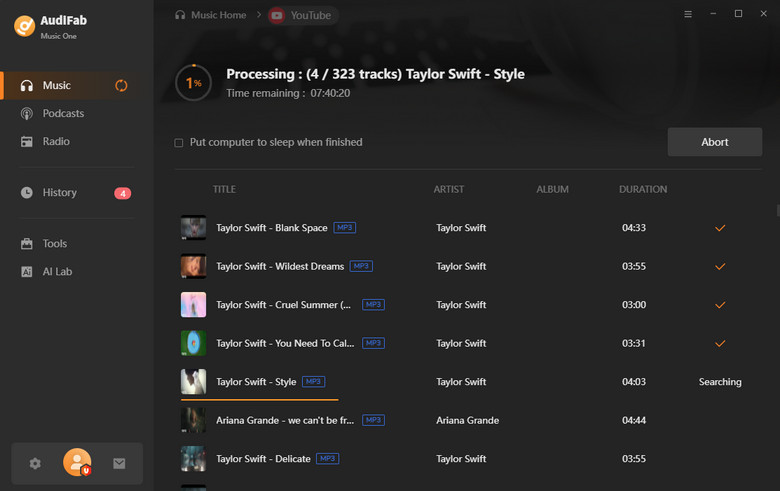
Batch Download YouTube to MP3
After adding everything you need, click 'Convert' to start the process. AudiFab will handle the selected content in batches and save the converted files to your chosen location.
Check Your Downloaded YouTube Files
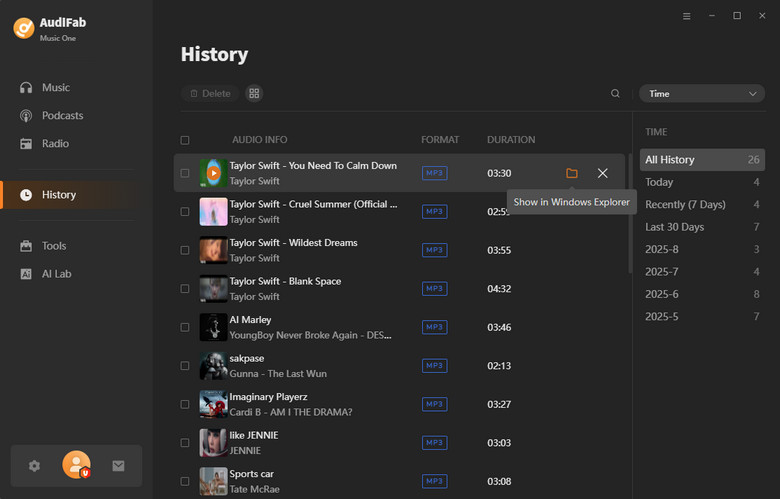
After the conversion finishes, switch to the 'History' tab to view your completed downloads. Your files will be stored in the output folder you selected earlier, with ID3 tags preserved for easier music management. You can then transfer the files to your phone, USB drive, or other compatible devices.
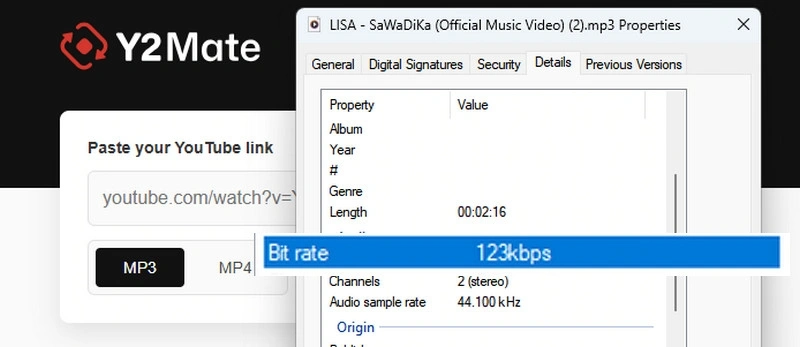
Y2Mate is a fast, free online downloader that instantly turns YouTube links into high-quality MP3 audio or crisp MP4 video.
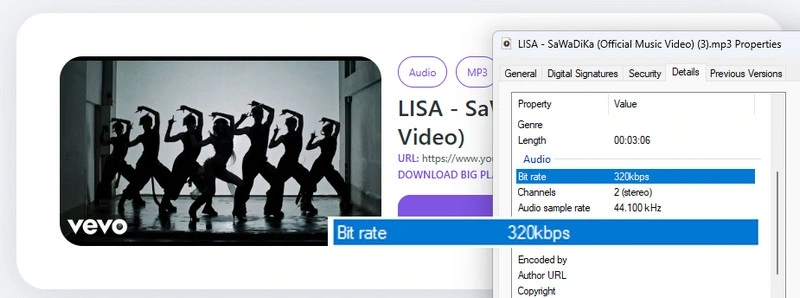
4K Downloader is an online YouTube to MP3 converter that lets you extract audio from YouTube videos and save it as an MP3. It also supports video downloads, making it useful if you want both MP3 audio and MP4 video from YouTube.
| Converter | Sources | Output Formats | Max Quality | Batch Download | Ad-Free | Free | Best For |
|---|---|---|---|---|---|---|---|
| AudiFab YouTube Converter | YouTube + YouTube Music | MP3, AAC (.m4a), WAV, FLAC, AIFF, ALAC |
✅ 100% Original Quality | ✅ Full Playlist | ✅ Ad-Free & Safe | Free Trial | ⭐⭐⭐⭐⭐ Best Overall |
| YTMP3 YouTube Converter | YouTube | MP3, MP4 | ❌ ~123 kbps | ❌ | ❌ Pop-ups & Redirects | Free | ⭐⭐⭐ Quick Online Conversion |
| Y2Mate YouTube Converter | YouTube | MP3, MP4 | ❌ ~123 kbps | ❌ | ✅ Fewer Redirects | Free | ⭐⭐⭐⭐ Best for Simple YouTube Downloads |
| 4K Downloader | YouTube | MP3, M4A, WAV, FLAC | ✅ re-encoded 320kbps | ❌ | ❌ Banner Ads | Free | ⭐⭐⭐⭐ Best for 320kbps Audio |
YTMP3 is a conversion tool, but its legality depends on the content you download and how you use it.
Not reliably. YTMP3 is mainly designed for converting individual YouTube videos rather than downloading entire playlists at once. If you want to download YouTube or YouTube Music playlists in batches, you can use AudiFab YouTube Converter.
No. YTMP3 cannot provide true 320kbps MP3 from YouTube videos because YouTube does not offer 320kbps audio streams. YTMP3 can only convert the audio quality available from the YouTube source, so the resulting MP3 cannot contain genuine 320kbps audio.
Not reliably. YTMP3 may not preserve complete metadata such as artist, album, title, and cover art in converted MP3 files. If keeping full ID3 tags is important, a desktop converter like AudiFab YouTube Converter is a better choice.
It depends on what you need. AudiFab YouTube Converter is a strong choice for users who want high-quality audio, batch downloads, and support for both YouTube and YouTube Music.
YTMP3 may fail to convert a video if it is:
If YTMP3 can't process the video, switching to another YouTube converter, like AudiFab YouTube Converter, is often the quickest solution.
YTMP3 remains a convenient free option for quick YouTube conversions, but its limited audio quality, lack of batch downloads, and redirects may be drawbacks. For better quality, batch conversion, and a more reliable experience, AudiFab YouTube Converter is a stronger alternative.

Download YouTube Music songs, playlists & albums in original quality, batch convert to MP3/AAC/FLAC/WAV/ALAC/AIFF, and keep ID3 tags.
Music is the greatest communication in the world and here are some articles that may help you enjoy music in a better way.

 Try It Free
 Try It Free