6 Best YouTube to MP3 Players & Converters in 2026
MP3 players can't play YouTube directly — here's how to convert YouTube videos and playlists into MP3 files you can transfer and play offline, on any device.
MP3 players can't play YouTube directly — here's how to convert YouTube videos and playlists into MP3 files you can transfer and play offline, on any device.
Can you download and play YouTube on an MP3 player? Not directly. MP3 players can't stream from YouTube or run apps, so there's no way to open YouTube and just hit play on a dedicated player. The audio has to be converted into an actual MP3 file first, then transferred over.
We tested six conversion tools, including desktop YouTube-to-MP3 converters for batch playlist downloads, web-based converters, and a mobile option, so you can pick the one that fits your MP3 player.
⚖️ Legal Disclaimer Only convert YouTube videos or playlists you own the rights to, or that are otherwise cleared for personal use. This guide is meant for private, non-commercial listening — not for redistributing copyrighted commercial tracks.
| Tool | Best For | Platform | Why Choose It |
|---|---|---|---|
| AudiFab YouTube Converter 🔥 | Batch playlist conversion | Windows / Mac | Keeps ID3 tags & cover art, no quality loss in conversion |
| CNVMP3 | Fast single-video downloads | Web | No sign-up, supports TikTok/Reddit/IG too |
| YTMP3 | Multiple format options | Web | MP3, WAV, OGG, Opus in one tool |
| ConvertYTMP3 | Occasional casual use | Web | Browser bookmarklet & add-on |
| YouTubeToolkit | Quick YouTube MP3 downloads | Web | No account needed, works with YouTube Shorts |
| NewPipe | Android users only | Android (sideload) | Ad-free, open-source, no Google account needed |
| Recommend level: ⭐⭐⭐⭐⭐ (5/5) | |||||||
|---|---|---|---|---|---|---|---|
|
As the best YouTube to MP3 player and converter on this list, AudiFab YouTube Converter skips the paste-one-URL-at-a-time routine entirely. It opens a built-in YouTube browser within the program, so you can search or play the YouTube videos, playlists, or YouTube Mixes directly, and every track queues for conversion automatically. It also supports converting tracks from Spotify, Apple Music, and more, so playlists from different services end up in a single MP3 library.
ID3 tags, titles, and cover art carry over without manual editing, which is the step every web-based YouTube to MP3 converter on this list skips or handles inconsistently. Once you convert YouTube to MP3 here, the same drag-and-drop step works whether you're moving YouTube tracks to a USB drive, a dedicated MP3 player, or any other device.
Here's the actual workflow inside AudiFab YouTube Converter:
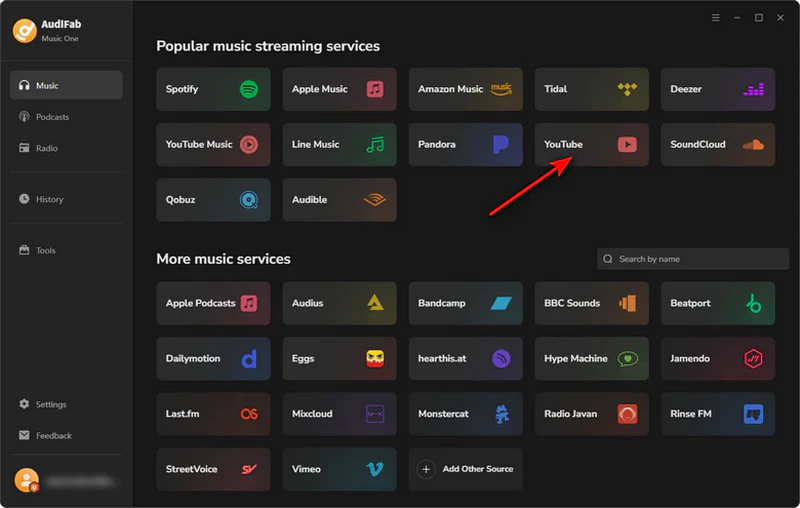
Open AudiFab and choose YouTube
Launch AudiFab. On the homepage, you'll see a section labeled Popular music streaming services. Just tap the YouTube icon to open its built-in browser.
Find your YouTube video or playlist and add it
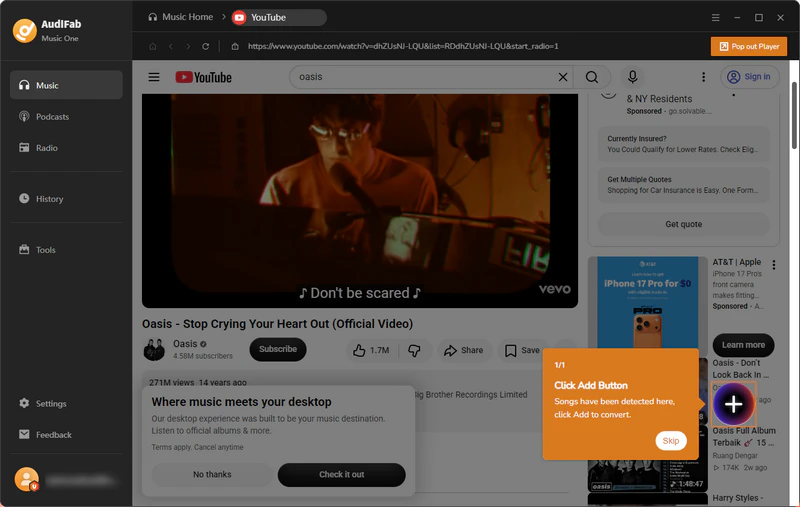
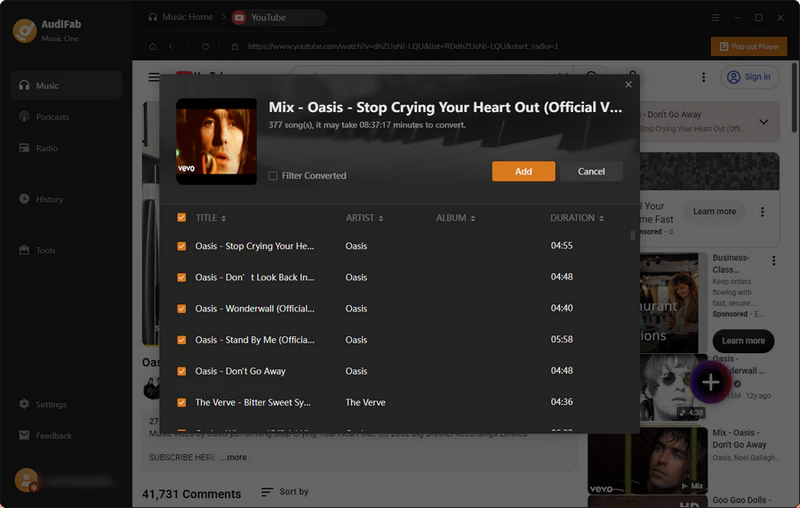
Inside AudiFab's built-in YouTube window, search for or play the video, playlist, or Mix you want. Once videos are detected, a prompt appears — click Add. A track list pops up; tick the ones you want to keep and click Add again to send them to your conversion queue.
Choose MP3 as the output format
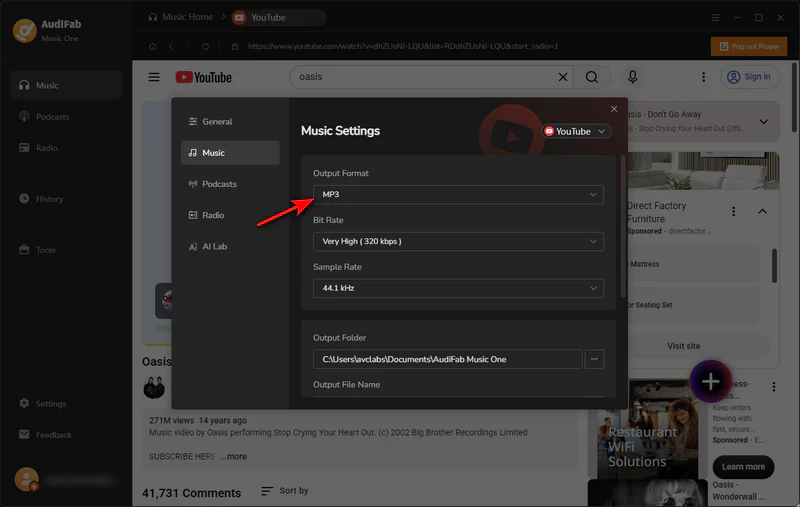
Open Settings, go to the Music tab, and set Output Format to MP3. Pick the highest bit rate available to match the quality of the original YouTube source. Confirm the output folder where your files will be saved.
Click Convert
Head back to your download queue page. You'll see every YouTube video you've added, plus the total playtime for all tracks. Hit the Convert button in the top right to convert them all to MP3 at once.
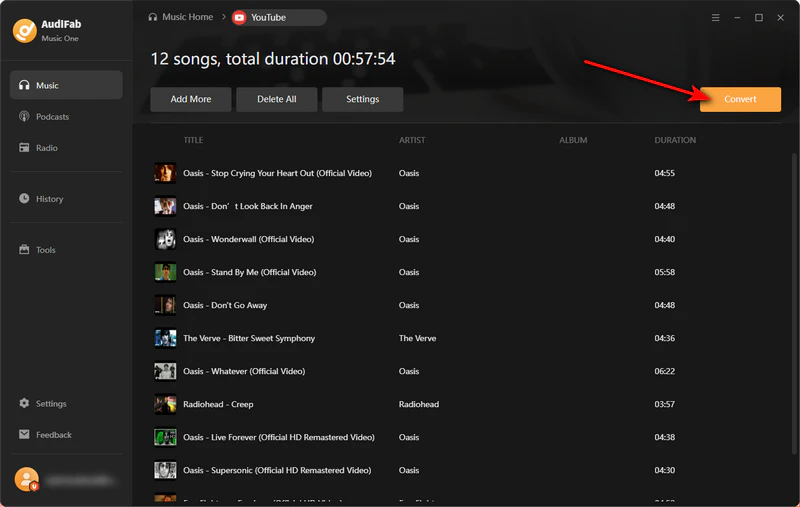
Transfer the MP3s to your player
Once conversion finishes, open the output folder or the History tab inside AudiFab. Copy the MP3 files to your phone, a USB drive for the car, or a dedicated MP3 player for offline listening.
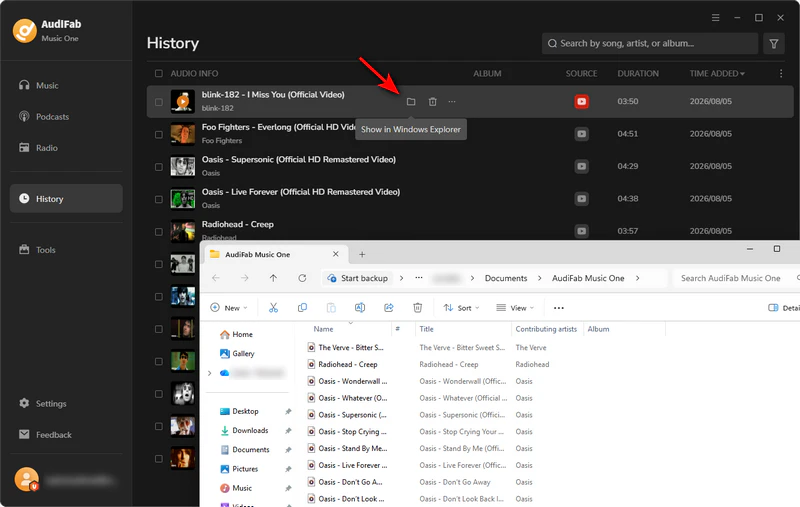
Pro Tips: If you want to turn YouTube songs into playable MP3 files, you first need a reliable YouTube Music converter. Learn how to convert YouTube Music to MP3 and save songs for offline playback.
| Recommend level: ⭐⭐⭐⭐☆ (4/5) | |||||||
|---|---|---|---|---|---|---|---|
|
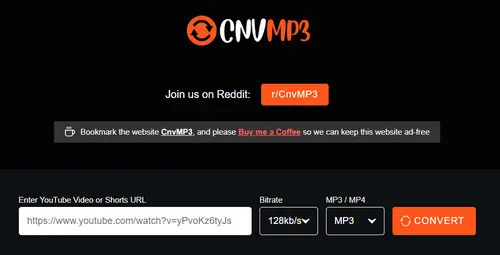
CNVMP3 is a browser-based YouTube to MP3 converter that works by pasting a video URL with no sign-up. We tested it on a handful of YouTube videos and Shorts; a typical 4-minute track came back in about 10 seconds, and the ad-free layout it advertises held up in practice — no redirect pages or pop-ups.
Beyond YouTube, the same input box also accepts TikTok, Reddit, Instagram, Facebook, Twitch, and Twitter links, so it functions as a general clip downloader rather than a YouTube-only tool.
| Recommend level: ⭐⭐⭐☆☆ (3/5) | |||||||
|---|---|---|---|---|---|---|---|
|
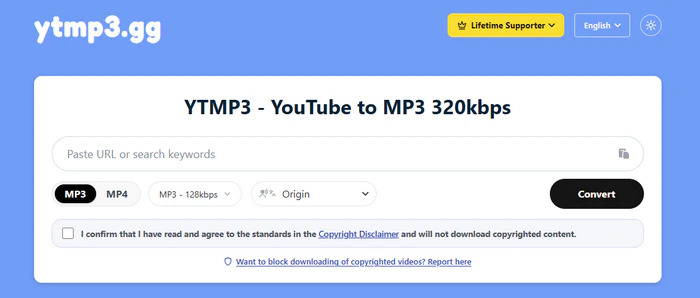
YTMP3 stood out for offering more than plain MP3 — alongside 128kbps and 320kbps MP3, it also converts to WAV (lossless), OGG, and Opus from the same input box, making it one of the more flexible YouTube to MP3 converter options if you don't want to be locked into one format.
As with most tools on this list, the 320kbps option can't exceed YouTube's real source quality (roughly 256kbps AAC). The bigger issue is that YTMP3's domain has changed several times over the past few years due to takedown requests, and some mirror sites with similar names carry heavier ad loads. Double-check the URL before pasting in a video link, and only convert videos you're legally permitted to use.
| Recommend level: ⭐⭐⭐☆☆ (3/5) | |||||||
|---|---|---|---|---|---|---|---|
|
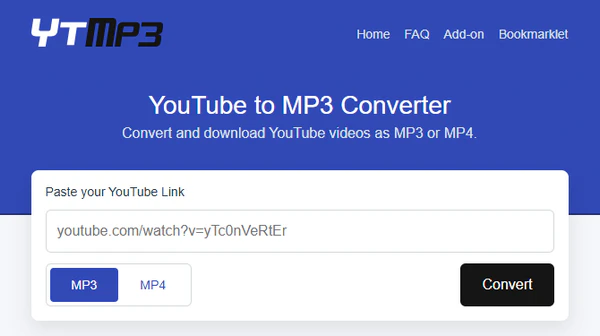
ConvertYTMP3 is a lightweight, stripped-down converter built around a single input box: paste a link, pick MP3 (up to 192kbps) or MP4 (up to 360p), and download YouTube videos in a couple of clicks. We tested the browser bookmarklet it offers, which lets you trigger a conversion directly from an open YouTube tab without navigating to a separate page — a small convenience that the other tools on this list don't offer.
Web tools work fine for one track at a time, but if you're building an actual offline library, AudiFab YouTube Converter converts full YouTube playlists in a single pass and keeps every track properly tagged. Compatible with Windows & macOS · 100% Safe & Clean
| Recommend level: ⭐⭐⭐☆☆ (3/5) | |||||||
|---|---|---|---|---|---|---|---|
|
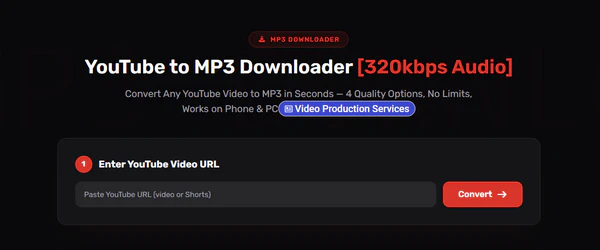
YouTubeToolkit offers a paste-and-download flow with no account requirement. One thing to know going in: the page shows a quick unlock prompt as soon as it loads — watching a short ad or subscribing to the newsletter opens up site-wide access for 24 hours.
In testing, a single 3-minute video took roughly 20 seconds to process after the unlock step. Best for users who want a quick browser-based converter and don't mind the short unlock step, and its 320kbps cap is subject to the same source-quality ceiling covered above.
Get real 320kbps audio in minutes — 10 safest YouTube to MP3 sites, tested for speed, security, and real quality.
Learn More →| Recommend level: ⭐⭐⭐☆☆ (3/5) | |||||||
|---|---|---|---|---|---|---|---|
|
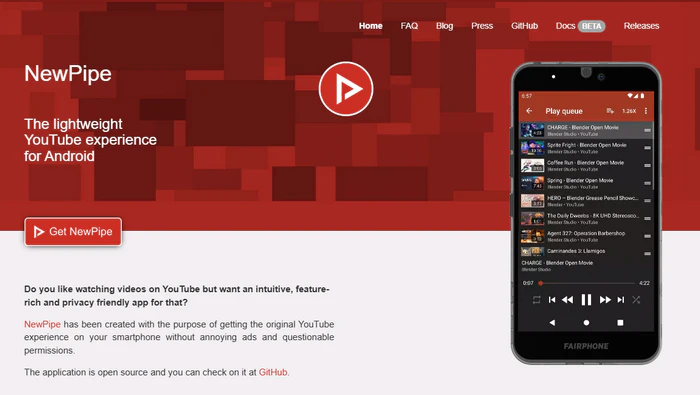
NewPipe is a free open-source YouTube app for Android phones, and probably the closest thing to a true YouTube to mp3 player app on this list since it plays and exports in one place. You can only get it from F-Droid, not the official Google Play Store.
It works for both watching videos and saving audio. You can watch YouTube videos without ads and don't even need a Google account to log in. The app has a built-in tool to save YouTube videos as MP3 or M4A files, so you don't have to use a separate download app on your phone. However, it does not support batch downloads of entire YouTube playlists.
⚠️ Worth knowing before you install it: since NewPipe accesses YouTube outside of Google's official API and terms, it has periodically faced takedown requests and app-store pressure over the years. As with any tool in this category, only use it to save content you're legally permitted to keep.
🏆 Best Overall: For batch playlist conversion, clean ID3 tags, and steady high-quality MP3 output, choose AudiFab YouTube Converter (Free Download for Windows | Mac).
⚡ Need a quick single-track download with zero install? Try CNVMP3 or ConvertYTMP3 — both are safe YouTube to MP3 player alternatives that skip the desktop install.
📱 On Android and comfortable sideloading? NewPipe plays and exports MP3 in one app, no separate converter needed.
Once your MP3s are saved locally, nearly every music player can open them. The right pick mostly comes down to which device you're on:
| Player | Platform | Best for |
|---|---|---|
| VLC Media Player | Windows / Mac / Android / iOS | Free, plays nearly any format, same experience on desktop and mobile |
| MusicBee | Windows | Organizing and tagging large MP3 libraries with detailed metadata |
| foobar2000 | Windows | Lightweight, highly customizable playback for advanced audio users |
| Windows Media Player | Windows | Already built in, zero install for quick local playback |
| Apple Music app | Mac / iPhone | Keeping MP3 tracks alongside an existing Apple Music library |
| Portable MP3 players | Dedicated hardware | Phone-free listening, often with longer battery life than a smartphone |
| NewPipe | Android (sideload) | Playing and exporting audio straight from YouTube without the official app |
Not directly. MP3 players can't stream from YouTube or run apps. You first need to convert the YouTube video or playlist into an actual MP3 file using a converter like AudiFab YouTube Converter, then copy that file onto the player.
There's no single official app that plays YouTube audio directly on a dedicated MP3 player. On Android, an open-source app like NewPipe can play and export YouTube audio to MP3 on your phone; for a traditional MP3 player, you'll still need to convert on a computer first and transfer the files over.
Pick a desktop converter that works straight on your computer. Don't use tools that ask for extra software installs, browser add-ons or hand over payment info just to download music. Desktop programs such as AudiFab YouTube Converter process everything on your device, while free web-based converters vary widely in quality.
Definitely. Specialized YouTube-to-MP3 converters are made just for this job, downloading all YouTube playlists into MP3s playable on music players. Check this playlist downloader guide for tools that convert every YouTube video automatically, no need to download one by one.
MP3 offers the widest device compatibility. If your player supports lossless formats and storage isn't a concern, converting to WAV or FLAC will sound closer to the original YouTube audio.
This depends on your country's copyright law and what you're converting. As noted at the top of this guide, only convert content you're legally allowed to use, keep it for personal and non-commercial purposes, and don't redistribute converted files.
Can you play YouTube on an MP3 player? Only after converting it — there's no shortcut around that step. Once you've picked a converter, the process is really just two moves: convert the YouTube video or playlist to MP3, then copy the files onto your MP3 player, phone, or car USB drive.
For one-off tracks, a web converter like CNVMP3 or YTMP3 gets the job done in seconds. For building an actual offline YouTube library, AudiFab YouTube Converter handles the batch conversion and keeps titles, artist info, and cover art intact. Once your files are on the device, any music player you already own can take it from there.
The free trial lets you convert a limited number of tracks per playlist so you can test the whole workflow first; unlocking unlimited batch conversions and every supported format (FLAC, WAV, ALAC, AIFF) needs a license.

Download YouTube Music songs, playlists & albums in original quality, batch convert to MP3/AAC/FLAC/WAV/ALAC/AIFF, and keep ID3 tags.
Music is the greatest communication in the world and here are some articles that may help you enjoy music in a better way.

 Try It Free
 Try It Free