
5 Free YouTube MP3 Downloader Extensions (Tested & Working 2026)
Discover the top 5 free, tested, and working YouTube MP3 downloader extensions for Chrome, Firefox, and Edge in 2026.
Discover the top 5 free, tested, and working YouTube MP3 downloader extensions for Chrome, Firefox, and Edge in 2026.
Looking for a reliable YouTube MP3 downloader extension? Many browser extensions stop working, disappear from Chrome or Firefox stores, or deliver lower audio quality than expected.
We tested 5 YouTube MP3 extensions (Chrome/Edge/Firefox) that still work in 2026, comparing browser support, MP3 quality, ease of use, and download limits. These extensions are ideal for quick single-video downloads, while users who need higher-quality audio, playlist support, or batch downloads may prefer a desktop alternative.
Below, see which YouTube MP3 downloader extension fits your needs best.
⚖️ Disclaimer This article is strictly for informational use. Please ensure you have the appropriate rights or permissions before converting or saving any media content for personal, non-commercial offline playback.
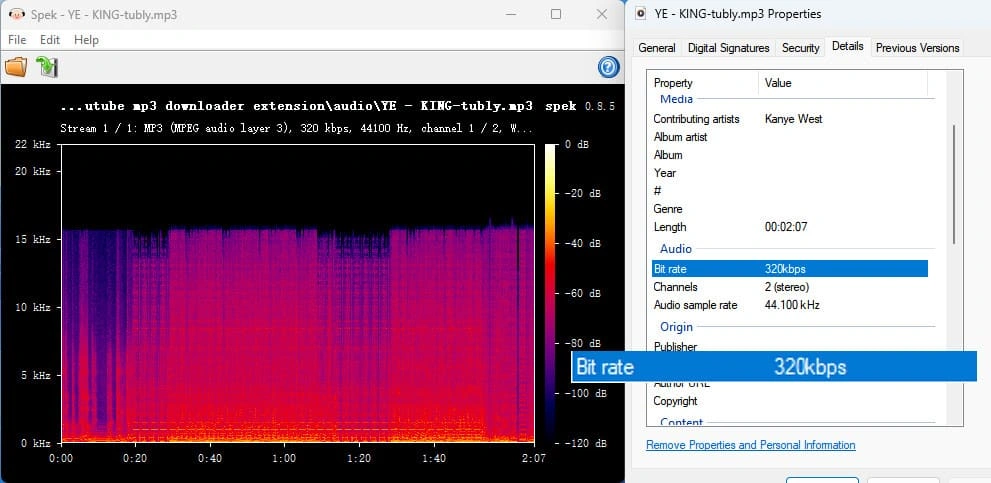
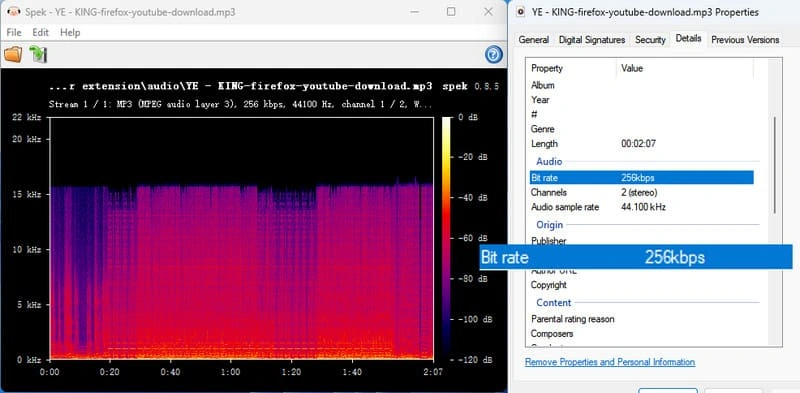
YouTube does not provide native 320kbps MP3 audio. When these tools claim 320kbps MP3, it means the original YouTube audio stream has been re-encoded into a 320kbps MP3 file. This process does not restore or add any missing audio information from the original source.
Since bitrate alone does not represent actual audio quality, a spectrum analysis can help evaluate whether a 320kbps MP3 retains high-quality audio information.
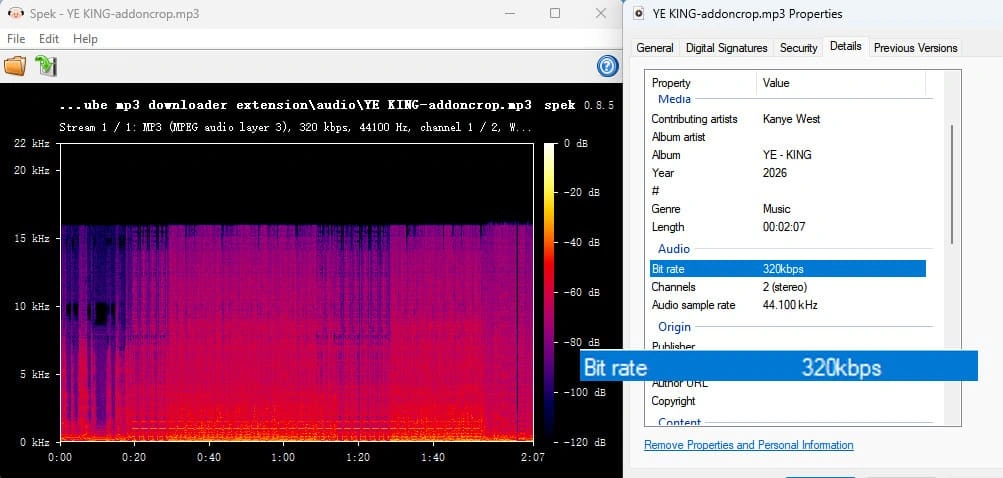
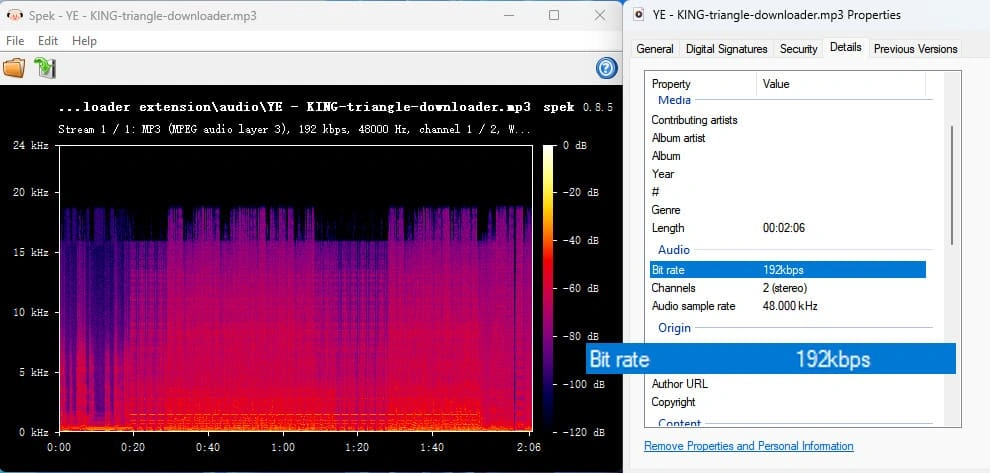
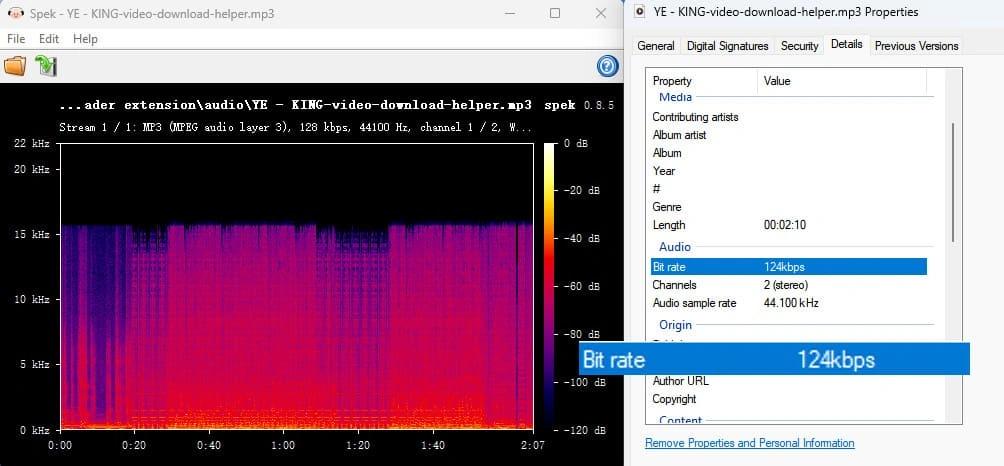
In our test, tested five YouTube MP3 Downloader extensions showed an around 16 kHz frequency cutoff, suggesting the output was re-encoded from lower-quality sources similar to 128–192kbps audio despite being labeled as 320kbps MP3. In comparison, Desktop Alternative's 320kbps MP3 output preserved a wider frequency range and more high-frequency details.
| Spectrum Frequency Analysis | Possible Audio Source Quality |
|---|---|
| Cutoff around 16 kHz |
Commonly found in re-encoded audio from lower-quality lossy sources (such as 128–192kbps streams) |
| Extends to 18–20 kHz | More consistent with higher-quality AAC/Opus sources converted to MP3 |
| Extends near 20–22 kHz |
More commonly associated with higher-quality source conversion (256kbps+ audio sources) |
| Tool | Browser | Max MP3 Quality | MP4 Support | Metadata | Playlist / Batch Download |
|---|---|---|---|---|---|
| Tubly YouTube to MP3 Converter | Chrome, Edge, Firefox | Up to 320kbps | ✅ Yes | Basic | ❌ No |
| Addoncrop YouTube MP3 Converter | Chrome, Edge | Up to 320kbps | ❌ No | Basic | ❌ No |
| Triangle Downloader | Chrome | Up to 192kbps | ✅ Yes | ❌ None | ❌ No |
| YouTube Video Download Helper | Edge | 124kbps | ✅ Yes | ❌ None | ❌ No |
| Easy YouTube Video Downloader Express | Firefox | Up to 256kbps | ✅ Yes | ❌ None | ❌ No |
| Desktop Alternative: AudiFab | Win & Mac | 320kbps | *✅ Yes | ✅ Yes | ✅ Yes |
| *Note: AudiFab Supports MP4 music video downloads from selected streaming services, but does not support downloading YouTube videos as MP4. | |||||
Need to Download Full YouTube Playlists in Batch with ALL Metadata?
Try AudiFab Free to Batch Save Entire Playlists & Channels at 10X Speed!
Compatible with Windows & macOS · 100% Safe & Clean · 3k+ downloads monthly · 99.9% success rate
Recommendation level: ⭐⭐⭐⭐
URL: https://tubly.download/youtube-to-mp3-converter.html
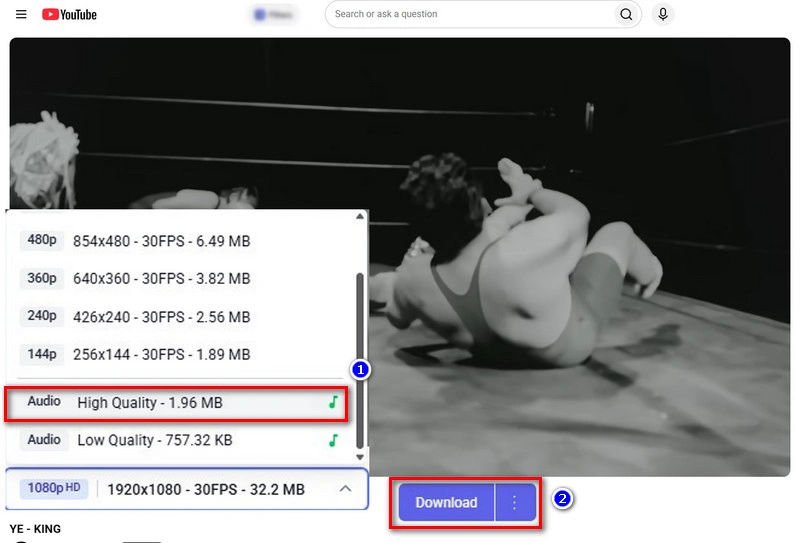
Tubly YouTube to MP3 Converter is a lightweight browser extension for Chrome, Edge, and Firefox that embeds a download button directly beneath YouTube videos and Shorts for one-click YouTube audio extraction.
Recommendation level: ⭐⭐⭐⭐
URL: https://addoncrop.com/v25/youtube-mp3-converter/
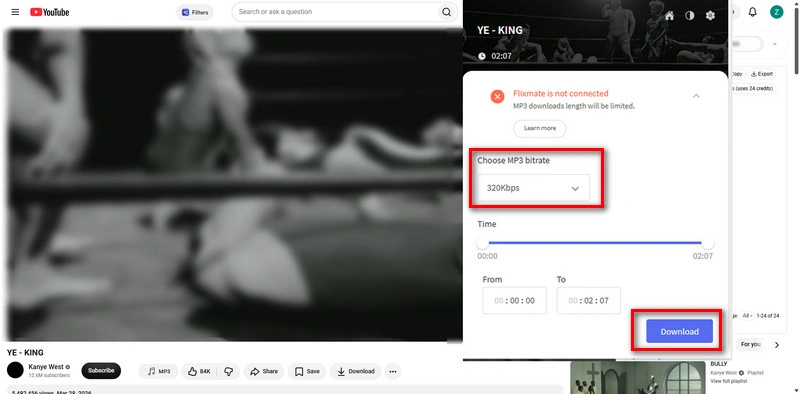
Addoncrop YouTube MP3 Converter is a browser extension available for Chrome and Edge that allows you to convert and download YouTube videos directly into MP3 audio files up to 320kbps. It features a built-in audio trimmer to customize clip lengths.
Recommendation level: ⭐⭐⭐
URL: https://github.com/HelpFreedom/Triangle-Downloader/blob/main/README.en.md
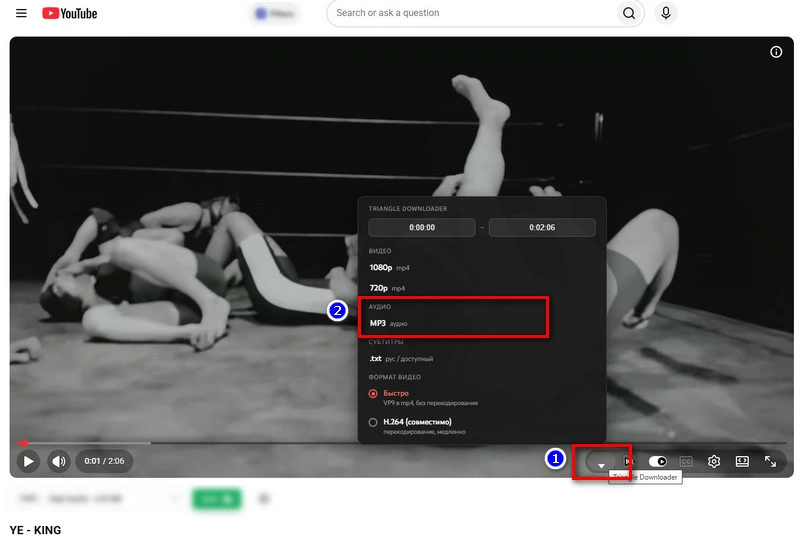
GitHub Triangle Downloader is an open-source Chrome extension that records YouTube videos and converts them to MP3 audio. Unlike standard Web Store YouTube Download extensions, it is manually loaded via Web Store Developer Mode.
Frustrated by Complex GitHub Setup & Developer Mode?
Try AudiFab Free for an Easy 1-Click Install with Zero Tech Skills Required!
Compatible with Windows & macOS · 100% Safe & Clean · 3k+ downloads monthly · 99.9% success rate
Recommendation level: ⭐⭐⭐
URL: https://microsoftedge.microsoft.com/addons/detail/video-download-helper/jmkaglaafmhbcpleggkmaliipiilhldn
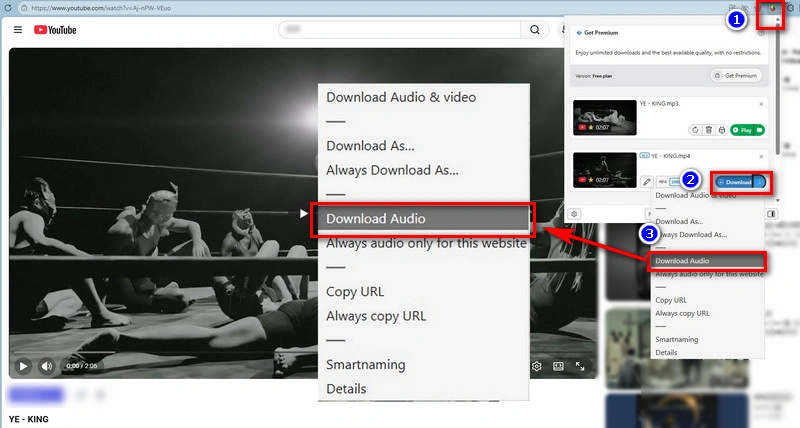
YouTube Video Download Helper is an Edge extension that helps users download YouTube videos as MP3 or MP4 files. Formerly available on Chrome, but now Video Download Helper works exclusively on Edge.
Recommendation level: ⭐⭐⭐
URL: https://addons.mozilla.org/en-US/firefox/addon/youtube-save-video/
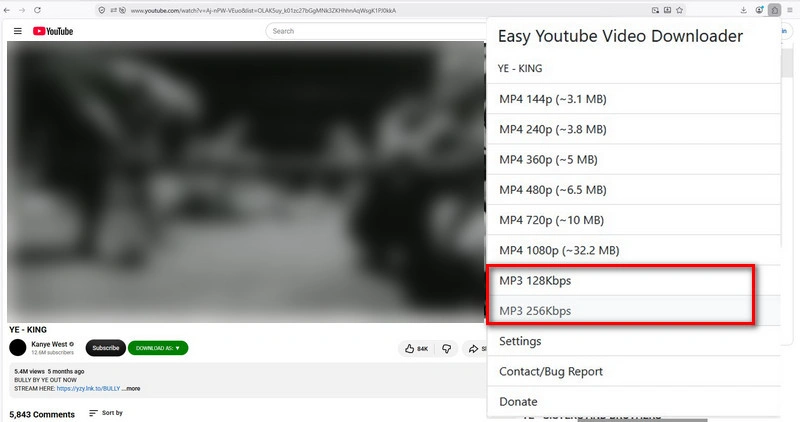
Easy YouTube Video Downloader Express is a long-standing Firefox add-on built specifically to convert and download YouTube content straight from the Firefox browser. It gives Firefox users a completely free, ad-free way to grab YouTube videos in MP4 or extract MP3 audio up to 256kbps.
Unlike browser extensions that limit bitrates and can't process bulk links, AudiFab YouTube MP3 Downloader lets you save any YouTube video, playlist, or channel, including music videos, podcasts, talks, and live performances, as local MP3, FLAC, WAV, AAC(.m4a), AIFF, or ALAC at 10X faster speeds.
AudiFab YouTube MP3 Downloader maintains 100% original audio quality from the source while automatically preserving complete ID3 metadata, including artist, album, and track information. The downloaded MP3 files are saved locally, making it easy to transfer YouTube music to USB drives, MP3 players, and other devices for offline playback. With no ads, bundled software, or security risks, AudiFab provides a clean and reliable downloading experience.

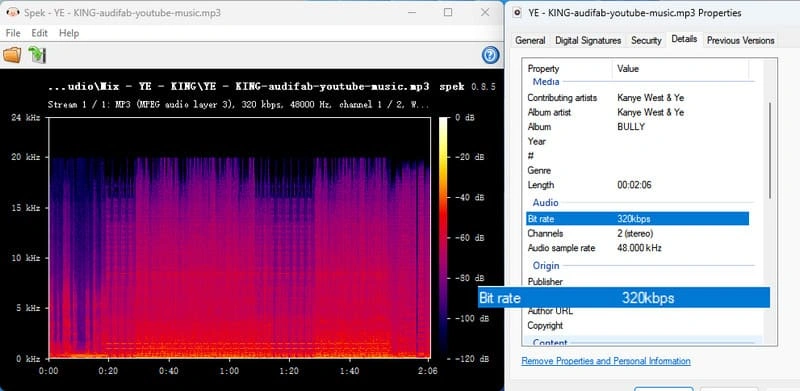
Using the same YouTube track, we compared MP3 files downloaded with Addoncrop and AudiFab. Both files show 320kbps MP3, but Spek analysis reveals a clear difference. The Addoncrop file shows frequency roll-off around 16 kHz, suggesting lower-quality source preservation. In contrast, the AudiFab file extends closer to 20 kHz and retains more high-frequency detail.
Bitrate alone does not guarantee audio quality. If you care more about higher-quality music and better audio preservation, AudiFab is the better choice for downloading YouTube audio.
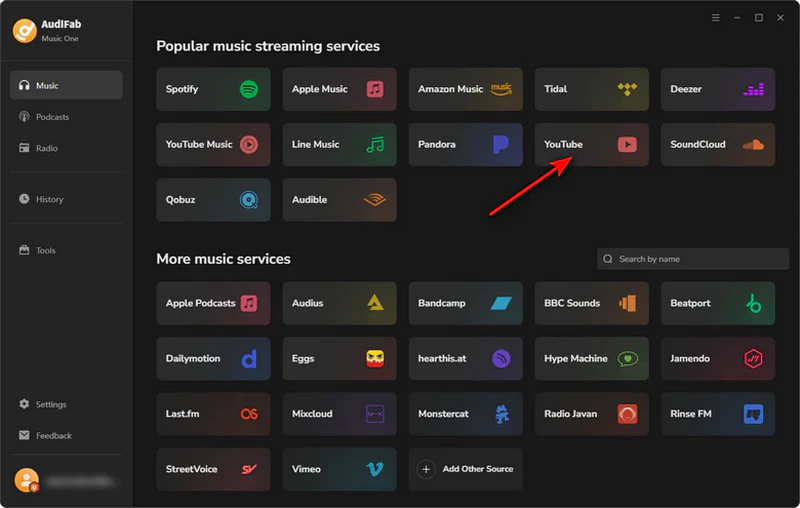
Select YouTube as the Source
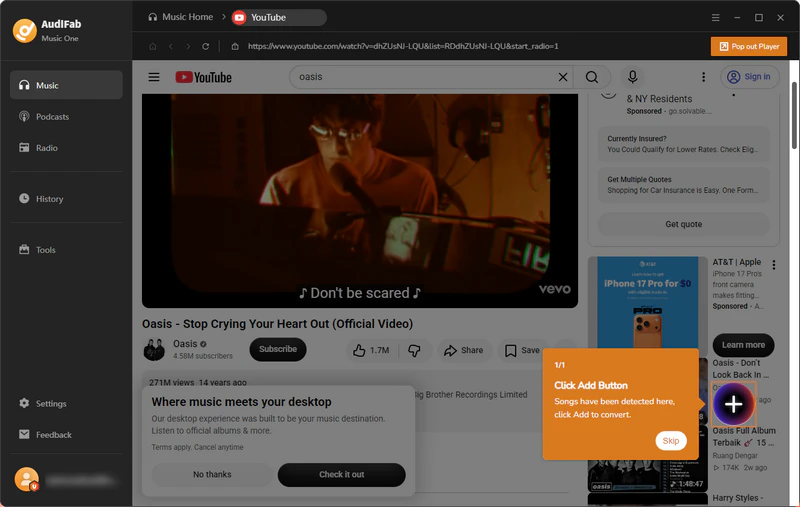
Open AudiFab, select 'YouTube', and access the automatic built-in browser (no plugins or logins needed).
Play the Video and Add Tracks
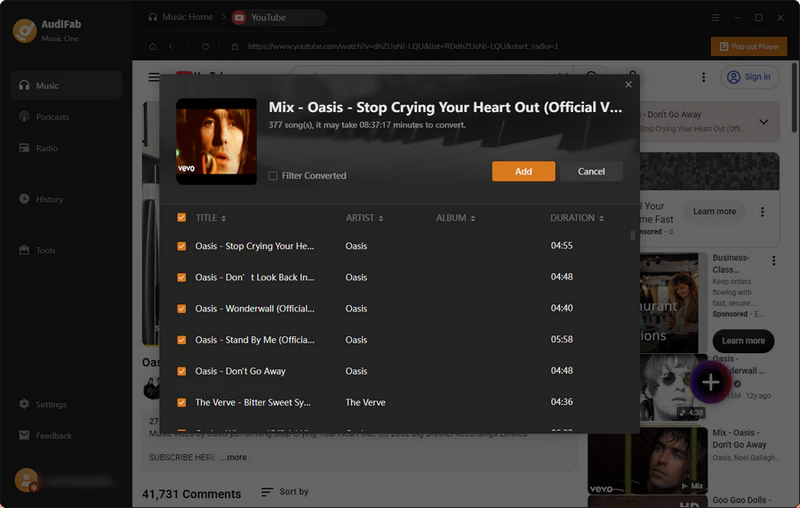
Search or paste a YouTube link, play the YouTube video, click the 'Add' prompt, and check the YouTube tracks you want to queue.
Configure Output Settings
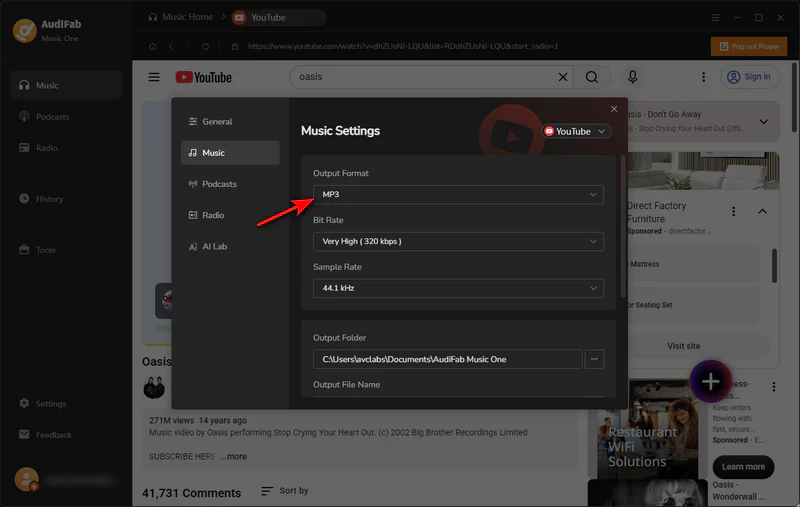
Go to 'Settings' to choose your output format (MP3, FLAC, etc.), audio quality, and target folder.
Convert and Access Your Downloaded YouTube MP3 Files
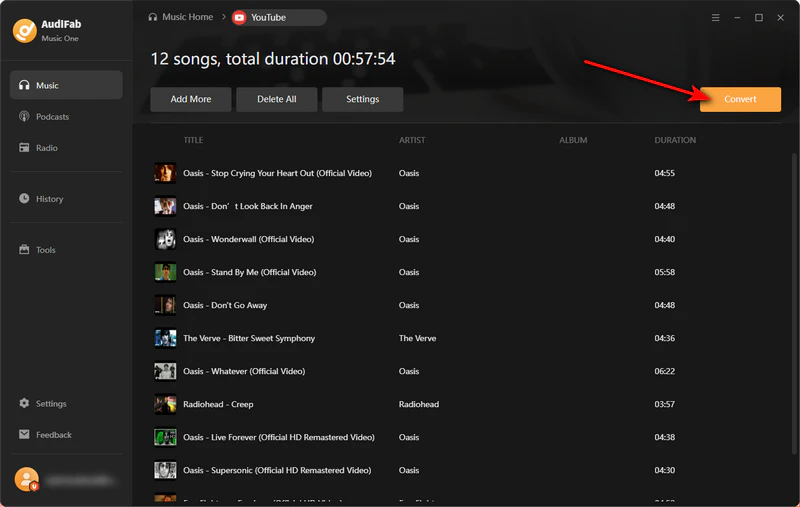
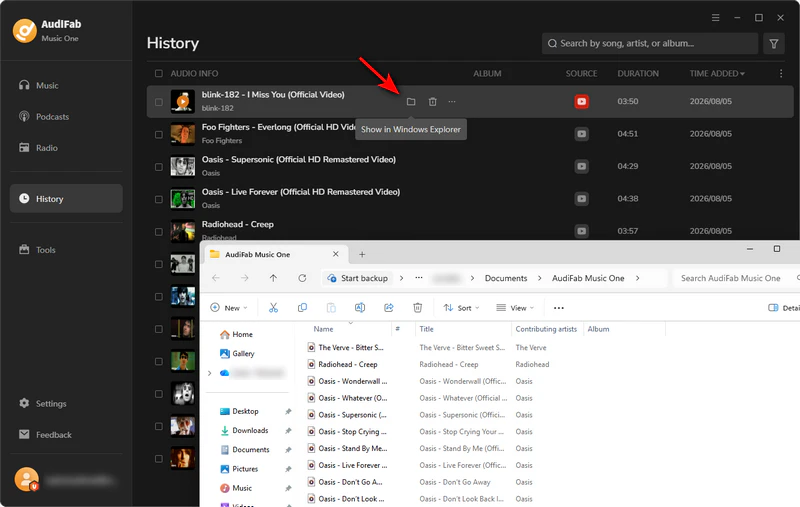
Click the orange 'Convert' button. When finished, find your local files under the 'History' tab via the folder icon.
While some popular extensions are safe, many carry risks of malware, aggressive pop‑up ads, or sudden removal from browser web stores due to policy violations. Always check user reviews, source code reliability, and permission requirements before installing one.
Extensions often break due to frequent YouTube site updates, strict browser store restrictions on video downloaders, or conflicting extensions. Clearing your browser cache or reinstalling the extension can sometimes fix temporary glitches.
If you want a more stable and safe experience, a dedicated desktop software like AudiFab YouTube Downloader is a great alternative. Unlike browser extensions that easily break or contain ad risks, AudiFab runs independently with a clean, virus‑free environment.
Most free browser extensions struggle with bulk downloading and can only process individual videos one by one. For full playlists or channels, desktop programs like AudiFab YouTube Downloader offer far more reliable 10X batch processing.
Generally, no, as desktop extensions are designed for full desktop browsers like Chrome or Firefox. Mobile users typically need specialized web‑based tools or dedicated desktop software to convert and transfer files to their phones.
For most users, Tubly is the best all-round YouTube MP3 downloader extension because it works across Chrome, Edge, and Firefox and supports up to 320kbps MP3. If you need playlist batch downloads or better audio preservation, a desktop downloader like AudiFab YouTube Downloader is more suitable.
YouTube MP3 downloader extensions are best for quick, single-video downloads, with Tubly and Addoncrop standing out among the tested options. For higher-quality audio, full metadata, or playlist batch downloads, AudiFab YouTube MP3 Downloader is a more suitable alternative.
The free trial lets you convert a limited number of tracks per playlist so you can test the whole workflow first; unlocking unlimited batch conversions and every supported format (FLAC, WAV, ALAC, AIFF) needs a license.

Download YouTube Music songs, playlists & albums in original quality, batch convert to MP3/AAC/FLAC/WAV/ALAC/AIFF, and keep ID3 tags.
Music is the greatest communication in the world and here are some articles that may help you enjoy music in a better way.

 Try It Free
 Try It Free