7 Free SoundCloud to FLAC Converters 2026 (Online, GitHub & Desktop)
Discover 7 best 2026 SoundCloud to FLAC converters to extract high-quality SoundCloud FLAC audio, convert playlists, and enjoy offline FLAC music.
Discover 7 best 2026 SoundCloud to FLAC converters to extract high-quality SoundCloud FLAC audio, convert playlists, and enjoy offline FLAC music.
Quick Answer: Can I Download SoundCloud to FLAC?
Yes, you can convert SoundCloud tracks to FLAC, but there's a catch. SoundCloud streams audio in lossy formats, so converters extract the highest available streaming quality rather than true lossless FLAC, unless the uploader enabled official lossless downloads.
To save you time and avoid fake or ad-heavy online FLAC converter sites, we tested 7 popular SoundCloud to FLAC converters based on speed, reliability, and audio quality. Here is our breakdown of the best online, GitHub, and desktop SoundCloud FLAC converters, along with a quick guide to getting high-quality FLAC audio files.
⚖️ Disclaimer This guide is for informational purposes only. Use the tools below strictly for personal, non-commercial use, and ensure your actions comply with SoundCloud's Terms of Service.
We compared these SoundCloud to FLAC converters based on exported bitrate, output formats, playlist support, ease of use, speed, and reliability. The results below are based on our hands-on testing.
| SoundCloud to FLAC Converter | Tested FLAC File Bitrate* | Output Formats | Playlist / Batch Download | Ease of Use | Speed | Reliability |
|---|---|---|---|---|---|---|
| AudiFab SoundCloud Converter (Desktop) |
2409 kbps FLAC | FLAC, MP3, AAC, WAV, ALAC, AIFF | ✅ Yes Playlist & batch download |
✅ Easy | ⚡ High Up to 10X |
High |
| SoundCloudRips (Online) |
1344 kbps FLAC | FLAC, MP3, M4A, WAV | ❌ | ✅ Easy | ➖ Medium | Moderate |
| Loader (Online) |
1344 kbps FLAC | FLAC, MP3, M4A, WAV | ❌ Failed Stuck on downloading |
✅ Easy | 🐢 Low | Low |
| Downcloud (Online) |
1344 kbps FLAC | FLAC, MP3, M4A, WAV | ❌ | ✅ Easy | ➖ Medium | Moderate |
| CutYT (Online) |
1344 kbps FLAC | FLAC, MP3, WAV, M4A, AAC | ❌ | ✅ Easy | 🐢 Low | Moderate |
| Scdl (GitHub) |
1344 kbps FLAC | FLAC, MP3, AAC, WAV | ❌ | ❌ Difficult | ➖ Medium | Low |
| yt-dlp (GitHub) |
1355 kbps FLAC | FLAC, MP3, AAC, WAV | ❌ | ❌ Difficult | ➖ Medium | Moderate |
| *Note: The displayed FLAC bitrate refers to the bitrate of the converted FLAC file, not the source audio quality. Converting a lossy SoundCloud AAC/MP3 stream to FLAC does not create true lossless audio. | ||||||
Among the seven SoundCloud to FLAC converters we tested, AudiFab stood out as the only tool that successfully completed full playlist downloads while preserving metadata.
AudiFab SoundCloud Converter is a safe and reliable converter that converts streaming audio from platforms like SoundCloud, Spotify, Apple Music, Amazon Music, Tidal, YouTube, and YouTube Music into formats like FLAC, MP3, WAV, ALAC, and AIFF.
AudiFab eliminates the tedious wait by batch-downloading entire SoundCloud playlists at 10X speed. If low-quality rips, lost lyrics, and messy metadata ruin your offline SoundCloud Music library, AudiFab can easily solve all these issues. It supports capturing 256kbps high-quality AAC audio from SoundCloud Go+ while perfectly preserving complete ID3 tags and lyrics.
Overall, AudiFab SoundCloud Converter is the most complete desktop option in our test, particularly for users who need fast, high-quality, and fully tagged downloads across virtually any music streaming platform.
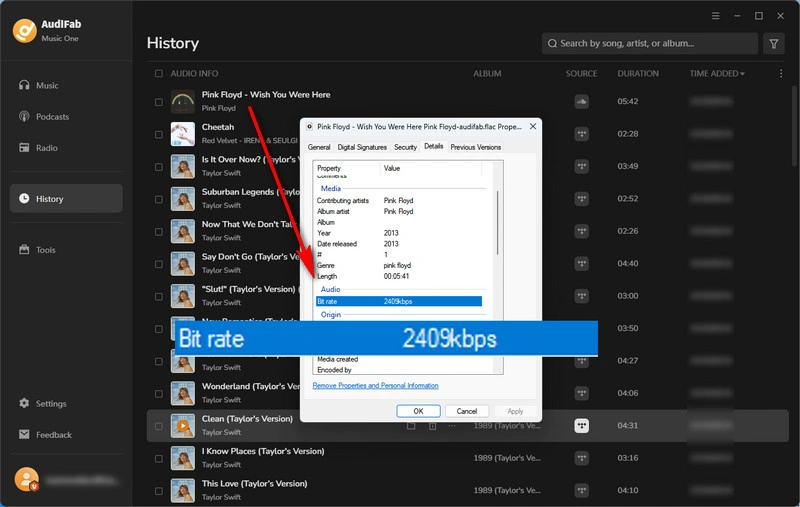
💪 Hands-on Test:
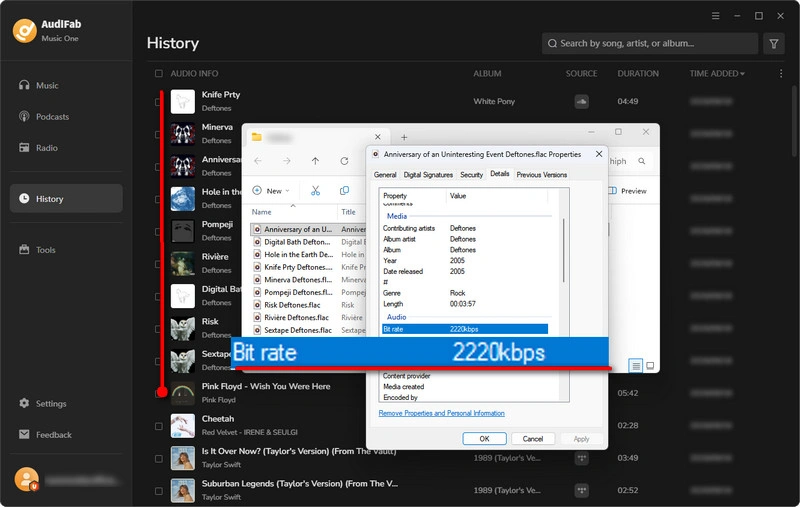
Setting itself apart as a robust desktop application, AudiFab SoundCloud to FLAC Converter outperforms online free converters by being the only converter tested that successfully downloads full SoundCloud playlists, achieving high-speed 10X batch transfers and impressive 2409 kbps FLAC audio quality. Its standout advantages lie in its high reliability, extensive support for 20+ streaming platforms, and complete metadata retention, including ID3 tags and lyrics, with its only real drawback being a lack of mobile support.
Overall, AudiFab SoundCloud Converter is best for power users who need a fast, highly reliable desktop solution for batch-downloading complete SoundCloud playlists with great audio quality and tags.
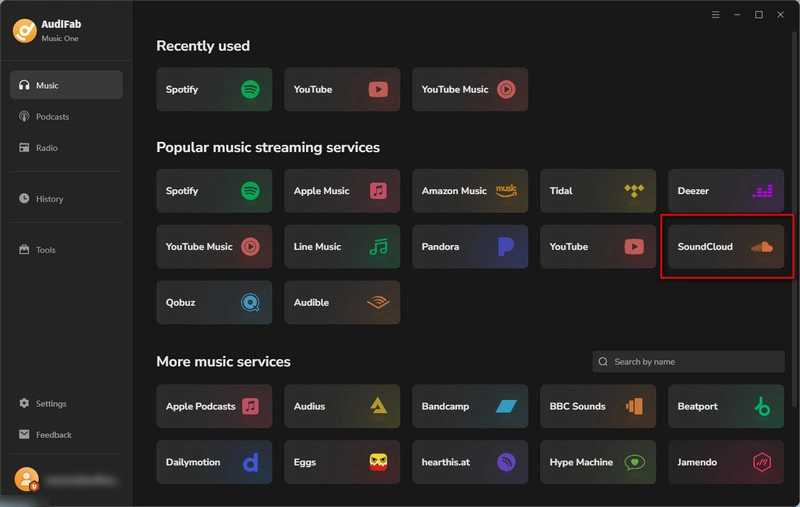
Install and Open AudiFab
Select SoundCloud from the supported streaming platforms, which will immediately launch the integrated browser player.
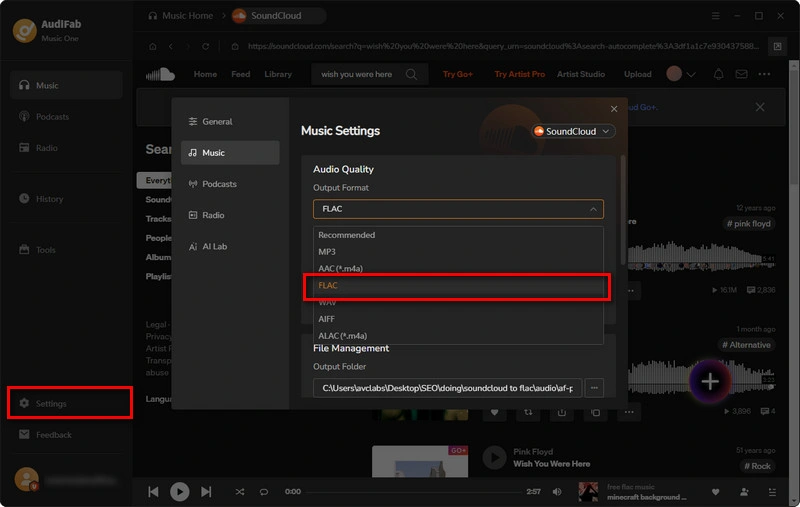
Adjust Settings to FLAC
Tap the gear icon near the bottom left to open the settings menu. Set your output format to 'FLAC', then tweak parameters like bit depth and save paths to your liking.
Import SoundCloud Tracks to AudiFab
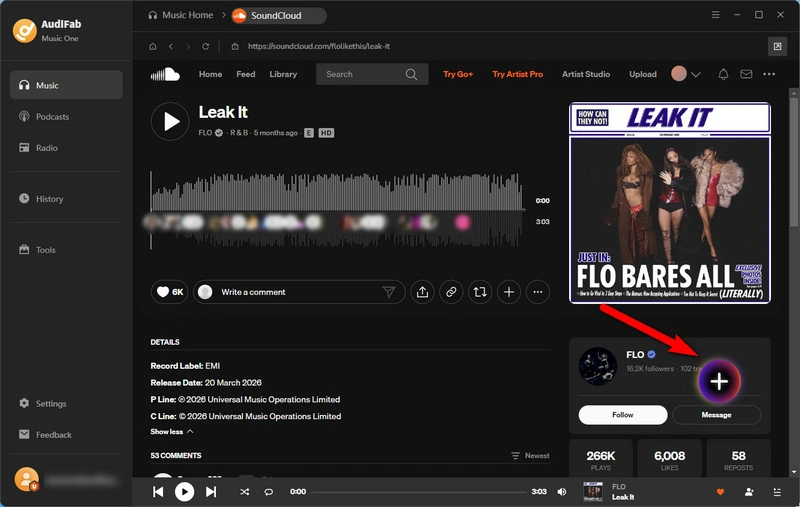
Navigate to your preferred SoundCloud track or playlist inside the AudiFab integrated browser, then press the '+' icon located at the bottom right to queue your items in AudiFab.
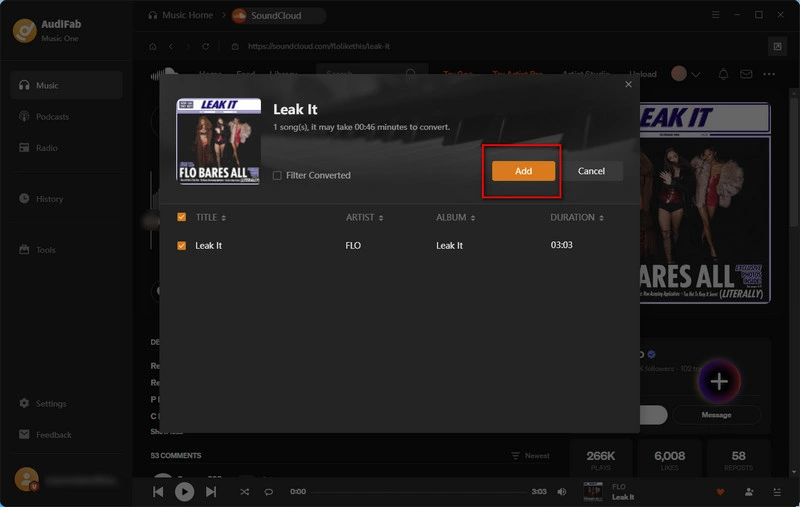
Convert and Export SoundCloud Tracks to FLAC
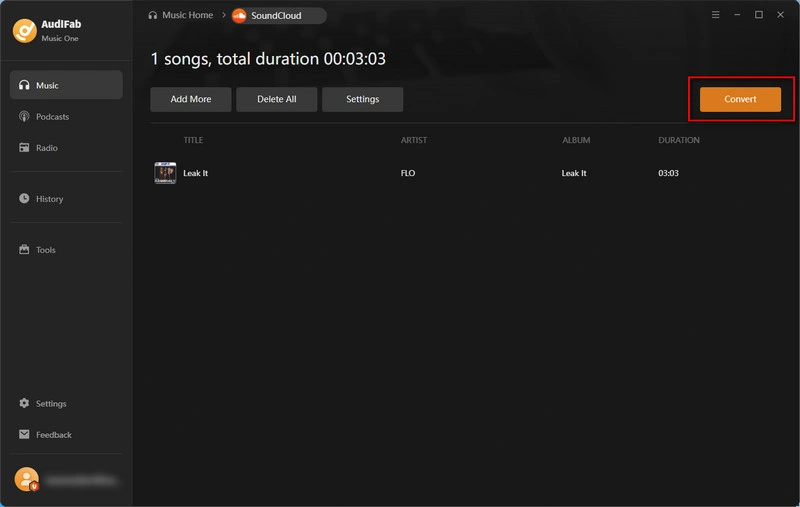
Review your queued items and hit the 'Convert' button to start converting your SoundCloud audio directly into FLAC format.
Locate Converted FLAC Audio
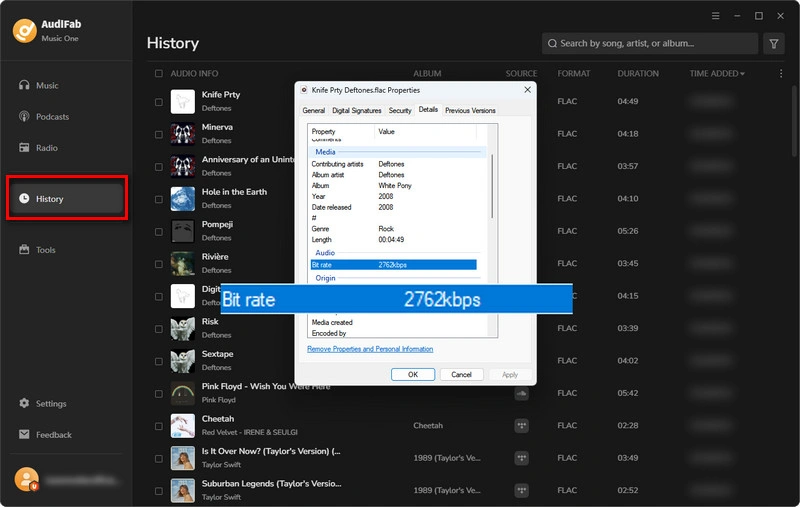
When processing is complete, head to the 'History' tab on the left panel to view your saved SoundCloud music. Mouse over any track and select the folder button to open its local directory.
Where to Download Lossless FLAC Music in 2026? Check this guide to get hi-res FLAC music from Spotify, Tidal, Qobuz, Apple Music, and more.
Learn More →SoundCloudRips is a free online SoundCloud downloader that lets users download SoundCloud tracks on their page without installing software or creating an account.
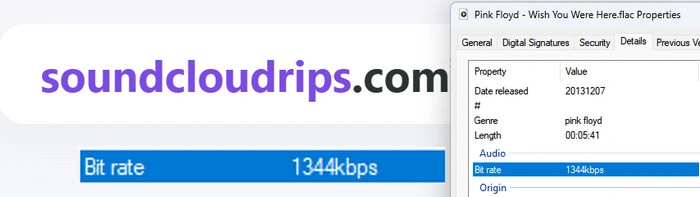
💪 Hands-on Test:
SoundCloudRips SoundCloud to FLAC Online Converter delivers good performance, testing at up to 1344 kbps FLAC while supporting MP3, M4A, and WAV exports alongside basic metadata preservation. Its main advantage is versatile multi-format support without requiring software installation, though it is held back by intrusive pop-up ads and a total failure to download SoundCloud playlists. Overall, SoundCloudRips is best for users who need to quickly download a single SoundCloud track in FLAC format.
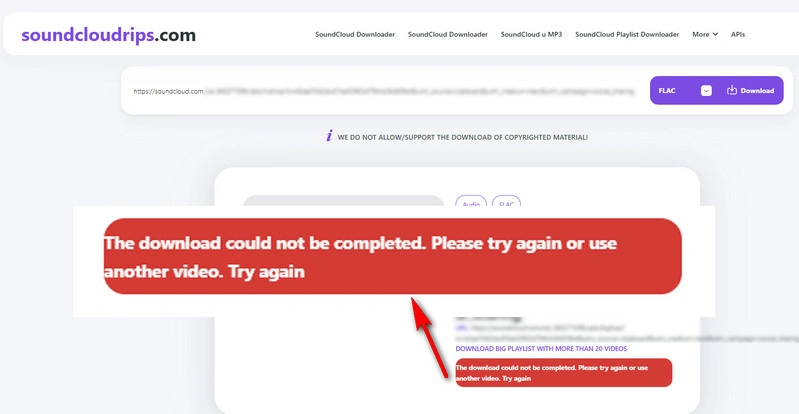
Step 1: Copy the SoundCloud URL.
Step 2: Open SoundCloudRips and paste the SoundCloud URL.
Step 3: Choose 'FLAC' and click 'Download'.
Try AudiFab to batch download complete SoundCloud playlists at up to 10X speed.
Compatible with Windows & macOS · 100% Safe & Clean
Loader.to is an online free YouTube downloader that also supports downloading SoundCloud tracks and converting them to FLAC.
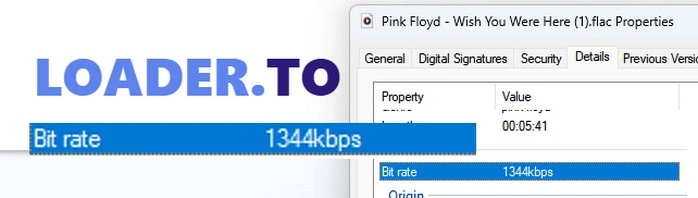
💪 Hands-on Test:
Unlike SoundCloudRips, Loader.to brings broader platform versatility by letting you pull audio directly from YouTube as well as SoundCloud into formats like FLAC at up to 1344 kbps with basic metadata intact. However, its main drawbacks are sluggish speed and low reliability, often hanging indefinitely when attempting to process SoundCloud playlists alongside the usual clutter of pop-ups and banner ads. Overall, Loader.to is best for users seeking a cross-platform tool to convert occasional YouTube or single SoundCloud tracks to FLAC when speed isn't a priority.
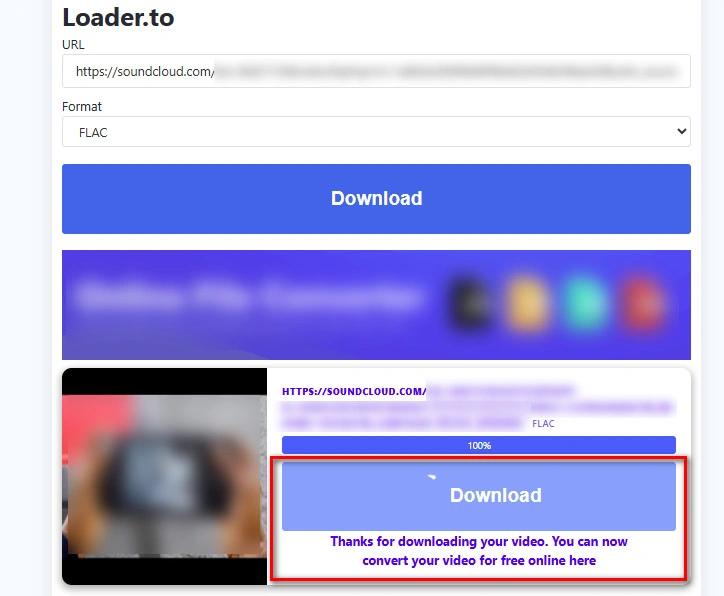
Step 1: Copy the SoundCloud Track URL.
Step 2: Open Loader.to and paste the SoundCloud URL.
Step 3: Choose 'FLAC' as the output format.
Step 4: Click 'Download' and save the resulting SoundCloud audio file.
DownCloud is a browser-based SoundCloud downloader that appears to operate as a mirror or sister site of SoundCloudRips.
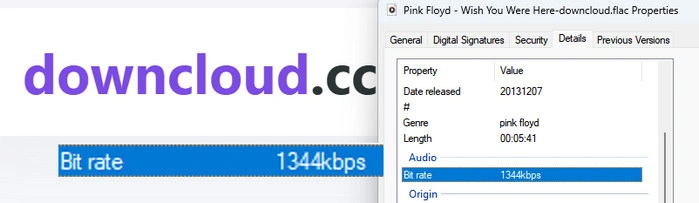
💪 Hands-on Test:
As a mirror of SoundCloudRips, DownCloud offers an identical experience by delivering 1344 kbps FLAC exports alongside MP3, M4A, and WAV options with basic metadata retention. Its primary advantage is providing stable, moderate-speed single-track downloads, but it suffers from the exact same drawbacks: intrusive pop-up ads and broken playlist support that fails to fetch the full playlist. Overall, DownCloud is best for users looking for a reliable backup mirror to quickly extract individual lossy SoundCloud tracks in FLAC formats.
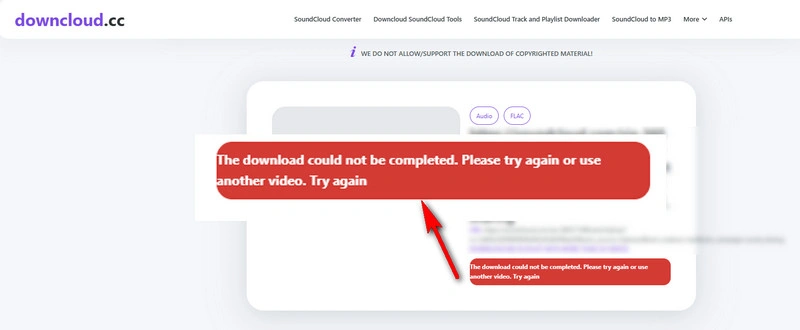
Step 1: Copy the SoundCloud URL.
Step 2: Open DownCloud and paste the SoundCloud URL.
Step 3: Select 'FLAC' from the available audio formats.
Step 4: Click 'Download' and save the converted SoundCloud FLAC file to your computer.
AudiFab supports stable batch downloads of complete SoundCloud playlists.
Compatible with Windows & macOS · 100% Safe & Clean
CutYT is a SoundCloud audio downloader that lets users trim tracks before downloading them and supports multiple formats, including MP3, FLAC, WAV, M4A, and AAC.
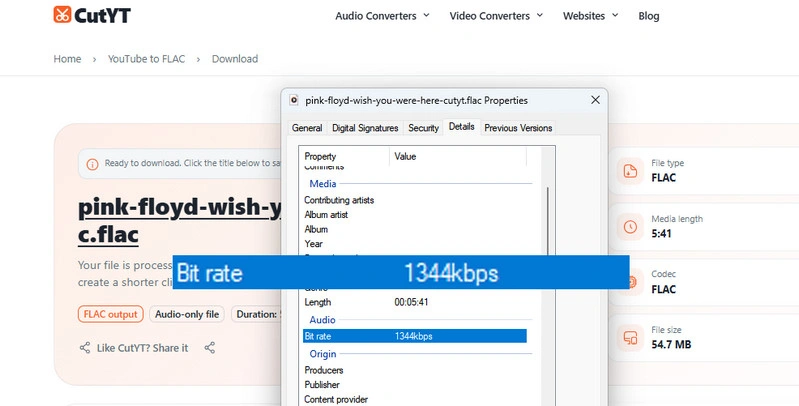
💪 Hands-on Test:
Distinguishing itself with built-in audio trimming and an ad-free interface, CutYT lets users clip SoundCloud tracks directly before exporting them to MP3, FLAC (tested at 1344 kbps), WAV, M4A, or AAC. Its standout advantage is a clean, popup-free workspace paired with custom trimming capabilities, though it struggles with slower processing speeds, broken playlist downloads, and a total lack of metadata preservation. Overall, CutYT is best for users who want to crop and download specific segments of SoundCloud tracks without dealing with intrusive ads.
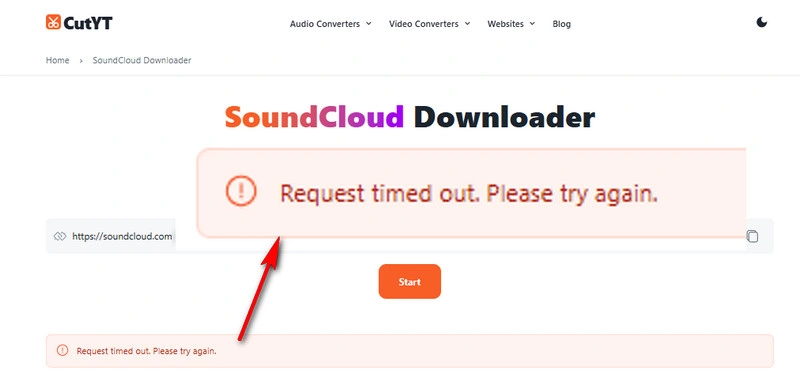
Step 1: Open CutYT SoundCloud Converter.
Step 2: Copy the SoundCloud Track URL.
Step 3: Paste the URL into CutYT and click 'Start'.
Step 4: Click 'FLAC' as the output format. Then, your FLAC file is ready.
Scdl is an open-source command-line SoundCloud downloader that supports tracks, user uploads, and FLAC conversion.
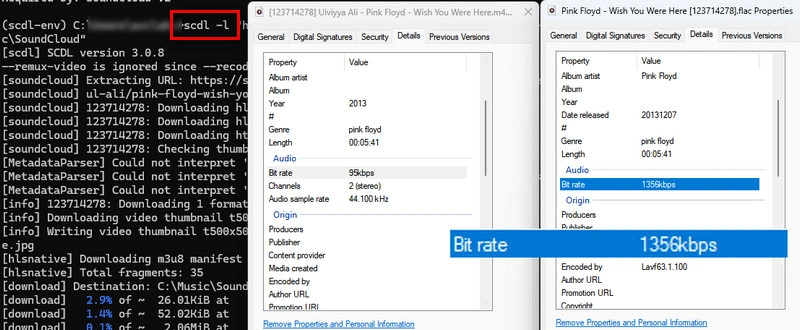
💪 Hands-on Test:
During testing, scdl successfully parsed SoundCloud playlists, but some tracks could not be downloaded because no audio streams were available. As a command-line tool, it also requires Python, FFmpeg, and related dependencies, and compatibility issues with curl_cffi, Python versions, and TLS connections may require troubleshooting, making it better suited to advanced users.
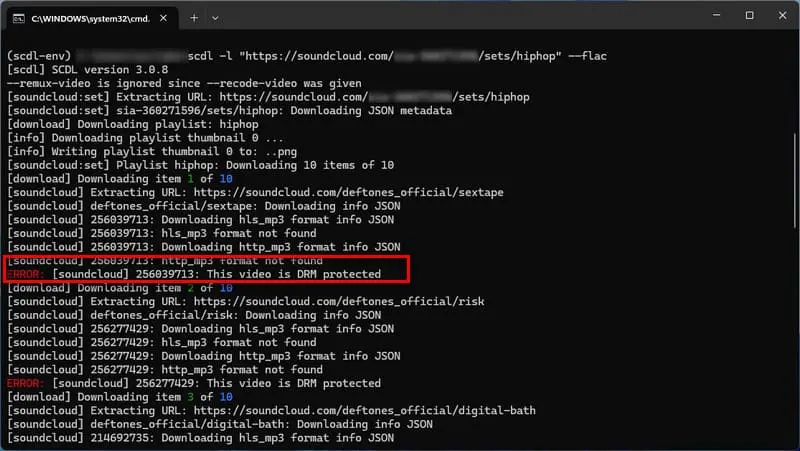
Install Python and FFmpeg
Download Python from the official website and install Python 3.11.
Open a Command Prompt
Win + R, type cmd, and press Enter.python --version to check the Python version.ffmpeg -version to confirm that FFmpeg is installed correctly.Install scdl
pip install scdl and press Enter.Download a SoundCloud Track to FLAC
scdl -l "SoundCloud Track URL" --flac.scdl -l "https://soundcloud.com/artist/song-name" --flacscdl -l "https://soundcloud.com/user/sets/playlist-name" --flac --path "C:\Music\SoundCloud"ImportError: cannot import name 'BrowserTypeLiteral'.--flac option, as scdl relies on FFmpeg to convert downloaded audio files into FLAC format.on.soundcloud.com), as short links may not be properly recognized by scdl.--flac does not download native FLAC files, but converts the downloaded SoundCloud audio (usually AAC or MP3) into FLAC format. The conversion does not improve the original audio quality.
AudiFab provides a simpler desktop interface for downloading SoundCloud tracks and playlists.
Compatible with Windows & macOS · 100% Safe & Clean
yt-dlp is an open-source command-line downloader that can download a range of SoundCloud tracks, with flexible audio format and metadata options.
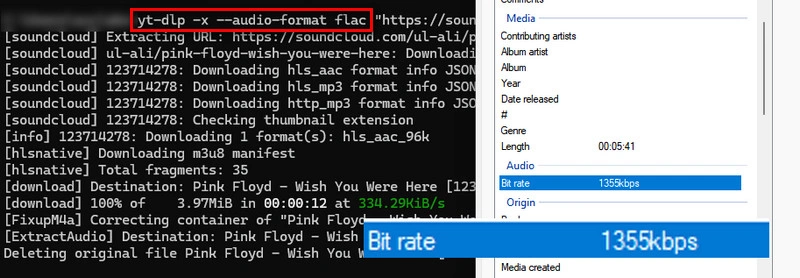
💪 Hands-on Test:
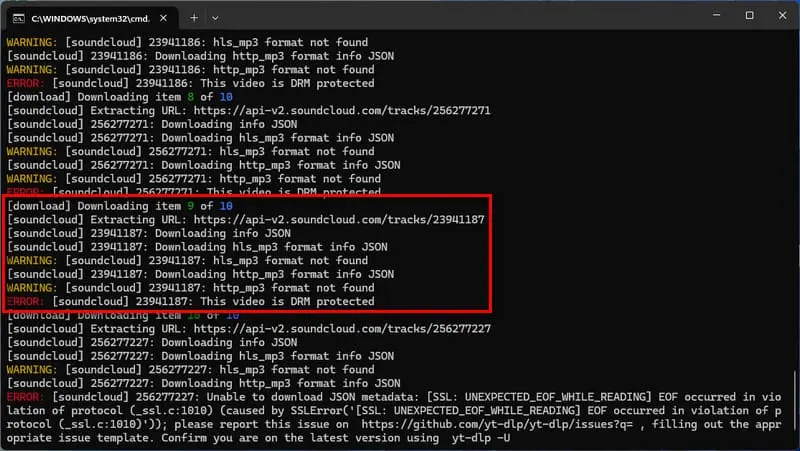
yt-dlp can successfully parse SoundCloud playlists, but some tracks may not be downloadable because SoundCloud does not provide accessible audio streams for them. In addition, temporary API timeouts or network connection issues may occasionally interrupt the download process.
Install Python and FFmpeg
Install Python and FFmpeg before using yt-dlp.
Open Command Prompt and Verify Versions
Press Win + R, type cmd, and press Enter. A Command Prompt window will open.
python --versionffmpeg -versionInstall yt-dlp
pip install -U yt-dlp.yt-dlp --versionDownload a SoundCloud Track and Convert It to FLAC
yt-dlp -x --audio-format flac "SoundCloud URL".yt-dlp -x --audio-format flac "https://soundcloud.com/artist/song"Downloading SoundCloud tracks in official, true-lossless FLAC format is possible, but only under specific conditions set by the original artist. Here is how you can do it directly on the platform.
Search for the track on SoundCloud and check below the waveform or under the 'More' (three dots) menu.
If the artist uploaded an uncompressed audio file like FLAC and enabled direct downloads, you will see a 'Download file' option.
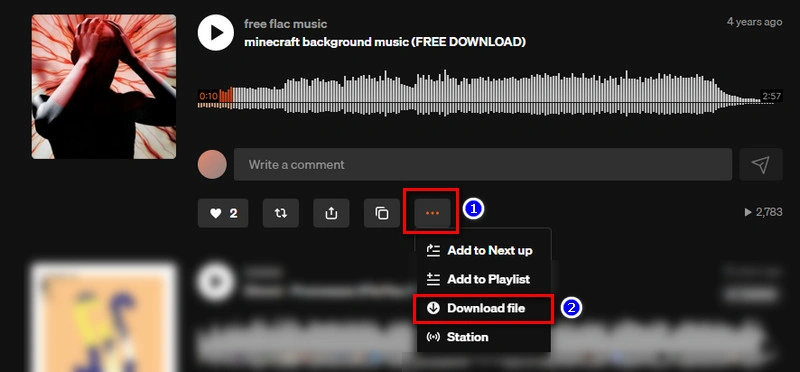
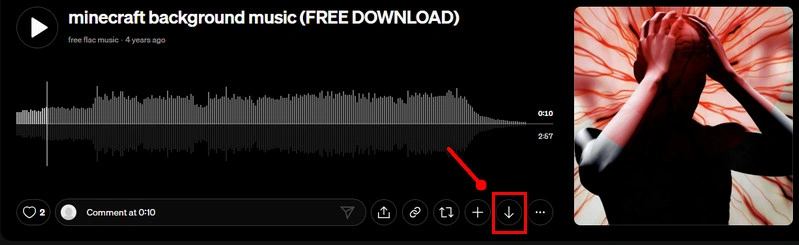
Click the button to download the artist's original lossless FLAC file straight to your device.
Note: This option is only available on the SoundCloud web browser (not the mobile app) and requires the uploader to have explicitly turned on downloads for that specific track. If you don't see the button, the artist hasn't enabled direct access, and you will need to use a third-party SoundCloud converter instead.
No, converting SoundCloud audio to FLAC will not improve the sound quality because you cannot recover data that was already lost in the original compressed SoundCloud stream. However, choosing a good converter is still important to prevent any additional quality loss during the export process.
You can only get true lossless FLAC if the creator originally uploaded a lossless source file and enabled direct downloads on SoundCloud. Otherwise, users have to use third-party converters like AudiFab SoundCloud Converter to encode SoundCloud's compressed stream into a FLAC file container, preserving the best possible source stream quality without recovering lost audio data.
Many free online SoundCloud converters use pop-up ads or redirects, so users should be cautious when clicking download buttons or external pages. Dedicated desktop software provides a much safer, ad-free alternative for offline audio extraction.
Most free online SoundCloud to FLAC downloaders fail or freeze when attempting to grab entire SoundCloud playlists at once. AudiFab SoundCloud Converter can handle full SoundCloud playlists and albums in bulk at up to 10X speed.
Based on our testing, AudiFab SoundCloud Converter is a strong choice due to its high reliability, 10X batch download speeds for playlists, and complete metadata retention. It supports FLAC, MP3, WAV, and ALAC output formats without ad-related hassles.
Overall, if you want a reliable SoundCloud to FLAC converter with fast batch downloads, playlist support, flexible output formats, and metadata retention, AudiFab SoundCloud Converter is a solid choice. Its desktop workflow is especially suitable for users who regularly save multiple SoundCloud tracks and want a more stable experience.

Save SoundCloud songs & playlists in MP3/AAC/FLAC/WAV/ALAC/AIFF at up to 10X speed, with original quality & ID3 tags preserved.
Music is the greatest communication in the world and here are some articles that may help you enjoy music in a better way.

 Try It Free
 Try It Free