We tested spotDL with a 67-track Spotify playlist and successfully downloaded 53 songs in 57 minutes, with all tested files at 128 kbps. While spotDL is free and open source, its command-line setup, slow downloads, and occasional matching errors can be frustrating. This hands-on spotDL review covers its real-world performance, audio quality, common problems, and whether it's worth using in 2026.
⚖️ Disclaimer For educational and personal use only. Respect copyright and Spotify's Terms of Service.
- What Is spotDL and How Does It Work?
- How to Install and Use spotDL
- spotDL Test Review: How Well Does It Actually Work?
- 1. Ease of Use: CLI vs Web UI
- 2. Playlist Downloads & Track Matching
- 3. Audio Quality & Metadata
- 4. Download Stability & Common Errors
- 5. Safety & Privacy
- Quick Verdict: Is spotDL Worth Using?
- Best spotDL Alternative: AudiFab Spotify Music Converter ⭐⭐⭐⭐⭐
- Frequently Asked Questions About spotDL
What Is spotDL and How Does It Work?
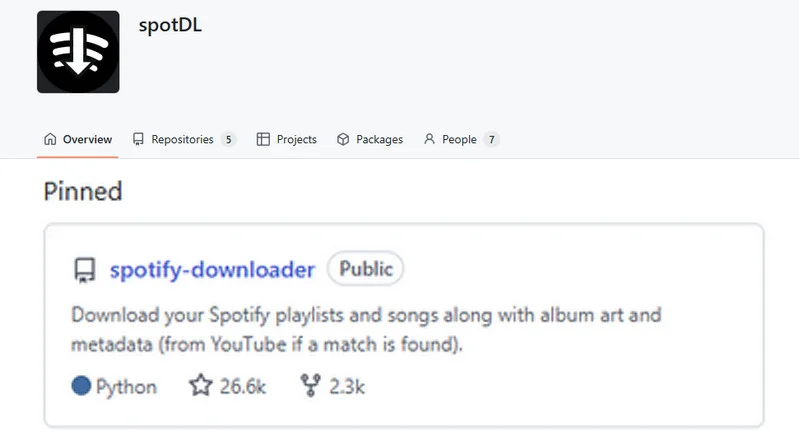
spotDL is a free, open-source command-line tool that downloads Spotify tracks, albums, and playlists by finding matching audio on YouTube Music, YouTube, or other supported sources. It uses Spotify metadata to identify songs, then processes the audio with FFmpeg and adds details such as track titles, artist names, album artwork, and available lyrics.
- 🔗Official download site: https://github.com/spotdl/spotify-downloader
- 💻Compatible OS: Windows, macOS, Linux, & Android via Termux (no native mobile app).
- 🎵 Key Features: Batch playlist and album downloads • Playlist syncing • Multiple audio formats • Metadata and lyrics support • Custom file organization
- ✅ Free and open-source.
- ✅ Supports playlist and album downloads.
- ✅ Multiple output formats (MP3, FLAC, etc.).
- ✅ Preserves metadata and album artwork.
- ✅ Supports playlist syncing.
- ❌ Complicated setup for beginners.
- ❌ Slow playlist downloads (57 min for 67 tracks).
- ❌ Incomplete downloads (79% success in our test).
- ❌ Limited source audio quality (128 kbps in our test).
- ❌ Occasional matching errors and download failures.
- ❌ Limited Web UI functionality.
How to Install and Use spotDL
Step 1 Install Python, FFmpeg & spotDL.
- 1. Install Python: Download and install Python from the official Python website. On Windows, make sure Python is added to PATH during installation.
- 2. Install spotDL:
py -m pip install spotdl. - 3. Check the installed version:
py -m spotdl --version. - 4. Install the required FFmpeg component:
py -m spotdl --download-ffmpeg. - 5. Install Deno if needed:
py -m spotdl --download-deno.
Step 2 Download a Spotify Track or Playlist.
- 1. Copy a Spotify track, album, or playlist URL and run:
py -m spotdl "SPOTIFY_URL".
For example:py -m spotdl "https://open.spotify.com/playlist/..." - 2. By default, spotDL uses YouTube Music as an audio provider.
You can switch to regular YouTube with:py -m spotdl "SPOTIFY_URL" --audio youtube.
Downloaded files are normally saved in the current command-line folder unless you specify another output location.
10 Best FREE Online Spotify Playlist Downloader
Discover a 40x faster Spotify playlist converter for you.
Learn More →spotDL Test Review: How Well Does It Actually Work?
Test Setup: spotDL 4.6.0 on Windows 11, using YouTube as the audio source. We tested two Spotify playlists containing 5 and 67 tracks, recording download times, success rates, audio bitrates, and common errors.
|
Success Rate |
Download Time |
Tested Audio Quality |
🚀 If command-line setup, potential matching errors, or 128 kbps speed are dealbreakers for your workflow, you may want to consider a dedicated GUI-based converter instead. |
||
1. Ease of Use: CLI vs Web UI
❓ Is spotDL beginner-friendly?
Not really. spotDL mainly works through commands, which can be confusing if you've never used a terminal. It also has a browser-based Web UI, but this version has limited features.
In our test, the Web UI failed to download a Spotify playlist, showing an "Invalid URL" error. Its search function also kept loading without returning results. We had to switch to the command-line version (CLI) to download playlists successfully.
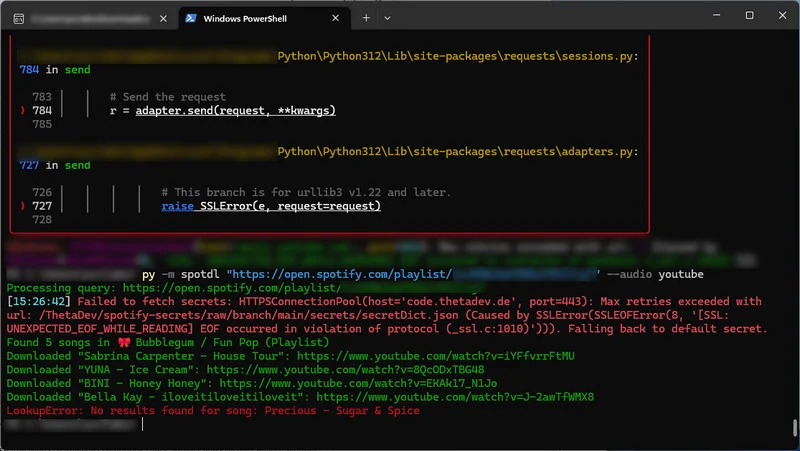
Our take: spotDL's Web UI is limited to individual songs, making the CLI the more practical option for playlists. This adds a learning curve for beginners.
2. Playlist Downloads & Track Matching
❓ Can spotDL download complete playlists reliably?
Yes, but some songs may fail, especially less popular tracks. spotDL searches YouTube or YouTube Music for audio that matches the songs in your Spotify playlist, rather than downloading directly from Spotify.
We tested two playlists using YouTube as the audio source:
| Test Case | Playlist Size | Time Taken | Successful Downloads | Success Rate |
|---|---|---|---|---|
| Test 1 | 5 songs | 8 minutes | 4/5 | 80% |
| Test 2 | 67 songs | 57 minutes | 53/67 | 79% |
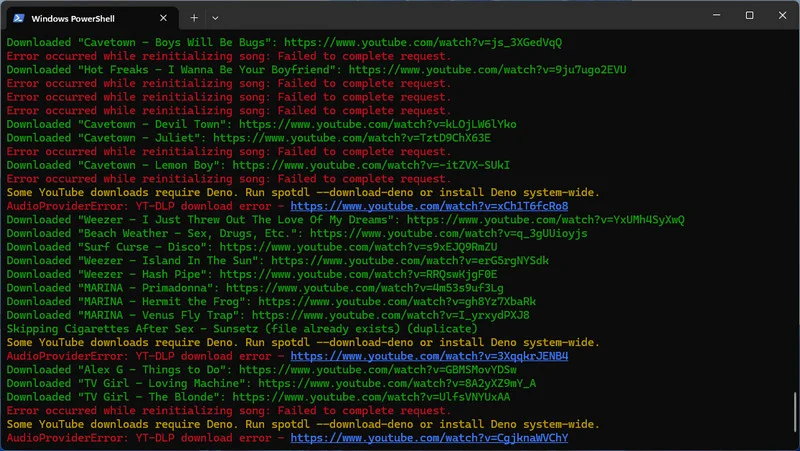
Our take: spotDL supports batch downloads, but downloading large playlists takes time, and you may need to check for missing or incorrect songs afterward.
Best spotDL Alternative for Reliable Playlist Downloads - AudiFab Spotify Music Converter
Directly download complete Spotify playlists without missing tracks or YouTube matching. Enjoy fast batch downloads, up to 320kbps MP3, lossless audio support, and preserved ID3 tags.
Compatible with Windows & macOS · 100% Safe & Clean · 3k+ downloads monthly · 99.9% success rate
3. Audio Quality & Metadata
❓ How good are spotDL downloads?
Metadata worked well. Our downloaded files kept their song titles, album names, and cover artwork, making them easy to organize in a music library.
Audio quality was more limited. All the files we checked were 128 kbps, and we couldn't select a higher-quality source during our test. Although spotDL supports formats such as MP3, M4A, FLAC, and Opus, choosing FLAC doesn't turn compressed YouTube audio into true lossless or higher-quality music.
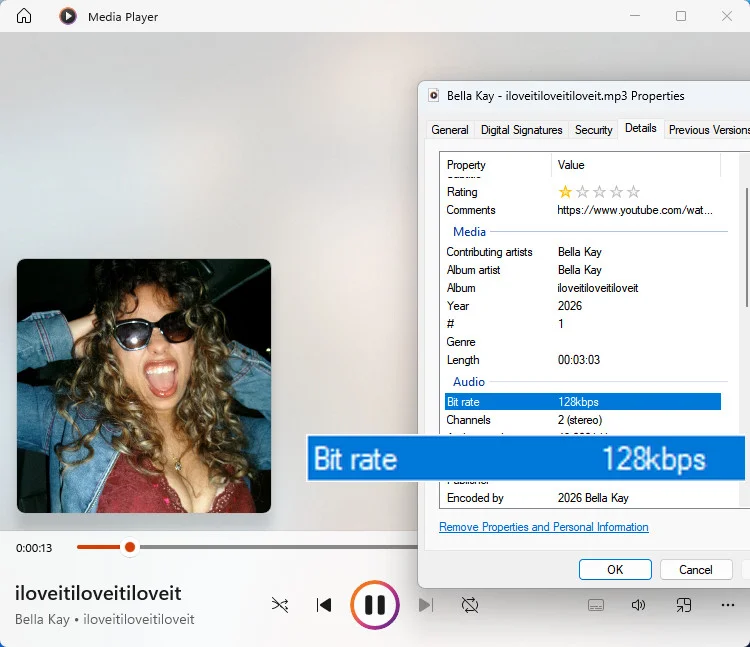
Our take: The downloads are fine for casual listening, but spotDL isn't ideal if you want consistent, high-quality audio.
4. Download Stability & Common Errors
❓ Does spotDL work reliably?
Not always. We encountered several errors during testing:
| Error We Encountered | What Worked / What to Try |
|---|---|
| Invalid URL in Web UI | Use the CLI for Spotify playlists |
| Spotify connection / SSL error | Check network and proxy settings |
| YouTube Music SSL error | Use YouTube as the audio source |
| Deno requirement | Run py -m spotdl --download-deno |
| AudioProviderError | Check Deno, update yt-dlp, or retry |
| LookupError | Search for the track manually or try another audio provider |
These errors meant we had to troubleshoot the setup and retry some downloads instead of completing everything in one attempt.
Our take: spotDL can work well once configured, but network issues and missing dependencies can disrupt downloads. Because spotDL relies on YouTube matching rather than direct Spotify audio extraction, network stability issues can disrupt multi-track downloads. Users seeking stable batch downloads without manual troubleshooting often opt for a spotDL alternative.
5. Safety & Privacy
❓ Is spotDL safe to use?
Generally, yes, when installed from the official spotDL GitHub repository or the official Python package. It's free, open source, and runs locally on your computer. We didn't encounter ads or unwanted software during testing.
However, avoid downloading spotDL from unknown websites. Also, downloading copyrighted music without permission may violate applicable laws or platform terms.
Quick Verdict: Is spotDL Worth Using?
Yes, if you're comfortable with command-line tools and want a free Spotify playlist downloader. spotDL supports batch downloads and preserves useful song information, but our tests revealed slow speeds, missing tracks, occasional download errors, and audio limited to 128 kbps in our setup.
It's a reasonable choice for casual listening and tech-savvy users. If you prefer simpler downloads, more consistent results, or higher-quality audio, a dedicated Spotify music converter may be a better fit.
Best spotDL Alternative: AudiFab Spotify Music Converter
spotDL vs AudiFab: Real-World Playlist Download Test
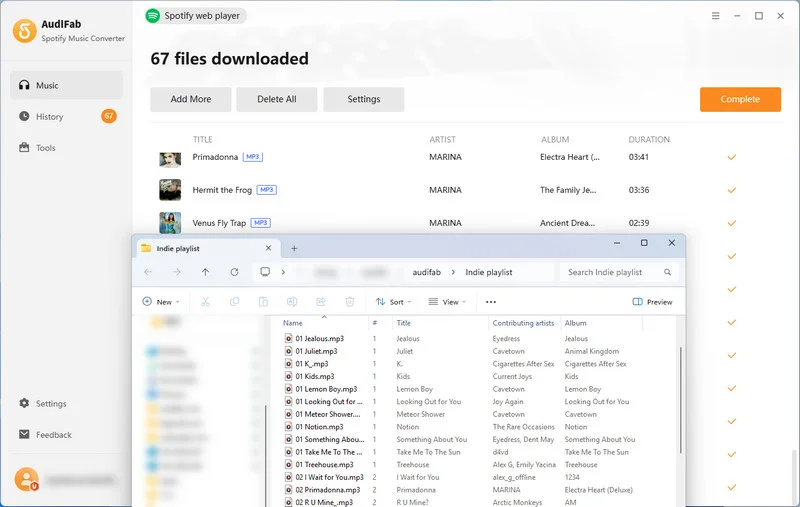
For users frustrated by spotDL's setup and missed downloads, AudiFab Spotify Music Converter offers an easier, more reliable alternative. We tested both tools with the same 67-track Spotify playlist. Here's how they compared:
| Feature | spotDL | AudiFab |
|---|---|---|
| Successful Downloads | 53/67 (79%) | ✔️67/67 (100%) |
| Time Taken | 57 minutes | ✔️14 minutes |
| Audio Quality Tested | 128 kbps in our test | ✔️320 kbps in our test; lossless supported |
| Interface | CLI (Command-Line) | ✔️GUI (User-Friendly) |
| Audio Source | YouTube | ✔️Spotify |
| Metadata | Preserved | Preserved |
Why Choose AudiFab Over spotDL?
Recommend Level
Ease of Use
Safety
Speed
Stability
- Webpage Link: https://www.audifab.com/spotii-music-converter.html
- Compatible OS: Windows & macOS
- Key Highlight: Batch download Spotify playlists to MP3 & Video to MP4 at 40x speed.
- Support downloading: 🎵 Tracks / 📂 Playlists /💿 Albums /👤 Artists /🎙️ Podcasts / 📚 Audiobooks / 📜 Lyrics /📻 Radio / 🎬 Video
AudiFab Spotify Music Converter
- Download Spotify music and playlists easily, without Python or FFmpeg.
- Convert Spotify playlists to 6 formats, including MP3/ AAC/ WAV/ FLAC/ AIFF/ ALAC.
- Keep original audio quality, ID3 tags, and lyrics.
- One click to burn Spotify music to CD.
- Free updates and technical support.
 Try It Free
 Try It Free
Tutorial: How to Use AudiFab to Download Spotify Playlists
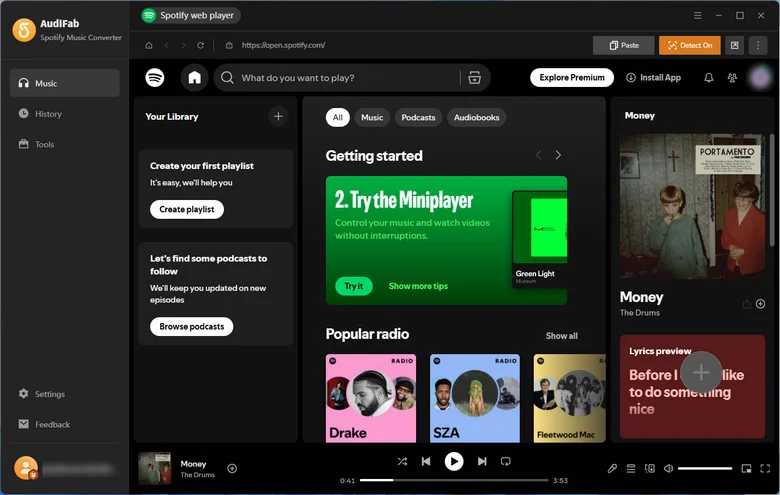
STEP 1 Download and install AudiFab on your Windows or Mac computer. Then, launch AudiFab.
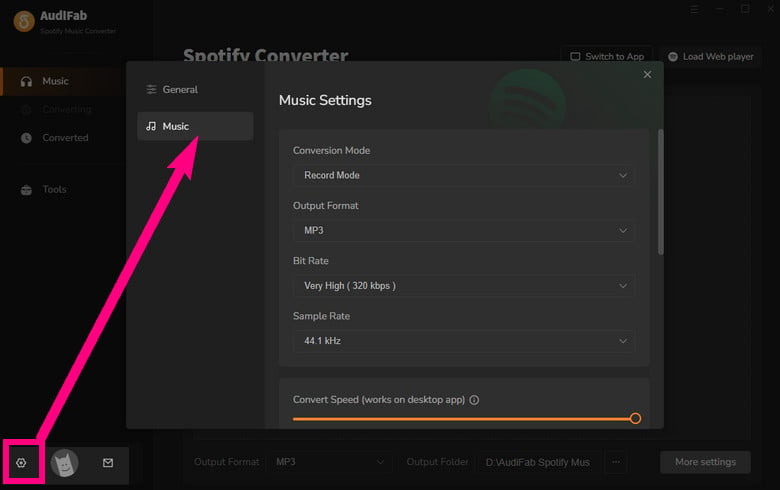
STEP 2 Click the Settings icon (gear icon) in the bottom-left corner to pick your target format (MP3, AAC, WAV, FLAC, AIFF, ALAC) and adjust the audio quality.
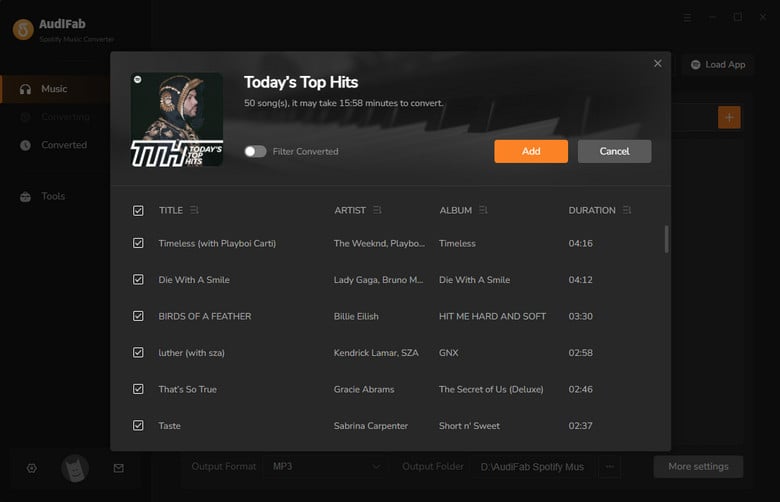
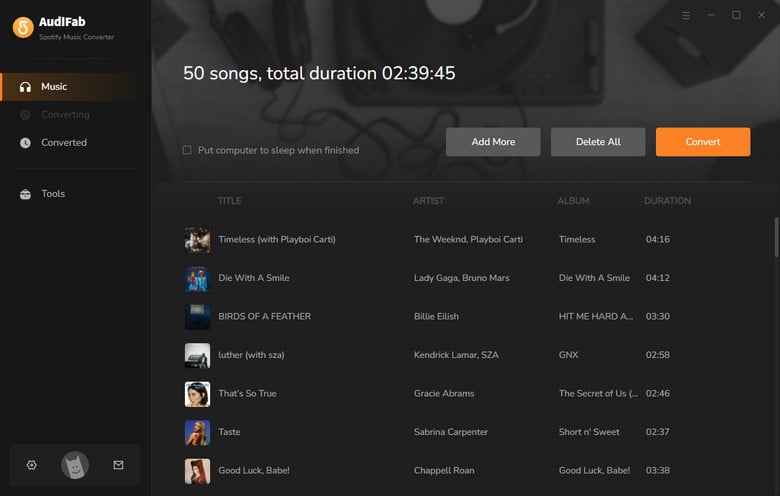
STEP 3 Browse Spotify in the built-in browser, open your target playlist, click the floating "+" button, and click "Add".
STEP 4 Hit the orange "Convert" button to begin downloading. Once complete, head over to the "History" tab to locate and manage your converted local audio files.
Frequently Asked Questions About spotDL
Q 1 Is spotDL still working in 2026?
Yes, spotDL is still working in 2026 and remains an actively maintained open-source project. However, some downloads may fail due to network issues or audio source limitations.
Q 2 Does spotDL download directly from Spotify?
No. spotDL retrieves Spotify metadata, such as track titles, artists, and artwork, then finds matching audio on YouTube or YouTube Music rather than downloading directly from Spotify.
Q 3 Does spotDL support 320kbps or lossless audio?
Not at true 320kbps or lossless quality. spotDL typically downloads at 128 kbps, or up to 256 kbps with YouTube Music Premium. For higher-quality Spotify downloads, AudiFab Spotify Music Converter supports 320kbps MP3 and lossless FLAC.
Try AudiFab free here:
Q 4 Why does spotDL not work?
Common causes include network errors, missing FFmpeg or Deno dependencies, and YouTube download restrictions. Updating spotDL, checking your connection, or switching audio providers may help. If you prefer a simpler solution without command-line troubleshooting, AudiFab Spotify Music Converter offers GUI-based playlist downloads.
Q 5 Can I use spotDL on Android?
Yes. You can run spotDL on Android through Termux after installing Python, FFmpeg, and spotDL. However, it requires command-line operations and isn't a native Android app.
spotDL is a free, open-source Spotify downloader with useful batch downloading and metadata features. However, our tests revealed slow speeds, missing tracks, and limited audio quality, making it less ideal for beginners. If you want faster, more reliable playlist downloads with better audio quality and no complicated setup, AudiFab Spotify Music Converter is a great alternative.

AudiFab Spotify Music Converter – A Reliable spotDL Alternative for Spotify Playlist Downloads
Download Spotify songs, playlists, albums & more without missing tracks or command lines. Fast batch downloads • MP3, FLAC, WAV & more • Up to 320kbps & lossless audio • Preserves ID3 tags