10 Best Free Music Downloaders for Android in 2026
Ten free music downloaders for Android tested, with notes on which ones save your songs as offline files.
Free music download apps and websites for Android let you save songs and playlists for offline listening. Some keep downloads inside the app, while others export real audio files you can play in any player. This guide tests 10 Android downloaders across catalog size, free limits, exportable files, ads, and ease of use, so you can pick the one that fits how you listen.
See also: Best Free Music Downloaders for Windows PC in 2026
⚖️ Disclaimer These are third-party services not affiliated with AudiFab. Only download content you created, content you have permission to keep, or content whose licence allows it. Some listed tools aggregate audio from public sources; check the licensing and permissions of each track before keeping or reusing it.
| Tool | Platform | Download Type | Output Format | Ad-Free | Free Usage Limits |
|---|---|---|---|---|---|
| Audiomack | Google Play | App-only Download | N/A | Paid | Free downloads on supported tracks |
| TREBEL | Google Play | App-only Download | N/A | ❌ | Downloads unlocked via ads or tasks |
| Boomplay | Google Play | App-only Download | N/A | Paid | Subscription for unlimited downloads, ad-free playback, 320kbps |
| Sidify | APK | Audio File | MP3, AAC, WAV, FLAC | ✅ | Feature-limited trial |
| YMusic | APK | Video & Audio | MP3, Opus, WebM, MP4 | ❌ | Audio source is YouTube only |
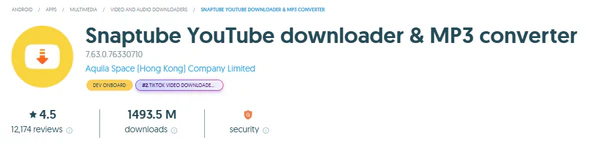
| Snaptube | APK | Video & Audio | MP3, M4A, MP4 | ❌ | Video-first |
| Jamendo | Mobile Browser | Audio File | MP3 | ✅ | Free for personal use; commercial use needs a separate license |
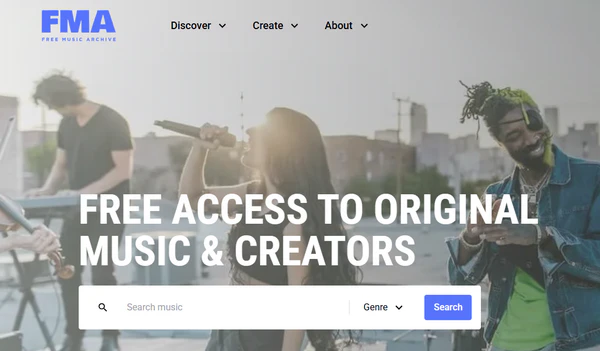
| Free Music Archive | Mobile Browser | Audio File | MP3 | ✅ | Track-specific licenses |
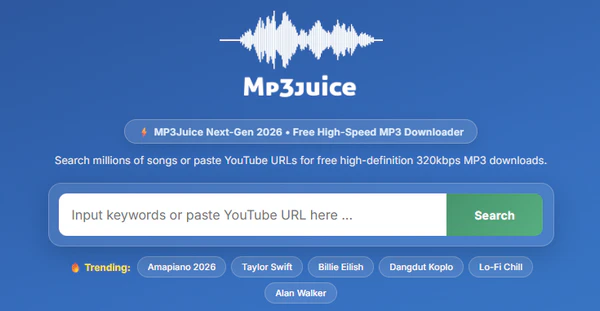
| MP3Juice | Mobile Browser | Audio File | MP3 | ❌ | No guaranteed quality |
| MyGOMP3 | Mobile Browser | Video & Audio | MP3, MP4, WAV, OPUS, M4A, FLAC | ❌ | Availability and quality vary |
|
|||||
Our Rating: ⭐⭐⭐⭐⭐
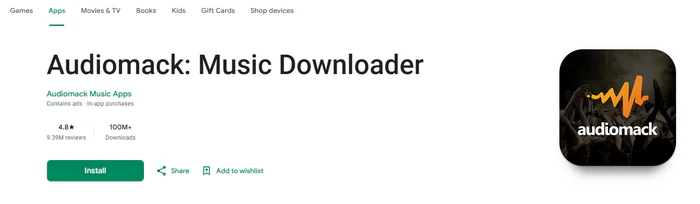
URL: https://play.google.com/store/apps/details?id=com.audiomack&hl=en_US
Listed on Google Play, Audiomack lets artists and labels upload their own tracks. The catalog leans toward hip-hop, rap, trap, R&B, Afrobeats, Afro-Caribbean, reggae, dancehall, EDM, and Latin urbano, and the app also doubles as a local player for the MP3, WAV, M4A, and AAC files already on your phone. The main limitation is that not every track is downloadable — the download button only shows up when the artist or label has enabled it.
AudiFab exports your tracks as real MP3, AAC, or FLAC files with tags and cover art, so you can copy them to any player, USB drive, or Android instead of leaving them locked inside the app. Compatible with Windows & macOS · 100% Safe & Clean
Our Rating: ⭐⭐⭐⭐☆
URL: https://play.google.com/store/apps/details?id=com.mmm.trebelmusic
TREBEL offers licensed music for on-demand and offline listening through an ad-supported free tier. You can download supported songs for offline playback, though free access comes with daily limits. The app does not support file export, and you need to watch ads to unlock downloads, while Premium offers additional benefits.
Our Rating: ⭐⭐⭐⭐☆
URL: https://play.google.com/store/apps/details?id=com.afmobi.boomplayer&hl=en_US
Boomplay holds a catalog of over 100 million songs across pop, rock, Afrobeats, Afropop, and reggae, letting Android listeners stream and save tracks directly within the app. Free streaming and offline downloads come alongside personalized playlists, lyrics, an equalizer, and a live community section.
Downloaded tracks are grouped in an offline library that also handles local MP3, AAC, M4A, and WAV files from your phone or SD card. The free tier includes ads; unlimited downloads, ad-free playback, and 320kbps quality are subscription features.
Our Rating: ⭐⭐⭐⭐☆
URL: https://www.sidify.com/sp-android/music-converter.html
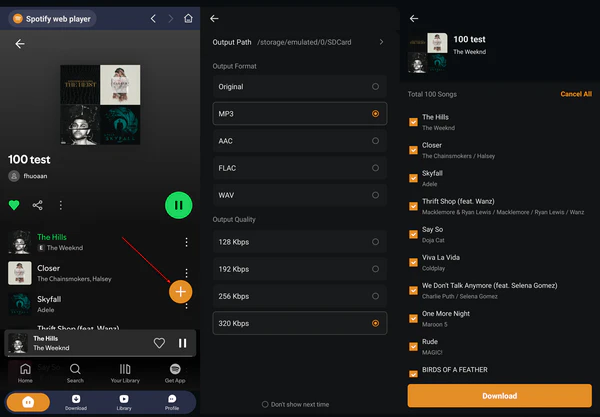
Best known for its Windows and Mac editions, Sidify also ships an Android APK that runs on Android 8 and later. The Android build converts Spotify songs, albums, playlists, podcasts, radios, and audiobooks into MP3, AAC, WAV, and FLAC files, keeps ID3 tags, and supports batch conversion of multiple tracks or whole playlists.
Our Rating: ⭐⭐⭐⭐☆
URL: https://ymusic.en.uptodown.com/android
Built for YouTube audio on Android, YMusic plays a video's audio stream even when the screen is off, and it can save tracks in MP3, Opus, WebM, or MP4. Its main strength is data saving — it loads audio only rather than the full video — and the download options are easy to reach from a track's playback screen. Because its audio source is YouTube, availability, quality, and licensing follow that platform's terms, and the app is distributed outside Google Play as an APK.
AudiFab supports multiple streaming services — Spotify, Apple Music, YouTube Music, Amazon Music, and more — converting your playlists to tagged local files. Compatible with Windows & macOS · 100% Safe & Clean
Our Rating: ⭐⭐⭐☆☆
URL: https://snaptube.en.uptodown.com/android
Snaptube searches across YouTube and several other video platforms, lets you pick resolution and format before saving, and includes an option to extract audio as MP3. The trade-offs are significant: the app is primarily a video downloader rather than a music library, it is not listed on Google Play, and it includes ads and in-app promotions. Treat downloaded content as for personal offline use only, and verify licensing before reusing any track.

Test 10 free YouTube audio downloaders in 2026. Compare online tools and AudiFab to find the best option for MP3, WAV, FLAC, playlists, and high-quality audio.
Learn More →If you prefer not to install another app, these free music download websites work in an Android phone browser. The first two offer legal, openly licensed music; the last two are online MP3 downloaders.
Our Rating: ⭐⭐⭐⭐⭐
URL: https://www.jamendo.com/
Built around independent artists, Jamendo pairs free streaming with free downloads of CC-licensed tracks, and it also keeps a separate royalty-free catalog for commercial projects. Browsing is organized by genre, mood, and artist, and downloadable tracks show clear license information. Because the catalog consists mostly of independent and emerging artists, it will not have every mainstream chart hit, but tracks you download are genuine audio files rather than app-locked cache.

Our Rating: ⭐⭐⭐⭐☆
URL: https://freemusicarchive.org/
Free Music Archive (FMA) makes tracks free to play, download, and share, with some royalty-free options for media projects. Music is grouped by genre and curator, and individual track pages list the license under which the work was released. Like Jamendo, it is built around independent artists rather than commercial hits, so it suits discovery and background-material hunting more than searching for the latest singles.
Our Rating: ⭐⭐⭐☆☆
URL: https://mp3juiced.yt/
MP3Juice works in a mobile browser, allowing you to search for tracks or paste a supported video link to generate an MP3 download. No account or app installation is required. The risks are important to weigh: the site relies on ad revenue and pop-ups, and audio quality and file completeness are not guaranteed. Do not enter personal account details, and only download content you have the right to keep.
AudiFab queues an entire playlist for batch conversion to tagged local MP3s, with consistent quality and no pop-up redirects — then copy the finished files to your Android. Compatible with Windows & macOS · 100% Safe & Clean
Our Rating: ⭐⭐⭐☆☆
URL: https://en1.mygomp3.com/
Another browser-based downloader, MyGOMP3 searches for songs, albums, and soundtracks and offers downloads in MP3, MP4, WAV, OPUS, M4A, and FLAC, with an in-browser player to preview before saving. As with MP3Juice, the site depends on ads; treat downloads as personal, temporary files and stay away from any installer or permission prompt the site displays.
🛍️ Prefer an official Google Play app? TREBEL offers mainstream tracks through an ad-supported model, while Audiomack and Boomplay cover hip-hop, rap, Afrobeats, and African music for offline listening.
🎯 A Spotify user who wants local files? Sidify converts Spotify songs, albums, and playlists to MP3, AAC, WAV, or FLAC on Android.
🎬 Want to pull audio from YouTube? YMusic and Snaptube pull audio from YouTube and other video portals.
🌐 Prefer no app installation at all? MP3Juice and MyGOMP3 work in the mobile browser and save files in MP3 without an account. Jamendo and Free Music Archive provide openly licensed independent tracks as real downloads.
When the apps and websites above do not carry the songs you want — for example, your saved playlists live inside Spotify, Apple Music, or YouTube Music — a desktop music converter is the most reliable way to turn that collection into local MP3 files you can move to your Android phone.
AudiFab Music One supports Spotify, Apple Music, YouTube Music, Amazon Music, Tidal, Deezer, SoundCloud and more. It exports tracks to MP3, AAC, WAV, FLAC, ALAC or AIFF while preserving ID3 tags and cover art. Its batch workflow works reliably for full playlists and albums, and converted files can be copied to any Android music player.
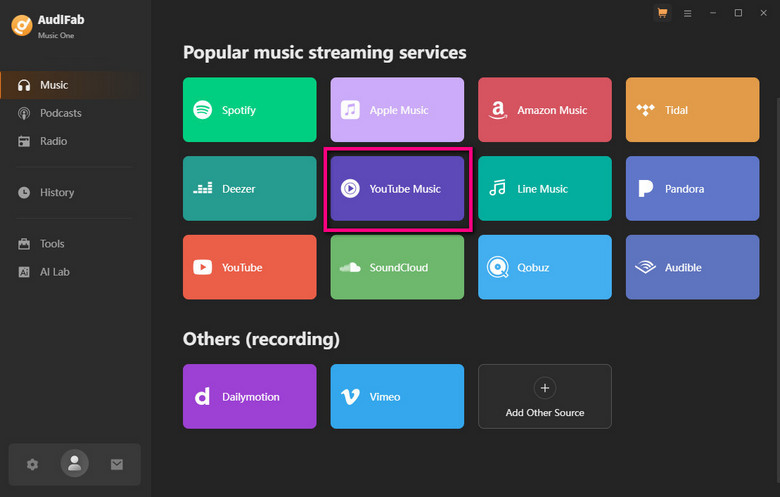
Choose Your Streaming Service
Install and open AudiFab on your Windows PC or Mac, and select the streaming service your playlist lives in — such as YouTube Music, Spotify, or Apple Music — then sign in when prompted.
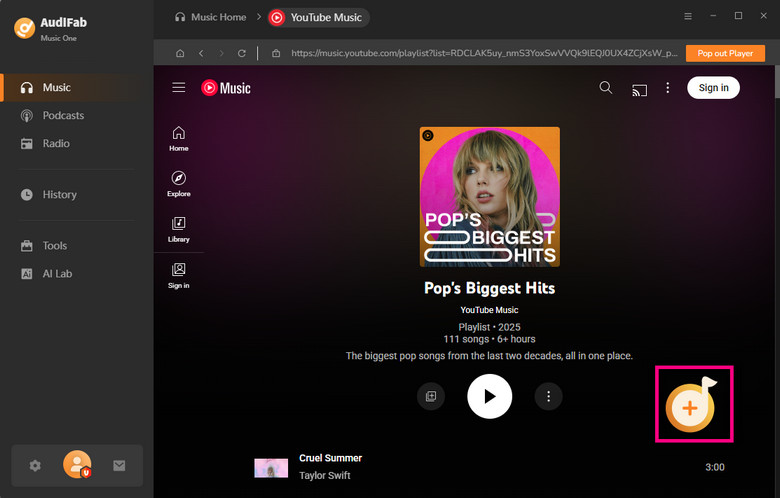
Open a Playlist and Tap the Add Button
Browse to the album or playlist inside the built-in player, then tap the plus button to bring its tracks into AudiFab.
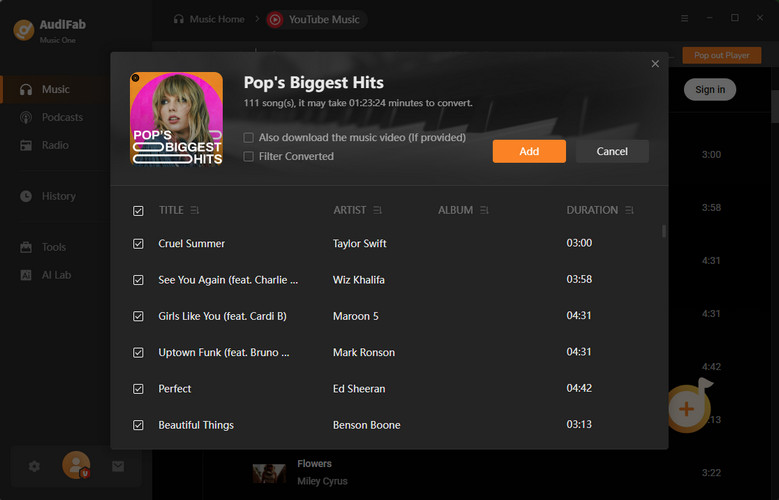
Select the Songs You Want to Convert
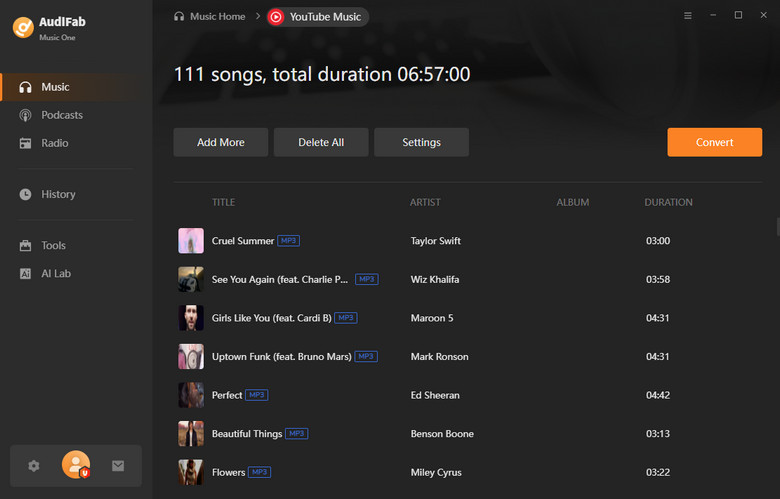
Tick the tracks you want to keep, then click Add. Leave out any song you do not need; already-converted tracks can be filtered from this dialog.
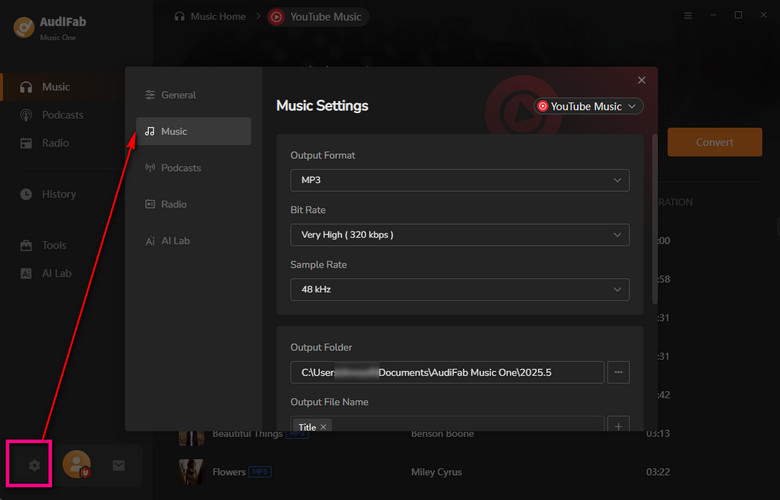
Set MP3 as the Output Format
Open Settings > Music, choose MP3 (or another format), set the bit rate and sample rate, and pick the folder where the converted files are saved.
Start the Batch Conversion
Check the queue, add more tracks if needed, then click Convert and wait for all songs to finish processing.
Locate the Files and Transfer Them to Your Android
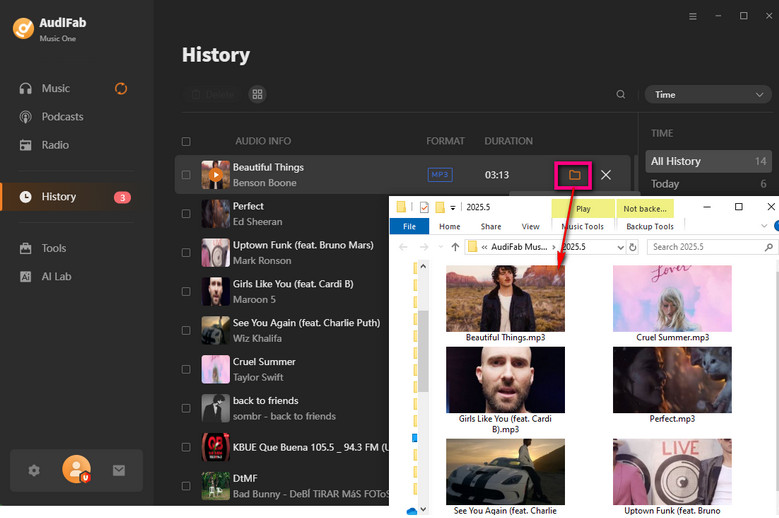
In the History tab, click the folder icon next to a finished track to open the exported folder. Connect your Android phone by USB, or use a cloud drive or transfer app, and copy the MP3 files into a music folder on the device; open a local Android player to browse and play them offline.
For a safe, all-around pick on the Play Store, Audiomack and TREBEL are the strongest choices: Audiomack covers hip-hop, rap, and Afrobeats, while TREBEL offers mainstream label songs. Boomplay is best for African and Afrobeats catalogs. If you want local files from Spotify, Sidify converts playlists to MP3, AAC, or FLAC. YMusic and Snaptube pull audio from YouTube and other video portals.
Yes, but the method matters. Legal MP3 files you can keep come from licensed platforms like Jamendo and Free Music Archive. Sidify can convert Spotify content to MP3, while online sites such as MP3Juice and MyGOMP3 save files directly in the browser. Note that downloads inside Audiomack, TREBEL, and Boomplay are saved as in-app offline cache rather than MP3s.
They are stored in different ways. An offline download kept inside an app, usually as a cached or protected file you cannot move to another player, and it may stop playing if the subscription ends or the app is removed. An MP3 download is saved as a real local file in your Downloads or music folder, so you can copy it to any player, USB drive, or device and keep it independently of the original app.
Open a music download website in your Android browser. Jamendo and Free Music Archive offer openly licensed independent tracks as real audio files you can keep. MP3Juice and MyGOMP3 are online downloaders that search an aggregated catalog and save MP3 and other formats in the browser.
Apps outside the official store skip Google Play's review process, so check the developer, download volume, rating, and permissions before installing, and get apps from recognized sources. Be cautious of apps that request unnecessary access, show aggressive pop-ups, or push bundled installers; prefer official Play Store apps or well-documented tools where possible.
Files saved by websites or third-party downloaders usually land in the Downloads folder, which you can open from a file manager. Music saved inside an official streaming app lives in that app's private offline library and generally cannot be moved to another player.
There is no single best free music download option for every Android user. Official Play Store apps like Audiomack, TREBEL, and Boomplay are the safest way to save tracks for in-app offline listening; Jamendo and Free Music Archive are the cleanest sources for legal, exportable independent MP3s; APK downloaders and online MP3 sites offer more catalog reach but carry ads, licensing uncertainty, and safety trade-offs. If your favorite songs live inside Spotify, Apple Music, YouTube Music, or another streaming service, AudiFab batch-converts them to tagged local files on Windows or macOS, which you can then copy to your Android for permanent offline playback.
Music is the greatest communication in the world and here are some articles that may help you enjoy music in a better way.

 Try It Free
 Try It Free