Tidal vs Qobuz 2026: Which Hi-Res Streaming Service Wins?
Compare Tidal vs Qobuz in 2026 on sound quality, pricing, catalog, and Hi-Fi features. Read our analysis to find the best hi-res music service for you.
Compare Tidal vs Qobuz in 2026 on sound quality, pricing, catalog, and Hi-Fi features. Read our analysis to find the best hi-res music service for you.
Tidal and Qobuz look almost identical on paper, with Hi-Res FLAC, serious Hi-Fi integrations, and huge music catalogs. After spending time with both, though, I stopped asking "Which one has better specs?" and started asking "Which one would I actually want to use every day?"
So I tested them the way a listener actually would: searching for exact albums and remasters, using their recommendation systems, comparing prices, and seeing how well each fits headphones, Hi-Fi gear, cars, and the living room.
The result was much less obvious than the spec sheets suggest. Keep reading to see where Tidal and Qobuz really differ and which one comes out ahead.
| Core Decision Factors | Tidal | Qobuz | Edge |
|---|---|---|---|
| Audio quality | Hi-Res FLAC up to 24-bit, 192 kHz + Dolby Atmos | Hi-Res FLAC up to 24-bit, 192 kHz (no Atmos) | Tidal |
| Individual price | $11.99/mo (monthly only); 30-days free trial |
$12.99/mo, or $10.83/mo billed yearly; 1-month free trial |
Qobuz |
| Catalog test (50 items) |
⭐⭐⭐⭐⭐ (48 complete) | ⭐⭐⭐⭐ (45 complete) | Tidal |
| Discovery & app | Algorithm-led mixes | Human curation + algorithms | Qobuz |
| Ecosystem & Hi-Fi | Roon, Sonos, streamers; more car integrations |
Roon, Sonos, streamers; Connect with 100+ partners |
Tidal |
| Extras | DJ tools, direct-to-fan sales | Hi-Res download store | Tie |
| Best for | Atmos, personalized discovery, cars, DJs | Annual or shared plans, reviews, owning files | — |
Based on their official claims, both services stream stereo music in the same top formats: lossless FLAC at CD quality and Hi-Res FLAC up to 24-bit/192 kHz. The clearest difference is that Tidal also offers Dolby Atmos.
We compared each service's own audio-quality and support pages as of 2026, since the formats are the same on paper and any audible difference would depend on the files, your gear, and your ears.
Sources: Tidal sound quality · Qobuz audio quality| Feature | Tidal | Qobuz | |
|---|---|---|---|
| Top stereo quality | Hi-Res FLAC, up to 24-bit/192 kHz (Max) | Hi-Res FLAC, up to 24-bit/192 kHz | |
| CD quality | FLAC, 16-bit/44.1 kHz (High) | FLAC, 16-bit/44.1 kHz | |
| Lowest tier | AAC, up to 320 kbps (Low) | MP3, 320 kbps | |
| Dolby Atmos | ✓ iOS 15+, Apple TV 4K, Nvidia Shield; not on desktop/Pixel | ✕ Not supported | |
| MQA | Removed July 2024; replaced with FLAC | No MQA | |
| Cheapest plan with top quality (US) | $11.99/month | $12.99/month, or $129.99/year ($10.83/month) |
|
| Note: Hi-Res availability depends on the master supplied by the label. Tidal discontinued MQA and Sony 360 Reality Audio in July 2024, standardizing on FLAC and Dolby Atmos. | |||
I tested both services using AirPods Pro during daily commutes and a Marshall Bluetooth speaker at home, carefully volume-matching identical tracks across both platforms. Here is what I actually experienced:
Try AudiFab Free Trial Now
Compatible with Windows & macOS · 100% Safe & Clean · 3k+ downloads monthly · 99.9% success rate
According to official pricing, Qobuz offers better long-term value if you pay annually across its Solo, Duo, and Family plans, or if you qualify for its Student discount. Tidal is cheaper only if you prefer month-to-month billing on Individual and Family plans, or if you qualify for its Cash App promotion.
We compared the official US pricing pages for both services in 2026. Tidal updated its prices for billing dates on or after August 3, 2026, so older reviews that quote $10.99 for Tidal are out of date. Prices below are as listed on each page; Tidal's are plus applicable taxes, and Qobuz's pages don't say.
Sources: Tidal Pricing · Qobuz Pricing| Plan Type | Tidal | Qobuz | Edge |
|---|---|---|---|
| Individual (Monthly) | $11.99 / month | $12.99 / month | Tidal |
| Individual (Annual) | N/A (Monthly only) | $129.99 / year ($10.83/mo) | Qobuz |
| Duo Plan (2 Accounts) | N/A (Requires Family Plan) | $17.99 / mo ($14.99/mo billed annually) | Qobuz |
| Family Plan (Up to 6) | $19.99 / month | $21.90 / mo ($17.99/mo billed annually) | Tidal(Monthly); Qobuz(Annual) |
| Student Plan | $6.99 / month | $4.99 / month (Max 24 mos) | Qobuz |
| Hi-Res Store Discount Tier | None | Sublime: $179.99 / year (Up to 60% off Hi-Res downloads) | Qobuz |
| Promotions & Offers | 25% off 12 mos via Cash App (US only) | None listed | Tidal |
| Free Access (No Subscription) | No permanent free streaming tier | No permanent free streaming tier; store purchases available without subscription | Tie |
| Free Trial | 30 Days | 1 Month | Tie |
| Note: Prices reflective of US market as of 2026. Tidal prices exclude applicable taxes. | |||
Is Qobuz Sublime worth it? Qobuz's top-tier Sublime plan costs $179.99/year upfront ($50 more than standard Studio Annual). To break even on that extra $50 using its 60% Hi-Res store discount, you'll need to buy roughly $83 to $100 worth of full-price album downloads per year.
For popular, indie, jazz, and new releases, the two services were identical in our test. Tidal pulled slightly ahead only on specific classical recordings and remastered editions, missing or incomplete on 2 of 50 items versus 5 for Qobuz.
Raw catalog size isn't a reliable metric. While Tidal claims over 180 million tracks and Qobuz claims over 100 million, both figures are self-reported and unverified. The better question for listeners is simple: Is the exact version you want available? To test real-world coverage, we checked 50 target albums and classical/remastered recordings on US accounts in 2026.
Sources: Tidal New Releases · Qobuz CatalogueBoth services carried every mainstream pop, indie, jazz, and recent release on our list (32 of 32). Gaps only appeared in specific classical performances and remastered editions:
| Category (items) | Tidal | Qobuz |
|---|---|---|
| Popular artists, mainstream pop, indie, jazz, recent releases (32) | 32 / 32 | 32 / 32 |
| Classical, specific conductor or performer (12) | 11 / 12 | 9 / 12 |
| Remastered editions of older albums (6) | 5 / 6 | 4 / 6 |
| Total complete (50) | 48 / 50 | 45 / 50 |
| Key discrepancies: Item | Tidal | Qobuz |
|---|---|---|
| Brahms Symphony No. 4, Kleiber / Vienna Philharmonic | ✓ Available | ✕ Missing |
| Chopin Nocturnes, Rubinstein | ✓ Available | △ Partial / Specific Version Missing |
| Led Zeppelin IV (2014 remaster) | ✓ Available | △ Partial / Specific Version Missing |
| Casals, Bach Cello Suites (1930s) | ✕ Missing | ✕ Missing |
| Pink Floyd, The Dark Side of the Moon (2011 / 2023 remasters) | △ Partial / Specific Version Missing | △ Partial / Specific Version Missing |
| *Note:✓ complete · △ partial or wrong version · ✗ not found; This is a small-scale test and does not measure the total coverage of each music library, but it can serve as a reference. | ||
When I built my daily playlists and tested 50 target albums across both apps, I found that day-to-day catalog differences are practically invisible if you listen primarily to mainstream pop, indie, hip-hop, or new releases. Both services had every single major track I searched for without missing a beat. The difference only became noticeable when I started searching for very specific versions:
Click the Download Button and Try AudiFab Free Trial Now!
Compatible with Windows & macOS · 100% Safe & Clean · 3k+ downloads monthly · 99.9% success rate
Tidal has the stronger recommendation engine, but Qobuz is the service I personally prefer as a reviewer. I value discovery that gives me a reason to care about an album—not just another track to play—and Qobuz's reviews, liner notes, interviews, and expert curation make exploring music feel closer to browsing a great record collection than scrolling through an endless feed.
We evaluated official feature documentation and app updates from both platforms in 2026. We specifically focused on recommendations, human curation, editorial context, UI, lyrics, and EQ.
Sources: Tidal Music Discovery · Qobuz Discover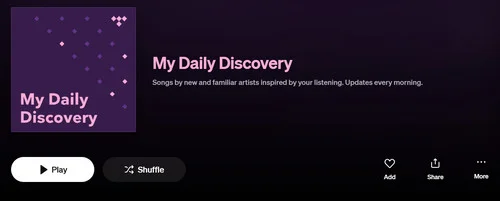
Algorithm-first discovery with Daily Discovery and personalized mixes.

Editorial discovery with expert picks, reviews, and music context.
| Feature / Spec | Tidal | Qobuz |
|---|---|---|
| Discovery Philosophy | Algorithm-First: Automated feeds based on listening history | Hybrid: Algorithmic recommendations + expert human curation |
| Personalized Mixes | Daily Discovery (10 new tracks daily), My Mix (up to 8), My New Arrivals (30 tracks every Friday) | DailyQ (daily), WeeklyQ (every Friday), Release Watch |
| Human Curation & Context | Editorial playlists and a magazine, but a lighter program than Qobuz | Core strength: Editor's Picks, Qobuzissimes, Albums of the Week, full liner notes, and interviews |
| UI & Player Design | Modern, sleek, playback-focused interface | Redesigned player with miniplayer, credits, and direct "Explore" tab access |
| Synchronized Lyrics | Line-by-line, 41 languages (Musixmatch); iOS, Android, desktop, web; not on TV | Line-by-line with translations; iOS and Android phones and tablets only |
| Built-in Equalizer (EQ) | No native general-purpose EQ | No native general-purpose EQ |
Using both apps side by side highlighted two very different listening styles.
Both services are excellent for serious Hi-Fi listening, with strong streamer support, native Connect systems, Roon, and Sonos integration. Tidal earns my vote as a reviewer because it feels like the more complete ecosystem: it handles a dedicated Hi-Fi setup just as well, but extends more naturally into cars, TVs, Dolby Atmos hardware, and other everyday listening environments.
We cross-referenced official hardware support pages, integration developer documentation, and partner ecosystem listings (Tidal, Qobuz, Roon, and Sonos) as of 2026.
Sources: Tidal Connect · Qobuz Connect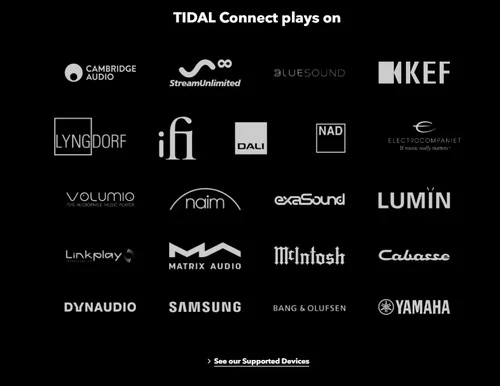
Broad support across streamers, speakers, TVs, and connected devices.

Strong Hi-Fi integration across streamers, amplifiers, and audiophile hardware.
| Ecosystem & Hi-Fi Integration | TIDAL | Qobuz |
|---|---|---|
| Native Connect | TIDAL Connect; FLAC, Hi-Res on selected hardware, Atmos | Qobuz Connect; bit-perfect up to 24/192 |
| Hi-Fi Brands / Streamers | Excellent | Excellent; rapidly expanded Connect support |
| Roon | ✓ Native integration | ✓ Native integration |
| Sonos | Direct control + Dolby Atmos; stereo up to 16/44.1 listed by Sonos |
Native Sonos app integration (up to 24-bit/48 kHz FLAC) |
| Car Integration | CarPlay, Android Auto, Android Automotive, plus Tesla, Mercedes-Benz, and Volkswagen integrations | CarPlay, Android Auto, Android Automotive |
| Smart TV | Apple TV, Android TV, Chromecast | Samsung TV, Android / Google TV |
| Voice Assistants | Amazon Alexa (US only); voice search in Tesla | Siri (CarPlay and mobile app); voice commands in car; not Alexa or Google Assistant |
Using both services across my everyday listening setup made the difference much clearer than simply comparing supported-device lists.
Qobuz is better for buying and permanently owning Hi-Res music, while Tidal is stronger for DJ tools and direct artist support.
We compared official Tidal and Qobuz documentation in 2026, focusing on offline downloads, permanent music ownership, DJ integrations, streaming payout transparency, and direct artist support.
Sources: Tidal Offline Mode · Tidal DJ · Tidal Artist Resources · Qobuz Offline Listening · Qobuz Music Store · Qobuz Artist Payout| Extra Features | TIDAL | Qobuz | Edge |
|---|---|---|---|
| App Offline Listening | ✓ Mobile offline downloads | ✓ App offline downloads | Same |
| Permanent Music Downloads | Limited Direct-to-Fan purchases from eligible artists | Download store with FLAC, WAV, ALAC, AIFF and more | Qobuz |
| DJ Tools | TIDAL DJ; Serato, rekordbox, djay Pro, stems, selected offline support | No equivalent official DJ product | Tidal |
| Published Streaming Payout | No fixed official per-stream rate published | Annual average to labels and publishers | Qobuz (Transparency) |
| Direct Artist Support | Contributions, 0%-platform-fee music sales | Primarily streaming and download-store royalties | Tidal |
These extras matter less for everyday streaming and more for specific listening habits and workflows.
Compatible with Windows & macOS · 100% Safe & Clean · 3k+ downloads monthly · 99.9% success rate
After comparing both services, I'd say the choice comes down less to sound quality and more to how you listen, discover music, and use your subscription.
If I had to recommend one service for the widest range of listeners, I'd lean toward Tidal. It combines excellent Hi-Res streaming with stronger personalized discovery, Dolby Atmos, DJ support, and a broader everyday device ecosystem.
But I'd choose Qobuz for a dedicated Hi-Fi setup or if I cared more about albums, editorial discovery, annual value, and actually owning Hi-Res music files.
Not necessarily. Both support Hi-Res FLAC up to 24-bit/192 kHz, so for stereo listening the difference depends more on the master, your DAC, and your playback setup.
No. Tidal discontinued MQA in July 2024 and now uses FLAC for lossless and Hi-Res stereo playback.
As of 2026, Tidal is cheaper if you pay monthly: Individual is $11.99/month vs. Qobuz at $12.99/month, and Family is $19.99/month vs. Qobuz at $21.90/month.
Qobuz is cheaper if you pay annually or need Duo/Student plans: Individual is $129.99/year ($10.83/month), Family is $215.88/year ($17.99/month), Duo starts at $14.99/month billed annually, and Student is $4.99/month.
Spotify Premium now offers lossless FLAC up to 24-bit/44.1 kHz, so you may not need to switch if Spotify already fits your needs. Tidal and Qobuz still make more sense if you want 24-bit/192 kHz Hi-Res, deeper Hi-Fi integration, Dolby Atmos on Tidal, or Qobuz's editorial and download-store features.
If you use multiple services and want more flexibility, AudiFab Music One lets you download music from Spotify, Tidal, Qobuz, and other 20+ platforms as local audio files for offline playback across your devices.
No, Qobuz does not currently offer Dolby Atmos streaming as a native service feature. It focuses on stereo lossless and Hi-Res audio instead.
Tidal and Qobuz both support offline listening inside their apps, but those subscription downloads are not normal local FLAC files. Qobuz also has a download store where you can buy FLAC files to keep permanently, while Tidal only offers permanent purchases in limited Direct-to-Fan cases.
If you want to save music from either service as local files, AudiFab Music One can download Tidal and Qobuz tracks, albums, and playlists to FLAC, MP3, WAV, and other common formats for more flexible offline playback.
Ultimately, choosing between Tidal and Qobuz in 2026 comes down to your personal listening habits. Both deliver top-tier 24-bit/192kHz Hi-Res audio, but Tidal stands out as the versatile all-rounder with Dolby Atmos, DJ integrations, and robust algorithmic discovery. Conversely, Qobuz is the premier choice for traditional audiophiles who value human curation, digital liner notes, permanent download purchases, and cost-effective annual or family plans.
If you want to keep music from either service as local files for more flexible offline playback, AudiFab Music One lets you download tracks from both Tidal and Qobuz to common audio formats for use across your devices.

Download Tidal and Qobuz tracks, albums, and playlists for flexible offline listening. FLAC, MP3, WAV & more • Hi-Res audio retained • Full metadata preserved


Best all-in-one tool to download from Spotify, Apple Music, Amazon Music, Tidal, Deezer, YouTube Music & more to MP3/AAC/FLAC.
Music is the greatest communication in the world and here are some articles that may help you enjoy music in a better way.

 Try It Free
 Try It Free