7 Best Tidal Downloaders 2026 (Free, Online, GitHub & More)
Discover the 7 best Tidal downloaders in 2026. Compare real test results for speed, lossless FLAC quality, and metadata across desktop, online, and GitHub tools.
Discover the 7 best Tidal downloaders in 2026. Compare real test results for speed, lossless FLAC quality, and metadata across desktop, online, and GitHub tools.
Looking for a reliable way to download Tidal music for offline listening? We tested 7 of the best Tidal downloaders in 2026, comparing real-world batch conversion speeds, lossless FLAC audio quality, and ID3 metadata preservation.
Our picks cover desktop Tidal downloaders, free online Tidal converters, GitHub Tidal converters, and mobile Telegram bots, with clear test results on speed, audio quality, and metadata. Keep reading to see how all 7 Tidal downloaders performed and find the one that best fits your needs.
⚖️ Disclaimer: This guide is for educational and personal use only. Please respect the copyright of content creators and Tidal's Terms of Service.
To ensure full transparency, all 7 Tidal downloaders were tested under identical conditions using a standardized 20-track playlist. We evaluated five core metrics: batch download speed, audio quality preservation (true lossless vs. lossy), metadata/ID3 tag accuracy, system stability, and ease of use.
| Downloader | Audio Quality | Output Formats | Tested Speed | Batch Download | Full Metadata | Ease of Use |
|---|---|---|---|---|---|---|
| AudiFab Tidal Downloader (Desktop) |
Lossless FLAC / Hi-Res |
FLAC, MP3, WAV, AAC, AIFF, ALAC | ⚡ Fast 20 songs/2m 54s |
✅ | ✅ | ✅ |
| Tidabie (Desktop) |
Lossless FLAC / Hi-Res |
MP3, AAC, WAV, FLAC, AIFF, ALAC | ⚡ Fast 20 songs/3m 02s |
✅ | ✅ | ✅ |
| Lucida (Online) |
320kbps MP3 | MP3 | ➖ Medium Frequent failures |
❌ | ❌ | ✅ |
| Apowersoft (Online Recorder) |
Low-quality MP3 (~16 kHz) |
MP3 | 🐢 Slow 1X/Real-time |
❌ | ❌ | ✅ |
| tiddl (GitHub) |
Standard CD Lossless FLAC / M4A |
FLAC, M4A | ➖ Medium 20 songs/4m 37s |
✅ | ❌ | ❌ |
| tidaloader (GitHub) |
Low-quality FLAC / MP3 / AAC / Opus | FLAC, MP3, AAC, Opus |
➖ Medium Occasional failures |
✅ | ❌ | ❌ |
| TidalMusic_DLbot (Telegram) |
Low-quality MP3 | MP3 | ➖ Medium | ❌ | ❌ | ✅ |
| OS | Pricing | Speed | Tested Audio Quality |
|---|---|---|---|
| Windows & Mac | Free Trial / Annual & Lifetime Plan |
10X | Lossless FLAC / Hi-Res |
|
Recommend Level: ⭐⭐⭐⭐⭐
Click the Link: Best Overall (Hi-Fi/Hi-Res Quality): AudiFab Tidal Downloader (Win & Mac) |
|||
AudiFab Tidal Downloader is a comprehensive audio solution designed to capture tracks, albums, playlists, and podcasts, from top platforms like Tidal, Spotify, Apple Music, and SoundCloud, without sacrificing sound quality. Its ad-free interface powers high-speed batch saving, allowing users to download Tidal music at up to 10X speed. AudiFab also handles format conversion with ease, transforming Tidal tracks into FLAC, MP3, WAV, AAC (.m4a), AIFF, or ALAC while keeping every detail of the original ID3 tags intact.
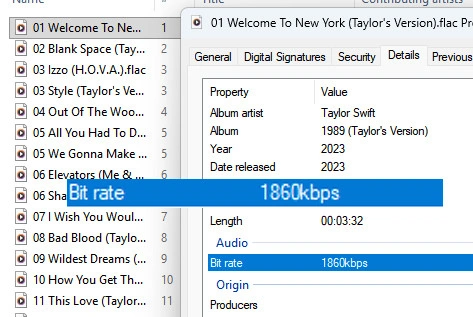
In our testing, AudiFab Tidal Downloader demonstrated fast playlist processing, downloading 20 songs in just 2 minutes and 54 seconds. It captured true 16-bit / 44.1 kHz lossless FLAC audio from Tidal with zero signs of lossy compression. The software is beginner-friendly and effortlessly handles full playlist downloads, a feature missing from many competing tools. Beyond Tidal, it also reliably converts playlists from Spotify, Apple Music, and YouTube audio while preserving complete ID3 tags.
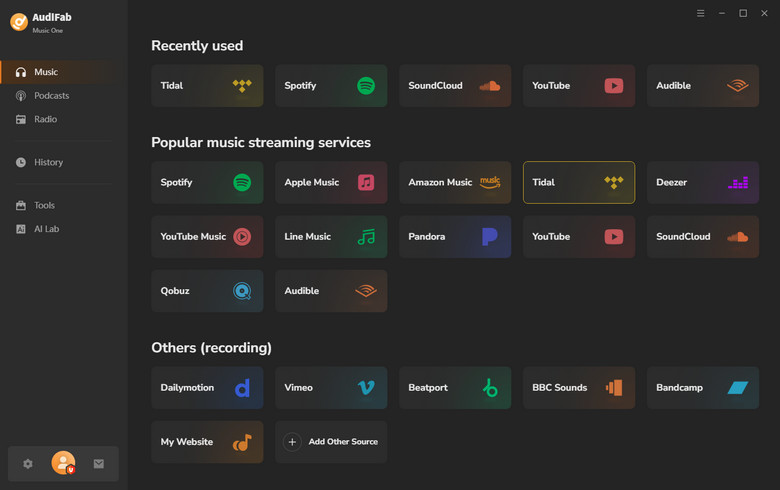
Install and run AudiFab
Open AudiFab and select 'Tidal' as your download source from the 'Music' tab.
Customize Output Settings
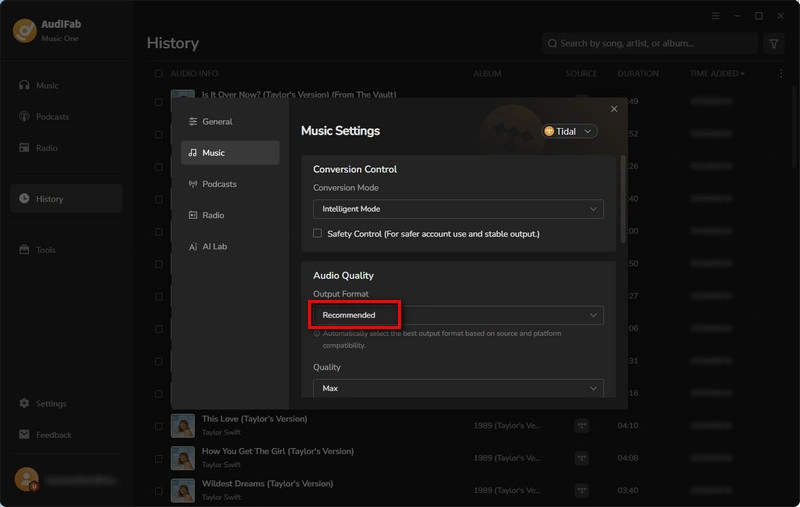
Before downloading, click the Settings icon in the bottom-left corner to open the preferences panel. Select 'Recommended' as the output format to preserve the original Tidal Lossless audio quality of your downloads.
Add Tidal Music to AudiFab Download List
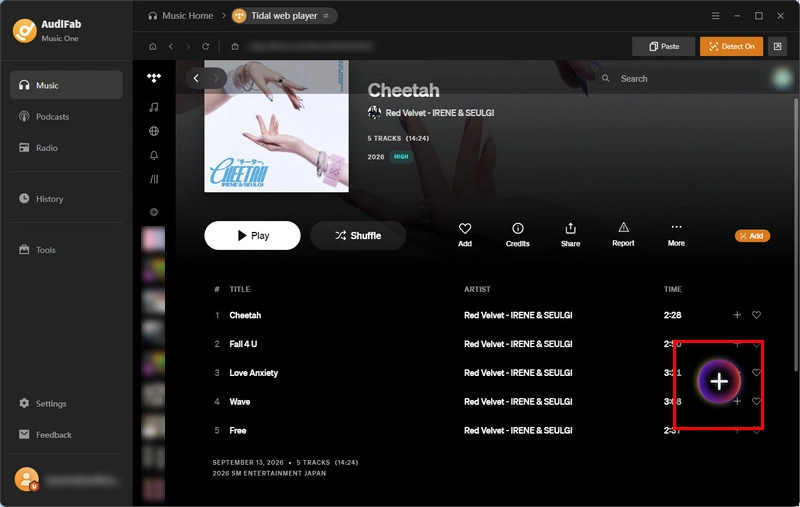
Browse your Tidal music library and find the songs, albums, or playlists you want to download. Click the '+' icon in the lower-right corner, and AudiFab will quickly analyze and load the available tracks. In the pop-up window, select the songs you want, then click 'Add' to add them to the AudiFab conversion queue.
Start the Conversion
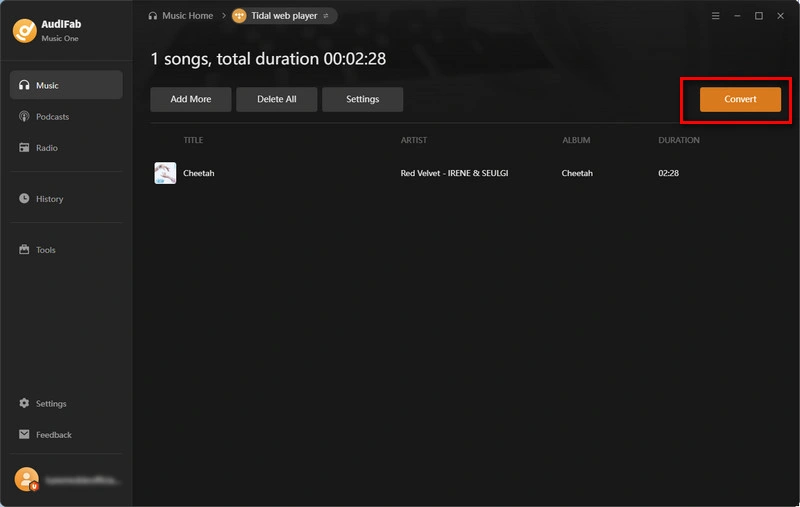
After adding your tracks, click the 'Convert' button to start the conversion. AudiFab will convert and download your selected TIDAL music as FLAC files. The process is quick and straightforward.
Find Your Converted TIDAL Music
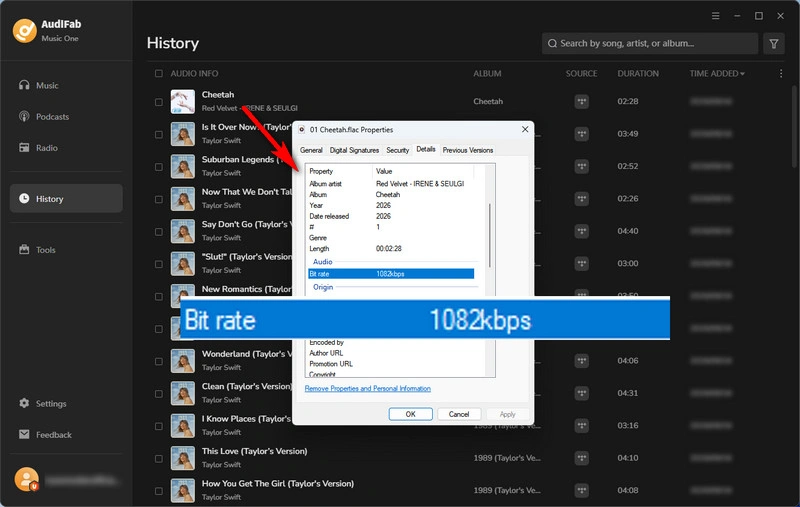
When the conversion is complete, you can access your downloaded FLAC files from the 'History' tab. Your lossless Tidal files are saved there for easy access and offline playback.
| OS | Pricing | Speed | Tested Audio Quality |
|---|---|---|---|
| Windows, macOS | Paid (Free trial available) | Fast (Up to 10x) | Lossless FLAC / Hi-Res |
|
Recommend Level: ⭐⭐⭐⭐
Click the Link: https://www.tidabie.com/tidal-music-converter.html |
|||
Tidabie Tidal Music Converter is a dedicated desktop application engineered to download and convert Tidal songs, full albums, playlists, and podcasts for offline listening. It exports Tidal tracks into versatile formats while retaining original high quality, song lyrics, and full ID3 metadata.
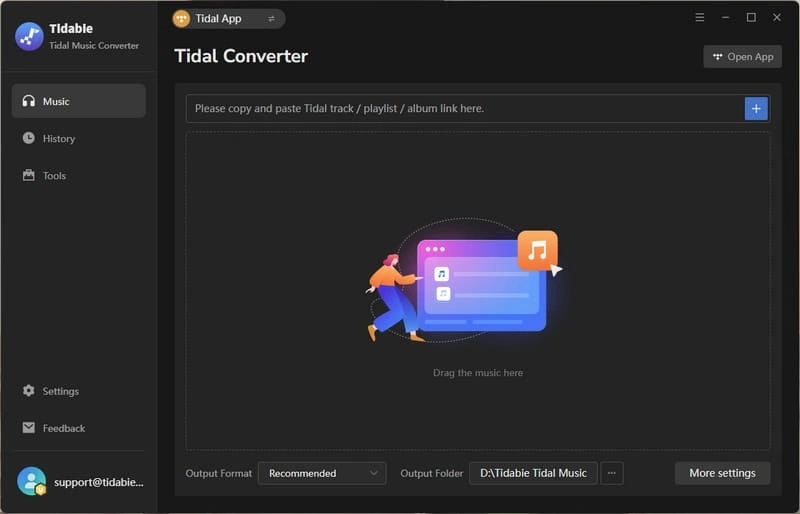
In our testing, Tidabie performed reliably in downloading full 16-bit / 44.1 kHz lossless FLAC tracks. It demonstrated fast playlist processing, downloading 20 songs in just 3 minutes and 02 seconds. Important metadata, including ID3 tags, cover artwork, and track order, was fully maintained in the output folders.
Step 1: Select Your Preferred Tidal Audio Source.
Step 2: Navigate to the program's settings menu to choose your desired output format, like MP3 or FLAC, and set the target audio quality.
Step 3: Select Your Desired Tidal Songs, Albums, or Playlists.
Step 4: Click 'Convert' to initiate and complete the download process.
| OS | Pricing | Speed | Tested Audio Quality |
|---|---|---|---|
| Online (Windows, macOS, Linux, Android, iOS) | Free | Medium | 320kbps MP3 |
|
Recommend Level: ⭐⭐⭐
Click the Link: https://lucida.to/ |
|||
Lucida is a completely free, web-based online Tidal Music downloader without ads or account registration. While Lucida offers an ultra-clean, minimalist interface, its reliability is questionable due to frequent backend server errors and 'Failed to fetch track' processing issues. When a Tidal conversion fails, the site attempts to resolve and fetch the track from alternative platforms like SoundCloud or Deezer.
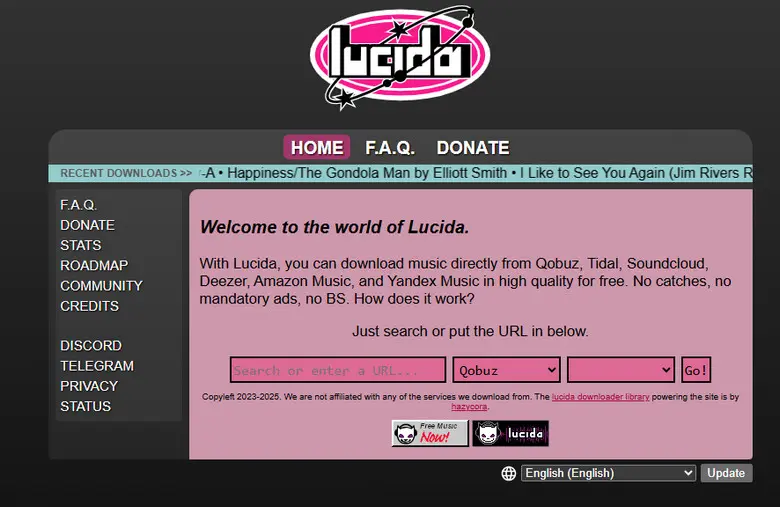
In our hands-on testing, Lucida repeatedly failed to directly process Tidal tracks, frequently triggering error messages like 'Stream URL could not be retrieved' or 'An error occurred'. As one of the few online Tidal converters available, its low success rate is offset by the fact that it is entirely free, ad-free, and requires no registration, making it somewhat useful for casual users. When Lucida manages to fall back and pull tracks from alternative platforms, it works as a decent last-resort option for downloading single songs.
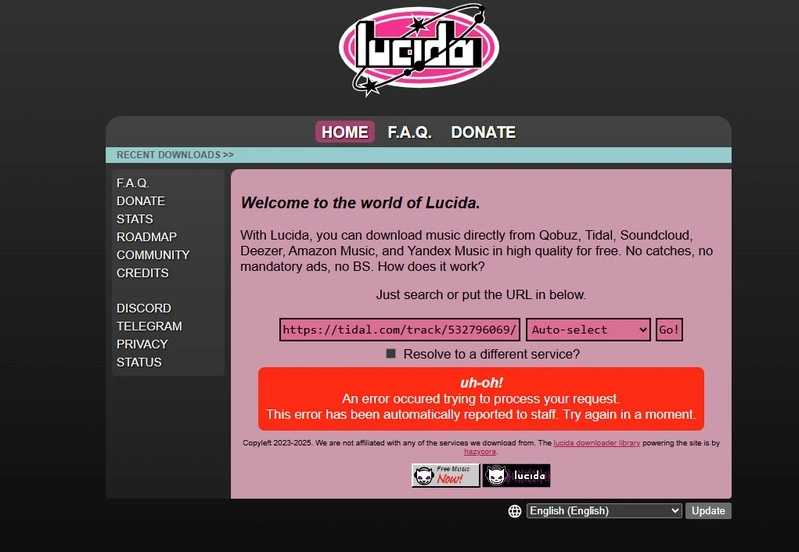
Step 1: Copy the Tidal music link.
Step 2: Go to the official Lucida site in your browser and paste the URL.
Step 3: Click 'Download track'.
Try AudiFab Tidal Downloader for lossless FLAC and Hi-Res audio, batch downloads, and full metadata.
Compatible with Windows & macOS · 100% Safe & Clean
| OS | Pricing | Speed | Tested Audio Quality |
|---|---|---|---|
| Online | Free Online Service (Up to 1 hour limit per recording) / $59.95 per year | 1X (Real-time recording) | Low-quality MP3 (~16 kHz sampling rate) |
|
Recommend Level: ⭐⭐⭐
Click the Link: https://www.apowersoft.com/free-online-screen-recorder |
|||
Apowersoft Free Online Audio Recorder is a web-based real-time audio capture tool that allows users to record Tidal music directly from their browser without ads. Unlike direct online Tidal Music downloaders, it captures system audio line-in as it plays, making performance relatively stable.
However, because it operates as a standard audio recorder rather than a lossless extractor, recorded Tidal files require manual audio editing/splitting for individual Tidal tracks, offer no ID3 metadata, and suffer from noticeable sound compression.
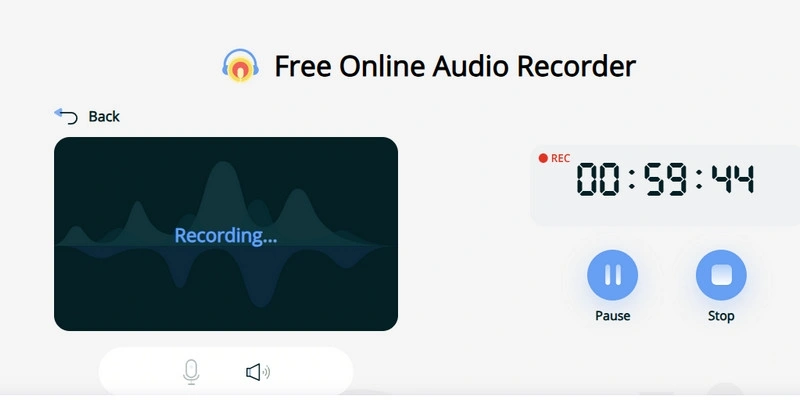
In our hands-on testing, Apowersoft Free Online Audio Recorder performed stably without audio popping or harsh distortion. However, audio quality is quite low. The sampling rate drops to around 16 kHz, with significant loss of left/right channel separation, spatial depth, and instrument detail. It works fine for casual listening, voice isolation, or quick track previews, but is unsuitable for audiophiles seeking true Tidal HiFi quality.
Step 1: Navigate to the Apowersoft Free Online Screen Recorder page in your web browser and click the 'Start Recording' button.
Step 2: Choose your recording preferences by selecting your screen area, webcam, system sound, or microphone, then click 'Start Recording'.
Step 3: Choose the specific window, tab, or application you want to record (such as the Tidal online player page) and click 'Share' to confirm.
Step 4: Use the toolbar controls to 'Pause' or 'Stop' the recording at any time.
| OS | Pricing | Speed | Tested Audio Quality |
|---|---|---|---|
| Windows, macOS, Linux | Free (Open-Source) | Medium | Standard CD Lossless FLAC / M4A |
|
Recommend Level: ⭐⭐⭐
Click the Link: https://github.com/oskvr37/tiddl |
|||
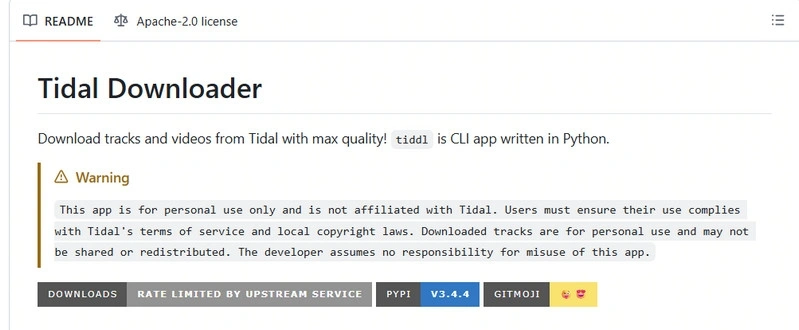
Tiddl is a free, fully open-source GitHub Tidal Downloader for downloading Tidal audio tracks, playlists, and albums. It offers high transparency and receives regular updates roughly every two months. However, because it lacks a graphical user interface (GUI), setup and daily use are non-intuitive for non-technical users, requiring pre-installed Python dependencies, FFmpeg binaries, and manual command inputs.
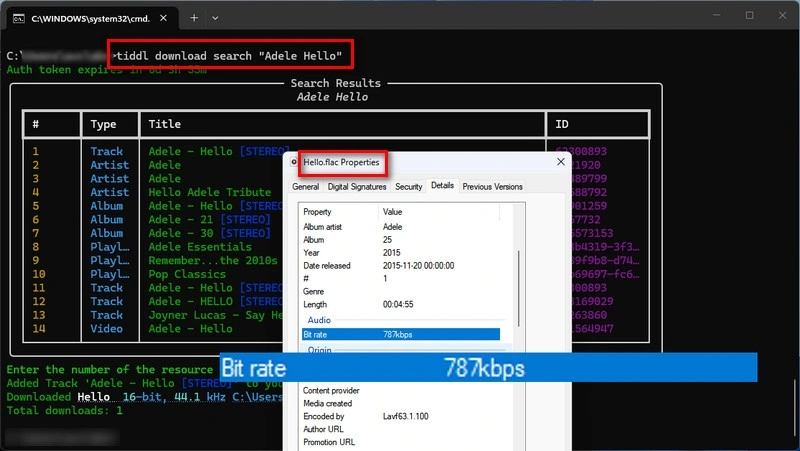
In our testing, tiddl downloaded 20 songs in 4 minutes and 37 seconds, delivering real, loss-free Tidal audio with no fake compression. The tracks were saved as standard CD-quality FLAC files (16-bit/44.1kHz), not top-tier Hi-Res audio. While the installation and command-line setup can be tricky for beginners, it remains a reliable, lightweight Tidal converter if you are comfortable using terminal commands.
Install Python & FFmpeg
Open Command Prompt
Win + Rcmd Install tiddl
pip install tiddltiddl --helpAuthenticate Tidal
tiddl auth loginDownload Tidal Music
tiddl download -q max url TIDAL_URLtiddl download -q max url https://tidal.com/browse/playlist/xxxxx
AudiFab offers a simpler desktop experience with batch downloads, lossless audio, and full metadata.
Compatible with Windows & macOS · 100% Safe & Clean
| OS | Pricing | Speed | Tested Audio Quality |
|---|---|---|---|
| Windows, macOS, Linux (Docker-based) | Free (Open-Source) | Medium | Low-quality FLAC / MP3 / AAC / Opus |
|
Recommend Level: ⭐⭐⭐
Click the Link: https://github.com/RayZ3R0/tidaloader |
|||
Tidaloader is a free, self-hosted open-source Tidal downloader featuring a modern web user interface. It allows users to download tracks, full albums, and playlists while preserving metadata (album artist, track numbers, release year, etc.). However, because it runs on Docker rather than as a standard desktop installer, setting it up requires navigating technical prerequisites, making the initial installation steep for beginners.
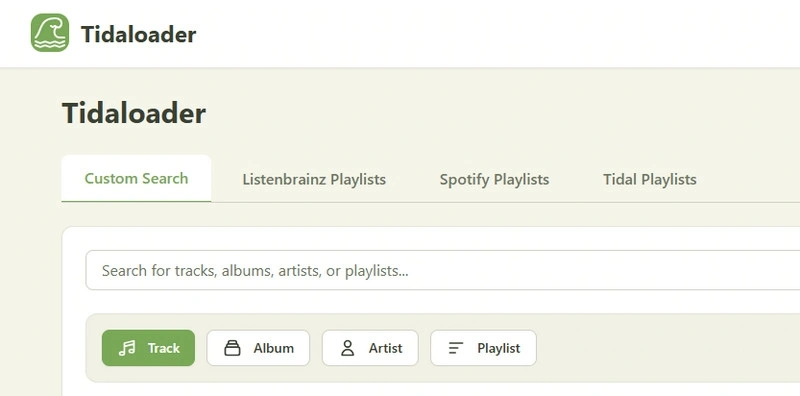
In our testing, the hardest part was setting up Tidaloader with Docker Desktop. It needs extra settings like WSL 2 and virtualization, which can take up to two hours for beginners. Once it is up and running, the web page looks modern and clean, but downloads can still fail randomly. In short, it works, but we do not recommend it as your first choice.
Install Required Software
Install Docker Desktop, WSL 2 (required by Docker Desktop), and Git. Then, enable Virtualization.
Download tidaloader
Win + R, and enter cmd.cd C:\Users\YourName\tidaloaderStart tidaloader
docker compose up -d. Docker will build and start the tidaloader service.Open the tidaloader Web Interface
http://localhost:8001.Download Tidal Music
In the web interface, you can search for a track or paste a Tidal URL. Add the Tidal song to the 'Download Queue' and click 'Download'. Your Tidal music will be downloaded to the configured music folder.
| OS | Pricing | Speed | Tested Audio Quality |
|---|---|---|---|
| Windows, macOS, Linux, Android, iOS (Telegram-based) | Free | Medium | Low-quality MP3 |
|
Recommend Level: ⭐⭐⭐
Click the Link: https://t.me/TidalMusic_DLbot |
|||
TidalMusic_DLbot is a free open-source Telegram bot designed for downloading Tidal audio directly inside the Telegram app. Because it runs within Telegram on Android (and other devices), it requires no separate app installation or account setup, making it one of the most convenient options for quick mobile downloads. However, like most Telegram bots, its reliability depends on unofficial APIs and active bot maintainers, which can lead to unexpected downtime.
In our testing, using Telegram bots was simple and fast for single songs, outputting basic MP3 files with title and artist tags included. However, overall reliability is low because these bots frequently go offline or break. Additionally, audio quality can be inconsistent, and trying to download full playlists usually fails. It is a handy option for a quick mobile download, but not for heavy daily use.
Step 1: Open the TidalMusic_DLbot.
Step 2: Copy a Tidal Link and send the Link to the Bot. The bot will send the audio file back in Telegram.
Step 3: Tap 'Save File' and the file will be stored in your Telegram download folder.
Switch to AudiFab for lossless FLAC and Hi-Res audio, batch downloading, and full metadata.
Compatible with Windows & macOS · 100% Safe & Clean
Tidal Downloader Next Generation (tidal-dl-ng) was a popular open-source tool built to download audio directly from Tidal, offering both a beginner-friendly graphical interface (GUI) and a command-line interface (CLI) for advanced users.
No, tidal-dl-ng is no longer actively maintained or officially available. The original GitHub repository and core developer account have been removed. While unofficial community mirrors and forks exist across various platforms, the primary project is abandoned.
Although unofficial community mirrors and forks still exist across various platforms, we excluded tidal-dl-ng from our top 7 recommendations due to the safety and malware risks associated with unverified third-party code. Furthermore, without active developer maintenance, the software cannot adapt to Tidal's backend API updates, leading to broken login flows and extraction failures.
https://github.com/r3ferrei/tidal-dl-ng-1https://radicle.network/nodes/rosa.radicle.network/rad%3Az3wRSu2dKrAEpedGC9gxvHux7SZbJAlternative mirrors exist across community platforms. If you choose to explore these backup links, proceed with caution and verify the source code before running any files.
Since the official project is no longer available on its main platform, we do not recommend using tidal-dl-ng mirrors for general users. Advanced users with code auditing skills can inspect these third-party community backups at their own risk, but switching to an actively maintained alternative is a safer and much simpler option.
Yes. While Tidal natively streams using FLAC and AAC formats, dedicated downloaders like AudiFab Tidal Downloader can automatically convert and export Tidal tracks, albums, and playlists into MP3 format with customizable bitrates (up to 320 kbps).
Yes, provided you use a tool that supports direct lossless extraction. AudiFab Tidal Downloader supports saving tracks in original 16-bit/44.1kHz CD-quality FLAC as well as 24-bit Hi-Res audio, ensuring 100% of the original audio fidelity is preserved alongside full ID3 metadata.
The original tidal-gui project has been largely unmaintained and frequently suffers from broken API keys and login failures due to Tidal's API updates. While some open-source forks exist, they require manual setup and troubleshooting. For a stable experience, a continuously maintained downloader is recommended.
Yes. Desktop tools like AudiFab Tidal Downloader and Tidabie support one-click batch processing for full playlists and albums. Open-source GitHub Tidal downloader like tiddl also support downloading full playlists by pasting the playlist URL, whereas basic online converters and Telegram bots typically require processing tracks one by one.
Based on our hands-on testing, AudiFab Tidal Downloader is the best overall choice for users. It offers fast 10X batch conversion speeds, lossless Hi-Res FLAC output, full ID3 tag preservation, and an easy-to-use interface that requires no command-line setup.
Whether you need a free online Tidal converter, a GitHub Tidal downloader, or a mobile bot, there are plenty of options. However, for speed, reliable 100% Hi-Res audio quality, and complete ID3 tags, AudiFab Tidal Downloader remains the best overall choice in 2026.

Best all-in-one tool to download from Spotify, Apple Music, Amazon Music, Tidal, Deezer, YouTube Music & more to MP3/AAC/FLAC/WAV/ALAC/AIFF.
Music is the greatest communication in the world and here are some articles that may help you enjoy music in a better way.

 Try It Free
 Try It Free