Best Free Online Apple Music Downloaders
We select and introduce the top 3 Apple Music to MP3 download sites, along with AudiFab for safely saving Apple Music tracks.
We select and introduce the top 3 Apple Music to MP3 download sites, along with AudiFab for safely saving Apple Music tracks.
Apple Music allows offline listening within its app, but it does not officially let users export songs as MP3 or other common audio formats. As a result, many users search for an Apple Music converter online to save tracks for offline use on MP3 players, USB drives, or other devices.
In this 2026 guide, we tested the best free Apple Music to MP3 converters online for speed, quality, and ease of use. We also include a safer alternative for users who need high-quality batch conversion and stable performance.
Below are 3 of the most frequently discussed online Apple Music downloaders that remain active in 2026, evaluated based on their current performance and functionality.
| Tool | Best For | Ads | Quality | Support Apple Music Links | Batch | ID3 | Stability |
|---|---|---|---|---|---|---|---|
| AM-DL | Wide link support | Med | High | Song/Album/Playlist/Video/Radio/Post | Limited | Yes | Med |
| APLMate | Simple MP3 conversion | Heavy | Med | Song/Album/Playlist | No | Part | Med |
| AAPL | Playlist download | Low | High | Song/Album/Playlist | Yes (Paid) | Yes | High |
Compared with online Apple Music downloaders, AudiFab provides a more stable and professional experience, especially for users managing large music libraries or multiple devices. You can try the free version first to see if it fits your workflow. 👇
If you want to download your favorite songs from Apple Music, a free online Apple Music downloader can be an essential tool. We tested and selected the best options in 2026.
Before using any free online Apple Music downloader, be aware of risks:
Looking for a Safer Alternative?
If you frequently download Apple Music playlists or want better audio quality, dedicated software like AudiFab Apple Music Converter is a safer and more reliable choice than online sites.
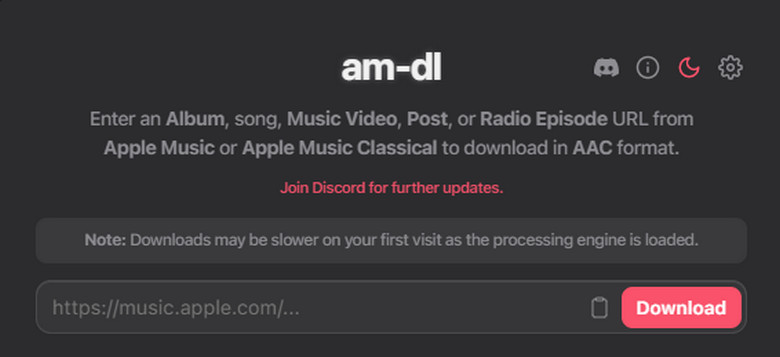
AM-DL is one of the most talked-about free online Apple Music downloaders on Reddit in 2026. In our tests, it handled single-song downloads quickly and smoothly in the browser. Smaller playlists downloaded reliably as well.
However, with larger playlists, we sometimes saw errors like “Download Error, Track Unavailable,” incomplete ZIP files, and failed tracks needing manual retries. These issues seem linked to server load or connection instability, not the Apple Music links themselves.
What We Like 🙂:
What We Don't Like 🙃:
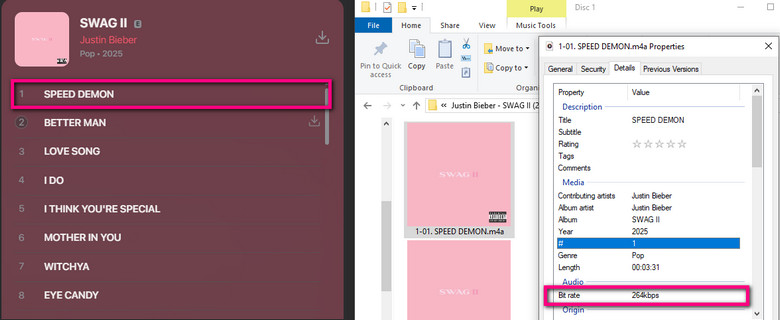
Want to download Apple Music in Lossless quality? Please use AudiFab Apple Music Converter in Part 3.
👉 See also: How to Convert Spotify Music to M4A [Full Guide]
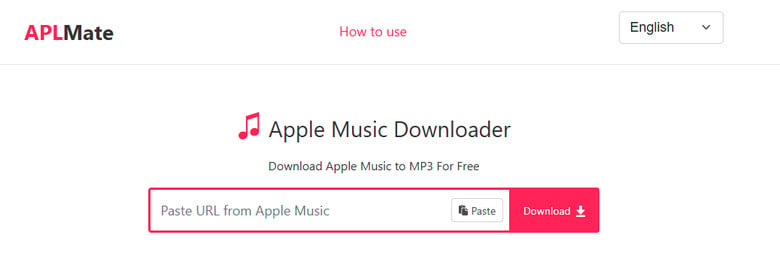
APLMate is a browser-based Apple Music downloader that claims to convert Apple Music songs, albums, and playlists into 320kbps MP3 for free. However, in our tests, it doesn’t rip audio directly from Apple Music but matches metadata to public sources like YouTube, resulting in lower audio quality than advertised.
What We Like 🙂:
What We Don't Like 🙃:
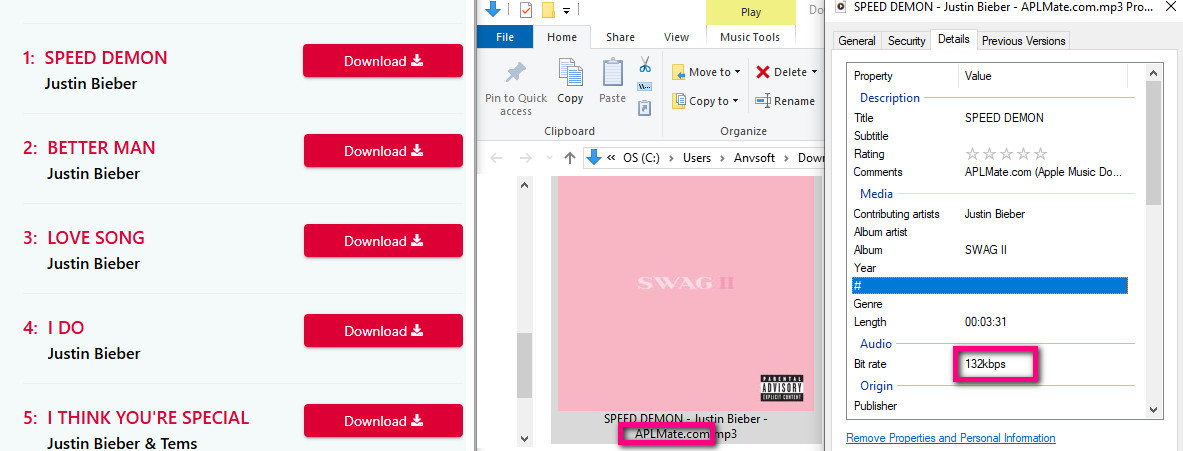
Tip: If you want to batch download higher-quality Apple Music songs, click here >>
AAPLMusicDownloader stood out as a fully browser-based free Apple Music downloader with a simple workflow and multi-format support. It provides access to high-quality streams, including original 256kbps AAC files, making it a strong free option for converting Apple Music to MP3/M4A. It has a clean interface and fast processing speed, outperforming many online Apple Music downloaders in terms of usability and stability.
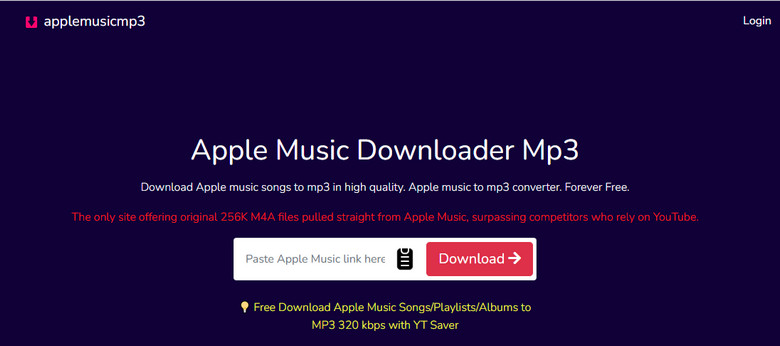
What We Like 🙂:
What We Don't Like 🙃:
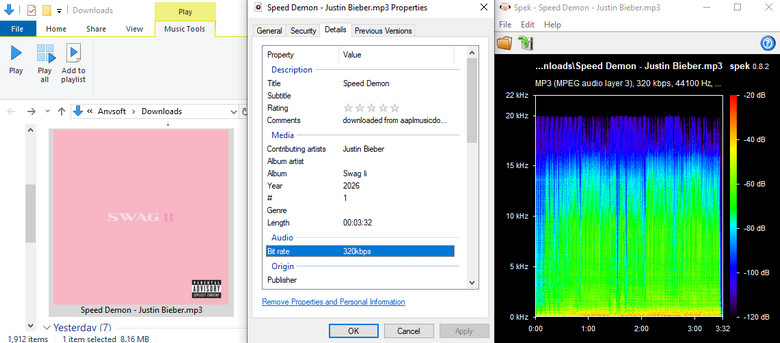
Looking for a faster way to download Apple Music tracks? Explore the recommended solution.
In our 2026 testing, we encountered many “popular” Apple Music downloader sites that still rank in search results but are no longer functional, safe, or reliable. Most have been abandoned, blocked by updated Apple Music protections, or turned into aggressive ad/redirect traps.
Save your time and skip these tools:
| Converter | Status | Why You Should Avoid It |
|---|---|---|
| KeepVid Music | ❌ Broken | Server-side parsing no longer works; often triggers browser security warnings |
| Apple Music to MP3 Downloader (apple-music-downloader.com) | ❌ Unstable | Frequently fails to process links and often redirects to unreliable or ad-heavy pages |
| Soundloaders | ❌ Defunct | Most links now return 404 errors or infinite loops after 2026 shutdown |
| MP3PAW | ⚠️ Unreliable | Not a real Apple Music converter; often matches YouTube, leading to wrong or low-quality (128kbps) audio |
| “Playlist-Downloader” (various clones) | 🛑 Risky | Many GitHub/on-render clones are linked to phishing pages or malware redirects |
So far, we have introduced several free Apple Music to MP3 download websites. If you regularly download large Apple Music playlists or care about higher audio quality, we recommend using a professional desktop tool — AudiFab Apple Music Converter.
AudiFab fully satisfies user needs by combining simplicity with powerful features. It helps you download Apple Music songs to computer while keeping lyrics, album cover, and metadata intact, so your music stays organized. With AudiFab, you can convert music for offline use, burn CDs, transfer files to USB, sync devices, and create karaoke tracks by removing vocals. Supporting Apple Music lossless audio quality up to 24-bit/192kHz, and the quick 10x conversion speed makes the process efficient and stable.
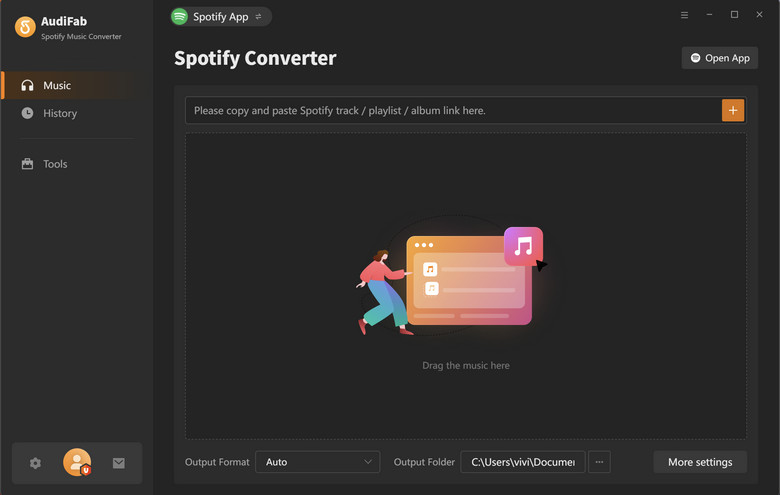
What We Like 🙂:
What We Don't Like 🙃:
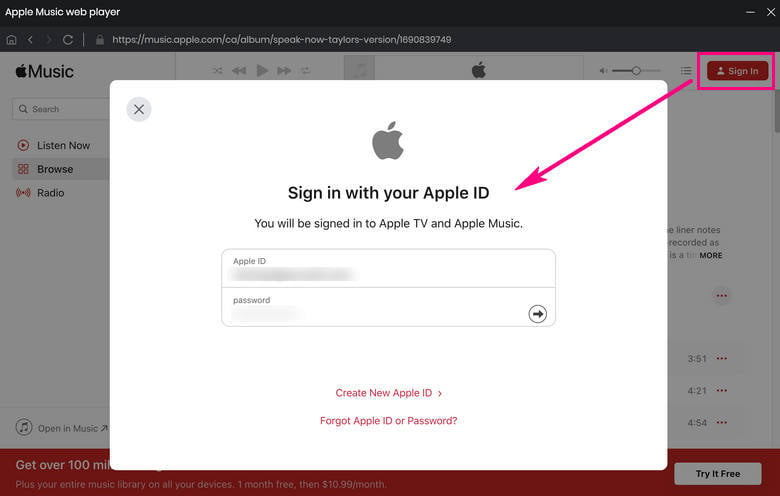
Download and open AudiFab Apple Music Converter
Download and open AudiFab Apple Music Converter. It supports converting music from both the iTunes app and the Apple Music web player. Here, we’ll use the Apple Music web player as an example.
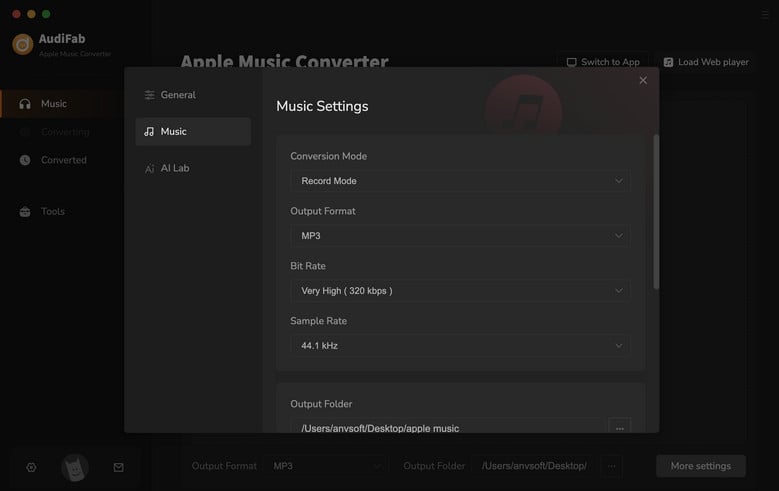
Set Output Preferences for Apple Music
Click the Settings button on the left panel. Set the output format to MP3, then customize the bit rate, sample rate, output folder, and file naming settings as needed.
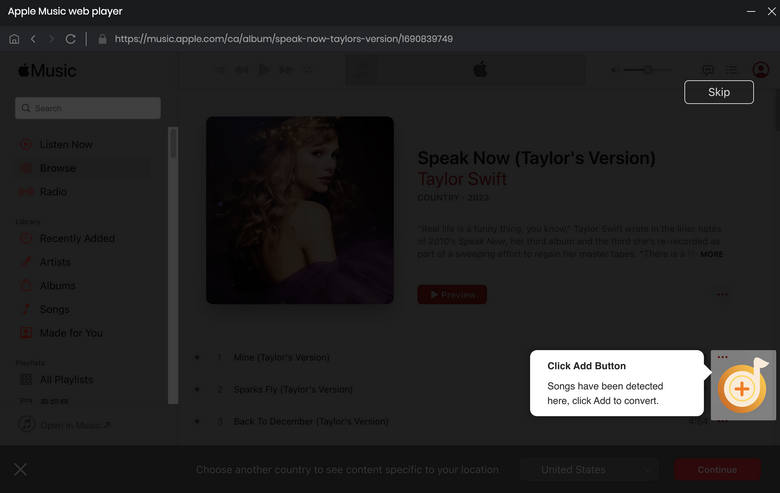
Add Apple Music Tracks for Conversion
Return to your Apple Music library and open the songs, albums, or playlists you want to download. Click the "+" button to parse the music content. Then select the tracks you want and click Add to include them in the conversion list.
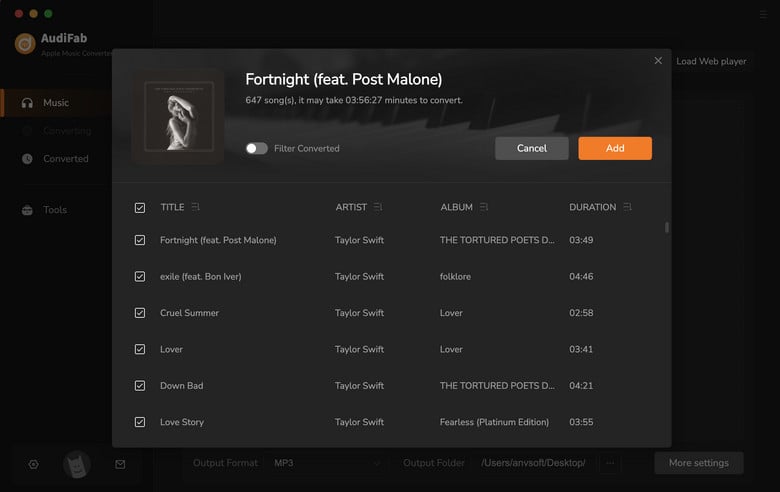
Convert Apple Music to MP3
Once everything is ready, click Convert to start downloading and converting Apple Music songs to MP3.
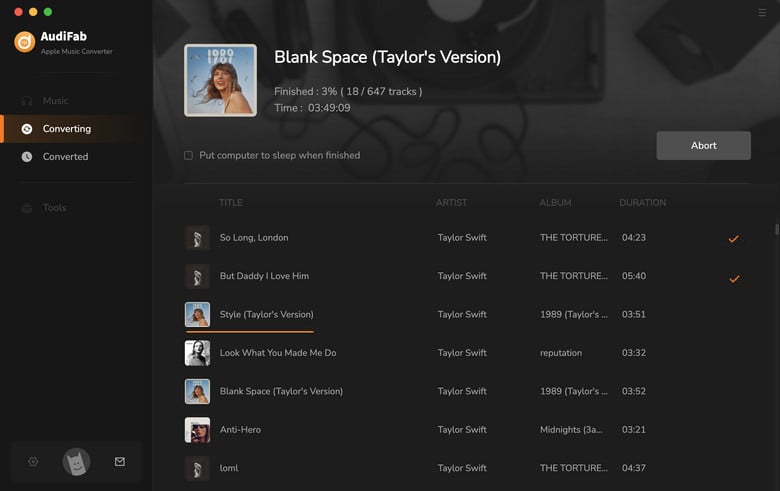
Locate Downloaded Apple Music Files
After conversion, go to the History list, hover over a track, and click the Folder icon to locate the downloaded Apple Music files on your computer.
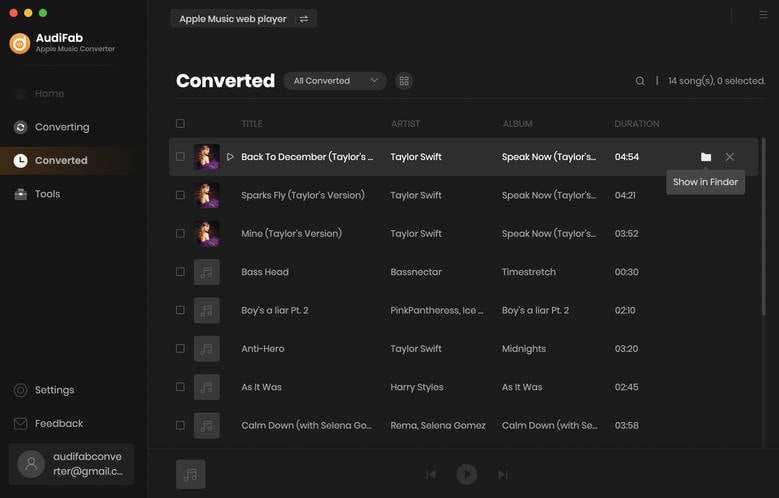

⚖️ Legal Disclaimer All downloads should be for personal, non-commercial use only. Respect content creators’ copyrights and comply with Apple Music’s Terms of Service and local copyright laws.
👉 See also: Guide to Unsubscribe Apple Music & Keep Its Songs Forever
Are free online Apple Music downloaders safe?
Not always. Some online Apple Music downloaders contain pop-ups, redirects, phishing pages, or malware risks. Avoid sites that ask for your Apple ID login or repeatedly fail to process links.
Can I download Apple Music songs as MP3 for free?
Yes. Some free online Apple Music downloaders can convert Apple Music links to MP3 files. However, many tools have limitations on audio quality, playlist support, or daily downloads.
Do online Apple Music downloaders support lossless audio?
Most online converters do not support true Apple Music lossless quality. Many are limited to compressed MP3 or AAC formats. For lossless audio, desktop tools like AudiFab Apple Music Converter are more reliable.
Why do some Apple Music downloaders stop working?
Apple Music frequently updates its platform systems and security mechanisms, which can cause many free online downloaders to become unstable, fail to process links, or stop working completely over time.
Can I download Apple Music playlists online?
Some tools support playlist downloads, but many free sites cannot batch download reliably. Large playlists often fail or require downloading tracks one by one.
What are the best free online Apple Music downloaders in 2026?
There are many free online Apple Music downloaders that let you download or convert Apple Music songs, albums, and playlists without installing software. Some offer better audio quality, while others focus on speed, playlist support, or ease of use. Check our comparison table above to find the best option for your needs.
What is the best alternative to online Apple Music downloaders?
If you need stable batch downloading, better audio quality, and safer conversion, a dedicated desktop Apple Music converter, like AudiFab is usually the best alternative.
This guide reviewed free online Apple Music downloaders based on audio quality, speed, playlist support, ease of use, safety, and stability. While these tools are good for quick single-track downloads, they often have limits like unstable performance and poor batch support.
If you're looking to use unblocked Spotify, consider using AudiFab Spotify Music Converter to download Spotify songs to MP3, allowing you to play music anywhere—at school, work, or beyond.
Your best choice depends on what you need—convenience, speed, or quality. For regular Apple Music playlist downloads and better stability, AudiFab Spotify Music Converter is a solid option with more features and consistent results.

Convert Apple Music, iTunes M4P, audiobooks & podcasts to MP3/AAC/FLAC/WAV. Preserve lossless quality and complete ID3 tags.
Music is the greatest communication in the world and here are some articles that may help you enjoy music in a better way.

 Try It Free
 Try It Free