8 Best Free Mixcloud Downloaders in 2026
Eight tools tested on Mixcloud shows — online, desktop, and mobile — plus which one fits the way you listen.
Eight tools tested on Mixcloud shows — online, desktop, and mobile — plus which one fits the way you listen.
A Mixcloud downloader lets you save a DJ mix, radio show, or podcast as a local audio file for offline listening. Unlike Mixcloud's built-in offline feature, third-party downloaders can export files you can play in other apps or move between devices. Below are eight tools tested on public Mixcloud links, compared for output formats, file quality, metadata, download options, and ease of use.
⚖️ Disclaimer These are third-party services not affiliated with AudiFab. Only download content you created, content you have permission to keep, or content whose licence allows it. Subscriber-only Mixcloud Select shows and private mixes cannot be downloaded by any tool listed here.
| Tool | Type | Output format | Output quality (tested) | Batch Download | Metadata |
|---|---|---|---|---|---|
| AudiFab | Desktop (Windows/macOS) | MP3, AAC, WAV, FLAC, AIFF, ALAC | 320 kbps MP3 | ✅ | ✅ |
| MixcloudDownloader.net | Online | M4A | 63 kbps M4A | ❌ | ❌ |
| FliFlik | Online | MP3 | 139 kbps MP3 | ❌ | ❌ |
| AnyDownloader | Online | M4A | 63 kbps M4A | ❌ | ❌ |
| Mixcloud MP3 | Online | M4A, MP3 | 63 kbps M4A | ❌ | ❌ |
| SMDownloader | Online | M4A | 63 kbps M4A | ❌ | ❌ |
| MixDownloader | Android app | M4A, MP3 | 63 kbps M4A | ❌ | ❌ |
| yt-dlp | Desktop CLI (open source) | M4A, AAC, MP3 | 191 kbps AAC | ✅ | Requires extra flags |
Our Rating: ⭐⭐⭐⭐⭐
URL: https://www.audifab.com/best-music-converter.html
AudiFab Mixcloud Downloader runs inside a desktop all-in-one converter, with Mixcloud sitting alongside other streaming sources such as SoundCloud, Bandcamp, BBC Sounds, and Beatport. The program queues shows and playlists for batch conversion, and exports to six audio formats — MP3, AAC, WAV, FLAC, AIFF, and ALAC.
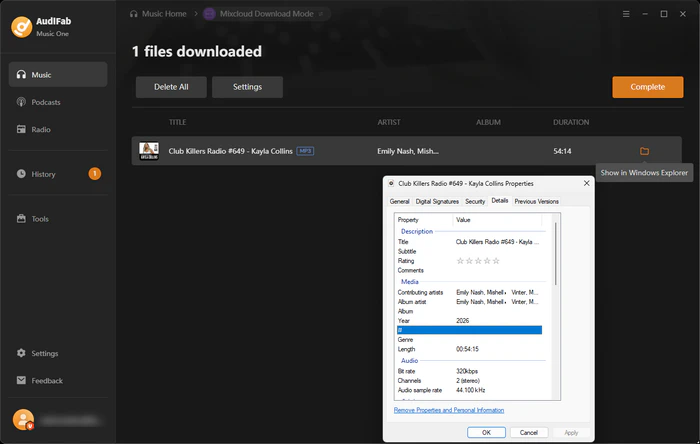
I tested AudiFab against a long public Mixcloud set. The exported MP3 came out at 320 kbps, and the file carried the detected title, artist, cover art, and track-level metadata. The whole set processed without freezing halfway. If your music library spans Mixcloud, SoundCloud, and Bandcamp, AudiFab lets you manage downloads from multiple sources in one queue. Its built-in tag editor and file-organization rules (such as Artist → Album or Playlist → Year) also help keep your files organized without manually renaming them.
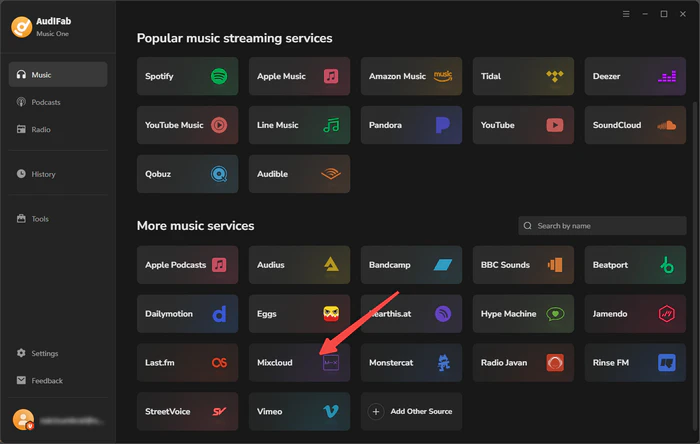
Choose Mixcloud as the Source
Install AudiFab and launch it. On the "More music services" screen, pick Mixcloud from the supported sources.
Browse the Web Player and Add the Show to the Queue
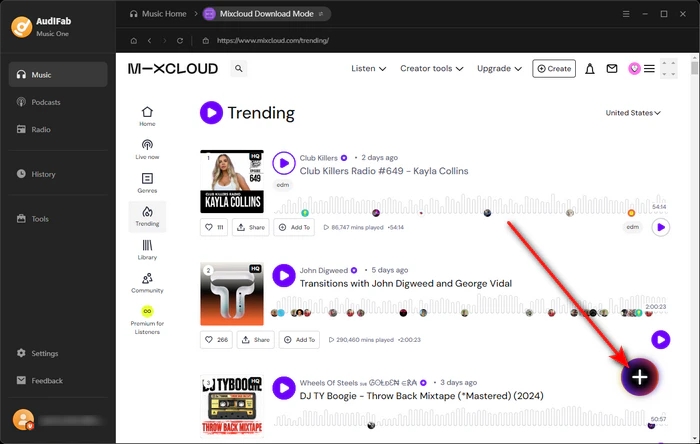
Once AudiFab opens the Mixcloud web player, browse Trending, genres, or the artist page to find the show you want to download. When you locate the target mix or radio set, click the plus button in the bottom-right corner to send it to the conversion queue.
Set Output Format
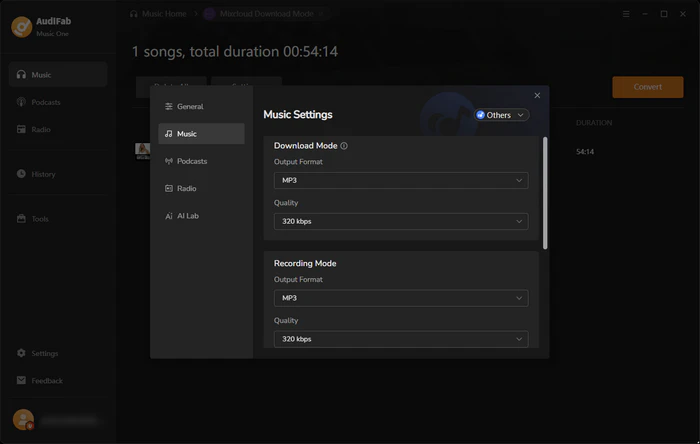
Click Settings to open Music Settings, then choose Output Format as MP3, along with bit rate, sample rate, output folder, and file naming rules.
Convert and Find Your Files
Review the queued shows, then click the orange Convert button. When it finishes, switch to the History tab, and click the folder icon to open the saved file — tags and artwork already attached, ready for a player or DJ software.
Our Rating: ⭐⭐⭐☆☆
URL: https://mixclouddownloader.net/
MixcloudDownloader.net is a no-install web resolver built only around Mixcloud. The homepage keeps the whole job to one paste box and a Download button. It handles one show per attempt only — no playlists or batch queue — and its reach stops at public content, so Mixcloud Select episodes and private mixes will not resolve here.
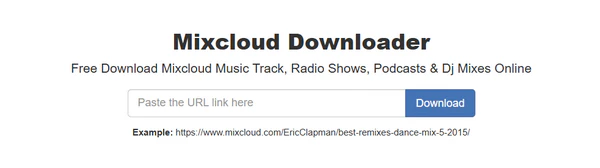
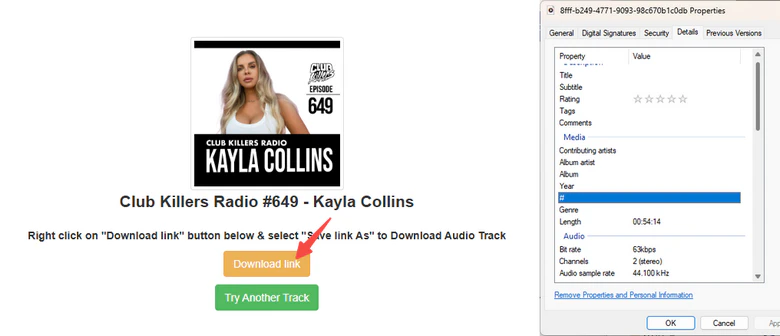
I put it through a 54-minute Club Killers Radio #649 episode, pasting the full show URL and clicking Download. The link resolved after a few page redirects, and the saved file landed as an M4A at 63 kbps. There were no output format options available. The title and cover were not carried into the file itself. For a casual one-off listen it does the job, but a compressed file with missing metadata is hard to keep in a tidy long-term library.
Our Rating: ⭐⭐⭐⭐☆
URL: https://online.fliflik.com/mixcloud-downloader/
FliFlik Mixcloud Downloader is the free online tool within the FliFlik media toolkit, and it lets you save Mixcloud shows, DJ sets and podcasts as MP3 in your browser. It is free to use and does not require registration. It works in a browser across phones, tablets, and computers, making it convenient for downloading individual public Mixcloud shows.
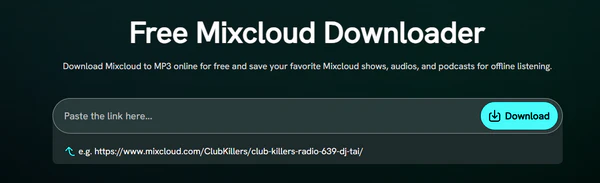
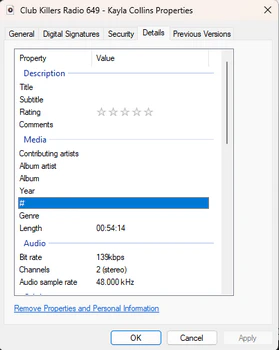
I tested it on the same Club Killers Radio #649 episode, pasting the link and letting the page analyze it before saving. The resulting file checked out at 139 kbps, a noticeably higher measured bitrate than those from other free web tools. The filename kept the show title, but the saved file's title, artist, and album fields were still empty, so the embedded tags and cover art did not carry over.
Our Rating: ⭐⭐⭐☆☆
URL: https://anydownloader.com/en/mixcloud-music-downloader/
AnyDownloader sits in the generic online downloader category rather than being Mixcloud-only: the same paste box also reaches Bandcamp, TikTok, Reddit, and more. It only processes one link at a time and cannot reach Select or private content.

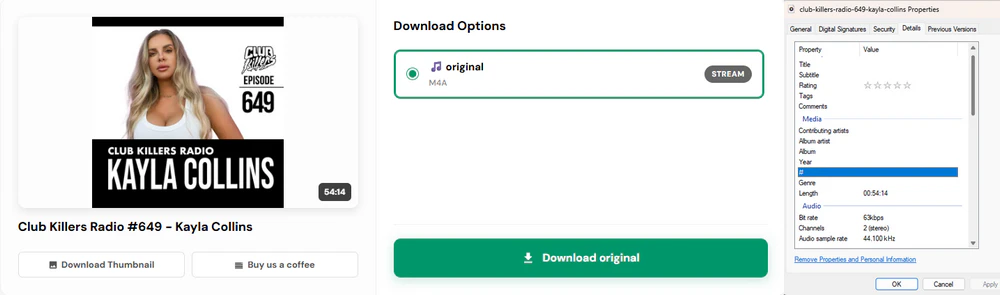
I tested it on the same 54-minute episode. On the results page, it returned a single original M4A entry plus a separate thumbnail download. The show slug was used in the filename, but the title, artist and album metadata fields within the file remained empty, with no embedded cover art.
Queue every episode at once with AudiFab Mixcloud Downloader and get a clean, tagged local archive — no re-pasting links one by one. Compatible with Windows & macOS · 100% Safe & Clean
Our Rating: ⭐⭐⭐☆☆
URL: https://mixcloudmp3.com/
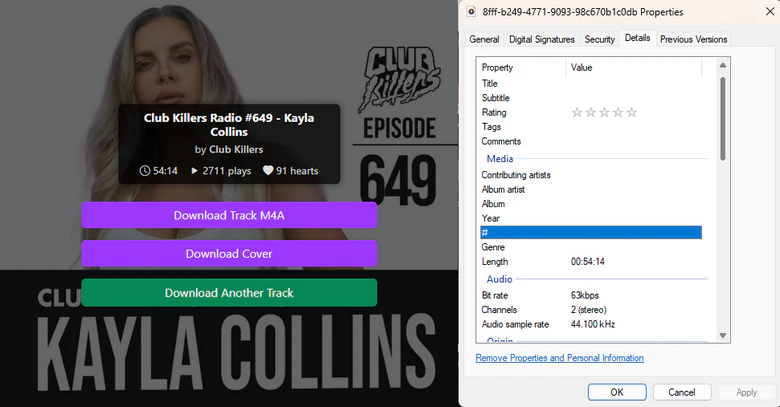
Mixcloud MP3 (mixcloudmp3.com) works right in your browser. You just paste one Mixcloud link into the input box and hit the purple "Download MP3" button. The website advertises several download options, including M4A and 128 or 320 kbps MP3, plus a separate cover art download.
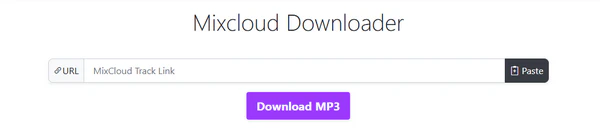
I ran the same 54-minute episode through it; on this show the panel only surfaced a Download Track M4A button. The output was 63 kbps with a random hash filename, rather than the show slug. Title, artist and album metadata stayed blank, so neither tags nor cover art were embedded even though the panel offered a separate Download Cover button.
Our Rating: ⭐⭐⭐☆☆
URL: https://www.smdownloader.com/platforms/mixcloud/mixcloud-audio-downloader
SMDownloader is another web-based Mixcloud download tool. It originally pulled audio and video from social platforms, and Mixcloud is now listed as a beta-supported site. You can paste links for dozens of platforms here. It only works on one public link at a time with no batch downloads.
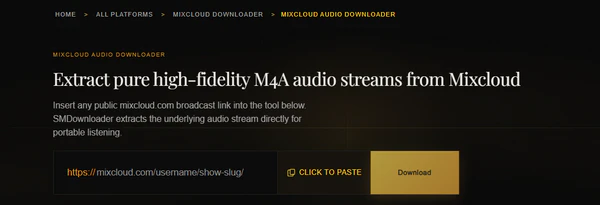
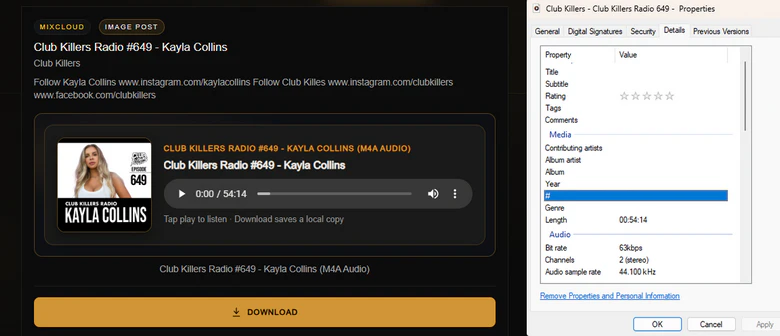
I ran the same episode through it, and the result card pulled up the artwork and show title. The downloaded file checked out as an M4A at 63 kbps; the preview displayed the cover, but the saved file itself had empty title, artist, and album fields, so the artwork and tags did not carry over as the site states. It suits a quick single grab rather than archiving a series.
Our Rating: ⭐⭐⭐☆☆
URL: https://play.google.com/store/apps/details?id=com.qmlab.mixdownloader.save.mix
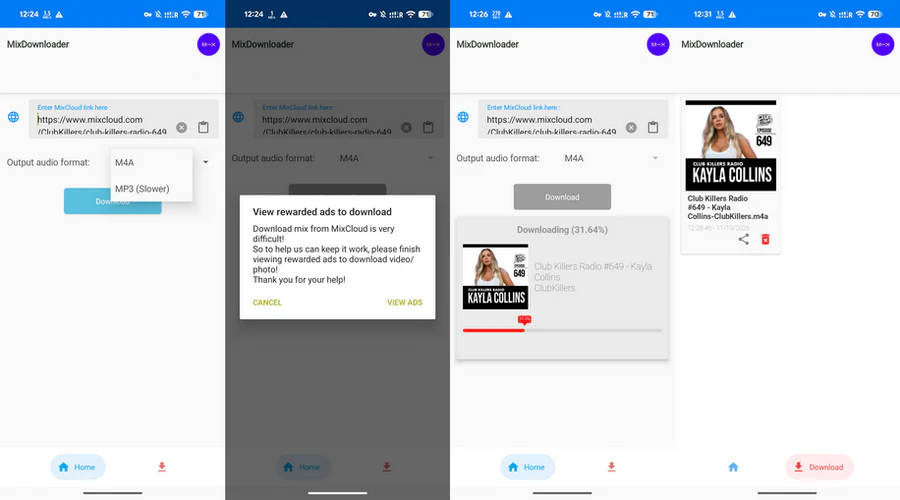
MixDownloader is an Android app from QMLab. Just copy a Mixcloud link, paste it in the app, and you can save the mix to your phone as M4A or MP3. It is free to install but comes with ads. Its privacy notice states that it may collect or share data such as location and app activity with third parties.
I tested MixDownloader against the same episode on an Android device. After pasting the link and leaving M4A selected, tapping Download brought up a reward ad. Completed downloads go into a separate MixCloud-Downloader folder on your phone. The finished file has no embedded title, artist, album, or cover tags.
Download on your computer with AudiFab Mixcloud Downloader, then copy one clean MP3 or FLAC file to your phone, USB drive, or car stereo. Compatible with Windows & macOS · 100% Safe & Clean
Our Rating: ⭐⭐⭐⭐☆
URL: https://github.com/yt-dlp/yt-dlp
yt-dlp is a free open-source command-line tool built with Python. It has native support for Mixcloud and can grab a show's public metadata and stream URLs directly from the page. It runs locally on Windows, macOS, and Linux.
I tested yt-dlp on the same Club Killers Radio #649 episode, and it produced an audio-only MP4 at 191 kbps, noticeably higher than the 64 kbps files the free web resolvers gave for the same show. yt-dlp reads the title, uploader, duration, thumbnail, and tag list from the page, but a default download does not embed those tags or the cover into the file; adding --add-metadata and --embed-thumbnail writes them, and -x --audio-format mp3 converts the audio to MP3 with ffmpeg.
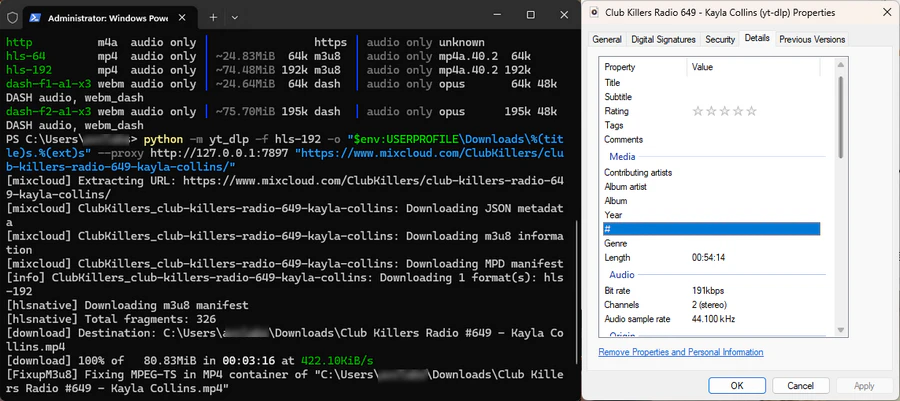
python -m pip install yt-dlp imageio-ffmpeg.python -m yt_dlp -F "<Mixcloud show URL>".python -m yt_dlp -f hls-192 -o "$env:USERPROFILE\Downloads\%(title)s.%(ext)s" "<Mixcloud show URL>".⏱️ Need one show in the next two minutes? Online tools like MixcloudDownloader.net and SMDownloader get you a file with no install — paste, click, save. None supports a batch queue, so they suit a single casual listen rather than archiving a series.
🎧 Saving multi-hour sets or building a music archive? AudiFab Mixcloud Downloader lets you queue multiple shows, export to six formats (MP3, AAC, WAV, FLAC, AIFF, and ALAC), and preserve tags and artwork. Our test MP3 was exported at 320 kbps.
📱 Downloading on the phone you listen on? MixDownloader for Android works for a single show, but the app carries heavy advertising; for anything longer, downloading on a computer and copying the file across is more reliable.
🧑💻 Want a free, open-source, local downloader? yt-dlp runs on Windows, macOS, and Linux, supports playlists and batch downloads, and offers command-line control. Our test retrieved a 191 kbps AAC stream.
Yes — via a third-party downloader. Most online tools output MP3 or M4A; desktop converters like AudiFab also export FLAC, WAV, and ALAC. Mixcloud's own apps only cache content for offline playback inside the app, with no file you can move elsewhere.
Several free options run right in the browser, with no install or sign-up: MixcloudDownloader.net, AnyDownloader, Mixcloud MP3, SMDownloader, and FliFlik. yt-dlp is a free, open-source command-line alternative for technical users. For batch downloads, more output formats, and easier file management, AudiFab is worth considering.
Yes, but web-based Mixcloud converters may time out on very long files, and mobile apps risk interruption if backgrounded. For longer DJ sets, desktop tools like AudiFab or yt-dlp are generally more practical because they support local processing and offer better control over the download.
Many Mixcloud downloaders save the original AAC audio stream in an M4A container instead of converting it to MP3. This avoids an additional encoding step, but if you need MP3 specifically, use a downloader that supports MP3 conversion or convert the M4A file afterward..
The usual causes are subscriber-only Select content, private or unlisted shows, geo-locked streams, and profile or playlist URLs rather than individual show pages. Copy the full mixcloud.com/artist/show-name/ address, check the show is public, and try again; long, new, or protected tracks can also fail to resolve. If it still won't download, try another tool or check whether the show is available publicly on Mixcloud.
There's no single best Mixcloud downloader for everyone. Free online tools are convenient for saving individual public shows, while desktop software and command-line tools are better suited to longer mixes, batch downloads, and more control over output files. For an easier way to manage downloads across multiple sources, AudiFab Mixcloud Downloader offers batch conversion, multiple audio formats, and metadata management in one desktop program.
Music is the greatest communication in the world and here are some articles that may help you enjoy music in a better way.

 Try It Free
 Try It Free