How to Download Beatport Music to MP3 (2026): 7 Tested Methods Compared
Find your best ways to download Beatport music to MP3 for free.
Find your best ways to download Beatport music to MP3 for free.
Can you download Beatport music as MP3? Yes—but the answer depends on how you use Beatport. Purchased tracks can be downloaded officially, while Beatport LINK streams are protected and can't be exported directly.
In this guide, we'll explain how Beatport downloads work, compare the most popular Beatport downloaders, and help you choose the best way to build an offline DJ library in 2026.
Before downloading Beatport music, it’s important to understand how different Beatport services work, what you actually own, and which formats are suitable for DJ use.
Understanding the differences between Beatport LINK, purchased downloads, and Beatport to MP3 download tools is essential before choosing how to build your DJ library.
| Feature | Beatport Streaming | Purchased Downloads | Beatport Downloader |
|---|---|---|---|
| Ownership | No | Yes | Yes |
| Offline Play | Limited | Unlimited | Unlimited |
| Export to USB | No | Yes | Yes (after conversion) |
| DJ Software | Requires LINK-supported software | Direct Import | Direct Import |
| File format | Streaming only | MP3, WAV, AIFF | MP3, WAV, FLAC, AIFF, AAC, ALAC |
| Compatibility | App-Dependent | Universal (CDJs, DJ software, USB) | Universal (CDJs, DJ software, USB) |
| Cost Efficiency | Monthly fee (No files) | Expensive ($1.29 - $2.49/track) | Best for Batch Saving Beatport Library |
👉 See also: Top FLAC Lossless Music Downloaders (2026)
Beatport allows downloads only for purchased tracks. You get high-quality MP3 or WAV files, but a large DJ library can become expensive quickly.
💡 Expert Tip: For offline Beatport MP3 libraries, some DJs use tools like AudiFab Music One to create local files for USB DJ setups.
| Format | Quality | Best For |
|---|---|---|
| MP3 320kbps | High | Club DJing, USB Sets |
| WAV | Lossless | Studio Use |
| AIFF | Lossless | Apple DJ Workflow |
| FLAC | Lossless | Archiving |
Beatport LINK is convenient for streaming, but many DJs still prefer local MP3, WAV, or AIFF files because they can be used offline, exported to USB drives, imported into Rekordbox or Serato, and kept as a long-term backup library. For this reason, Beatport downloaders remain popular among DJs who want greater flexibility and control over their music collection.
⚖️ Disclaimer This guide is just for info—use the tools below for personal, non-commercial use only.
For pro DJs and aspiring performers, time and audio quality matter most. Tools like AudiFab Music One are commonly used to help convert Beatport streaming tracks into structured local libraries for offline DJ performance preparation.
AudiFab Music One includes a Beatport music converter that helps users download and convert Beatport tracks into MP3, WAV, FLAC, AIFF, and ALAC formats. It features a clean and easy-to-use interface designed for both beginners and professional DJs. As an all-in-one solution, it also supports multiple DJ platforms like SoundCloud, TIDAL, Spotify, Apple Music, Deezer, and Bandcamp, helping you build a larger, organized DJ library for offline use.

Follow these steps to download Beatport tracks as MP3 files using AudiFab Music One:
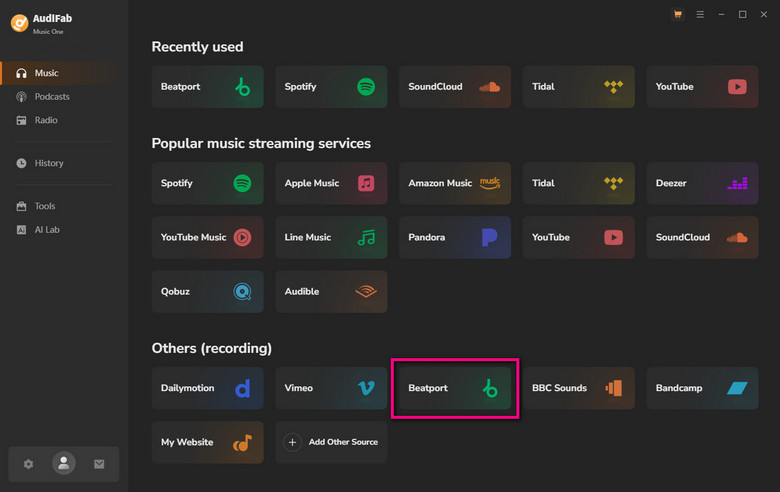
Launch AudiFab Music One and select the Beatport portal from the available music sources.
Choose your preferred format such as MP3 (320kbps) for best compatibility or AIFF for optimal CDJ performance.
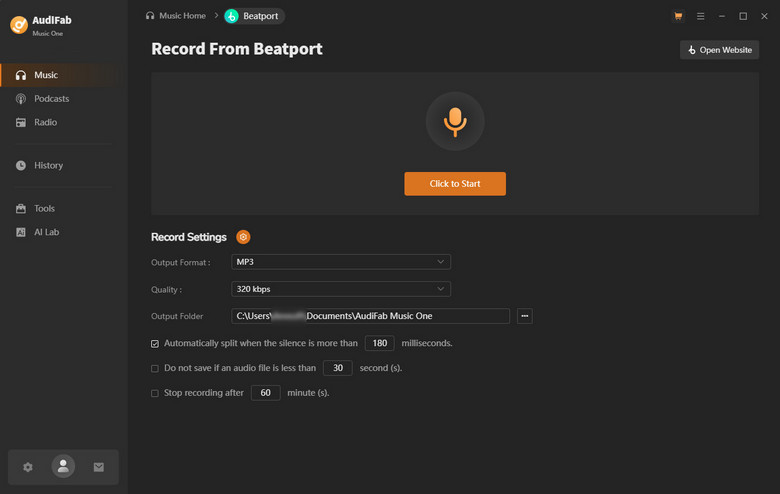
Click “Click to Start” to begin the conversion process. Open the built-in Beatport window and play any track you want. AudiFab will automatically capture and convert the audio in real time. You can also add multiple tracks to the queue for batch processing.
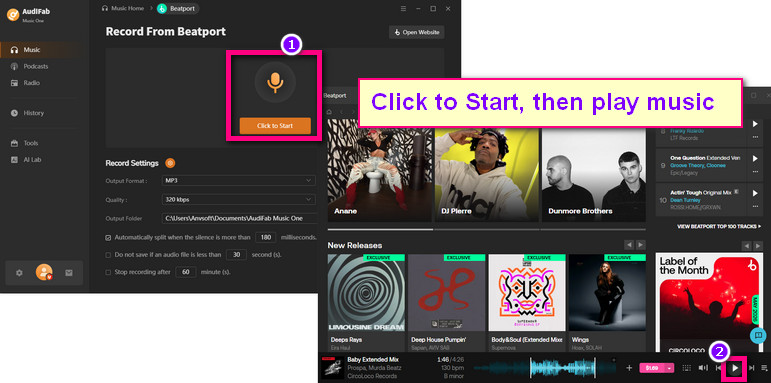
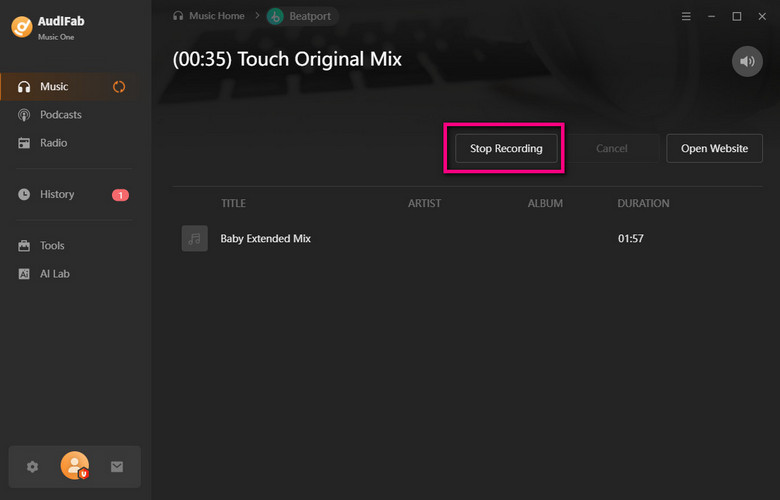
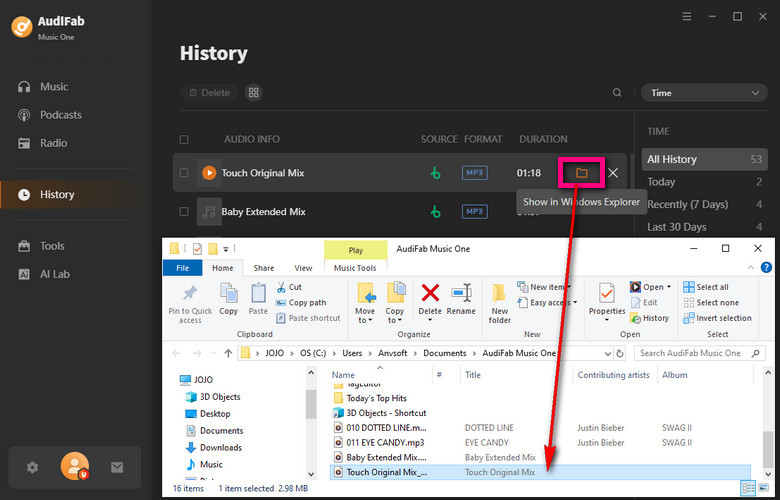
When finished, click Stop. Your Beatport MP3 files will be automatically generated and saved to your local folder, ready for DJ software or USB export.
Free Beatport download tools are often used by DJs who want to quickly test tracks, build small playlists, or explore different workflows without paying for a full converter.
However, compared to professional tools, free options usually come with limitations in stability, audio quality, and batch processing.
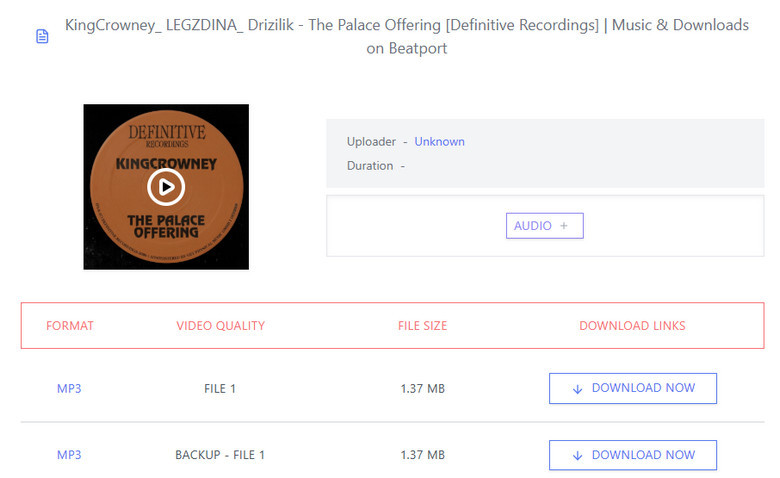
Many free Beatport download websites seem simple and convenient. There’s no need to install an app or Beatport account, and most claim to support free MP3 downloads directly in your browser. However, in real-world testing, many of these tools are unstable, limited, or no longer work properly.
| Tool | Reality Check | Main Issues | Recommendation |
|---|---|---|---|
| TubeNinja tubeninja.net |
Mostly failed | Only fetched album artwork in testing; music parsing often failed | ★☆☆☆☆ |
| TTOK Beatport Downloader ttok.app |
Failed | Returned “We could not fetch data from this URL”; only artwork could be downloaded | ★☆☆☆☆ |
| YT2Save yt2save.com |
Partially worked | Some tracks downloaded, but filenames were messy and ID3 tags/cover art were missing | ★★☆☆☆ |
| Keepv Beatport Downloader keepv.id |
Failed | Could not properly parse Beatport audio links | ★☆☆☆☆ |
| PasteDownload pastedownload.com |
Failed | Download button often had no response | ★☆☆☆☆ |
| TubeRipper tuberipper.com |
Failed frequently | Parsing errors and heavy redirect ads reported by users | ★☆☆☆☆ |
Community discussions on Reddit also mention that many Beatport download methods break frequently or become unreliable over time.
💡 Expert Tip: Free online Beatport downloaders may work occasionally for single tracks, but they are generally unreliable. This is why many DJs eventually switch to dedicated desktop tools like AudiFab for stable downloads.
Compared to unstable online downloaders, Beatport downloaders on Github are for better control and batch downloading. However, most of these tools are difficult to set up and usually require command-line knowledge, configuration, or a valid Beatport subscription.
| Tool | How to Use | Supported Devices | Main Function | Reality Check |
|---|---|---|---|---|
|
GitHub - beatportdl github.com |
Install dependencies (Python + FFmpeg), run CLI commands with Beatport URL | Windows / macOS / Linux | Beatport & Beatsource downloader (FLAC/AAC support) | Powerful but technical; requires valid streaming account; setup not beginner-friendly |
|
GitHub Beatport Topics github.com |
Browse and manually test different repositories | Windows / macOS / Linux | Collection of Beatport-related open-source tools | Many projects outdated, experimental, or no longer maintained |
|
beets-beatport4 github.com |
Install via Python pip, integrate into Beets music manager | Windows / macOS / Linux | Beatport metadata tagging plugin | Useful for library organization, not a downloader |
|
yt-dlp GitHub github.com |
Install Python + FFmpeg, use terminal commands with URL input | Windows / macOS / Linux | Universal downloader with extractor system (including Beatport support) | Very powerful but complex; often limited to preview streams without cookies |
|
electronic music downloader github.com |
Run Python script to scrape Beatport charts and match tracks via YouTube | Windows / macOS / Linux | Beatport Top 100 metadata + YouTube matching downloader | Audio source mismatch; metadata may be inaccurate or require manual correction |
If you’re good at coding, GitHub tools can be useful. But if you don’t want to waste time fixing Python errors before a gig, a ready-to-use Beatport to MP3 converter tool like AudiFab is much more practical for real DJ workflows.
Telegram bots are another popular “free Telegram downloader” option because they don’t require installation or setup—users simply send a link and receive a file directly in chat.
| Bot | Link | Reality Check |
|---|---|---|
| @beatport_downloader_bot | https://t.me/beatport_downloader_bot | Sometimes returns audio files, but stability is inconsistent; may fail or stop working without notice |
| @beatportal_bot | https://t.me/beatportal_bot | Works occasionally, but stability, metadata, and download success are inconsistent |
Free Beatport Telegram bots can be convenient for quick, occasional downloads, but they are not reliable for professional DJ workflows or long-term library building.
See also: Best Telegram Bots - Convert Spotify Playlist at 320kbps MP3
Let’s check which Beatport Downloader is the best.
| Category | AudiFab Music One | Online Sites | GitHub Scripts | Telegram Bots |
|---|---|---|---|---|
| Ease of Use | One-click (GUI) | Easy (Web) | Hard (Coding) | Easy (Chat) |
| Success Rate | High & Stable | Very Low | Moderate | Moderate |
| Audio Quality | 320kbps | Mostly 128kbps | Variable (Preview) | Often Upscaled |
| Batch Support | Yes | No | Yes (if configured) | No |
| ID3 Tags/BPM | Automatic | Missing | High (if working) | Inconsistent |
| Free | Free Trial | Yes | Yes | Yes |
| Ads-free | Yes | No | Yes | Yes |
| Safe | Yes | No | Yes | Yes |
Is it legal to download music from Beatport to MP3?
It depends on the method. Purchased downloads are official and legal for DJ use. Beatport LINK recording/conversion tools like AudiFab are generally used for personal offline listening or workflow backup.
I moved from Beatsource. Can I still access my tracks?
Yes. Beatsource is now merged into Beatport, and most playlists/libraries are automatically migrated into your Beatport account.
Can I re-download purchased Beatport tracks?
Usually yes. Beatport allows re-downloads for purchased tracks, but removed releases may disappear later. Backing up your DJ library is highly recommended.
Why are Beatport tracks not loading in Rekordbox?
Beatport LINK tracks are streaming-based and require a stable internet connection plus active account sync in Rekordbox.
👉 See also: How to Add Music from Spotify to Rekordbox
Can I use Beatport offline on CDJs?
Not directly. CDJs require local MP3/WAV/AIFF files on USB drives. Beatport LINK streaming tracks cannot be played offline on CDJs.
How to export Beatport tracks to USB?
Only local Beatport downloads can be exported. Once the files are saved on your computer, simply drag and drop the MP3/WAV/AIFF files to your USB drive for CDJ use.
👉 See also: Best Method to Transfer Spotify Playlist to USB Drive
Any best beatport playlist tips for new DJs?
Focus on energy levels rather than just genres. Organize your Beatport playlists into "Early Sets" (lower energy), "Peak Time" (high energy), and "After Hours" to help you read the crowd better during your performance.
Downloading Beatport music to MP3 depends on the method you use. While official downloads are the safest option, they can be expensive and limited. Beatport LINK is convenient for streaming but does not provide usable local files for USB or CDJs. Free tools like online downloaders or Telegram bots may work occasionally, but they are unreliable for professional DJ workflows.
For DJs who need stable offline libraries, tools like AudiFab Music Oneprovide a more practical solution for building organized MP3 collections for Rekordbox, Serato, and CDJ setups.
AudiFab is free to try. It can be downloaded for free and converts the first minute of each audio file for sample testing. If the program meets your needs, you can buy a license to unlock the time limit.

Best all-in-one tool to download from Spotify, Apple Music, Amazon Music, Tidal, Deezer, YouTube Music & more to MP3/AAC/FLAC.
Music is the greatest communication in the world and here are some articles that may help you enjoy music in a better way.

 Download
 Download