Looking for the best Apple Podcast downloader in 2026? We tested 8 free Apple Podcast downloaders, including online tools and a desktop solution, comparing MP3 quality, download speed, batch support, and metadata preservation. Whether you're saving a single Apple episode or an entire podcast series, discover which tool works best for your needs.
| Quick Decision: Which Apple Podcast Downloader Should You Choose? | |
|---|---|
| Batch download entire podcast series with full metadata | |
| Free online batch downloads without installation |
PodcastToMP3
Online
|
| Simple, ad-free single-episode downloads |
podcastmp3
Online
|
| Download podcast MP3s with free transcripts |
Podcast2MP3
Online
|
| Finding original podcast RSS feeds |
RSS Feed Finder
Online
|
⚖️ Disclaimer: This guide is for educational and personal use only. Please respect copyright and Apple Podcasts' Terms of Service. All tools were tested on public Apple Podcast links for review.
How We Tested the 8 Free Apple Podcast Downloaders
We tested 8 free Apple Podcast downloaders using The Joe Rogan Experience #2578 – Calley Means (Apple Podcasts), a 2-hour, 24-minute episode.
| Podcast Name | Episode Title | Duration | Host | Guest | Platform | Type |
|---|---|---|---|---|---|---|
| The Joe Rogan Experience | #2578 – Calley Means | 2h 24m | Joe Rogan | Calley Means | Apple Podcasts | RSS Podcast |
Each tool was evaluated based on download speed, audio quality, metadata preservation (episode title, podcast name, and artwork), batch download support, ease of use, and download reliability. We also checked filename accuracy, download limits, and third-party redirects.
Key Findings from Our Tests:
- Download Speed: Several online tools downloaded the 2h 24m test episode in approximately 30 seconds.
- Batch Downloads: AudiFab, PodcastToMP3, and podcastdownloadrss supported multiple episode downloads.
- Metadata & Filenames: Some tools preserved basic audio tags but saved files with generic names such as resolve.mp3.
- Reliability: Podcast2MP3 had download failures and RSS parsing errors, while other tools required third-party redirects.
Top Recommend: AudiFab Apple Podcast Downloader (Win/Mac)
Recommendation level: ⭐️⭐️⭐️⭐️⭐️
URL: https://www.audifab.com/best-music-converter.html
While web-based podcast downloaders skip installation, they often leave you with broken links, messy filenames, and tedious single-file downloads. AudiFab solves these hassles by delivering high-speed batch downloads, automatically organized metadata, and lossless Apple Music integration.
With AudiFab Apple Podcast Downloader, you can easily batch download entire podcast episodes, including long 2–3-hour shows, and save them as high-quality MP3 files with original show titles, episode names, and artwork intact. Beyond Apple Podcasts, it also supports batch downloading Apple Music playlists, albums, and tracks in up to Apple Lossless quality. This makes it simple to keep your entire audio library organized and ready for seamless offline listening on any device.
 Try It Free
 Try It Free
- ✅ Supports Apple Podcasts, Spotify Podcasts, and more.
- ✅ Fast downloads with preserved episode titles, artwork, and metadata.
- ✅ Supports MP3, FLAC, WAV, and other audio formats.
- ✅ Free podcast downloads without a subscription.
- ✅ Downloads Apple Music in up to Apple Lossless quality.
- ✅ Supports 20+ major streaming services, including Apple Music (Lossless), Spotify (Lossless), Qobuz Hi-Res, Tidal, YouTube Music, YouTube, Amazon Music, and more.
- ❌ Only a desktop version.
How to Use AudiFab Apple Podcast Downloader
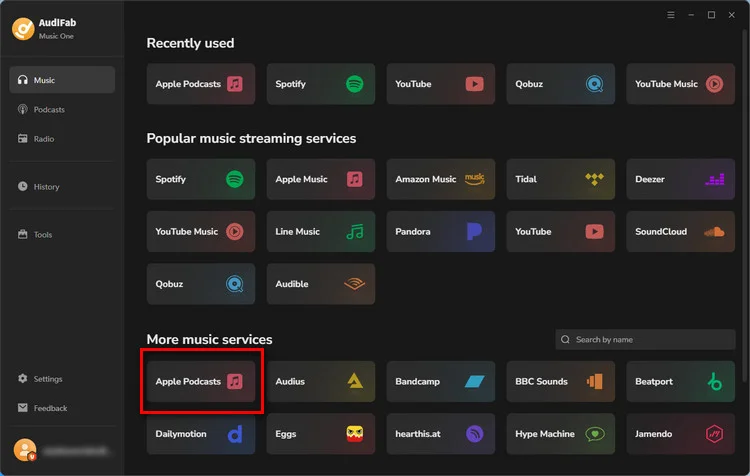
Step 1 Download and install AudiFab. Under "More Music Services", select "Apple Podcasts".
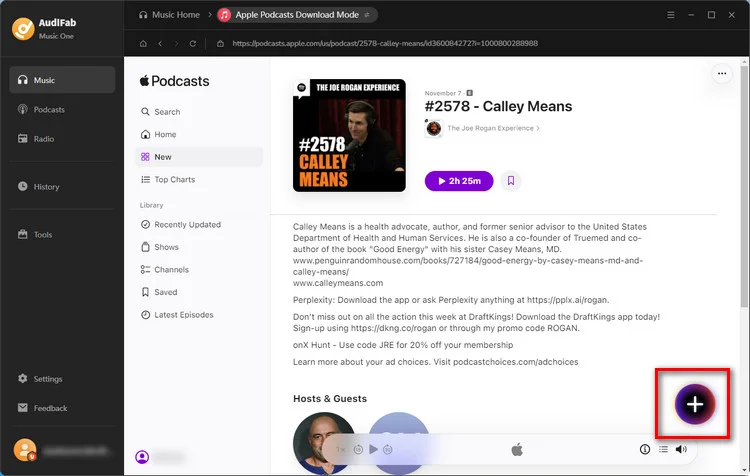
Step 2 Browse the built-in Apple Podcasts player for your desired episodes. Click the "+" icon in the bottom-right corner to parse the files, then click "Add" to confirm.
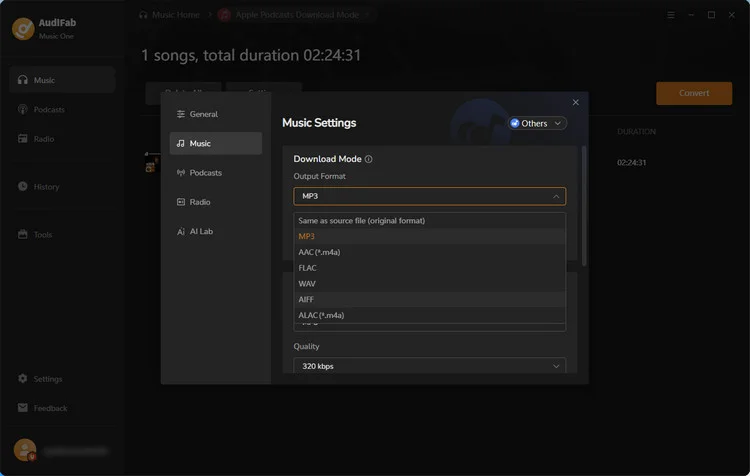
Step 3 Click the "Settings" icon (gear icon) in the bottom-left corner to select your preferred output format, such as MP3, M4A, WAV, FLAC, ALAC, or AIFF.
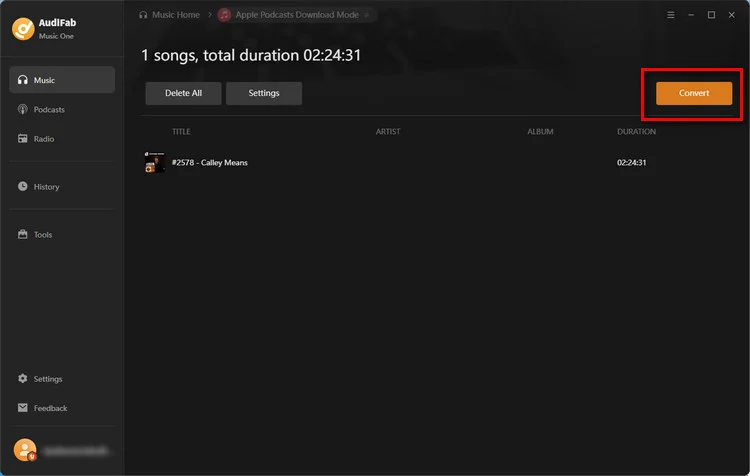
Step 4 Click the orange "Convert" button to start downloading. Once finished, navigate to the "History" tab to locate and manage your local audio files.
1. AudiFab Free Apple Podcast Downloader (Win/Mac)
Recommendation level: ⭐️⭐️⭐️⭐️⭐️
URL:https://www.audifab.com/best-music-converter.html
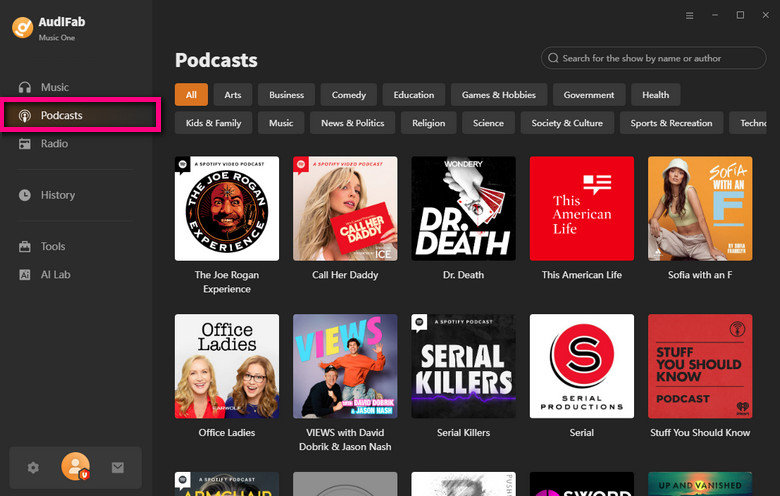
AudiFab Free Podcast Downloader is a free feature within AudiFab Apple Podcast Downloader. It features an integrated free library of over 100,000 podcast sources, and supports bulk downloading for individual episodes or entire shows while preserving full metadata.
💡 Note: AudiFab Free Apple Podcast Downloader is a free tool built into AudiFab Music One, the ultimate all-in-one music downloader, which helps you easily save audio from Spotify, Apple Music, Amazon Music, Tidal, Deezer, YouTube Music, Audible, SoundCloud, and many others.
- ✅ Available without requiring a subscription.
- ✅ Download multiple episodes or entire podcast series at once.
- ✅ Compatible with Apple Podcasts, Spotify Podcasts, and standard RSS feeds.
- ✅ Supports and indexes over 100,000+ podcast sites and sources.
- ✅ Features high-speed downloading (up to 300x speed).
- ❌ Only a desktop version.
How to Use AudiFab Free Apple Podcast Downloader
Step 1 Download and Install AudiFab Music One.
Step 2 Navigate to the "Podcast" tab and search for your show.
Step 3 Choose individual episodes or click "Download All".
Step 4 Your episodes will be saved as MP3 files quickly.
2. SpotScribe Online Free Podcast Downloader
Recommendation level: ⭐️⭐️⭐️
URL: https://spotscribe.io/uses/apple-podcast-downloader
SpotScribe is an online Apple Podcast downloader that lets users save podcast episodes for offline listening without installing additional software. It downloaded our 2h 24m test episode in around 30 seconds, retaining basic metadata. However, the file was named resolve.mp3, and only three free credits are available. Best for occasional downloads.
- ✅ Supports Apple Podcasts, Spotify Podcasts, YouTube, TikTok, and more.
- ✅ A 2.5-hour episode took about 30 seconds.
- ✅ Saves podcast episodes in MP3 format.
- ✅ Preserves basic metadata, including title, album, and year.
- ✅ Offers 3 free credits (about 3 episodes or videos).
- ❌ Requires sign-up for transcription of episodes up to 60 minutes.
- ❌ Downloads files with the generic name "resolve," requiring manual renaming.
- ❌ Redirects to a third-party service to download audio.
- ❌ No batch download support.
How to Use SpotScribe to Download Apple Podcasts
Step 1 Copy the link to the Apple Podcasts episode you want to download.
Step 2 Paste the episode URL into SpotScribe's input box and click the "Download" button.
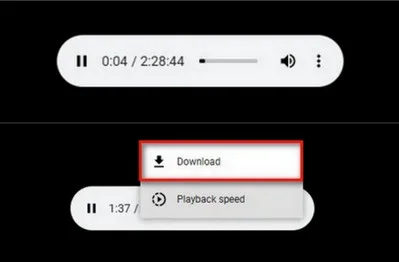
Step 3 Follow the redirect to the download service, click the three-dot button, and choose "Download".
Step 4 Rename the downloaded file if it appears as "resolve.mp3".
3. Swell AI Apple Podcast Downloader Free
Recommendation level: ⭐️⭐️⭐️
URL: https://www.swellai.com/apple-podcast-downloader
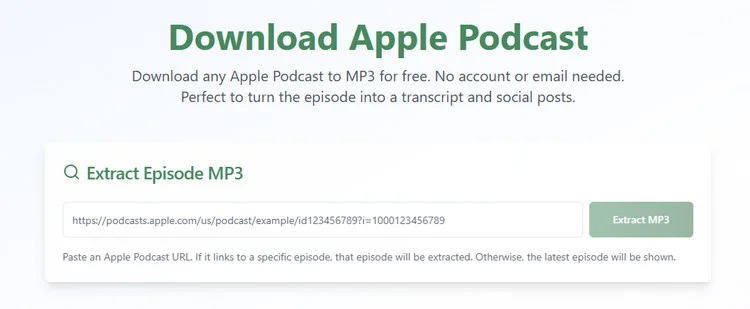
Swell AI is an online Apple Podcast downloader to save Apple podcast episodes while offering AI-powered transcription and content creation features. However, the MP3 used an RSS-style filename, and batch downloads aren't supported.
- ✅ No account or email required.
- ✅ Quick processing — downloads a 2.5-hour podcast episode in approximately 30 seconds.
- ✅ Saves podcast episodes in MP3 format.
- ✅ Preserves basic metadata, including title, album, and year.
- ❌ Downloads files with generic names like "GLTXXXXXX", requiring manual renaming.
- ❌ Redirects to Megaphone to download audio.
- ❌ No batch download support.
- ❌ Resource coverage is limited.
How to Use Swell AI Apple Podcasts Downloader
Step 1 Copy the URL of the Apple Podcasts episode you want to download.
Step 2 Paste the episode link into the input box and click the "Download" button.
Step 3 Follow the redirect to Megaphone and download the episode as an MP3 file.
Step 4 Rename the downloaded file if it has a generic filename like "GLTXXXXXX.mp3".
4. PodcastToMP3 Apple Downloader Online
Recommendation level: ⭐️⭐️⭐️⭐️
URL: https://podcasttomp3.com/
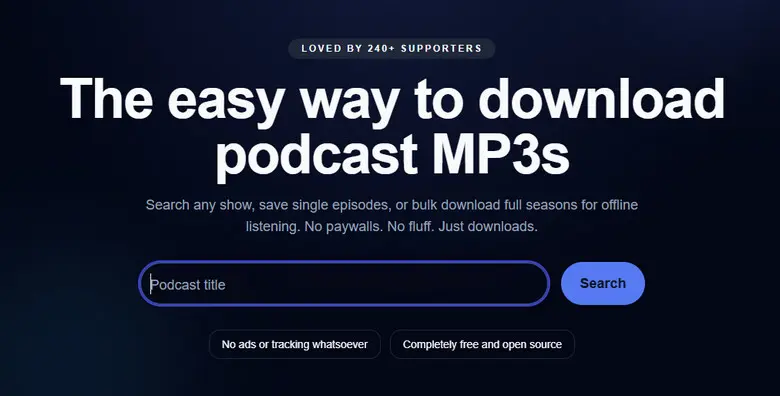
PodcastToMP3 is a free online Apple podcast downloader. Users can search podcasts by name and batch-download episodes as MP3 files. It supports free batch downloads of up to 100 episodes, with recognizable filenames and basic metadata.
- ✅ Search for podcasts by title without needing an episode URL.
- ✅ Supports batch downloading of multiple episodes.
- ✅ Automatically names files using the podcast and episode titles.
- ✅ Preserves basic metadata, including title, album, and year.
- ✅ A 2.5-hour episode takes around 30 seconds.
- ❌ Apple links cannot be pasted directly.
- ❌ Some podcasts or episodes may be missing.
- ❌ Max 100 episodes per download batch.
- ❌ Varying performance across browsers.
How to Download Apple Episodes with PodcastToMP3
Step 1 Open PodcastToMp3.com in your web browser.
Step 2 Type the name of the podcast you want into the main search bar.
Step 3 Browse through the list of available episodes or seasons that appear in the results.
Step 4 Click the "Download" option next to the episode or click "Bulk download" and choose the number of episodes.
Not every download starts with one click.
podcastdownloadrss supports batches, but some files require manually selecting "Save Link As". AudiFab offers a simpler download process, with episode names and artwork preserved.
Compatible with Windows & macOS · 100% Safe & Clean · 3k+ downloads monthly · 99.9% success rate
5. podcastdownloadrss for Free Apple Podcast
Recommendation level: ⭐️⭐️⭐️
URL: https://podcastdownloadrss.top/
podcastdownloadrss is a free online Podcast Downloader that allows you to quickly parse and batch-download full podcast episodes as MP3 files from Apple Podcasts, Spotify, and RSS feeds, but some downloads required manually selecting “Save Link As.
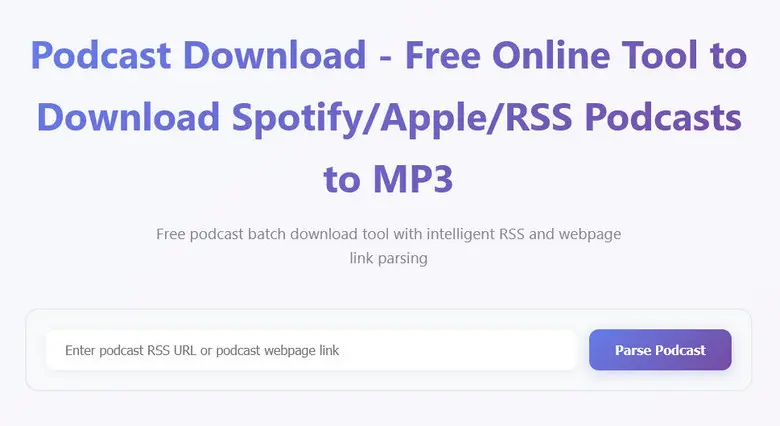
- ✅ Compatible with Apple Podcasts, Spotify, and direct RSS feed URLs.
- ✅ High-speed downloads (approx. 30 seconds for two 2.5-hour episodes).
- ✅ Supports selecting and downloading multiple episodes at once.
- ✅ Automatically names files as Podcast Name - Episode Name.
- ❌ Automatically loads all episodes from a podcast feed, even when you only need one.
- ❌ Direct browser downloads may sometimes be blocked, requiring a manual "Save Link As" right-click download.
How to Download Podcasts with podcastdownloadrss
Step 1 Copy the Podcast Link From Apple Podcasts.
Step 2 Open PodcastDownloadRSS.top in your web browser and paste the link into the main search, then click the "Load Podcast" button.
Step 3 Check the boxes next to the specific episodes you want to download, or click "Select All" for a batch download. Click "Download Selected" to save the audio files directly to your device.
6. Podcast2MP3 for Downloading Apple Podcasts MP3
Recommendation level: ⭐️⭐️⭐️
URL: https://www.podcast2mp3.com/
Podcast2MP3 is an Apple podcast downloading tool that allows you to search for podcasts by name and quickly download individual episodes as MP3 files. It also offers free transcripts, though occasional RSS parsing errors and failed downloads affected reliability.
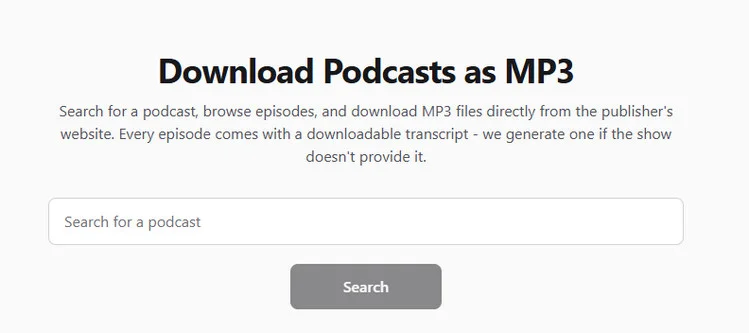
- ✅ Search for podcasts by name without needing an episode URL.
- ✅ Saves a 2.5-hour episode in approximately 30 seconds.
- ✅ Automatically names downloaded files after the episode title.
- ✅ Supports free podcast transcript downloads.
- ❌ No bulk or batch downloading of episodes.
- ❌ Frequent download failures and RSS feed parsing errors.
- ❌ Doesn't accept direct Apple Podcast links, making it less convenient to download.
How to Use Podcast2MP3 to Get Apple Podcasts
Step 1 Go to Podcast2MP3.com and enter the title of the podcast.
Step 2 Browse the search results and click "MP3" or "Transcript" if you want.
Step 3 The file will save directly to your device.
7. podcastmp3 Online Podcast MP3 Downloader
Recommendation level: ⭐️⭐️⭐️
URL: https://podcastmp3.com/
PodcastMP3 is an online podcast tool featuring a clean, ad-free interface. However, filenames must be renamed manually, and batch downloading is not supported. Basic metadata was preserved, but the filename used an RSS-style code, and batch downloading isn't available.
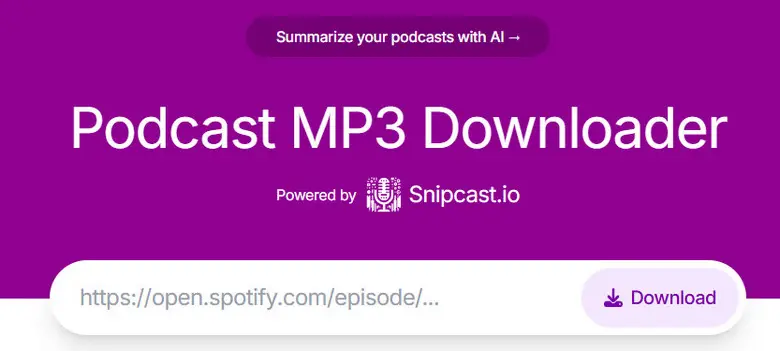
- ✅ Supports downloading from Apple Podcasts, Spotify, and direct RSS feed URLs.
- ✅ High-performance processing (approx. 30 seconds for a 2.5-hour audio file).
- ✅ Keeps essential audio tags and episode metadata intact after download.
- ❌ Does not support downloading multiple episodes or entire feeds at once.
- ❌ Downloaded files are saved with random codes (e.g., GLTXXXXXX), requiring manual renaming.
How to Use Podcast MP3 Downloader
Step 1 Copy the podcast URL and paste the link into the search/URL box.
Step 2 Click the "Download" button. Once loaded, click to save the MP3 file to your device.
Step 3 Locate the downloaded file in your browser's download folder and manually rename it (files default to generic codes like GLTXXXXXX).
8. RSS Online Free Apple Podcast Feed Finder
Recommendation level: ⭐️⭐️⭐️
URL: https://rss.com/tools/find-my-feed/
RSS Podcast Feed Finder is a free and ad-free online tool for discovering podcast RSS feeds. Unlike direct podcasts downloaders, it requires you to open the RSS XML, locate the episode's audio URL, and manually save the MP3 file. Although manual downloads take a few extra steps, no dedicated downloader is needed. It's ideal for finding and downloading original podcast audio files, and accessing the full episode list.
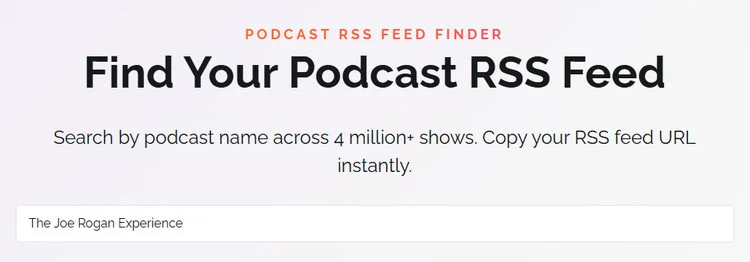
- ✅ Indexes over 4 million podcasts.
- ✅ Free to use with no account or payment required.
- ✅ Easily find and copy podcast RSS links by searching for a show name.
- ❌ No one-click or batch downloads; requires manual RSS link extraction.
- ❌ Similar podcast names may require manual selection.
- ❌ Cannot access private, paid, or unindexed podcast feeds.
How to Use the Podcast RSS Finder
Step 1 Open the Podcast RSS Finder website and search for the podcast by name.
Step 2 Select the correct podcast and click "Copy RSS Feed".
Step 3 Paste the RSS URL into your browser's address bar to view the podcast's XML feed.
Step 4 Press Ctrl+F (or Cmd+F on Mac) and search for .mp3 to find an episode's audio URL.
Step 5 Copy the MP3 URL and open it in a new browser tab.
Step 6 Click the three-dot menu in the audio player and select "Download" to save the episode.
Don't want to dig through RSS feeds for MP3 links?
RSS Feed Finder helps locate podcast feeds, but downloading audio still takes several manual steps. AudiFab lets you find podcasts and save entire series directly as organized MP3 files.
Compatible with Windows & macOS · 100% Safe & Clean · 3k+ downloads monthly · 99.9% success rate
Official Method: Use iTunes to Download Apple Podcasts
Option 1: On Windows PC/Mac (iTunes)

- Open iTunes and select Podcasts from the top-left menu.
- Click Store and search for your desired podcast.
- Click Get to download an episode or Subscribe to receive new episodes automatically.
Option 2: On iPhone (Apple Podcasts App)
- Open Apple Podcasts and search for your desired show.
- Tap the "three-dot menu (···)" next to an episode and select Download Episode.
- To download new episodes automatically, open the show's Settings and enable Automatic Downloads.
- Go to "Library" > Downloaded to access saved episodes.
Option 3: On Android (Web Browser)
- Open
podcasts.apple.comin your browser. - Search for a podcast and stream episodes online.
- Bookmark the page or select Add to Home Screen for quick access.
Note: The Android web player supports streaming, not direct offline downloads.
Comparison of Best Apple Podcast Downloaders
| Converter | Batch Download | Basic Metadata | Filename | MP3 Export | Highlights |
|---|---|---|---|---|---|
| AudiFab Music One (Win/Mac) | ✅ | ✅ Full | ✅ Original titles | ✅ | Lossless music, 20+ services |
| AudiFab Free (Win/Mac) | ✅ | ✅ Full | ✅ Original titles | ✅ | 300× speed, 100k+ sources |
| SpotScribe (Online) | ❌ | ✅ | ❌ Generic names | ✅ | AI transcription |
| Swell AI (Online) | ❌ | ✅ | ❌ RSS Code | ✅ | No sign-up required |
| PodcastToMP3 (Online) | ✅ (Max 100) | ✅ | ✅ Original titles | ✅ | Search by podcast name |
| podcastdownloadrss (Online) | ✅ | ✅ | ✅ Original titles | ✅ | Spotify & RSS support |
| Podcast2MP3 (Online) | ❌ | ✅ | ✅ Episode titles | ✅ | Free transcripts |
| podcastmp3 (Online) | ❌ | ✅ | ❌ RSS Code | ✅ | Clean, ad-free interface |
| RSS Feed Finder (Online) | ❌ | N/A | N/A | ⚠️ Manual | 4M+ podcast RSS feeds |
| Official iTunes / App | ✅ | App-managed | App-managed | ❌ | Native offline listening |
FAQs About Apple Podcast Downloaders
Q 1 Do I Need an Apple ID to Download Podcasts?
No, many free online podcast downloaders let you download Apple Podcasts as MP3 files without an Apple ID or login.
Q 2 Can I Download an Entire Apple Podcast Series at Once?
Yes, tools like AudiFab and PodcastToMP3 support batch downloading multiple episodes.
Q 3 Can I Download Apple Podcasts as WAV or FLAC?
Yes, AudiFab supports converting Apple Podcasts to WAV, FLAC, MP3, and other formats, though conversion cannot improve the original audio quality.
Q 4 Are Apple Podcast Downloaders Safe to Use?
Generally, reputable tools are safer, but avoid suspicious download links, intrusive ads, and websites requesting unnecessary personal information.
Q 5 Why Can't I Download Some Apple Podcast Episodes?
Some episodes may be unavailable due to private or paid feeds, regional restrictions, removed content, or broken RSS links.
Summary
The best Apple Podcast downloader depends on your needs. Free online tools like PodcastToMP3 and Swell AI work well for occasional MP3 downloads, while Apple Podcasts supports convenient in-app offline listening. For faster batch downloads, better file organization, and preserved metadata, AudiFab Apple Podcast Downloader is our top recommendation.

AudiFab Apple Podcast Downloader – Best Apple Podcast Downloader for Batch MP3 Downloads
Download Apple Podcasts episodes, entire series & more • Up to 300× speed • MP3, FLAC, WAV & more • Batch downloads • Preserves episode titles, artwork & ID3 tags • Supports Apple Music and 20+ music services