Love Qobuz's incredible Hi-Res audio and want to keep your favorite playlists offline forever? From free online Qobuz converters and Telegram bots to powerful desktop software, there are plenty of ways to save your music. We tested 14 top Qobuz downloaders to help you find the perfect match for studio-quality listening!
- Quick Decision: Which Qobuz Downloader Should You Choose?
- Top 1. AudiFab Qobuz Downloader - Best for Hi-Res Playlist Downloads ⭐⭐⭐⭐⭐
⚖️ Disclaimer This guide is for educational and personal use only. Please respect the copyright of content creators and Qobuz's Terms of Service.
Quick Decision: Which Qobuz Downloader Should You Choose?
- If you need to batch download full Qobuz albums or playlists with high stability and a simple interface:
👉 AudiFab Qobuz Downloader — Highest success rate for offline batch downloads, featuring a friendly GUI and regular software updates. - If you only need to download 1 or 2 Qobuz tracks occasionally and don't want to install software:
👉 DoubleDouble/Lucida — Works directly in your web browser, completely free, and requires zero installation. - If you prefer downloading and saving Qobuz music directly on your smartphone (Android/iOS):
👉 DezAlty — Easily parse links within the Telegram app and save track files straight to your mobile device. - If you are tech-savvy, comfortable with command lines, and want a 100% open-source, free tool:
👉 qobuz-dl or other GitHub tools — Completely free with no commercial limits, ideal for advanced users and developers.
How We Tested: We tested these Qobuz downloaders in October 2026 using tracks, albums, and playlists across different release types. Each tool was evaluated for download success, playlist/album support, available audio quality, metadata retention, ease of use, and recent maintenance. For GitHub projects, we also checked whether the repository had received recent updates and whether playlist or album downloads still worked during testing.
Top 1. AudiFab Qobuz Downloader - Best for Hi-Res Playlist Downloads
✨ No quality loss, 40x faster, more formats, dual recording modes, batch conversion, useful free tools...
| OS | Pricing | Speed | Tested Audio Quality | Ease of Use |
|---|---|---|---|---|
| Windows, Mac | Free Trial | Up to 40x | No quality loss (Support 24-bit/192 kHz Hi-Res FLAC) |
⭐⭐⭐⭐⭐ |
While free online Qobuz tools, CLI scripts, and open-source GitHub downloaders offer quick access, they often suffer from frequent parsing errors on tracks, missing metadata, complex setup requirements for command-line tools, and a lack of ongoing maintenance.
If you want a reliable, easy-to-use solution that consistently batch-downloads full Qobuz albums and playlists up to Hi-Res 24-bit/192kHz across multiple audio formats, AudiFab Qobuz Downloader integrated into AudiFab Music One provides a simple graphical interface with regular software updates to guarantee stable performance.
Want to keep your favorite Qobuz Hi-Res playlists offline permanently? Try AudiFab Qobuz Downloader!
- Multi-Platform & Hi-Res Quality Support: Downloads from over 20 major streaming services, including Qobuz Hi-Res, Tidal, Spotify (Lossless), Apple Music (Lossless), Amazon Music, and Deezer.
- Reliable Batch Downloads: Downloads entire Qobuz playlists and albums without parsing errors or strict transfer caps.
- Active Maintenance & Easy GUI: Features a simple graphical interface with regular software updates to ensure continuous compatibility.
Compatible with Windows & macOS · 100% Safe & Clean · 3k+ downloads monthly · 99.9% success rate
 Try It Free
 Try It Free
Pros
- ✓Supports FLAC, WAV, MP3, AAC(.M4A), ALAC, AIFF output formats.
- ✓Supports 40X Batch download streaming playlists and albums.
- ✓Preserves original sound quality (up to Hi-Res) and ID3 tags.
- ✓Download audio from all major streaming platforms like Spotify, Apple Music, YouTube Music, Tidal, Bandcamp, and so on.
- ✓Extra Free Tools, such as AA/AAX Converter, Format Converter, CD Burner, and Tag Editor.
- ✓Provides free updates and timely technical support.
Cons
- ×Currently No mobile version is available.
- ×Paid software (Free trial available).
Easy Steps to Convert Qobuz Playlists with AudiFab
Step 1 Install and run AudiFab.
Step 2 Open AudiFab and select 'Qobuz' as your download source from the 'Music' tab.
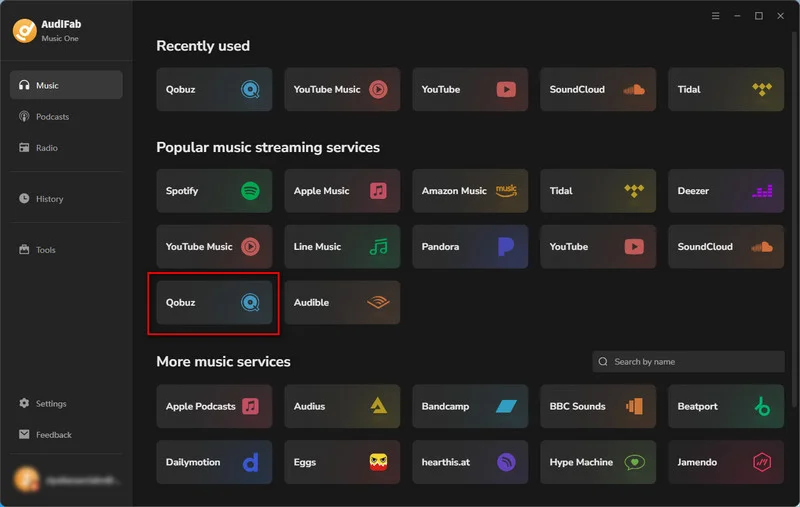
Step 3 Add Qobuz Music to AudiFab Download List.
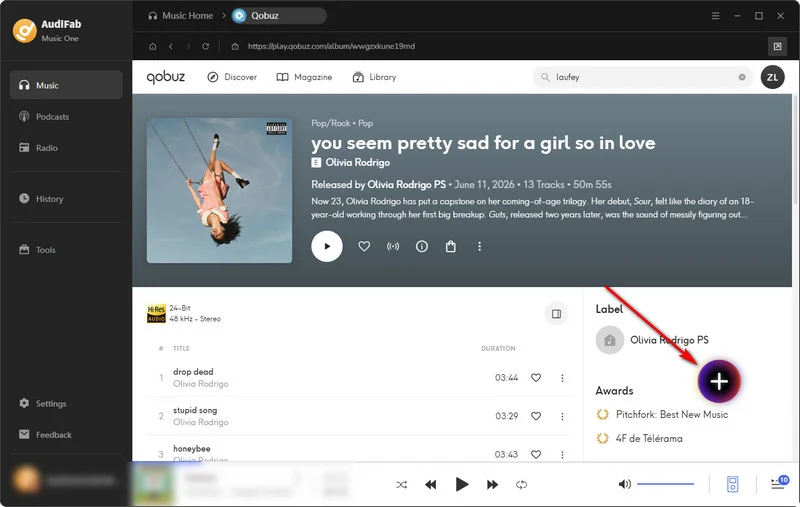
Browse your Qobuz music library and find the songs, albums, or playlists you want to download. Click the '+' icon in the lower-right corner, and AudiFab will quickly analyze and load the available tracks. In the pop-up window, select the songs you want, then click 'Add' to add them to the AudiFab conversion queue.
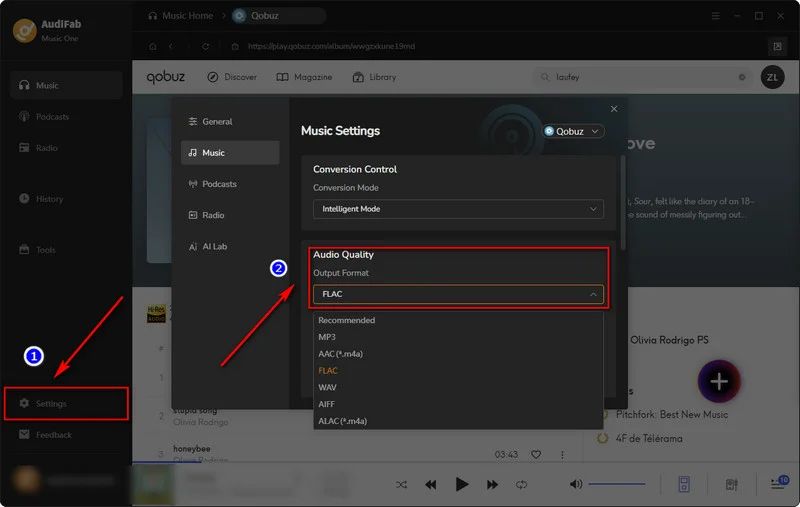
Step 4Customize Output Settings.
Before downloading, click the 'Settings' icon in the bottom-left corner to open the preferences panel. Select 'FLAC' as the output format to preserve the original Qobuz Lossless audio quality of your downloads.
- Output Format: Auto, MP3, AAC, WAV, FLAC, AIFF, ALAC
- Bit Rate: 320 kbps, 256kbps, 192 kbps, 128 kbps
- Sample Rate: 44.1KHz, 48KHz, 96KHz, 192KHz
- Output File Name: Track Number, Title, Artist, Album, Playlist Index, Year
- Output Organized (way): None, Artist, Album, Artist/Album, Album/Artist, Playlists, Playlists/Album, Playlists/Artist
Step 5 Start the Conversion.
After adding your tracks, click the 'Convert' button to start the conversion. AudiFab will convert and download your selected Qobuz music as FLAC files. The process is quick and straightforward.
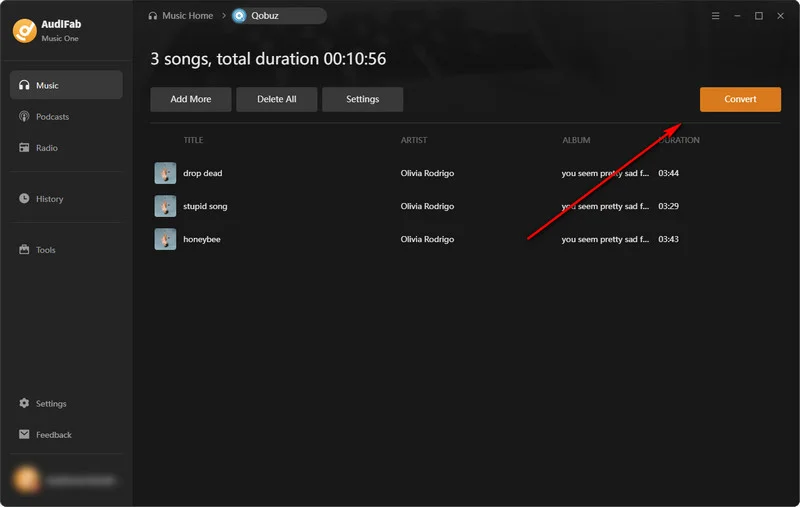
Step 6 Find Your Converted Qobuz Music.
When the conversion is complete, you can access your downloaded FLAC files from the 'History' tab. Your lossless Qobuz files are saved there for easy access and offline playback.
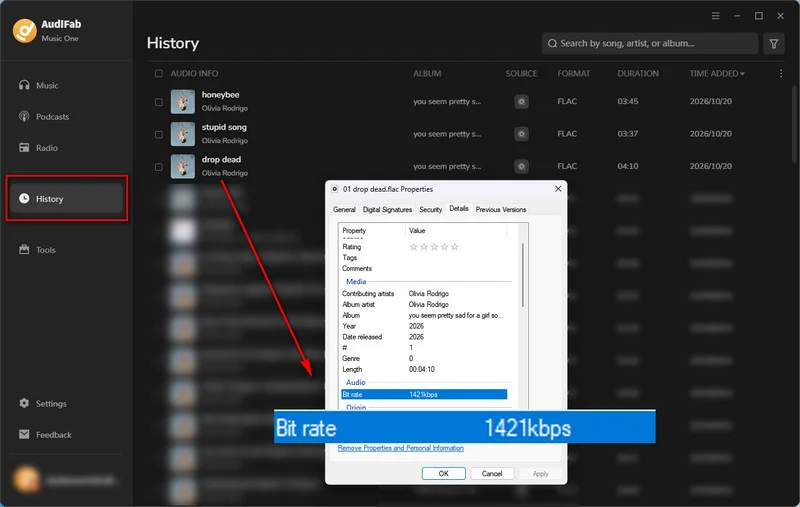
No. 2 DoubleDouble (Free Online)
DoubleDouble is a clean, ad-free web tool that parses direct music links from platforms like Qobuz, Tidal, and Deezer to download tracks, albums, and playlists as ZIP files.
✨ Link: https://doubledouble.top/
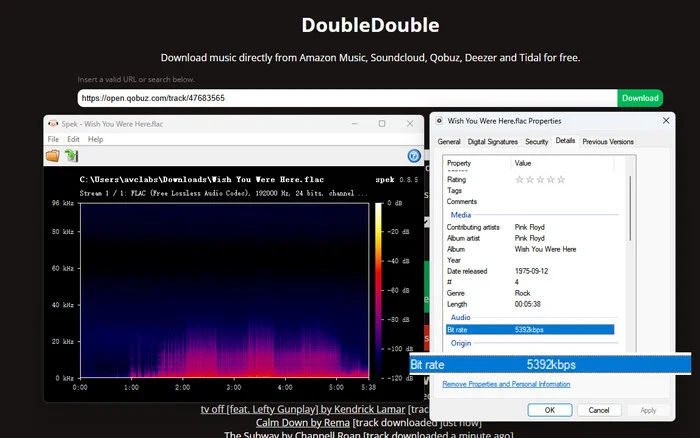
- ✅ Supports Qobuz, Tidal, Deezer, Amazon Music, and SoundCloud.
- ✅ Downloads Qobuz tracks, albums, and playlists in ZIP files.
- ✅ Preserves basic metadata and ID3 tags.
- ✅ Completely clean web interface with no intrusive ads.
- ❌ Processing speeds can be slow.
- ❌ Downloads are hosted via Pixeldrain, which enforces a 6.00 GB daily transfer limit.
- ❌ Offers only FLAC format with no MP3, AAC, or WAV options.
- ❌ CAPTCHA may appear, adding an extra step.
- ❌ Region-locked releases may fail and require switching to another DoubleDouble region/server.
How to Use DoubleDouble to Download Qobuz Tracks
Step 1 Open Qobuz and copy the direct URL of the track, album, or playlist you want to download.
Step 2
Open your web browser and go to https://doubledouble.top/. Select the USA or Europe region to continue.
Step 3 Paste the copied Qobuz link into the DoubleDouble input box.
Step 4 Solve the CAPTCHA if it appears on the screen. Click the 'Download' button and wait for DoubleDouble to process the Qobuz link.
Step 5 Once processing is complete, click the provided Pixeldrain host link (if you select Pixeldrain as the Upload Site) to download your Qobuz tracks, albums, or playlists as a ZIP file.
Note: If the download fails due to region restrictions, switch to another DoubleDouble region from their site menu and try again.
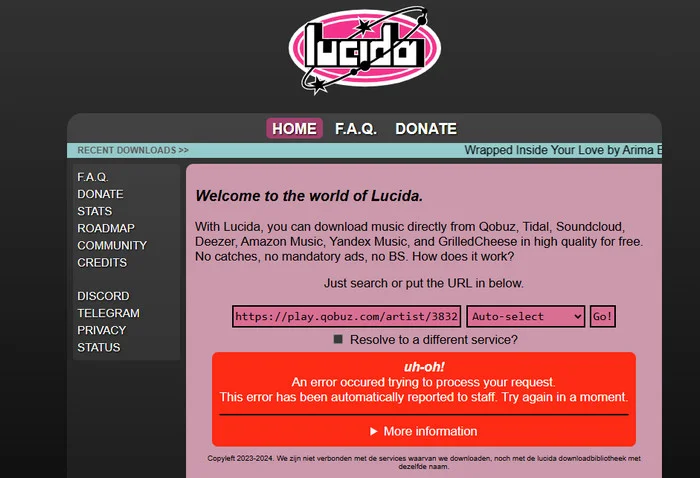
No. 3 Lucida (Free Online)
Lucida is a free online downloader that allows users to grab music from Qobuz, Tidal, and SoundCloud using direct links. It is best suited for quick single-track downloads, as its parsing stability is lower than DoubleDouble and it frequently fails when processing tracks or playlists.
✨ Link: https://lucida.to/
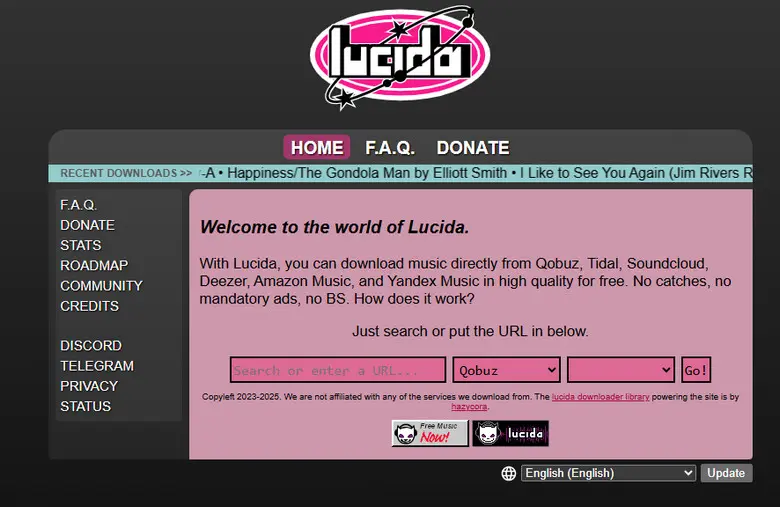
- ✅ Supports Qobuz along with Tidal, Amazon Music, and several other music sources.
- ✅ Simple to use, completely free, and features an ad-free interface.
- ❌ Lucida Downloader remains unstable. Downloads can fail on the first attempt and require retries.
- ❌ Lower success rates compared to DoubleDouble (frequent failed attempts requiring retries).
- ❌ Lacks advanced batch management compared to dedicated desktop downloaders.
How to Use Lucida to Download Qobuz Tracks
Step 1 Copy the direct track or album URL from Qobuz.
Step 2
Go to https://lucida.to/ in your web browser.
Step 3 Paste your copied Qobuz link into the search field. Click 'Go!' to parse the Qobuz link.
Step 4 Click the generated download button to save the file to your device.
⚠️ Limitations:
Free web-based converters like Lucida are subject to public server loads and may experience frequent parsing failures. If you need to download entire discographies without network timeouts, consider using a dedicated desktop app or local GitHub script.
No. 4 JUMO-DL (Free Online)
JUMO-DL is an ad-free, search-based web downloader that allows users to search for artists, songs, or albums and download them directly. Unlike link-based tools, it operates strictly through keyword search (it cannot parse direct Qobuz URLs).
✨ Link: https://jumo-dl.pages.dev/
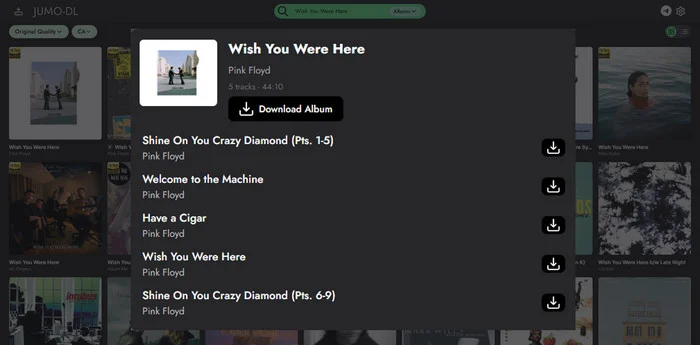
- ✅ Search for an artist/song/album.
- ✅ Supports both individual tracks and albums.
- ✅ Completely clean web interface with no intrusive ads.
- ❌ Primarily search-based, which is less convenient if the user already has a Qobuz URL.
- ❌ Download success rate is noticeably lower compared to DoubleDouble.
- ❌ Users must manually identify and select the correct release from the search results.
How to Use JUMO-DL to Download Qobuz Tracks
Step 1
Go to https://jumo-dl.pages.dev/ in your web browser.
Step 2 Type the name of the artist, song title, or album into the search bar (do not paste direct streaming links).
Step 3 Review the search results list to identify and locate the exact Qobuz track or album release you want.
Step 4 Click on the target track or album from the list, then click the download button to save the file.
No. 5 DezAlty (Telegram)
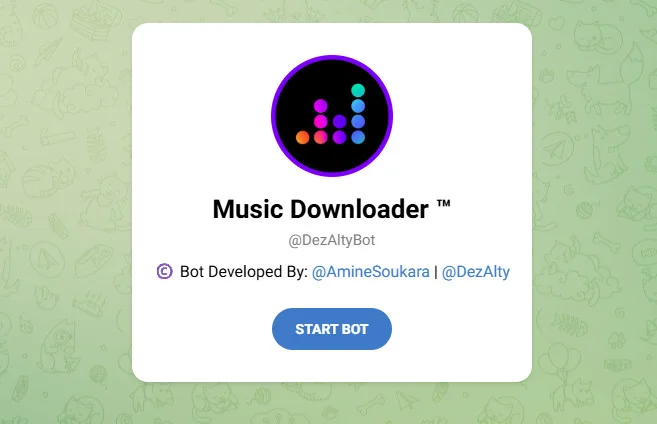
DezAlty is a feature-rich Telegram music downloader supporting Qobuz high-quality tracks, albums, and playlists with rich metadata and lyrics.
✨ Link: https://t.me/DezAlty
- ✅ Supports Qobuz, Tidal, and YouTube.
- ✅ Supports up to 24-bit/192kHz Hi-Res FLAC.
- ✅ Built-in support for lyrics, metadata tag editing, and Shazam song recognition.
- ❌ Service stability depends on server health and upstream API changes.
- ❌ You must use the actual bot dialog (@DezAltyBot), not its broadcast/update announcement channel.
How to Use DezAlty Telegram Bot
Step 1 Launch the Telegram app on your phone or desktop.
Step 2
Search for @DezAltyBot or visit https://t.me/DezAlty (make sure to chat directly with the bot, not the update channel) and click Start.
Step 3 Paste the direct Qobuz URL into the bot chat, or send a track title/artist keyword.
Step 4 Select your desired audio quality (up to 24-bit/192kHz Hi-Res FLAC) from the inline button menu provided by the bot.
Step 5 Wait for DezAlty to generate and send the Qobuz audio file directly into the chat, then click to download and save it to your device.
Get Rock-Solid Hi-Res Downloads with AudiFab Qobuz Downloader!
Say Goodbye to Bot Downtime and Try AudiFab Free Today!
Compatible with Windows & macOS · 100% Safe & Clean · 3k+ downloads monthly · 99.9% success rate
No. 6 JioDLBot (Telegram)
JioDLBot is a simple Telegram bot for quickly searching and downloading individual Qobuz tracks directly in chat.
✨ Link: https://t.me/JioDLBot
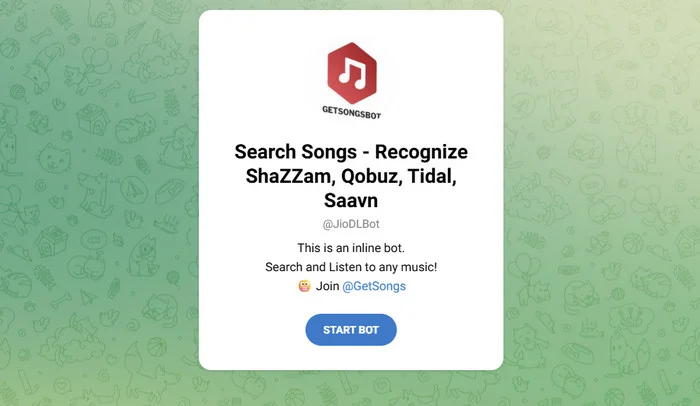
- ✅ Supports inline search (type @JioDLBot in any chat to search for songs).
- ✅ Ideal for quick, on-the-go track searches and single downloads.
- ❌ Download audio quality is inconsistent and not guaranteed.
- ❌ Lacks proper song metadata (such as cover art, tags, and complete info) and does not support batch downloading.
How to Use JioDLBot Telegram Bot
Step 1
Search for @JioDLBot in Telegram or visit https://t.me/JioDLBot and click 'Start'.
Step 2 Type the song name or artist into the chat and send the message.
Step 3 Tap on the correct track from the returned list to download it.
Note: You can also type @JioDLBot followed by a song title or artist name in the text box (e.g., @JioDLBot Taylor Swift). Then, wait for the search menu to pop up above your keyboard, tap your desired track, and the bot will send the track to download.
No. 7 HiFiTideBot (Telegram)
HiFiTideBot is a Telegram bot specifically designed to download music from Qobuz and Tidal via direct links, though it experiences frequent maintenance downtime due to upstream account dependencies.
✨ Link: https://t.me/HiFiTideBot
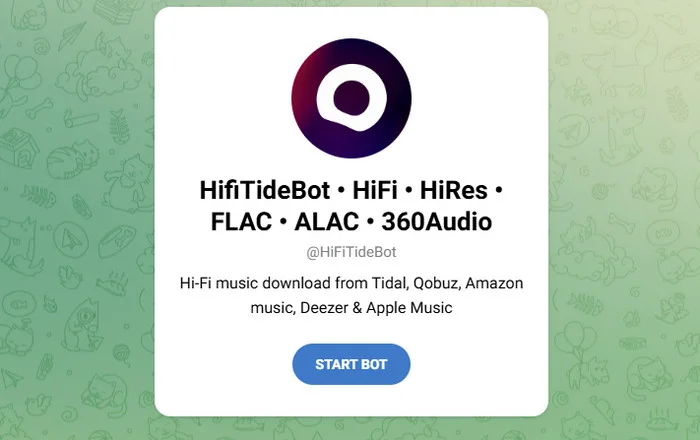
- ✅ Works with Qobuz, Tidal, Amazon Music, and Apple Music.
- ✅ Supports simple link parsing and album searches/downloads.
- ❌ High downtime frequency due to reliance on upstream commercial streaming accounts and server status.
- ❌ Playlist support and exact audio specifications are not as transparently defined as DezAlty.
How to Use HiFiTideBot Telegram Bot
Step 1
Go to https://t.me/HiFiTideBot in Telegram and click Start.
Step 2 Copy a direct track, album, or playlist link from Qobuz. Then, paste and send the link into the bot chat window.
Step 3 Wait for HiFiTideBot to process the Qobuz link, then tap the delivered Qobuz music file or archive link to download the Qobuz track you want.
No. 8-14 Open-Source GitHub Qobuz Downloaders
Most free open-source CLI and GUI tools (such as qobuz-cli, qobuz-dl, Streamrip, and QobuzDownloaderX) are no longer actively maintained and frequently fail when downloading full albums or playlists. While QBZ-Downloader remains updated, open-source options generally fall short in platform support, ease of use, and long-term stability.
| Tool | Ease of Use | Supported Platforms | Playlist / Album Download | Up to 24-bit/192 kHz | Metadata Support | Recently Maintained |
|---|---|---|---|---|---|---|
| qobuz-cli | ⭐⭐☆☆☆ | Qobuz | ❌ Fail | ✅ | Rich | ❌ No |
| qobuz-dl | ⭐⭐☆☆☆ | Qobuz | ✅ | ✅ | Standard | ❌ No |
| QobuzDownloaderX | ⭐⭐⭐☆☆ | Qobuz | ❌ Fail | ✅ | Standard | ❌ No |
| QobuzDownloaderX-MOD | ⭐⭐⭐☆☆ | Qobuz | ❌ Fail | ✅ | Standard | ❌ No |
| QBZ-Downloader | ⭐⭐⭐☆☆ | Qobuz | ❌ Fail | ✅ | Rich | ✅ Yes |
| Streamrip | ⭐⭐☆☆☆ | Qobuz, Tidal, Deezer, SoundCloud | ❌ Fail | ✅(Qobuz only) | Standard | ❌ No |
| qobuz-dl-go | ⭐⭐⭐☆☆ | Qobuz | ❌ Fail | ⚠️ Max 24/96 kHz | Rich | ✅ Yes |
💡 Why Do Free Open-Source Qobuz Downloaders Stop Working?
If you frequently use open-source CLI scripts or free tools from GitHub, you've likely encountered errors like Parse Failed, Token Expired, or 403 Forbidden. Free downloaders frequently stop working due to three major technical factors:
Frequent Streaming API Updates
Music platforms like Qobuz continuously update their internal Application Programming Interfaces (APIs), authentication tokens, and web request headers to prevent unauthorized scraping. When the API changes, open-source scripts break until a developer updates the code.
Lack of Maintenance & Abandoned Repositories
Most GitHub projects are created by individual developers as personal side projects. When developers lose interest, run out of free time, or face potential legal takedown notices (DMCA), they stop updating the repository, leaving the downloader permanently broken.
Loss of Shared/Upstream Premium Accounts
Tools like Telegram bots and web-based converters rely on a central pool of active Qobuz Hi-Fi subscription accounts to fetch music keys. When Qobuz detects high-frequency downloads from a single account, it quickly bans the account or rate-limits the IP address, causing the downloader to fail for all users.
If you're looking for a reliable, easy-to-use, and feature-packed downloading tool, AudiFab Qobuz Downloader is a great choice. Get an easy desktop GUI for Qobuz Hi-Res audio now!
Compatible with Windows & macOS · 100% Safe & Clean · 3k+ downloads monthly · 99.9% success rate
Comparison Table of the Best Qobuz Downloaders
| Tool | Output Quality | Output Format | Download Experience | Easy to Use | Keep Complete ID3 Tags | Batch Download |
|---|---|---|---|---|---|---|
| AudiFab Qobuz Downloader | Lossless Hi-Res (Up to 24-bit/192kHz) | FLAC/ MP3/ WAV/ AAC/ ALAC/ AIFF | High (Up to 40x speed) | ✔️ | ✔️ | ✔️ |
| DoubleDouble (Online) | Source-dependent (Up to Hi-Res) | FLAC | Medium (6GB daily limit) | ✔️ | ✔️ | ✔️ |
| Lucida (Online) | Source-dependent (Up to Hi-Res) | FLAC | Slow (Frequent failures) | ✔️ | ✔️ | ❌ |
| JUMO-DL (Online) | Source-dependent (Up to Hi-Res) | FLAC | Slow (Manual selection) | ✔️ | ✔️ | ❌ |
| DezAlty (Telegram Bot) | Source-dependent (Up to Hi-Res) | FLAC | Slow | ✔️ | ✔️ (Includes lyrics) | ❌ |
| JioDLBot (Telegram Bot) | Inconsistent | FLAC | Fast | ✔️ | ❌ | ❌ |
| HiFiTideBot (Telegram Bot) | Source-dependent (Up to Hi-Res) | FLAC | Slow (Frequent downtime) | ✔️ | ✔️ | ❌ |
| Qobuz GitHub Downloaders | Hi-Res (Up to 24-bit/192kHz) | Limited (Mainly FLAC) | Varies (Maintenance-dependent) | ❌ (CLI / Complex setup) | ✔️ | Limited (qobuz-dl only) |
Note on Audio Quality: Free web and Telegram tools fetch audio files directly based on Qobuz source availability (Source-dependent). However, output quality and success rates may vary due to upstream account limits or server traffic.
📊 Our test takeaway:
AudiFab offers the most complete combination of batch downloading, Hi-Res quality, metadata retention, and ease of use. DoubleDouble is the stronger choice for occasional free browser downloads, while DezAlty stands out for mobile users. Open-source GitHub tools remain useful for advanced users, but reliability varies significantly depending on maintenance status.
FAQs about Qobuz Downloaders
Q 1 Is there a Qobuz downloader available for Android or iOS?
Yes. Mobile users can download Qobuz music directly on Android or iOS by using Telegram bots like DezAlty. These bots parse Qobuz links within the chat interface and deliver standard or Hi-Res FLAC files directly to your phone's local storage.
Q 2 Can I download Qobuz music directly in FLAC format?
Yes, Qobuz natively streams in lossless FLAC format, and most downloaders support direct FLAC exports. Free online Qobuz converters like DoubleDouble provide FLAC downloads via ZIP files, while dedicated desktop software like AudiFab Qobuz Downloader allows you to convert and save full albums or playlists into FLAC, WAV, or ALAC formats with complete ID3 tags.
Q 3 Can Qobuz downloaders save 24-bit/192kHz Hi-Res audio?
Yes, but it depends on the tool you use. Most GitHub Qobuz downloaders, such as qobuz-cli and qobuz-dl, can save studio-grade 24-bit/192 kHz audio, but their complex setup makes them inconvenient for average users. If you want a quick and effortless way to batch download Hi-Res Qobuz playlists and albums, AudiFab Qobuz Downloader is the better choice.
Q 4 Why do free online Qobuz converters fail when downloading full playlists?
Online free Qobuz converters often fail on large playlists because of server timeout limits, strict rate-limiting from Qobuz, or IP throttling. Additionally, web hosts like Pixeldrain enforce daily bandwidth caps (e.g., 6 GB per day). For batch downloading large playlists without strict transfer caps, desktop Qobuz conversion software is much more reliable.
Q 5 What Is the Best Qobuz Downloader?
AudiFab Qobuz Downloader is the best all-around option thanks to its user-friendly interface, high batch success rates, and active software maintenance. Unlike unmaintained GitHub scripts or ad-heavy web converters, it delivers a smooth and reliable Hi-Res downloading experience.
Summary
While free online tools, Telegram bots, and open-source Qobuz downloaders each have their strengths, the right choice depends on how you download music. DoubleDouble works well for occasional browser-based downloads, DezAlty is convenient for mobile users, and GitHub tools suit advanced users comfortable with command-line setups. For those who regularly download full Qobuz albums and playlists and prioritize Hi-Res quality, complete metadata, batch support, and ease of use, AudiFab Qobuz Downloader is our best all-around pick.

AudiFab Qobuz Downloader – Download Hi-Res Qobuz Music as Local Files
Easily download Qobuz tracks, albums, and playlists for seamless offline listening on any device. FLAC, MP3, WAV & more • Retains original Hi-Res audio (up to 24-bit/192kHz) • Preserves full ID3 tags & metadata