Bought a Shokz OpenSwim Pro and wondering why you can’t stream Spotify directly? Many swimmers hit the same wall. To listen to Spotify while swimming, you must download Spotify playlists to MP3 and transfer them to your waterproof headphones. In this guide, we’ll walk you step by step to play Spotify music on Shokz underwater, without Wi-Fi, in up to 320 kbps MP3.
The Shokz OpenSwim Pro is a "Dual-Mode" headset, but for swimmers, only one mode truly matters. If you want to play Spotify while swimming, here’s why the standard Spotify app won’t work underwater—and what you can do instead.
| Feature | Bluetooth Mode (Land) | MP3 Mode (Water) |
|---|---|---|
| Best For | Running, Cycling, Gym | Swimming, Surfing, Diving |
| Works Underwater? | ❌ No. Signal drops. | ✅ Yes. Plays from internal storage. |
| Spotify App | ✅ Yes. Streams via phone. | ❌ No. Headset can't run apps. |
| Phone Required? | ✅ Yes. Must be within 10 meters. | ❌ No. Leave your phone in the locker. |
| Downloads on Spotify | ✅ Works inside the app. | ❌ Locked. Headset can't "see" them. |
| Audio Quality | Medium | High-Fidelity. Supports MP3, FLAC |
![[Solved!] Where Does Spotify Download Music to?](/assets/img/articles/where-does-spotify-download-music-to.jpg)
Check where Spotify downloads are stored in this guide.
Learn More →💡 Pro Tip: Stick to 320kbps MP3 files for the best balance between sound quality and library size. With 32GB on Shokz OpenSwim Pro, you can store up to 8,000 songs and listen to your entire Spotify playlist in the pool!
While Reddit threads and Facebook swimming groups often recommend various "Free Online Spotify Downloaders," experienced swimmers know these sites are often unstable and risky. After extensive testing, we recommend AudiFab Spotify Music Converter as the most reliable desktop solution for your Shokz headset.
AudiFab makes it easy and safe to get your Spotify music ready for underwater listening. Here’s why it stands out:
"Having downloaded the AudiFab Spotify Converter, I followed the basic instructions and was extremely satisfied with the result transferring audio to MP3 format for my SHOKZ SWIM – underwater over the ear headphones. I also found their customer care extremely helpful."
Now that you have a trusted Spotify to MP3 converter, here’s a straightforward guide to download your Spotify music to waterproof soundtrack—whether you have a Spotify Free or Premium account.
Launch AudiFab and Sync Spotify
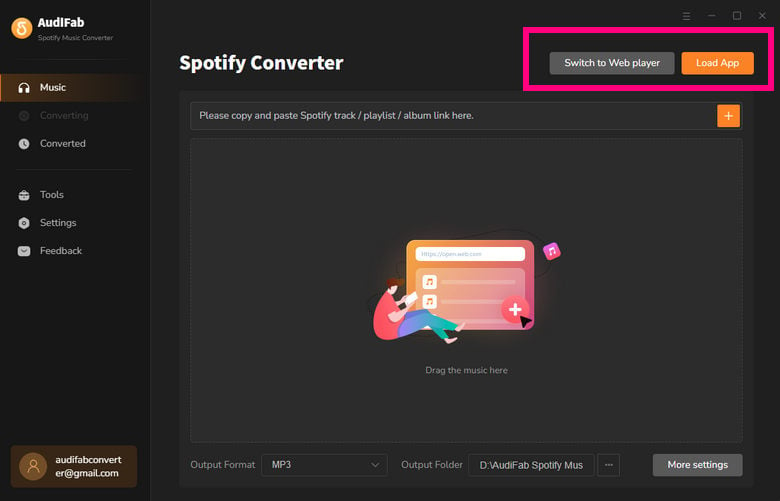
Open AudiFab Spotify Music Converter on your Windows or Mac. The Spotify app or web player will automatically launch. Simply find the playlist, album, or specific song you want to take to the pool or swim session.
Add Spotify Songs or Playlists
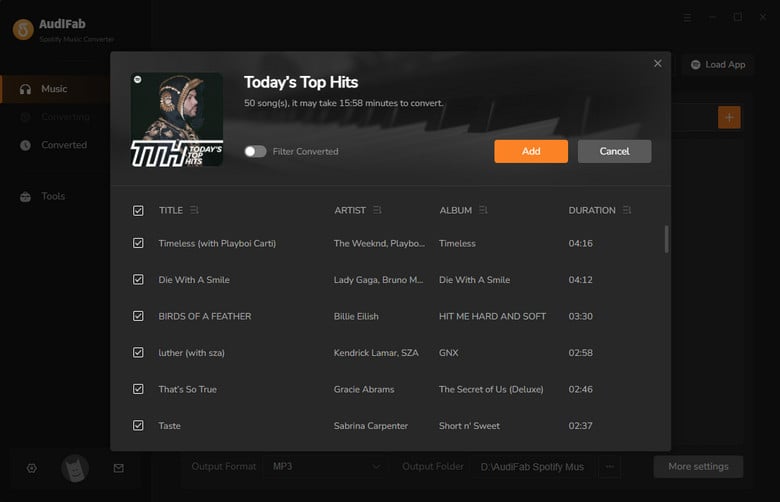
Click the “Add” button to import your Spotify playlist—no need to copy and paste URLs. AudiFab will quickly analyze and display all tracks.
Tip: You can check or uncheck specific songs if you want the perfect swim playlist.
Choose Your "Swimming" Settings
Click the "Settings" (gear icon) in the bottom-left corner. To get the best experience on Shokz OpenSwim Pro, we recommend the following:
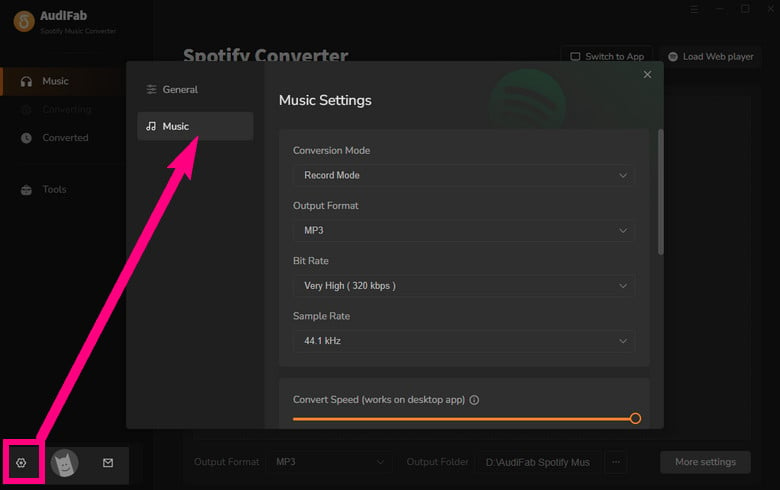
Convert Spotify to MP3
Once all your settings are ready, click the "Convert" button. AudiFab will quickly start batch downloading your Spotify songs and save them as high-quality MP3 files to your local folder.
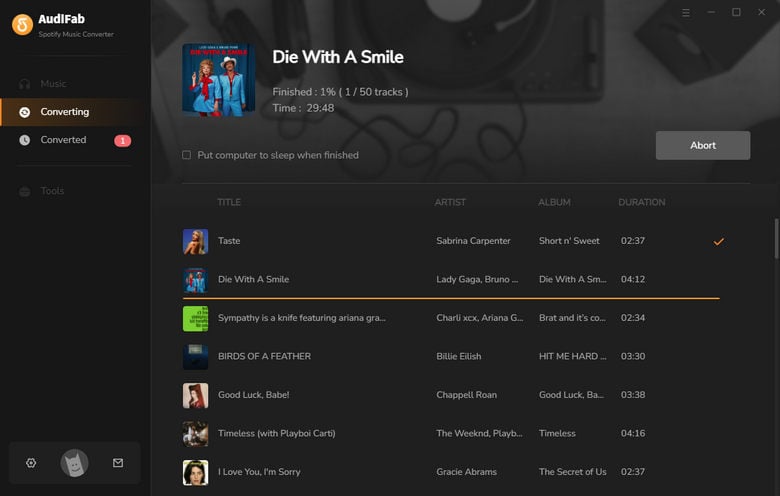
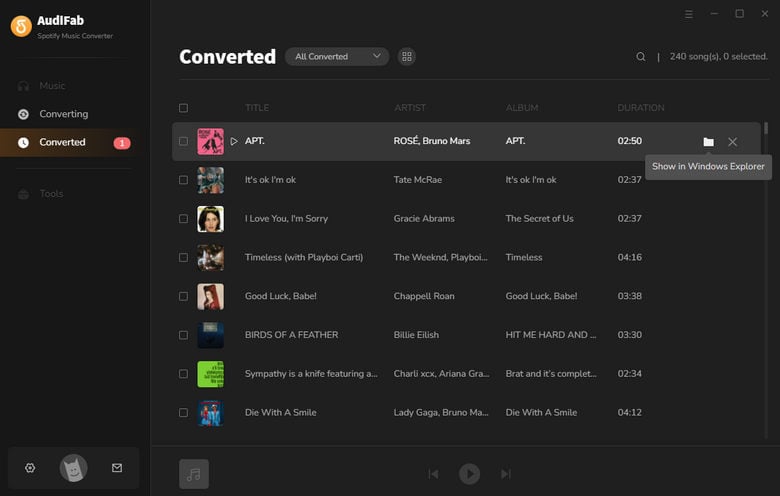
Find Your MP3s for Playing While Swimming
After conversion, go to the "History" tab to view your local files. All ID3 tags (cover art, artist, album) are preserved, making it easy to organize your music into folders like “Warm-up,” “Sprint,” and “Cool-down” before transferring to Shokz.
💡 Pro Tip: Looking to download music from Apple Music, YouTube, or Amazon Music for Shokz as well? Try AudiFab Music One for an all-in-one solution.

Now that you’ve converted your Spotify songs to MP3, it’s time to transfer them to your Shokz OpenSwim Pro or any swimming headphones. Just enjoy crystal-clear music in or out of the water.
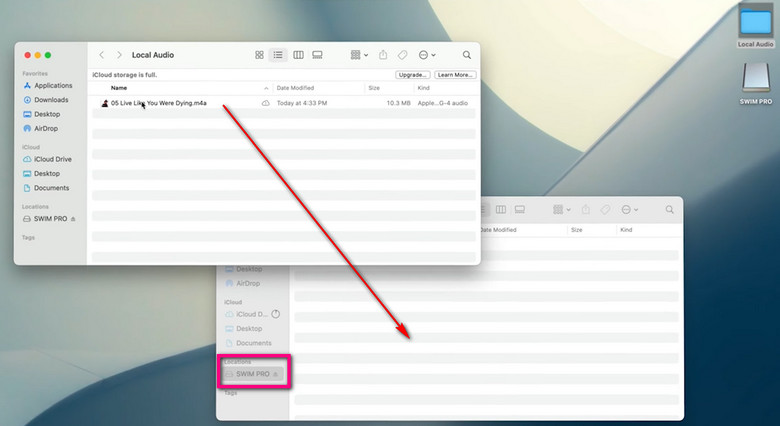
Think of your Shokz as a USB drive—moving music is as easy as Plug, Drag, and Play.
Connect Shokz to Your Computer
Use the original magnetic charging cable that came with your Shokz. Plug the USB end into your PC or Mac. A new drive named "SWIM PRO" will appear on your desktop.
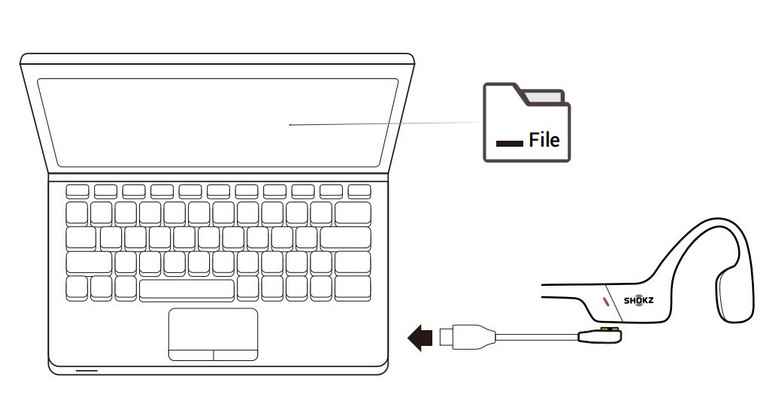
Copy & Paste Spotify MP3s
Open the "SWIM PRO" drive. Locate your converted Spotify MP3s in the AudiFab output folder. Drag and drop the files into the headset drive.
Tip: You can create folders (e.g., "Workout," "Chill") to keep your 8,000+ songs organized.
Switch to MP3 Mode (Crucial!)
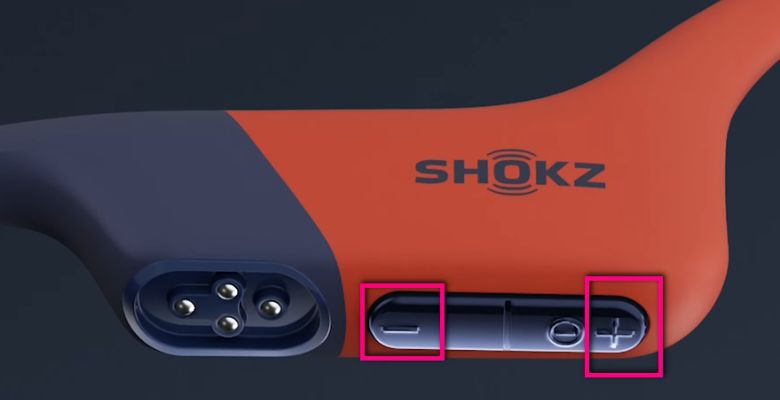
Once you’ve unplugged the cable and are ready to swim, you must manually switch the mode:
Optimize for Water (Swimming EQ)
To get the best sound while wearing earplugs:
![Best MP3 Players for Spotify in 2026 [Top 10]](/assets/img/articles/best-mp3-player-with-spotify.jpg)
Enjoy your favorite Spotify songs on your MP3 player anytime, anywhere!
Learn More →Can I download Spotify music to my Shokz MP3 player via Bluetooth?
No. Bluetooth does not work underwater, and Shokz cannot run Spotify apps. To play music while swimming, you must download Spotify tracks to MP3 or other supported formats first.
What audio formats work best with Shokz OpenSwim Pro?
The OpenSwim Pro supports WAV, WMA, FLAC, AAC, M4A, APE, and MP3. For the best balance of audio quality and storage, we recommend 320kbps MP3.
How many songs can I store on the OpenSwim Pro?
With 32GB of internal memory, the OpenSwim Pro can hold around 8,000 songs at 320kbps MP3 or 1,200 lossless FLAC tracks. This is a big upgrade from the original OpenSwim, which had 4GB storage (~1,200 songs).
Will the music quality be affected underwater?
Underwater with earplugs, Shokz bone conduction makes your Spotify MP3s sound richer, as vibrations travel through your cheekbones and outside noise is blocked.
What if my Shokz doesn't recognize the downloaded files?
If your headset is in MP3 mode but says "No Files," check two things:
Where to download music from?
Use a reliable Spotify to MP3 converter like AudiFab Spotify Music Converter, or explore free MP3 music download sites, such as Jamendo Music.
How do I keep my Shokz in MP3 mode permanently?
Shokz doesn’t offer a permanent MP3 mode. A common community hack is to turn off Bluetooth and avoid opening the Shokz app—this reduces auto-switching to Bluetooth. Most swimmers simply press Volume ± for 2 seconds at the poolside to enter MP3 mode quickly and easily.
More tips: Shokz community discussion
Any best playlists for swimming workouts?
Need some inspiration for your 32GB of storage? Based on popular Shokz user discussions, here are the top Spotify playlist vibes to convert:
Streaming Spotify on Shokz OpenSwim Pro isn’t possible due to Bluetooth limits and no app support. That’s why downloading your Spotify playlists to MP3 is essential for uninterrupted underwater playback.
By using a reliable Spotify to MP3 converter like AudiFab, you can keep high-quality audio, maintain playlist order, and store thousands of tracks. Just transfer to your headset, switch to MP3 mode, and you’re ready to enjoy crystal-clear beats while swimming, training, or just relaxing in the pool.
Don’t let tech limits stop your workout music—prepare your Shokz OpenSwim Pro with offline tracks and dive in. Download the free trial of AudiFab Spotify Music Converter and start your day with your favorite music!

Convert Spotify songs, playlists & podcasts to MP3/AAC/FLAC/WAV at up to 40X speed. Keep original quality & ID3 tags.
Music is the greatest communication in the world and here are some articles that may help you enjoy music in a better way.

 Download
 Download