Want to convert Spotify songs or playlists to WAV for offline listening, DJing, or editing? Spotify doesn't support direct WAV exports, while many free online Spotify converters suffer from failed downloads or poor audio quality.
We tested 13 Spotify to WAV converters, from free online tools to desktop and open-source options, comparing audio quality, reliability, and ease of use to help you find the best fit.
🔜 Quick Picks: Choose Your Spotify to WAV Converter
- For Spotify Lossless WAV & Batch Conversion: AudiFab Spotify Music Converter (Up to Spotify lossless).
- For free online downloads: SpotyLoader (high success rates).
- For open-source tools: OnTheSpot or spotDL (technical setup may be required).
- When direct WAV downloads fail: Download Spotify as MP3, then convert to WAV (free online workaround).
- No. 2 SpotyLoader (Online) ⭐⭐⭐⭐
- No. 3 SpotiLab (Online) ⭐⭐⭐
- No. 4 Soundverter (Online) ⭐⭐⭐
- No. 5 ConverterFactory (Online) ⭐⭐
- No. 6 Audacity (Win/Mac/Linux) ⭐⭐⭐
- No. 7–10 Best 4 GitHub Spotify to WAV Converters ⭐⭐
- No. 11-13 Extra Workflow: Spotify to MP3 + Convert MP3 to WAV ⭐⭐⭐
 Download for Windows
 Download for Mac
⚖️ Disclaimer For educational and personal use only. Please respect copyright and Spotify's Terms of Service.
Spotify to WAV: Formats & Lossless Quality
❓ Spotify to WAV vs. FLAC vs. MP3: Which Should You Choose?
WAV, FLAC, and MP3 differ mainly in compression, file size, and compatibility. The best format depends on how you plan to use your Spotify music.
| Format | Audio Quality | File Size | Compression | Best For |
|---|---|---|---|---|
| WAV | Lossless | Large | Uncompressed | Audio editing & DJ software |
| FLAC | Lossless | Medium | Lossless compression | High-quality music storage |
| MP3 | Lossy | Small | Lossy compression | Everyday listening & sharing |
Our recommendation: Choose WAV for audio editing and software compatibility, FLAC for lossless music storage with smaller files, or MP3 for everyday listening and easy sharing. All three formats also suit other uses, depending on your needs.
10 Best FREE Online Spotify Playlist Downloader
Discover a 40x faster Spotify playlist converter for you.
Learn More →❓ Can I Get Spotify Lossless WAV?
Yes. Since Spotify Premium now supports lossless streaming up to 24-bit/44.1kHz, desktop tools like AudiFab Spotify Music Converter can capture Spotify lossless streams and save them locally in WAV format while retaining the original sample rate and bit depth.
Note that some Spotify streams use lossy compression at up to 320kbps. To get true lossless WAV audio, you must first ensure Spotify provides a lossless source.
No. 1 AudiFab - Best Spotify to Lossless WAV
Unlike free online Spotify converters with frequent failures, lossy WAV output, or limited batch support, AudiFab Spotify Music Converter offers a more reliable Windows and Mac solution. It batch converts Spotify songs, playlists, and albums to WAV, FLAC, MP3, M4A, ALAC, and AIFF, while preserving full ID3 metadata.
Its biggest advantage is Spotify Lossless support. With Spotify Premium, users can save audio up to Spotify Lossless audio with the proper settings, and Spotify Free users can also convert Spotify music to WAV with minimal quality loss during conversion.
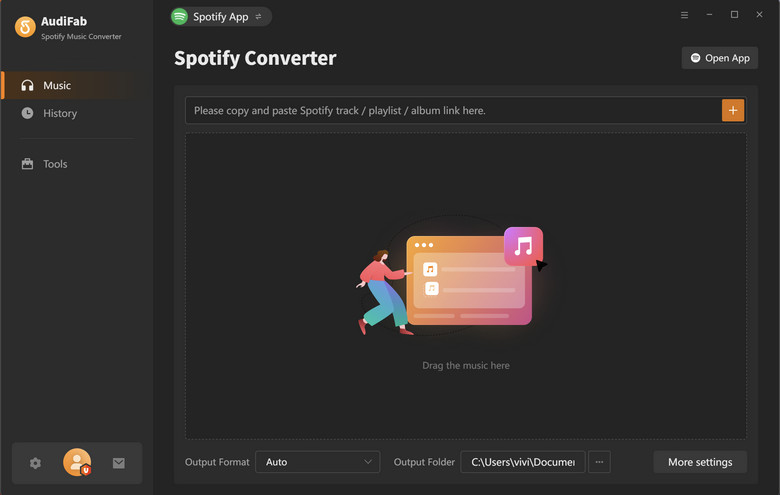
- ✅ Preserves the original audio quality up to Spotify Lossless downloads.
- ✅ Converts Spotify music to WAV, FLAC, MP3, AAC, ALAC, and AIFF.
- ✅ Batch converts entire Spotify playlists and albums in one go.
- ✅ Preserves complete ID3 metadata, including titles, artists, albums, and cover art.
- ✅ Easy-to-use interface for Windows and Mac, with no technical setup required.
- ✅ Regular software updates for improved stability and compatibility.
- ❌ Available on Windows and macOS only (no mobile version).
- ❌ Paid software (Free trial available).
📊 Test Review (November 2026):
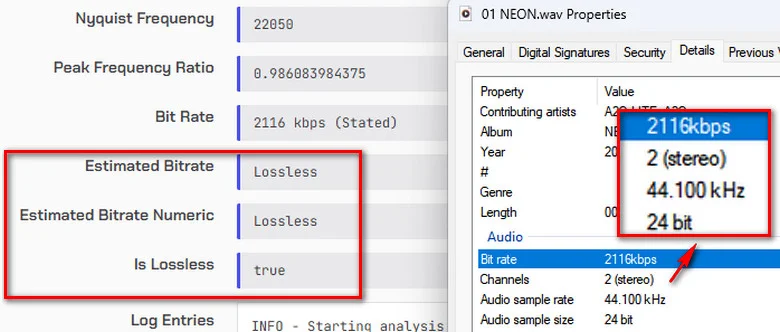
We converted Spotify's "NEON" to WAV using AudiFab and analyzed the output. The file showed 24-bit/44.1kHz stereo audio at 2,116kbps, with the analyzer confirming "Is Lossless: true". AudiFab successfully exported lossless WAV audio.
How to Use AudiFab Spotify to WAV Converter
Step 1 Download, install, and open AudiFab on your Windows or Mac computer.
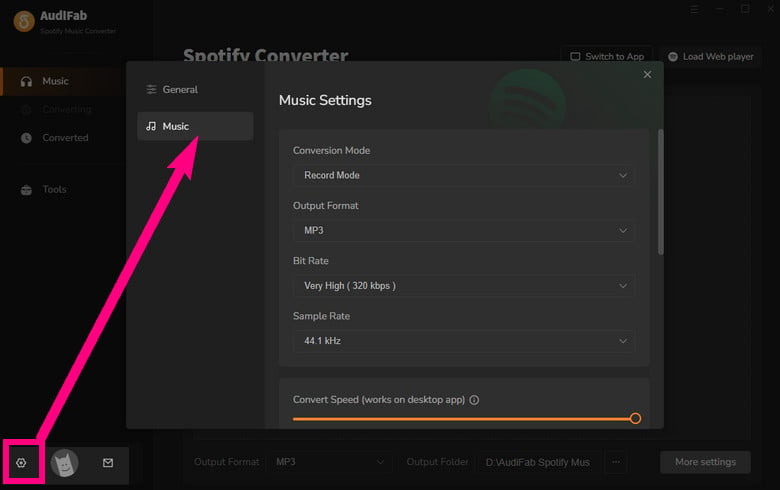
Step 2 Click the "Settings" (gear icon) in the bottom-left corner to choose your output format (MP3, WAV, FLAC, AAC, AIFF, or ALAC) and adjust audio parameters.
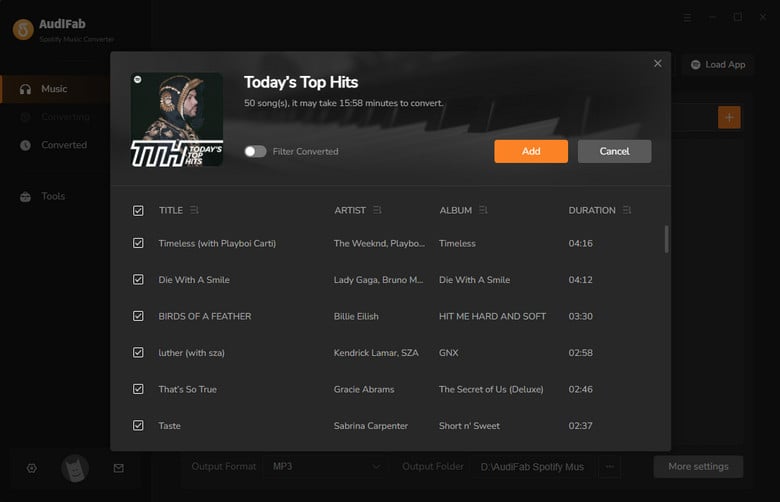
Step 3 Open the desired Spotify playlist within the built-in browser, click the floating "+" button, and select "Add".
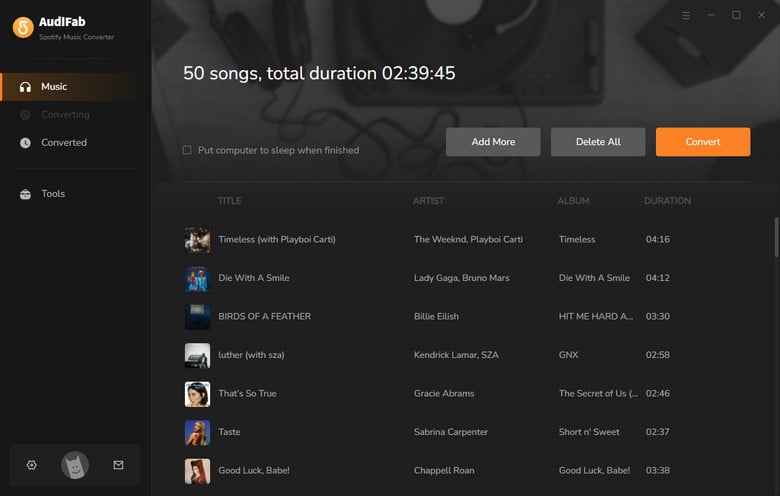
Step 4 Click "Convert" to start processing. Once finished, find your local files under the "History" tab.
✨ Note: Many free online Spotify to WAV converters rely on YouTube-sourced audio, resulting in lower sound quality. Our tests also found frequent download failures and inconsistent success rates. These tools may work for occasional free downloads, but if you prioritize reliable downloads and true lossless WAV quality, we recommend using a dedicated Spotify Lossless Music Downloader.
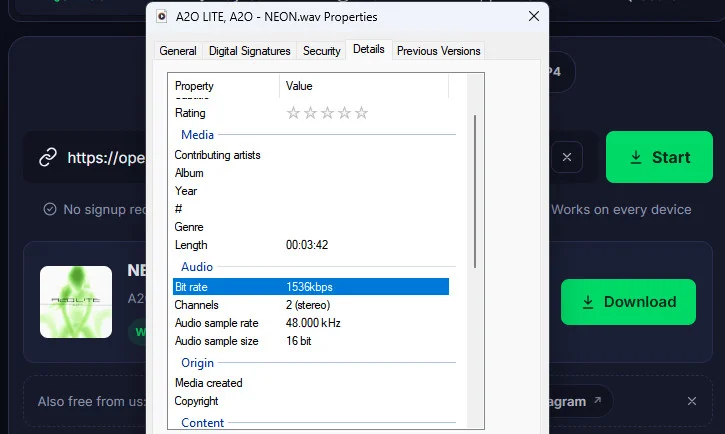
No. 2 SpotyLoader - High Success Free Online Spotify to WAV
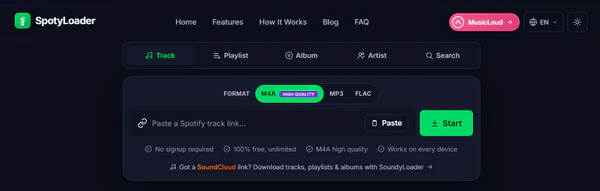
SpotyLoader is a free, web-based Spotify audio downloader that lets you quickly convert individual songs to WAV, MP3, and other formats without installing any software.
✨ Link: https://spotyloader.com/
- ✅ High download success rate.
- ✅ Supports WAV, MP3, M4A, FLAC, and MP4.
- ✅ Preserves basic metadata.
- ✅ Free and browser-based, with no installation required.
- ❌ WAV output is lossy-sourced, not true lossless audio.
- ❌ No batch or ZIP downloads for playlists and albums; songs must be downloaded individually.
How to Use SpotyLoader to Convert Spotify to WAV
Step 1 Go to Spotify, find the song you want, and click "Share" → "Copy Link".
Step 2 Paste the Spotify URL into SpotyLoader's search box.
Step 3 Select "WAV" as the output format and click "Start".
Step 4 Once the song is processed, click "Download" to save the WAV file to your device.
No. 3 SpotiLab - Free Spotify WAV Converter Online
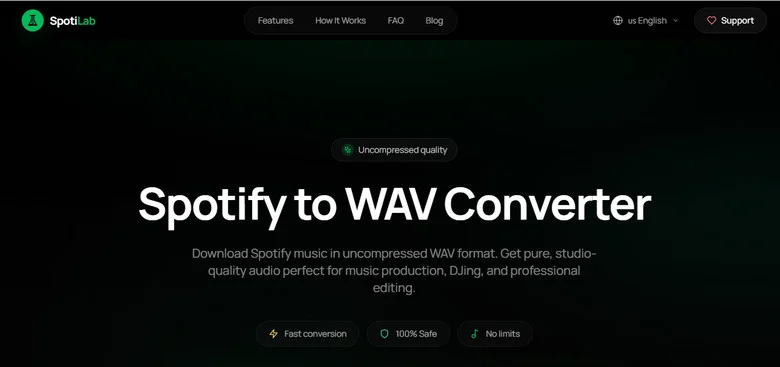
SpotiLab is a free online Spotify converter that allows login-free audio downloads with basic metadata retention, offering convenience for light use, though testing revealed unstable performance, daily limits, and lossy-sourced WAV outputs.
✨ Link: https://spotilab.com/spotify-to-wav
- ✅ Supports WAV, FLAC, and MP3 (128kbps or 320kbps) output.
- ✅ No Spotify account or login required.
- ✅ Preserves basic metadata.
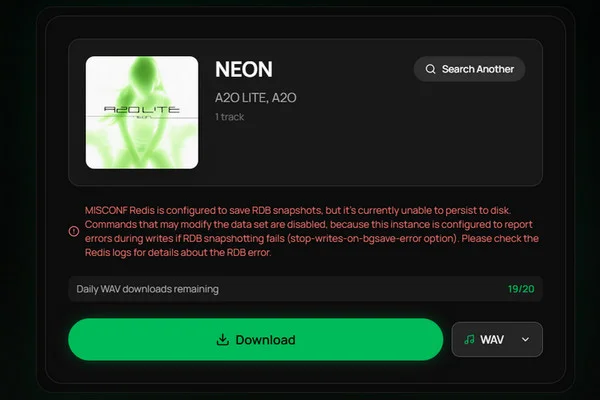
- ❌ One-click playlist (up to 50 songs) and album downloads failed during testing, despite being supported.
- ❌ WAV files are lossy-sourced; no lossless audio.
- ❌ Free downloads are limited to 20 files per day.
- ❌ Unstable downloads; processing often gets stuck at 95% or fails with an RDB error.
How to Use SpotiLab Free Spotify WAV Downloader
Step 1 Go to Spotify, find a song, album, or playlist, and select "Share" → "Copy Link".
Step 2 Paste the Spotify URL into SpotiLab's input box and click "Download".
Step 3 Select "WAV" as the output format if prompted, then start the conversion.
Step 4 Once processing is complete, download the WAV file to your device.
Upgrade from SpotiLab to Stable & Unlimited Downloads - AudiFab Spotify Music Converter
Skip daily limits, lossy audio, and download freezes with AudiFab to Enjoy unlimited batch downloads and true lossless Spotify playlist conversion.
Compatible with Windows & macOS · 100% Safe & Clean · No Technical Setup · True Lossless Quality
No. 4 Soundverter - Online Spotify Music Downloader
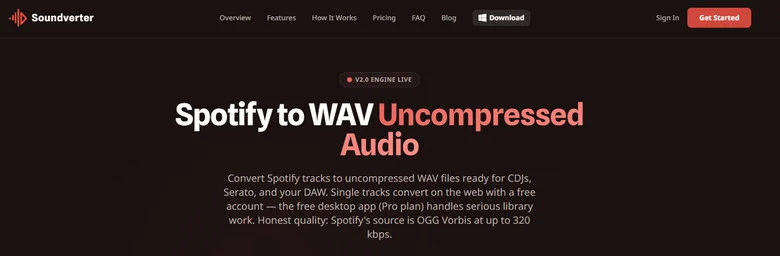
Soundverter is a multi-platform online downloader that supports audio extraction from Spotify, Apple Music, and YouTube Music, though free guests face strict monthly limits and ads for WAV exports.
✨ Link: https://soundverter.com/spotify-to-wav
- ✅ Supports WAV, MP3, FLAC, AAC, and M4A output formats.
- ✅ Preserves basic metadata, such as song titles and artist names.
- ✅ Supports audio services including Spotify, Apple Music, SoundCloud, and YouTube Music.
- ❌ WAV, FLAC, AAC, and M4A downloads require a Premium account; guests can only download MP3.
- ❌ Free users are limited to 10 conversions per month.
- ❌ Free users must deal with ads.
- ❌ Low download success rate, with frequent failures during testing.
How to Use Soundverter Spotify to WAV Online Converter
Step 1 Open Soundverter and click "Sign In" or create an account using your email address.
Step 2 Open Spotify, find the song you want, and select "Share" → "Copy Link".
Step 3 Paste the Spotify URL into Soundverter's input box. Select "WAV" as the output format and click "Convert".
Step 4 Once the conversion is complete, click "Download" to save the Spotify WAV file.
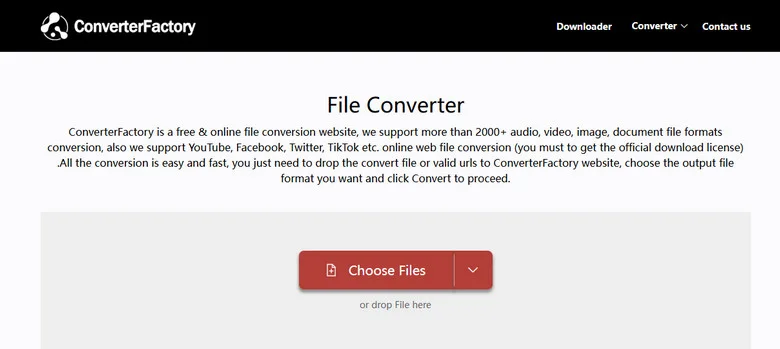
No. 5 ConverterFactory - Online Spotify WAV Converter
ConverterFactory functions both as a web downloader and a direct audio file converter, allowing you to convert existing MP3 or M4A files to WAV online.
✨ Link: https://converterfactory.com/spotify-to-wav
- ✅ Supports WAV, MP3, M4A, and FLAC output formats.
- ✅ Converts existing MP3 or M4A audio files to WAV directly online.
- ✅ Preserves basic audio metadata, such as song titles and artist names.
- ❌ WAV output is lossy-sourced, not true lossless audio.
- ❌ Low Spotify download success rate; links frequently return an "Unavailable: link is not supported" error.
How to Use ConverterFactory Free WAV Converter
Step 1 Paste a downloadable Spotify audio URL into the ConverterFactory Spotify to WAV input box, or upload an existing Spotify MP3 or M4A file to the ConverterFactory home page.
Step 2 Click "Convert" to start the conversion.
Step 3 Once processing is complete, click "Download" to save the WAV file.
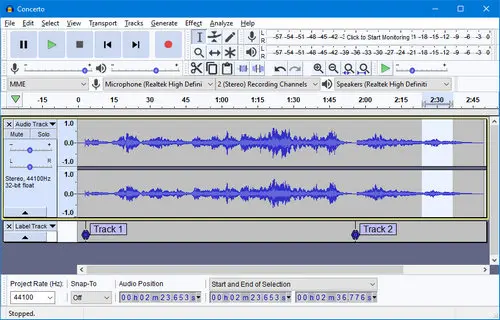
No. 6 Audacity - Free Spotify WAV Recorder
Audacity is a free, open-source audio recorder that lets you capture Spotify playback and export it as WAV files. It's a practical alternative to Spotify downloaders, but requires real-time recording for each track.
✨ Link: https://www.audacityteam.org/
- ✅ Completely free and open-source, with no subscription required.
- ✅ Records Spotify playback and exports audio as WAV files.
- ✅ Supports 16-bit and 24-bit PCM WAV output, though actual audio quality depends on the source.
- ❌ Cannot download Spotify songs directly; audio must be recorded during playback.
- ❌ No automatic playlist or album downloads; tracks must be recorded manually.
- ❌ Real-time recording required; recording a 5-minute song takes 5 minutes.
How to Use Audacity to Record Spotify to WAV
Step 1 Open Audacity. On Windows, select Windows WASAPI and the appropriate Loopback recording device.
Step 2 Play Spotify music and click "Record" in Audacity to start recording.
Step 3 Once finished, go to "File" → "Export Audio".
Step 4 Select "WAV", choose 16-bit or 24-bit PCM, and export the file.
No. 7–10 Best 4 GitHub Spotify to WAV Converters
GitHub Spotify to WAV converters are best for tech-savvy users who prefer free, open-source tools and don't mind technical setup. For a simpler experience, try AudiFab or a free online converter.
Here are four GitHub Spotify to WAV Converters worth considering:
| Comparison Factor | OnTheSpot | Spytify | spotDL | Zotify |
|---|---|---|---|---|
| WAV Output | ✅ Converted | ✅ Recorded | ✅ Converted | ❌ Requires conversion* |
| Audio Source & Quality | Spotify, varies | Recorded playback | YouTube, lossy | Spotify, up to 320kbps |
| Ease of Use | ✅ GUI | ✅ GUI | ❌ CLI | ❌ CLI |
| Fast Playlist Downloads | ✅ | ❌ Real-time recording | ✅ | ✅ |
| Rich Metadata | ✅ | ✅ | ✅ | ✅ |
| Maintained | ✅ | ✅ | ✅ | ✅ |
*Note: Zotify does not support direct WAV output. You'll need an additional MP3 to WAV converter to convert the downloaded audio files.
spotDL Review 2026: Is It Still Worth Using?
Read our 2026 spotDL review to discover its features, download success rates, audio quality, common errors, and the best beginner-friendly alternative.
Learn More →❓ Which GitHub Spotify to WAV Tool Should You Choose?
- 1. spotDL: Best for tech-savvy users who want to batch-download Spotify playlists and don't mind using YouTube-sourced audio.
- 2. OnTheSpot: Best for beginners who prefer a simple GUI to download Spotify playlists and convert music to WAV without command-line setup.
- 3. Spytify: Best for users who want to record Spotify playback directly to WAV and don't mind real-time recording.
- 4. Zotify: Best for CLI users who want to download audio directly from Spotify at up to 320kbps and convert it to WAV afterward.
💡 Why Do Free Spotify to WAV GitHub Converters Stop Working?
| Common Reasons | How to Fix |
|---|---|
| Spotify API Changes | Update the tool to the latest version or check GitHub Issues for fixes. |
| Outdated Dependencies | Update Python, FFmpeg, and required packages. |
| Login or Authentication Errors | Check account requirements and reauthenticate using the tool's official instructions. |
| Unavailable Audio Sources | Try another track or check whether the tool's audio source is accessible. |
| Abandoned GitHub Projects | Look for an actively maintained fork or alternative tool. |
| Download or Conversion Errors | Check FFmpeg installation, output settings, and available storage. |
Ditch Complex Setup & Audio Loss - AudiFab Spotify Music Converter
Skip complex command lines, broken scripts, and lossy YouTube rips. AudiFab provides a simple one-click GUI for lossless batch Spotify conversion.
Compatible with Windows & macOS · 100% Safe & Clean · No Technical Setup · True Lossless Quality
No. 11-13 Extra Workflow: Spotify to MP3 + Convert MP3 to WAV
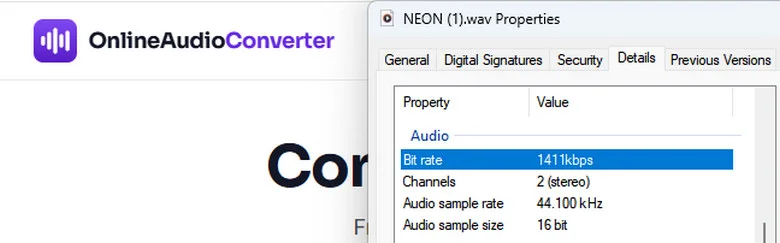
Some free online Spotify to WAV converters fail to process Spotify links or don't offer reliable WAV downloads. A practical workaround is to download Spotify songs as MP3 first, then convert the files to WAV using a separate online audio converter.
Step 1 Download Spotify Music as MP3.
Use an online Spotify MP3 downloader, such as SpotMate and Spotisaver, to save the song as an MP3 file.
Step 2 Convert MP3 to WAV Online.
Upload your MP3 file to an online audio converter, select WAV as the output format, and start the conversion.
📃 Here are 3 Online Spotify MP3 to WAV Converters worth considering:
| Comparison Factor | FreeConvert | Convertio | Online Audio Converter |
|---|---|---|---|
| Free MP3 to WAV | ✅ 20 conversion min/day | ✅ 10 conversion credits/day | ✅ 5 files/day |
| Max File Size | 1 GB | 1 GB | 250 MB |
| Batch Conversion | ✅ | ✅ | ❌ |
| Custom Audio Settings | ✅ Codec, volume | ✅ Codec, sample rate, channels | ✅ Sample rate, channels |
| No Sign-Up Required | ✅ | ✅ | ✅ |
| Automatic File Deletion | ✅ After 8 hours | ✅ Within 24 hours | ✅ Within 24 hours |
Comparison of Best Spotify to WAV Converters
| Converter | Lossless & HQ WAV | High Success Rate | Batch Downloads | Rich Metadata | Easy to Use |
|---|---|---|---|---|---|
| AudiFab | ✅ up to Lossless | ✅ | ✅ | ✅ | ✅ |
| SpotyLoader | ✅ HQ | ✅ | ❌ | ❌ Basic | ✅ |
| SpotiLab | ❌ LQ | ❌ | ❌ | ❌ Basic | ✅ |
| Soundverter | ❌ LQ | ❌ | ❌ | ❌ Basic | ✅ |
| ConverterFactory | ❌ LQ | ❌ | ❌ | ❌ Basic | ✅ |
| Audacity | Depends on Source | ✅ | ❌ | ❌ | ✅ |
| GitHub Spotify WAV Tools | Depends on Source | Vary | Vary | ✅ | ❌ |
| MP3 to WAV Tools | Depends on Source | ✅ | Vary | Depend on MP3 Source | ✅ |
Key Takeaway:
- AudiFab is the best overall Spotify to WAV converter in our comparison, offering up to lossless WAV quality, reliable batch downloads, and rich metadata.
- SpotyLoader is a convenient free online option for individual songs, while Audacity works well for free WAV recording.
- GitHub Spotify WAV Tools suit more technical users, and MP3 to WAV converters provide a practical fallback when direct downloads fail.
FAQ about Spotify to WAV Converters
Q 1 Can I Convert Spotify to WAV Without Premium?
Yes, you can convert Spotify to WAV without Premium. Tools like AudiFab Spotify Music Converter work with Spotify Free accounts to convert music to WAV while preserving the available source quality.
Q 2 Can I Convert an Entire Spotify Playlist to WAV?
Yes, AudiFab Spotify Music Converter can help you convert entire Spotify playlists to WAV in one click while keeping all metadata intact.
Q 3 Can I Convert Spotify to WAV on Android or iPhone?
Yes, mobile browser-based converters support Spotify to WAV conversion on Android and iPhone, though features and download success rates may vary by platform.
Q 4 Are Free Online Spotify to WAV Converters Safe?
Free online converters are not always safe. Some web-based tools carry intrusive ads, aggressive redirects, or privacy risks, so avoid entering personal login details on untrusted sites. Choose reputable tools such as AudiFab Spotify Music Converter and avoid entering Spotify credentials on untrusted websites.
Q 5 Why Do Some Spotify to WAV Converters Not Work?
Spotify API updates and broken links frequently disrupt converter tools. Failures are usually caused by server downtime, outdated software versions, or missing original audio sources.
Summary
Converting Spotify to WAV is possible through desktop software, free online Spotify to WAV tools, online audio recorders, and open-source Spotify converters, but reliability and audio quality vary. Free tools work for occasional downloads, while GitHub options suit technical users. For the best overall experience, we recommend AudiFab Spotify Music Converter, offering lossless WAV support with Spotify Premium, batch playlist downloads, and complete metadata preservation.

AudiFab Spotify Music Converter – The Best Lossless Spotify to WAV Converter
Convert Spotify songs, playlists & albums to WAV without quality loss or download errors. Fast batch conversion • Provide Up to Spotify lossless WAV • Windows & Mac • Preserves full ID3 tags & cover art