📌 Quick Answer:
Spotify Premium can be canceled at any time, but canceling renewal does not guarantee a refund.
In 2026, Spotify raised prices for the third time, pushing the Individual plan to $12.99/month and the Family plan to $21.99/month. This has led many users to cancel their subscriptions and switch to alternatives like Apple Music or YouTube Music. In this guide, we’ll explain how to cancel and request a refund for Spotify Premium, plus how to keep listening to your favorite Spotify songs offline even after canceling Premium.
Want to try Spotify Premium free for up to 6 months? Here are 15 legal, safe, and working methods for 2026.
Learn More →✨ Tips: We strongly recommend backing up your music with AudiFab Spotify Music Converter before clicking “Cancel.” Your songs will remain permanently available for offline playback even after your Spotify account switches to Free.
Now that you know what happens when Spotify Premium expires, you can decide whether canceling is the right choice for you. The cancellation process depends on how you subscribed. Follow the method below based on your billing provider or plan type.
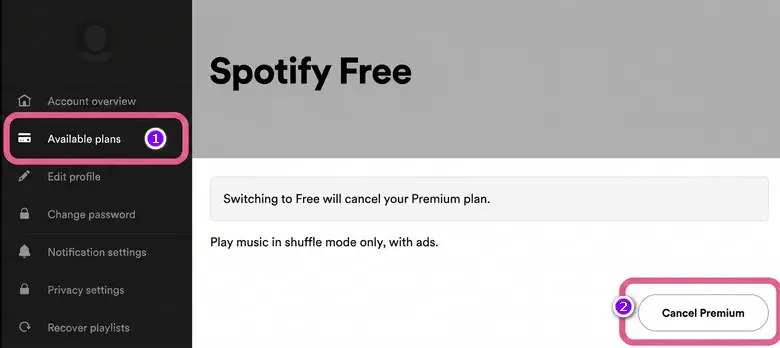
If you pay Spotify directly by credit card or PayPal:
See also: Two Methods to Download Spotify Music to Android Phones
If your Spotify subscription is billed through your Apple ID:
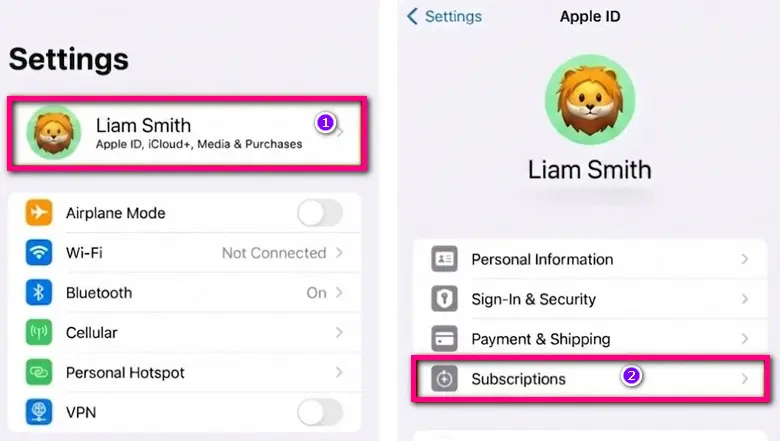
See also: 6 Ways to Download Spotify Music to iPhone 17 & Older Models
If you subscribed through Google Play:
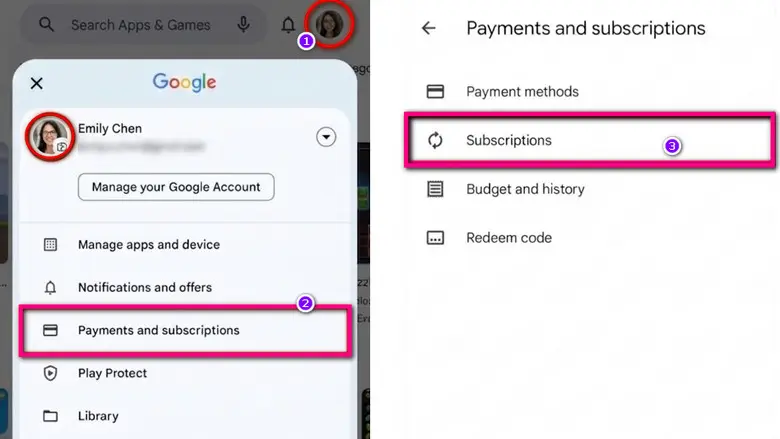
The cancellation steps vary depending on your plan type:
If your Spotify subscription is managed by a third-party provider, you'll need to cancel it through that service.
💡 Smart Reminder: Whether you use GCash or Apple Pay, once you cancel, your offline downloads will be wiped out. Don't forget to use AudiFab Spotify Music Converter to save your playlists to local MP3s before your billing cycle ends!
If the Cancel Premium button is missing, your subscription may not be managed directly through Spotify.
Canceling Spotify Premium only stops future payments. It does not automatically give you a refund. To get your money back, you need to request it manually and meet Spotify’s refund conditions.
You may be eligible for a refund under the following circumstances:
Note: Refunds are generally unavailable for gift card purchases or subscriptions billed through mobile carriers.
You can use the following template:
Once your refund is approved, Spotify will downgrade your account and your Premium access will end. Your downloaded songs will stop working for offline playback. If offline listening is still important to you, go to the next part to learn how to keep your Spotify music available after canceling Premium.
To keep listening to Spotify offline without Premium, you need to save Spotify music as local audio files.
AudiFab Spotify Music Converter offers a reliable solution for this. Unlike free online Spotify Downloaders that compromise sound quality, AudiFab is a lossless Spotify Downloader that batch-saves your entire Spotify library —including playlists, albums, podcasts, audiobooks, even videos—directly to your computer.
Additional features include Spotify to CD burning, iTunes upload, and customizable download settings. You can organize Spotify downloads by title and category while keeping original playlist order intact. This makes it easy to transfer Spotify music to USB drives or SD cards. Enjoy 100% offline, ad-free playback in your car, on an MP3 player, or any other device without an internet connection and Spotify subscription.
Follow these steps to download Spotify Lossless songs offline using AudiFab Spotify Music Converter:
STEP 1: Add Spotify Playlist
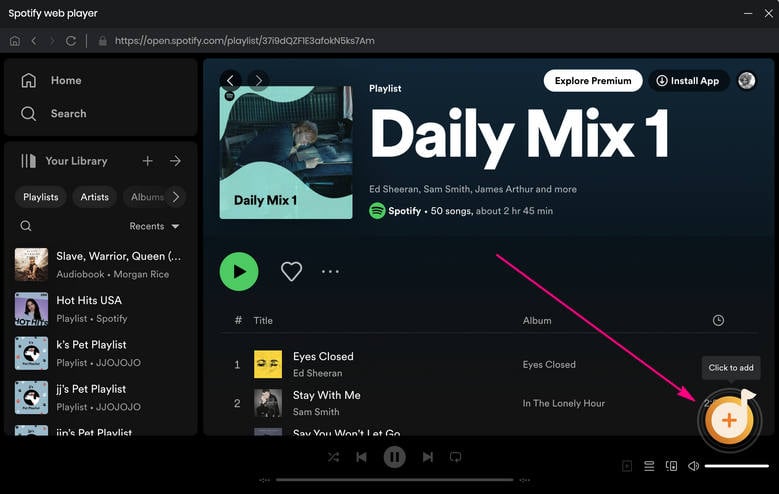
Launch AudiFab and open a Spotify playlist. Click Add.
STEP 2: Choose MP3 & 320 kbps

Go to "Settings" and select MP3 and 320 kbps as bit rate.
STEP 3: Convert Spotify MP3s
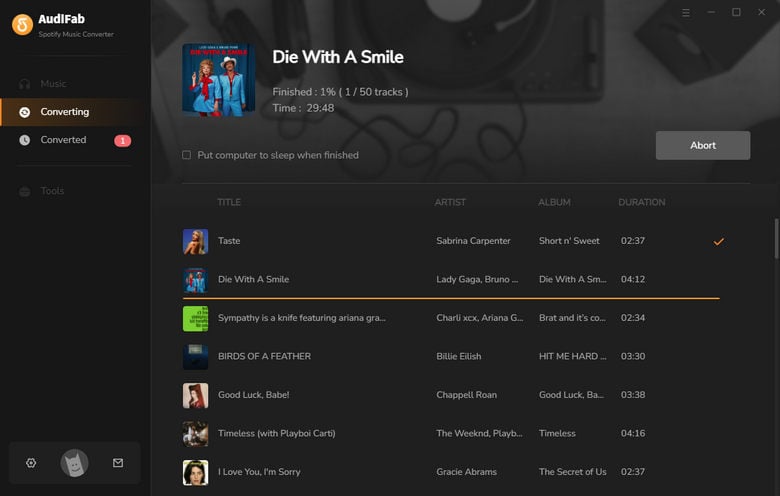
Click Convert to back up your Spotify playlist to MP3 in one go.
Now, even though your Spotify Premium is officially gone, your music is entirely yours—ad-free, fully skippable, and 100% offline-ready forever!
Want to enjoy lossless and hi-res audio not just from Spotify, but from Apple Music, Tidal, Amazon Music, Deezer, Qobuz, and more? AudiFab Music One lets you own your music in its purest form!
Download Music One →No. Your account will switch to Spotify Free, but your playlists, liked songs, and followed artists will remain. Only downloaded offline tracks will be removed.
See also: How to Listen to Spotify Offline for Free
This usually happens because of a duplicate account or third-party billing through Apple, Google Play, or a mobile provider. You must cancel the subscription through the platform where it was originally purchased.
Possibly. Refunds are not guaranteed, but you may qualify if you request a refund within 14 days (or 7 days for recurring charges) and have not used Premium features after the charge.
Approved refunds typically take 3–5 business days to reach your original payment method, depending on your bank or payment provider.
No. Spotify does not currently offer a pause option. You can only cancel your subscription and resubscribe later if needed.
Yes. You can cancel at any time, but your Premium benefits will usually remain active until the end of your current billing cycle.
Go to your Spotify account page and check Your Plan. If it shows Spotify Free and displays a Premium end date, your subscription has been successfully canceled.
Yes. You can cancel during the free trial period to avoid future charges. Premium access will usually remain available until the trial expires.
Whether you're canceling Spotify Premium to save money, switch services, or simply take a break, the process is straightforward once you understand how billing and refunds work. The most important thing is to cancel through the correct platform and know what to expect after your subscription ends.
If you want to keep your music available offline without a Premium subscription, use AudiFab Spotify Music Converter to batch-save your favorite playlists as local MP3 files. This lets you enjoy your music offline, access it across multiple devices, and avoid monthly subscription fees.
AudiFab is free to try. It can be downloaded for free and converts the first minute of each audio file for sample testing. If the program meets your needs, you can buy a license to unlock the time limit.

Convert Spotify songs, playlists & podcasts to MP3/AAC/FLAC/WAV/ALAC/AIFF at up to 40X speed. Keep original quality & ID3 tags.
Music is the greatest communication in the world and here are some articles that may help you enjoy music in a better way.

 Download
 Download