How to Set YouTube to Ringtone (Android, iPhone & Computer)
A complete guide to setting YouTube audio as a custom ringtone for Android, iPhone, and desktop.
A complete guide to setting YouTube audio as a custom ringtone for Android, iPhone, and desktop.
Want to turn that viral YouTube clip or your favorite YouTube song into a custom ringtone? Whether you are using an iPhone or an Android device, setting YouTube audio as your ringtone is easier than you think. Read on to discover the best tools and hassle-free step-by-step methods to customize your phone's ringtone in minutes.
⚖️ Disclaimer For personal use only. Please respect creators' intellectual property and comply with YouTube's rules and local copyright regulations.
AudiFab YouTube Converter is a powerful desktop software designed to convert and download audio from major streaming platforms, including YouTube, YouTube Music, Spotify, and Apple Music.
Beyond standard ringtone formats like MP3 and AAC (M4A), AudiFab supports lossless formats such as FLAC, WAV, ALAC, and AIFF, making your music compatible with almost all devices, including MP3 players and car stereos.
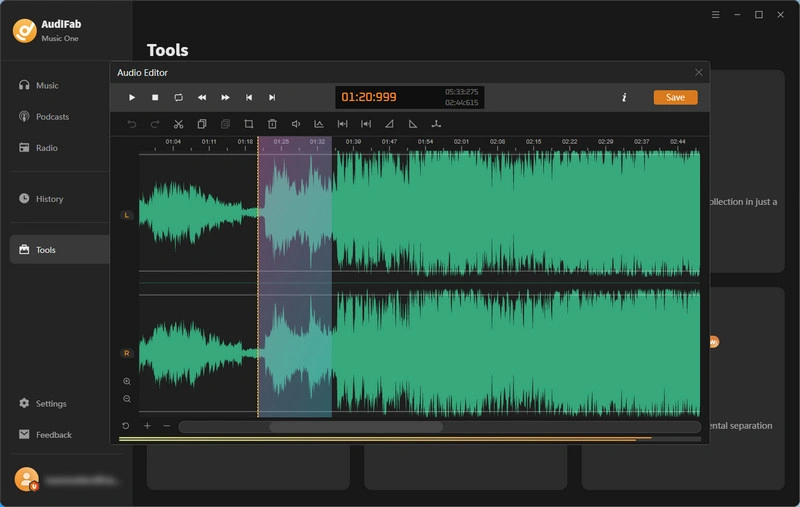
Once you've downloaded your desired YouTube audio, you can instantly customize it using AudiFab's built-in Free Audio Edit Tool. Whether you want to create seamless audio transitions with fade-in and fade-out effects, or adjust the tempo by speeding up or slowing down the track, perfecting your audio only takes a few clicks.
Download YouTube Audio as Your Ringtone with AudiFab
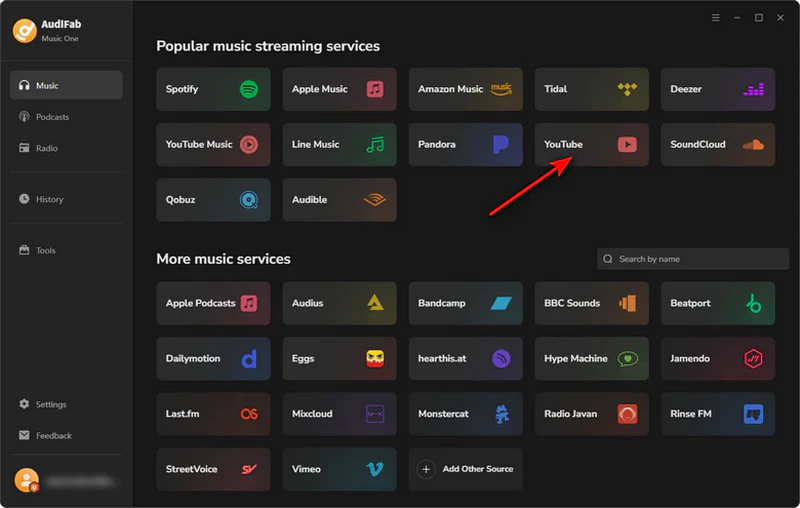
1. Install and open AudiFab, then select YouTube as your music source from the main screen.
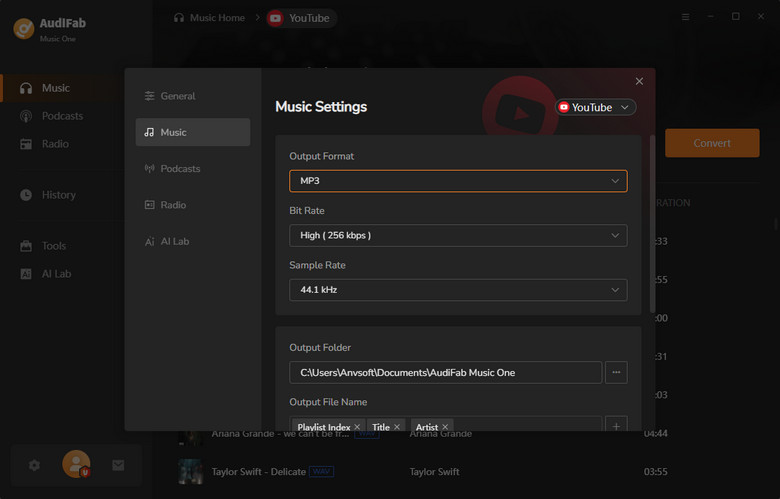
2. Click 'Settings' in the bottom-left corner and select either MP3 (for Android) or *M4A (for iPhone) as your output format.
*Note for iPhone users: Change the downloaded file extension from .m4a to .m4r after exporting.
3. Return to the YouTube interface and locate the audio track you want to use. Click the '+' button in the bottom-right corner, then click 'Add' to place it in the conversion list.
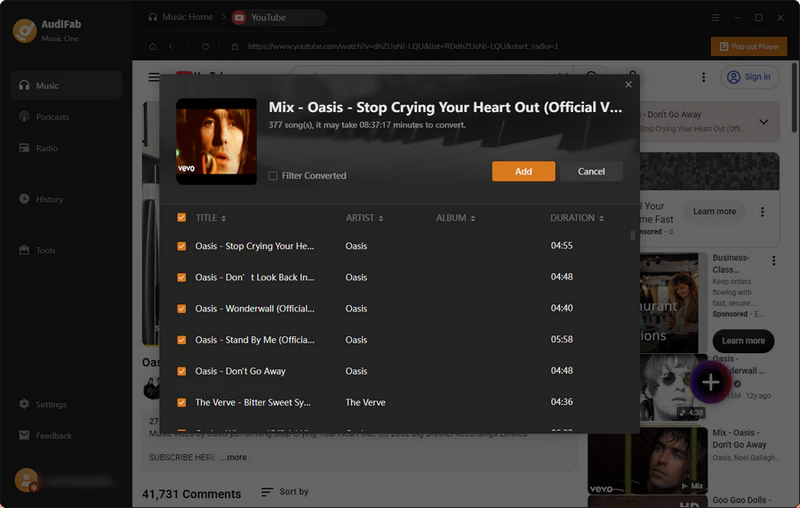
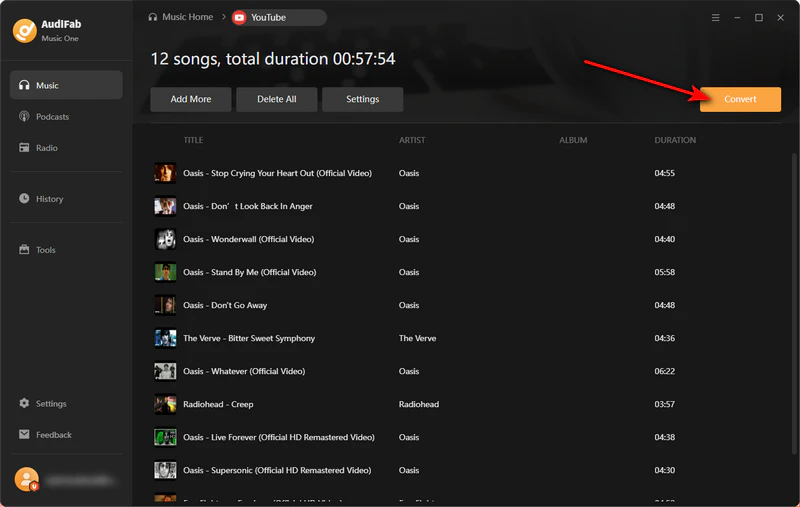
4. Click 'Convert' to begin downloading and processing the YouTube audio.
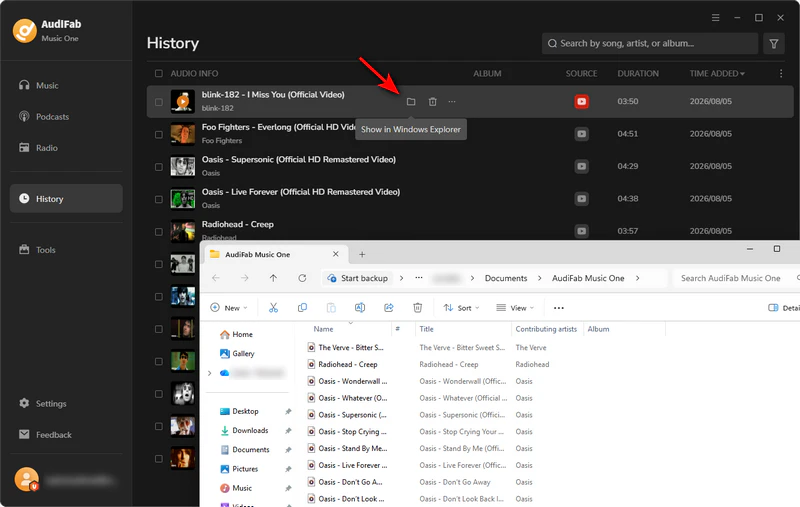
5. Once complete, head over to the 'History' tab to view your downloaded file.
6. Navigate to 'Tools' in the left sidebar, open the 'Audio Editor', and import the downloaded YouTube track. Once edited, simply attach your phone to the computer with a USB cable to transfer the custom YouTube ringtone to your device.
Set as Your Ringtone
Choose your device type to continue:
Ringtone4u is an intuitive online tool that turns YouTube audio into custom ringtones through a simple, step-by-step process.
First, users can trim any preferred audio segment from YouTube to capture the exact sound they want. Next, the tool provides built-in editing controls to fine-tune the YouTube clip, allowing users to adjust volume levels or increase the speed up to 2x for creative effects. Finally, the finished ringtone can be exported in formats like MP3, M4A, M4R, WAV, or FLAC, ensuring better compatibility with any device.
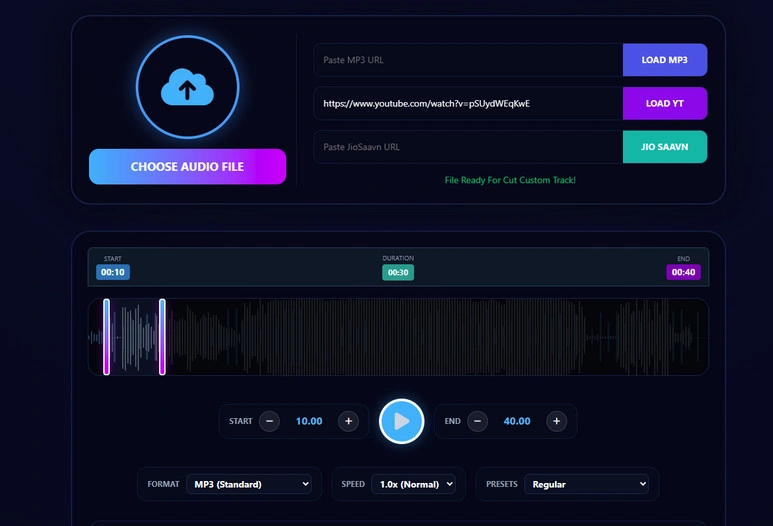
Trim and Download the Audio
Copy a YouTube URL, paste it into the input box, and click 'Load YT'.
Trim the audio to your preferred length and select your output format.
Click 'Cut & Download Ringtone' to save the file.
Set as Your Phone Ringtone
Save YouTube/ YouTube Music Audio with AudiFab Free Trial Now
Compatible with Windows & macOS · 100% Safe & Clean
Once you have downloaded your YouTube audio, follow the steps below to set it as your ringtone on Android.
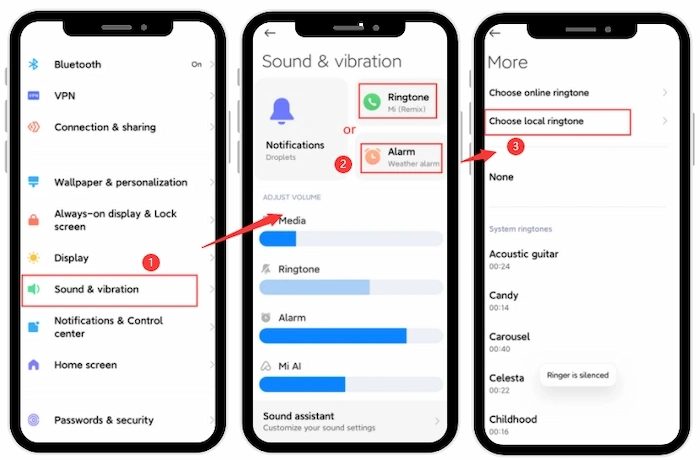
Head over to your phone's Settings and tap 'Sound & Vibration'.
Select Phone Ringtone or the '+' button. Then look for Custom Ringtone.
Find your saved YouTube MP3 track, select it, and hit Done—you're all set!
Ready to set your new iPhone ringtone? Follow the quick steps below once your YouTube audio file is saved to your device.
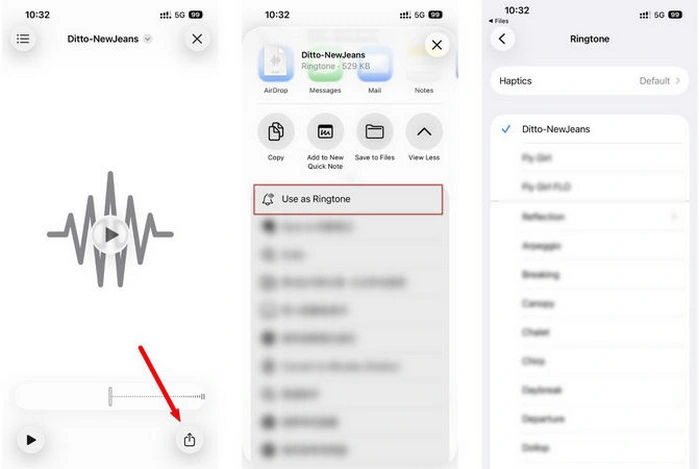
Open your saved YouTube track on your iPhone and tap the Share icon in the top right.
Tap 'Use as Ringtone' (check under More if it doesn't show up right away).
Your phone will open Settings > Sounds & Haptics > Ringtone automatically. Just tap your new track at the top, and you're good to go!
Download YouTube Audio with AudiFab Free Trial Now
Compatible with Windows & macOS · 100% Safe & Clean
For personal, non-commercial use, converting a YouTube video into a ringtone is generally acceptable.
Not all sites are safe. Some can expose you to intrusive ads, unwanted redirects, or suspicious downloads. For a cleaner and safer experience, AudiFab YouTube Converter is a reliable alternative. It delivers ad-free, malware-free downloads while keeping the original YouTube audio quality intact.
You can easily buy official ringtones from platforms like the iTunes Store. Alternatively, for custom ringtones, reliable tools like AudiFab YouTube Converter let you convert your music into local MP3 or M4R files for quick editing.
Yes, as long as you have the audio file saved locally. First, convert and save the YouTube track using a reliable tool like AudiFab YouTube Converter, then follow these quick steps:
iPhone: Sync your custom .m4r file to your phone using iTunes or GarageBand. Go to Contacts > choose the person > Edit > Ringtone to select it.
Android: Transfer the .mp3 file to your device's internal storage. Open Contacts > select the contact > Edit > Ringtone, and choose your downloaded audio.
iPhone custom ringtones automatically cut off or fail to sync if they exceed Apple's strict limit of 30 seconds for call ringtones or if they aren't formatted as .m4r files, so you must trim the audio clip to under 30 seconds and save it in the .m4r format before syncing.
Setting a YouTube video as a custom ringtone is a great way to personalize your phone. While there are various methods available across devices, using a safe and reliable tool like AudiFab YouTube Converter ensures high-quality YouTube audio downloads without risks or ads. Follow the steps above to easily convert, trim, and assign your favorite YouTube audio as unique ringtones today!

Download YouTube Music songs, playlists & albums in original quality, batch convert to MP3, AAC, FLAC, WAV, ALAC or AIFF, and keep ID3 tags.
Music is the greatest communication in the world and here are some articles that may help you enjoy music in a better way.

 Try It Free
 Try It Free