SoundCloud audio ads can interrupt your music at the worst moments, and finding a reliable extension for blocking SoundCloud ads isn't always easy. Some extensions fail to block SoundCloud audio ads, while others interfere with music playback.
If you're looking for a free SoundCloud ad blocker that actually works, we've tested 5 popular SoundCloud ad blocker extensions to see how well they block SoundCloud audio and display ads without disrupting your listening experience.
- Quick Fix: SoundCloud Ad Blocker Not Working?
- Bonus: Save SoundCloud Music as MP3 for Ad-Free Playback
- FAQs About SoundCloud Ad Blocker Extensions
 Download for Windows
 Download for Mac
⚖️ Disclaimer For educational and personal use only. Please respect copyright and SoundCloud's Terms of Service.
Quick Comparison: Which SoundCloud Ad Blocker Is Best for You?
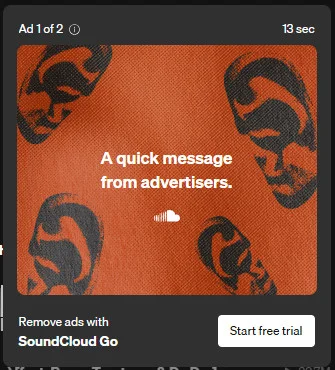
SoundCloud has several types of ads, but audio and display ads are the most disruptive. In our test of 20 SoundCloud tracks without an ad blocker, audio ads appeared every 3–4 songs, sometimes even between consecutive tracks. Display ads also popped up frequently, disrupting the listening experience.
💡 How We Tested:
Test Environment: Chrome • SoundCloud (Free/Logged In) • 2026 Test
We tested each ad-block extension with 20 SoundCloud tracks, including switching, pausing, resuming, and skipping songs. We checked audio and display ad blocking, blocked requests, and playback stability.
Note: Blocked request counts may include ads, trackers, and other content, so higher numbers don't necessarily mean better ad blocking.
| Extension | No Audio Ads | No Display Ads | Playback | Free | Supported Browsers | Best For |
|---|---|---|---|---|---|---|
| uBlock Origin Lite | ✅ | ✅ | ✅ | ✅ | Chrome, Edge, Firefox, Safari | Custom Filters |
| AdGuard AdBlocker | ✅ | ✅ | ✅ | ✅ | Chrome, Edge, Firefox, Opera | Privacy & Ad Blocking |
| Adblock Plus | ✅ | ✅ | ✅ | Partially | Chrome, Edge, Firefox, Safari, Yandex, Opera | Beginners |
| AdLock | ✅ | ✅ | ✅ | ✅ | Chrome, Firefox, Safari | Multilingual Sites |
| Stands AdBlocker | ✅ | ✅ | ✅ | ✅ | Chrome, Edge, Firefox, Opera, Brave, Vivaldi | Streaming Sites |
💡 Quick Verdict:
All five extensions blocked SoundCloud audio and display ads without playback issues in our SoundCloud tests. Choose uBlock Origin Lite for customizable filtering, AdGuard for privacy protection, Adblock Plus for easy setup, AdLock for multilingual websites, or Stands AdBlocker for streaming-focused ad blocking.
Want Ad-Free SoundCloud Listening Without Extensions? - AudiFab SoundCloud Converter
Download SoundCloud songs, albums, and playlists and enjoy SoundCloud ad-free offline playback without relying on browser extensions.
Compatible with Windows & macOS · 100% Safe & Clean · No Technical Setup · True Lossless Quality
1. uBlock Origin Lite - Best for Customizable SoundCloud Ad Blocking
uBlock Origin Lite is a free, open-source ad blocker for Chrome, Edge, Firefox, and Safari that uses customizable filter lists and three filtering levels to block ads, trackers, and unwanted web content.
Another useful feature is element blocking, which lets users manually hide unwanted webpage elements, such as SoundCloud's "Artist Tools" and "Download the SoundCloud App" promotions. Overall, uBlock Origin Lite is a lightweight, completely free option for customizable SoundCloud ad blocking.
| Browsers | Audio Ads | Display Ads | Playback | Free | Ease of Use |
|---|---|---|---|---|---|
| Chrome, Edge, Firefox, and Safari | ✅ Blocked | ✅ Blocked | ✅ Stable | ✅ | ✅ |
Link:
|
|||||
Features:
|
|||||
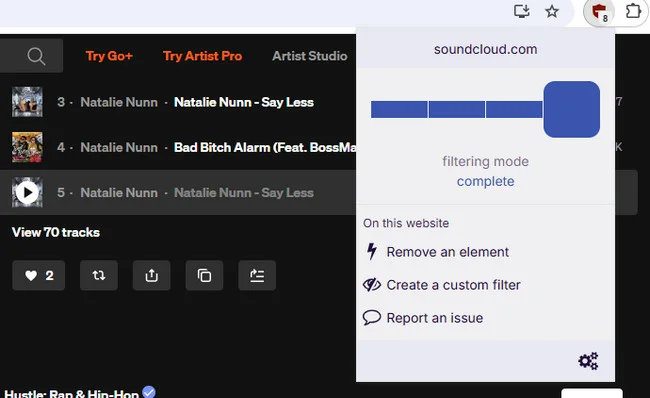
📊 Test Review (2026):
Filtering mode: complete
We tested uBlock Origin Lite in Complete filtering mode by playing 20 SoundCloud tracks. No audio or display ads appeared during the test, and the extension recorded 38 blocked requests, typically one or two when switching tracks. Music playback remained smooth, with no interruptions or loading issues.
How to Use uBlock Origin (Lite) to Block SoundCloud Ads
Step 1Install uBlock Origin Lite from the Chrome Web Store.
Step 2Open SoundCloud and Run uBlock Origin Lite.
Step 3Select Optimal filtering mode. For stronger filtering, try Complete mode.
Step 4Play several tracks to check whether audio ads are blocked and music playback works normally.
2. AdGuard AdBlocker - Best for SoundCloud Ad Blocking & Privacy
AdGuard AdBlocker is a free browser extension that blocks ads, trackers, and pop-ups across multiple websites. In our tests, it successfully blocked SoundCloud audio ads while offering customizable filters and advanced privacy protection.
| Browsers | Audio Ads | Display Ads | Playback | Free | Ease of Use |
|---|---|---|---|---|---|
| Chrome, Edge, Firefox, and Opera | ✅ Blocked | ✅ Blocked | ✅ Stable | ✅ | ✅ |
Link:
|
|||||
Features:
Note: The AdGuard AdBlocker browser extension is completely free. AdGuard also offers paid apps with broader ad blocking across browsers and applications on your device. |
|||||
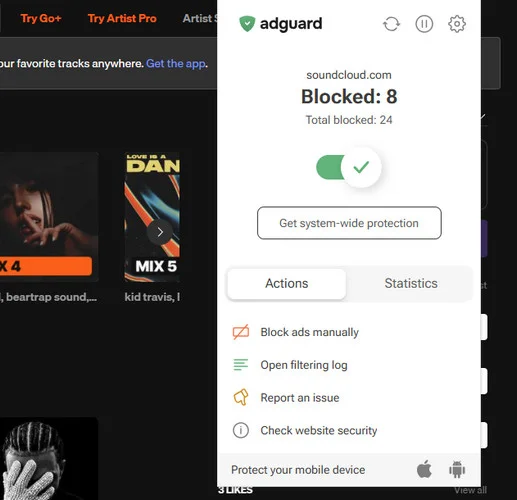
📊 Test Review (2026):
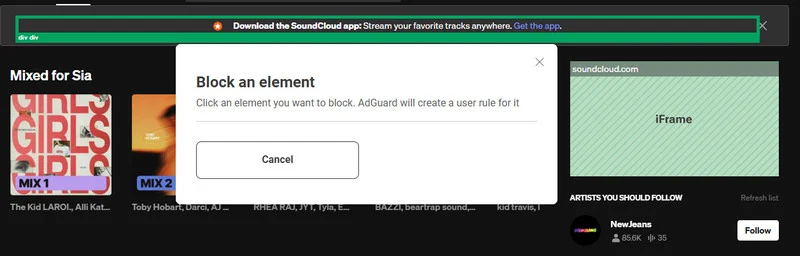
In our test of 20 SoundCloud tracks, AdGuard AdBlocker successfully blocked both audio and display ads, recording 43 blocked requests without disrupting music playback. It also lets users manually hide unwanted elements on SoundCloud pages. One useful feature is its detailed statistics, which break down blocked requests into Trackers, Ads, CDN, and Others, making it easy to see how the extension performs.
Beyond SoundCloud, AdGuard works across other websites, including YouTube and Spotify. The browser extension is completely free, while the paid AdGuard apps for Windows and Mac offer broader system-wide ad blocking. Overall, it's a solid choice for users who want reliable ad blocking and privacy protection across multiple websites.
How to Use AdGuard AdBlocker Extension on SoundCloud
Step 1Install AdGuard AdBlocker from the Chrome Web Store.
Step 2Visit SoundCloud in Chrome and make sure AdGuard AdBlocker is enabled.
Step 3Play a few SoundCloud tracks to see if audio ads are blocked without interrupting music playback.
3. Adblock Plus - Best Free SoundCloud Ad Blocker for Beginners
The free version of Adblock Plus blocks banner ads and pop-ups, while Premium adds protection against floating videos, newsletter sign-ups, survey requests, cookie pop-ups, and more. If you simply want to block SoundCloud audio and display ads, the free version should be sufficient, provided it works in your browser.
| Browsers | Audio Ads | Display Ads | Playback | Free | Ease of Use |
|---|---|---|---|---|---|
| Chrome, Edge, Firefox, Safari, Yandex, and Opera | ✅ Blocked | ✅ Blocked | ✅ Stable | Partially | ✅ |
Link:
|
|||||
Features:
Adblock Plus offers a free browser extension with an optional Premium upgrade: $4/month or $40/year. |
|||||
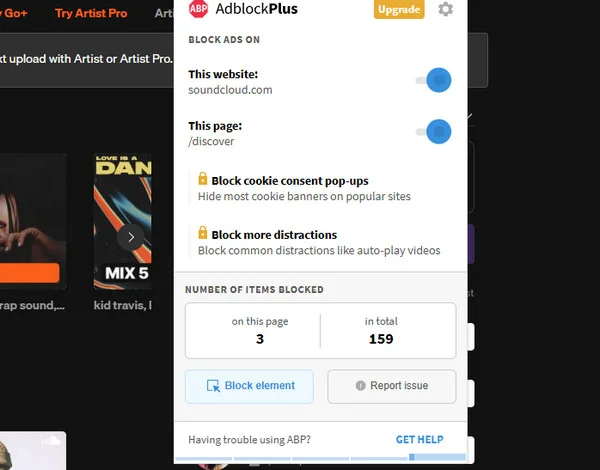
📊 Test Review (2026):
During our 20-track SoundCloud test, Adblock Plus recorded 20 blocked requests, averaging roughly one per track. Both audio and display ads were successfully blocked, allowing us to listen without interruptions.
Although Adblock Plus recorded fewer blocked requests than uBlock Origin Lite and AdGuard, it still handled SoundCloud ads effectively in our test. The free version is enough for most users who simply want an ad-free listening experience without paying for Premium or adjusting complicated settings.
How to Use Adblock Plus to Listen to SoundCloud Without Ads
Step 1Install Adblock Plus from the Chrome Web Store and enable the extension.
Step 2Open SoundCloud in Chrome and make sure Adblock Plus is active. You can also disable Acceptable Ads in the extension settings for stricter ad blocking.
Go Beyond Adblock Plus for Ad-Free SoundCloud Listening - AudiFab SoundCloud Converter
Skip browser limitations and unreliable ad blocking. Download SoundCloud songs and playlists in batches with AudiFab for ad-free offline listening on any device.
Compatible with Windows & macOS · 100% Safe & Clean · No Technical Setup · True Lossless Quality
4. AdLock - Best SoundCloud Ad Blocker for Multilingual Websites
AdLock is a completely free SoundCloud ad blocker extension that removes ads, pop-ups, and trackers across websites, offering customizable filters. All browser extension features are available without a paid subscription.
| Browsers | Audio Ads | Display Ads | Playback | Free | Ease of Use |
|---|---|---|---|---|---|
| Chrome, Firefox, and Safari | ✅ Blocked | ✅ Blocked | ✅ Stable | ✅ | ✅ |
Link:
|
|||||
Features:
|
|||||
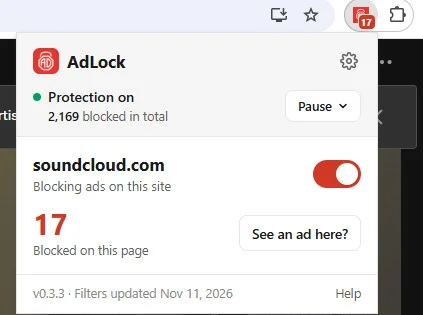
📊 Test Review (2026):
AdLock kept SoundCloud playback completely ad-free throughout our 20-track test, recording 21 blocked requests. Switching tracks, pausing, and resuming music all worked smoothly, with no audio ads or playback issues.
What sets AdLock apart is its multi-language filtering support. It offers regional filter lists for English, French, German, Dutch, Polish, Spanish, Portuguese, and Cyrillic-script websites. This makes AdLock particularly useful for users who browse websites in different languages and want a free ad blocker that works beyond SoundCloud.
How to Use AdLock to Block SoundCloud Ads
Step 1Install AdLock extension and run it.
Step 2Open AdLock's settings and make sure ad blocking is enabled. You can also enable additional language filters.
Step 3Visit SoundCloud and enjoy ad-free music listening.
5. Stands AdBlocker - Best for Blocking SoundCloud & Streaming Ads
Stands AdBlocker is a free, lightweight SoundCloud ad blocker extension that blocks ads, pop-ups, and trackers across websites, including streaming platforms like YouTube and Twitch, with Manifest V3 support and customizable blocking settings.
| Browsers | Audio Ads | Display Ads | Playback | Free | Ease of Use |
|---|---|---|---|---|---|
| Chrome, Edge, Firefox, Opera, Brave, and Vivaldi | ✅ Blocked | ✅ Blocked | ✅ Stable | ✅ | ✅ |
Link:
|
|||||
Features:
|
|||||
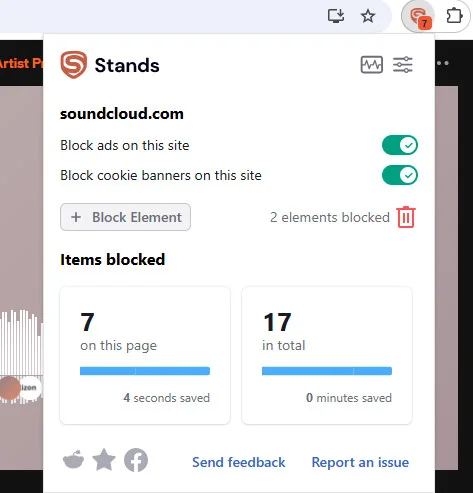
📊 Test Review (2026):
Stands AdBlocker made SoundCloud listening hassle-free in our 20-track test, blocking 33 items, including ads and cookies, without affecting SoundCloud music playback. The extension was easy to use, and switching between SoundCloud songs remained smooth throughout.
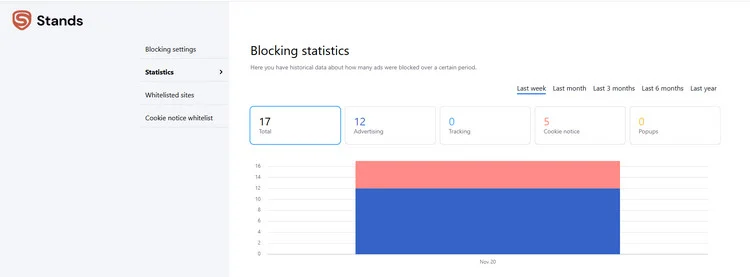
A standout feature is its built-in Statistics dashboard, accessible from the top-right corner of the extension. It breaks down blocked content into Advertising, Tracking, Cookie Notices, and Popups, giving users a clear view of what Stands is blocking. This makes it a great choice for users who prefer simple ad blocking with detailed, easy-to-read statistics.
How to Enable Stands AdBlocker to Listen to SoundCloud Without Ads
Step 1Add Stands AdBlocker to Chrome and pin its icon to the browser toolbar.
Step 2Visit SoundCloud, click the Stands icon, and ensure Protection is ON for the website.
Step 3Refresh SoundCloud and start listening to check whether audio ads are blocked without disrupting playback.

8 Best SoundCloud Playlist Downloaders in 2026
Compare 8 SoundCloud playlist downloaders tested for batch downloads, audio quality, ID3 tags, free limits, and desktop or online use.
Learn More →Quick Fix: SoundCloud Ad Blocker Not Working?
If your SoundCloud ad blocker isn't working properly, try these quick fixes to restore ad blocking without affecting music playback.
| Issue | How to Fix |
|---|---|
| Audio ads still playing | Update your extension and filter lists. Try enabling a stronger filtering mode if available. |
| Display ads still appearing | Enable additional ad filters or use the extension's element-blocking feature to hide unwanted ads. |
| SoundCloud won't play music | Switch to a less restrictive filtering mode or temporarily disable custom filters. |
| Ad blocker suddenly stopped working | Update your browser and extension, then refresh SoundCloud. |
| Conflicts between extensions | Disable other ad blockers and use only one at a time. |
| Ad blocker not working in Incognito | Open your browser's extension settings and enable Allow in Incognito if supported. |
Note: SoundCloud may change how it delivers ads, so even extensions that worked during testing may require updated filters or settings later.
Bonus: Save SoundCloud Music as MP3 for Ad-Free Playback
Browser ad blockers can help remove SoundCloud ads, but they may stop working when SoundCloud updates its ad system. If you want to enjoy your favorite songs without relying on extensions or an internet connection, AudiFab SoundCloud Converter offers another option.
It lets you download SoundCloud songs and playlists as MP3, M4A(AAC), FLAC, WAV, ALAC, and AIFF, so you can listen to SoundCloud music offline without streaming ads or playback interruptions.
AudiFab SoundCloud Converter - Enjoy SoundCloud Music Without Audio and Display Ads
- Ad-Free Offline Playback: Save SoundCloud playlists locally and play them without audio ads and display ads.
- Batch Downloads & Multiple Audio Formats: Download entire SoundCloud playlists to MP3, FLAC, WAV, AAC, and more.
- Audio Quality & ID3 Tags: Preserve SoundCloud source audio quality, song titles, artists, albums, and cover art.
Compatible with Windows & macOS · 100% Safe & Clean · 3k+ downloads monthly · 99.9% success rate

How to Download SoundCloud Music for Ad-Free Playback
Step 1 Launch AudiFab and Select SoundCloud
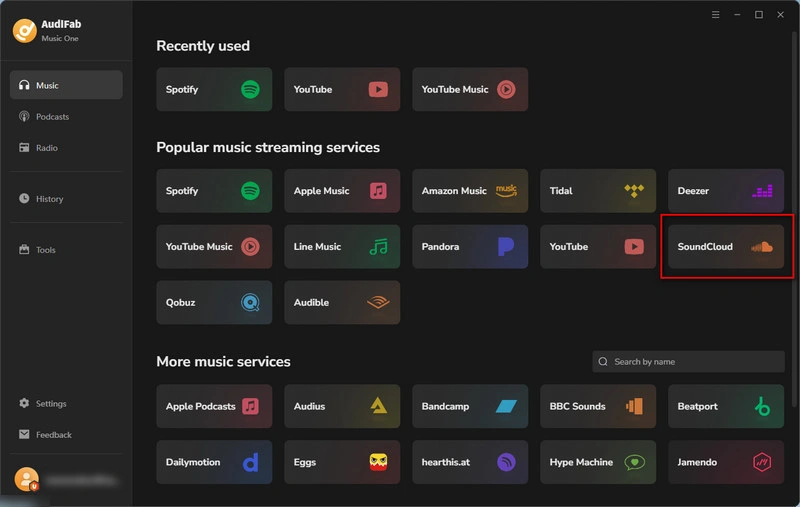
Open AudiFab and choose "SoundCloud" from the supported music platforms to launch its built-in browser.
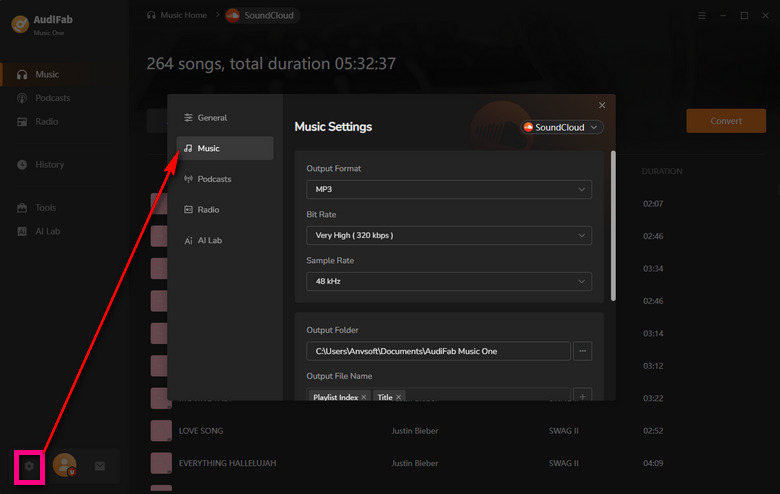
Step 2 Set MP3 as the Output Format
Click the gear icon in the bottom-left corner to open Settings. Select MP3 as the output format and customize the audio settings and output folder if needed.
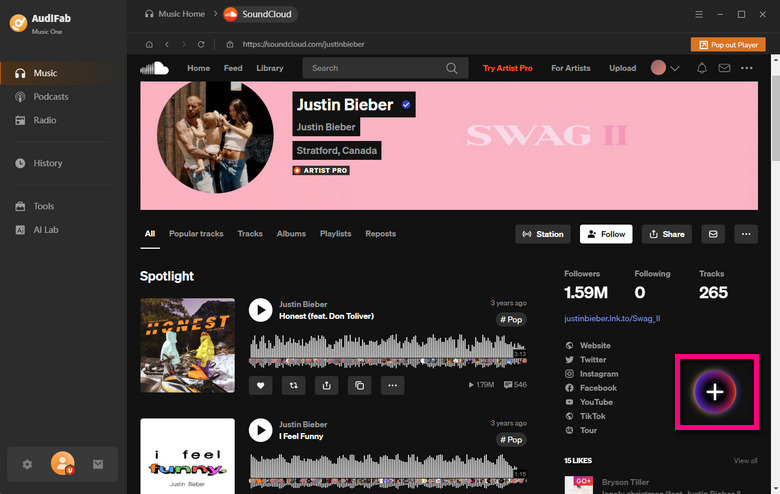
Step 3 Add SoundCloud Songs or Playlists
Find the songs or playlists you want in the built-in SoundCloud browser. Click the "+" button in the bottom-right corner to add them to the AudiFab conversion list.
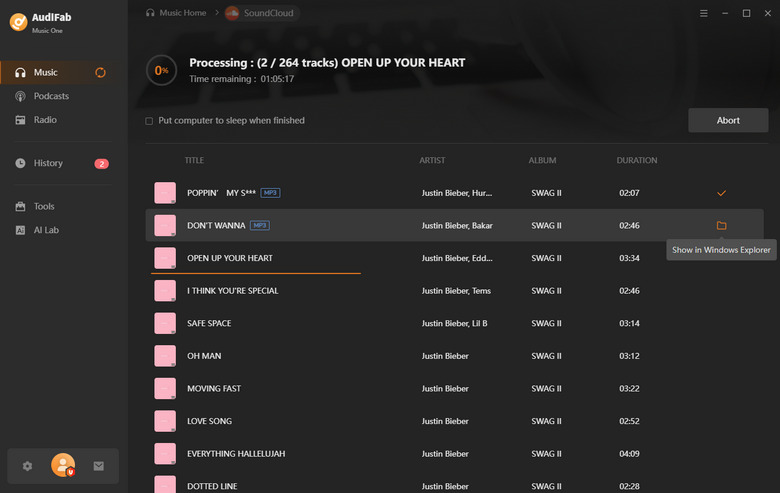
Step 4 Convert SoundCloud Music to MP3
Review your selected SoundCloud tracks and click "Convert" to download and save them as local MP3 files.
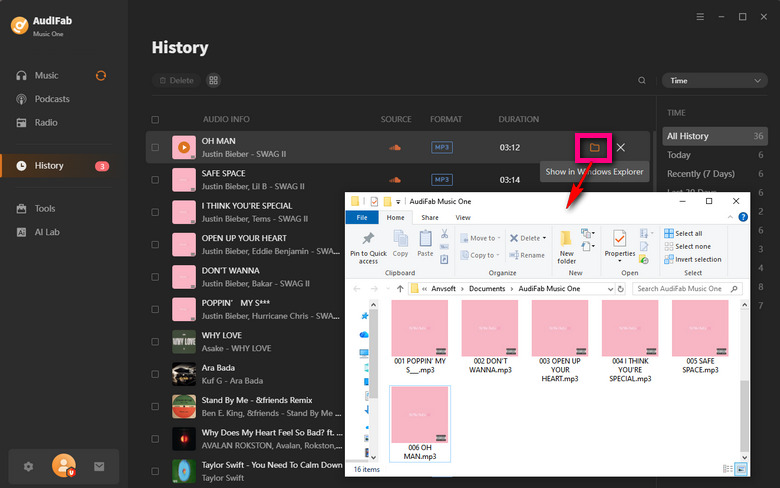
Step 5 Find Your Downloaded MP3 Files
Once conversion is complete, open the "History" tab on the left. Hover over a track and click the folder icon to locate your downloaded SoundCloud MP3 files for offline playback.
FAQs About SoundCloud Ad Blocker Extensions
Q 1 Do SoundCloud ad blocker extensions block audio ads?
Yes, many SoundCloud ad blocker extensions can block both audio and display ads. However, effectiveness may vary depending on browser updates and SoundCloud's ad delivery methods.
Q 2 Can I use a SoundCloud ad blocker extension on mobile?
Most SoundCloud ad blocker extensions are designed for desktop browsers and don't work in the SoundCloud mobile app.
Q 3 Is it safe to use SoundCloud ad blocker extensions?
Generally, reputable ad blockers are safe when installed from official browser stores, but you should always check their permissions and reviews. For ad-free offline listening without browser extensions, try AudiFab SoundCloud Converter to download SoundCloud music as MP3 files.
Q 4 Are SoundCloud ad blockers completely free?
Many SoundCloud ad blockers, including uBlock Origin Lite and AdLock, are completely free. Others, such as Adblock Plus, offer free basic ad blocking with optional paid features.
Q 5 How can I listen to SoundCloud without ads or extensions?
You can subscribe to SoundCloud Go+ for ad-free streaming without browser extensions. Alternatively, AudiFab SoundCloud Converter lets you download SoundCloud music as local files for ad-free offline playback.
Summary
All five SoundCloud ad blocker extensions successfully blocked SoundCloud audio and display ads in our tests, with stable playback. uBlock Origin Lite and AdGuard offer advanced filtering, while Adblock Plus, AdLock, and Stands suit different browsing needs. Choose an extension based on your preferences, or use AudiFab SoundCloud Converter to download SoundCloud music for ad-free offline listening.

AudiFab SoundCloud Converter – Best SoundCloud Downloader for Ad-Free Listening
Download SoundCloud songs and playlists as MP3 files for ad-free offline playback. Fast batch downloads • MP3, FLAC, WAV & more • No ad blocker needed • Preserves audio quality & ID3 tags • Windows & Mac